
게시판 프로젝트
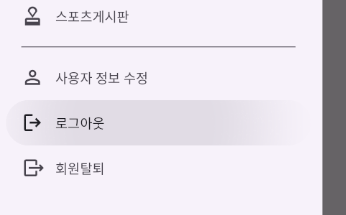
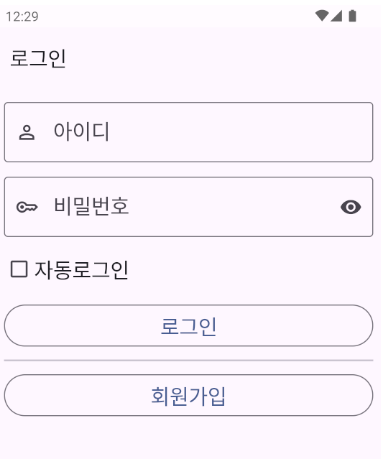
로그아웃/회원탈퇴
로그아웃 처리 메서드
로그아웃을 하면
로그인 사용자와 관련된 프로퍼티를 초기화한다.
SharedPreferences에 자동 로그인 정보가 있다면 삭제한다.
// ContentActivity.kt

    // 로그아웃 처리
    fun logoutProcess(){
        // 로그인 사용자와 관련된 프로퍼티를 초기화한다.
        loginUserIdx = 0
        loginUserNickName = ""

        // SharedPreferences에 자동 로그인 정보가 있다면 삭제한다.
        val sharedPreferences = getSharedPreferences("AutoLogin", Context.MODE_PRIVATE)
        // 자동로그인 정보를 가져온다.
        val tempUserIdx = sharedPreferences.getInt("loginUserIdx", -1)
        // 자동 로그인 정보가 있다면
        if(tempUserIdx != -1){
            // 정보를 삭제한다.
            val editor = sharedPreferences.edit()
            editor.remove("loginUserIdx")
            editor.remove("loginUserNickName")
            editor.apply()
        }
    }
사용자의 상태를 변경하는 메서드
// UserDao.kt

        // 사용자의 상태를 변경하는 메서드
        suspend fun updateUserState(userIdx:Int, newState: UserState){
            val job1 = CoroutineScope(Dispatchers.IO).launch {
                // 컬렉션에 접근할 수 있는 객체를 가져온다.
                val collectionReference = Firebase.firestore.collection("UserData")
                // 컬렉션이 가지고 있는 문서들 중에 contentIdx 필드가 지정된 글 번호값하고 같은 Document들을 가져온다.
                val query = collectionReference.whereEqualTo("userIdx", userIdx).get().await()

                // 저장할 데이터를 담을 HashMap을 만들어준다.
                val map = mutableMapOf<String, Any>()
                map["userState"] = newState.num.toLong()
                // 저장한다.
                // 가져온 문서 중 첫 번째 문서에 접근하여 데이터를 수정한다.
                query.documents[0].reference.update(map)
            }
            job1.join()
        }
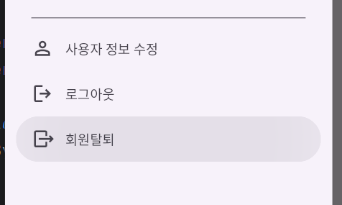
회원 탈퇴 메서드
로그아웃 처리를 먼저 한 후 회원 상태를 탈퇴로 바꾼다
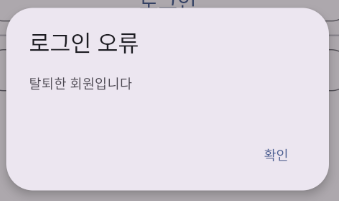
로그인을 할 때 탈퇴한 아이디로 로그인을 하려고 하면 탈퇴한 회원이라고 메시지
// ContentActivity.kt


    // 회원 탈퇴
    fun signoutProcess(){
        // 로그아웃 처리
        val signoutUserIdx = loginUserIdx
        logoutProcess()

        CoroutineScope(Dispatchers.Main).launch {
            // 사용자의 상태를 탈퇴 상태로 설정한다.
            UserDao.updateUserState(signoutUserIdx, UserState.USER_STATE_SIGNOUT)
        }
    }
현재 액티비티를 종료하고 MainActivity를 실행하는 메서드
//ContentActivity.kt


    // 현재 액티비티를 종료하고 MainActivity를 실행하는 메서드
    fun startMainActivity(){
        // MainActivity를 실행하고 현재 Activity는 종료한다.
        val mainIntent = Intent(this, MainActivity::class.java)
        startActivity(mainIntent)
        finish()
    }
로그아웃/회원탈퇴 메서드 호출
// ContentActivity.kt


    // 네비게이션 뷰 설정
    fun settingNavigationView(){
        activityContentBinding.apply {
            navigationViewContent.apply {
                // 헤더로 보여줄 view를 생성한다.
                val headerContentDrawerBinding = HeaderContentDrawerBinding.inflate(layoutInflater)
                // 헤더로 보여줄 View를 설정한다.
                addHeaderView(headerContentDrawerBinding.root)

                // 사용자 닉네임을 설정한다.
                headerContentDrawerBinding.headerContentDrawerNickName.text = loginUserNickName

                // 메뉴를 눌렀을 때 동작하는 리스너
                setNavigationItemSelectedListener {
                    // 딜레이를 조금 준다.
                    SystemClock.sleep(200)
                    // 메뉴의 id로 분기한다.
                    when(it.itemId){


                        // 로그아웃
                        R.id.menuItemContentNavigationLogout -> {
                            logoutProcess()
                            startMainActivity()
                        }
                        // 회원탈퇴
                        R.id.menuItemContentNavigationSignOut -> {
                            signoutProcess()
                            startMainActivity()
                        }
                    }
                    true
                }
            }
        }
    }
로그인하려는 아이디 상태가 탈퇴상태인 경우 메시지
// LoginFragment.kt


    // 로그인 처리
    fun loginPro(){
        // 사용자가 입력한 정보를 가져온다.
        val userId = loginViewModel.textFieldLoginUserId.value!!
        val userPw = loginViewModel.textFieldLoginUserPw.value!!

        val job1 = CoroutineScope(Dispatchers.Main).launch {
            val loginUserModel = UserDao.getUserDataById(userId)

            // 만약 null이라면
            if(loginUserModel == null){
                Tools.showErrorDialog(mainActivity, fragmentLoginBinding.textFieldLoginUserId, "로그인 오류", "존재하지 않는 아이디입니다")
            }
            // 만약 정보를 가져온 것이 있다면
            else {
                // 입력한 비밀번호와 서버에서 받아온 사용자의 비밀번호가 다르다면..
                if(userPw != loginUserModel.userPw){
                    Tools.showErrorDialog(mainActivity, fragmentLoginBinding.textFieldLoginUserId, "로그인 오류", "비밀번호가 잘못되었습니다")
                }
                // 비밀번호가 일치한다면
                else{
                    // 회원이 탈퇴 상태라면
                    if(loginUserModel.userState == UserState.USER_STATE_SIGNOUT.num){
                        MaterialAlertDialogBuilder(mainActivity).apply {
                            setTitle("로그인 오류")
                            setMessage("탈퇴한 회원입니다")
                            setPositiveButton("확인"){ dialogInterface: DialogInterface, i: Int ->
                                loginViewModel.textFieldLoginUserId.value = ""
                                loginViewModel.textFieldLoginUserPw.value = ""
                                Tools.showSoftInput(mainActivity, fragmentLoginBinding.textFieldLoginUserId)
                            }
                            show()
                        }
                    } else { // 탈퇴 상태가 아니라면
                        // 자동 로그인이 체크되어 있다면
                        if(loginViewModel.checkBoxLoginAuto.value == true){
                            // Preferences에 사용자 정보를 저장해준다.
                            val sharedPreferences = mainActivity.getSharedPreferences("AutoLogin", Context.MODE_PRIVATE)
                            val editor = sharedPreferences.edit()
                            editor.putInt("loginUserIdx", loginUserModel.userIdx)
                            editor.putString("loginUserNickName", loginUserModel.userNickName)
                            editor.apply()
                        }

                        // Snackbar.make(fragmentLoginBinding.root, "로그인에 성공하였습니다", Snackbar.LENGTH_SHORT).show()

                        // ContentActivity를 실행한다.
                        val contentIntent = Intent(mainActivity, ContentActivity::class.java)

                        // 로그인한 사용자의 정보를 전달해준다.
                        contentIntent.putExtra("loginUserIdx", loginUserModel.userIdx)
                        contentIntent.putExtra("loginUserNickName", loginUserModel.userNickName)

                        startActivity(contentIntent)
                        // MainActivity를 종료한다.
                        mainActivity.finish()
                    }
                }
            }
        }

    }

안드로이드공부