
게시판 프로젝트
댓글
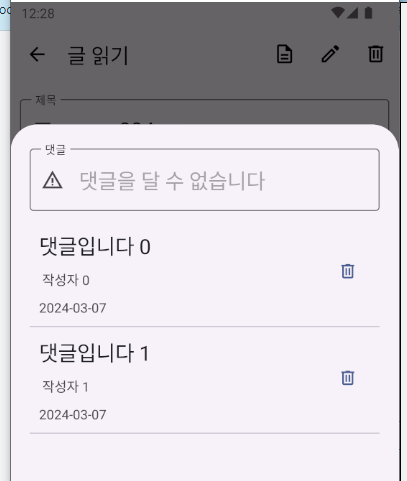
글 작성자인 경우 댓글 입력창 비활성화
글 작성자 여부를 ReadContentBottomFragment클래스의 생성자 매개변수로 받는다.
// ReadContentBottomFragment.kt


class ReadContentBottomFragment(var isContentWriter:Boolean) : BottomSheetDialogFragment() {


    override fun onCreateView(
        inflater: LayoutInflater, container: ViewGroup?,
        savedInstanceState: Bundle?
    ): View? {
        // Inflate the layout for this fragment

        fragmentReadContentBottomBinding = FragmentReadContentBottomBinding.inflate(inflater)
        contentActivity = activity as ContentActivity

        settingRecyclerViewAddContentReply()
        settingTextField()

        return fragmentReadContentBottomBinding.root
    }


    // 입력 요소 설정
    fun settingTextField(){

        fragmentReadContentBottomBinding.apply {
            // 현재 글의 작성자가 로그인한 사람이라면..
            if(isContentWriter==true){
                // 자신의 글에는 댓글을 입력할 수 없다는 문구를 넣어준다.
                textFieldAddContentReply.setText("댓글을 달 수 없습니다")
                textFieldAddContentReply.isEnabled = false
            }
        }
    }

}
ReadContentFragment에서 ReadContentBottomFragment를 띄울때 글 작성자 여부를확인하여 매개변수에 담아준다.
// ReadContentFragment.kt


	// 글작성자와 로그인한 사람이 같은지
    var isContentWriter = false


    // 입력 요소에 값을 넣어준다.
    fun settingInputForm(){

        ...


        CoroutineScope(Dispatchers.Main).launch {

            ...

            // 글 작성자와 로그인한 사람이 같은지 확인한다.
            isContentWriter = contentActivity.loginUserIdx == contentModel?.contentWriterIdx

            // 이미지 데이터를 불러온다.
            if(contentModel?.contentImage != null) {
                delay(1000L)
                ContentDao.gettingContentImage(contentActivity, contentModel.contentImage!!, fragmentReadContentBinding.imageViewReadContent)
            }


        }
    }


    // 댓글을 보여불 BottomSheet를 띄워준다.
    fun showReplyBottomSheet(){
        val readContentBottomFragment = ReadContentBottomFragment(isContentWriter)
        readContentBottomFragment.show(contentActivity.supportFragmentManager, "ReplyBottomSheet")
    }
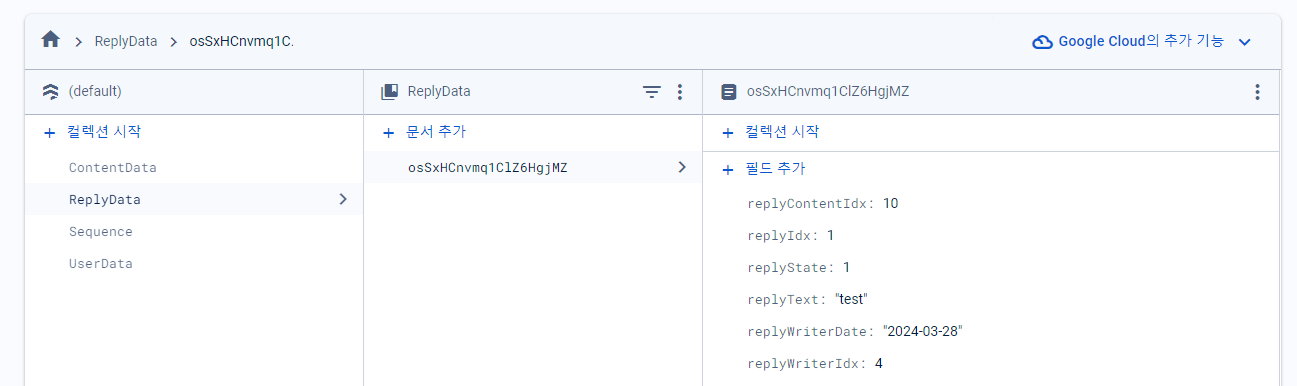
댓글 모델 정의
댓글 번호 (replyIdx)
댓글 작성자 번호 (replyWriterIdx)
댓글 작성 날짜 (replyWriteDate)
댓글을 단 글번호(replyContentIdx)
댓글 내용(replyText)
댓글 상태(replyState)
// ReplyModel.kt


data class ReplyModel(var replyIdx:Int, var replyWriterIdx:Int, var replyWriterDate:String, var replyContentIdx:Int,
    var replyText:String, var replyState:Int) {

    constructor():this(0,0,"",0,"",0)
}
댓글 뷰모델 정의
// ReadContentBottomViewModel.kt


class ReadContentBottomViewModel: ViewModel() {

    // 댓글 내용 입력 요소
    val textFieldAddContentReply = MutableLiveData<String>()
}
<!--fragment_read_content_bottom.xml-->
<layout xmlns:android="http://schemas.android.com/apk/res/android"
xmlns:app="http://schemas.android.com/apk/res-auto"
xmlns:tools="http://schemas.android.com/tools">
<data>
<variable
name="readContentBottomViewModel"
type="kr.co.lion.androidproject4boardapp.viewmodel.ReadContentBottomViewModel" />
</data>
<LinearLayout
android:layout_width="match_parent"
android:layout_height="match_parent"
android:orientation="vertical"
android:padding="20dp"
tools:context=".fragment.ReadContentBottomFragment">
<com.google.android.material.textfield.TextInputLayout
android:layout_width="match_parent"
android:layout_height="wrap_content"
android:layout_marginBottom="10dp"
android:hint="댓글"
app:endIconMode="clear_text"
app:startIconDrawable="@drawable/warning_24px">
<com.google.android.material.textfield.TextInputEditText
android:id="@+id/textFieldAddContentReply"
android:layout_width="match_parent"
android:layout_height="wrap_content"
android:inputType="text"
android:textAppearance="@style/TextAppearance.AppCompat.Large"
android:text="@={readContentBottomViewModel.textFieldAddContentReply}"/>
// ReadContentBottomFragment.kt


    lateinit var readContentBottomViewModel: ReadContentBottomViewModel

    override fun onCreateView(
        inflater: LayoutInflater, container: ViewGroup?,
        savedInstanceState: Bundle?
    ): View? {
        // Inflate the layout for this fragment

        // fragmentReadContentBottomBinding = FragmentReadContentBottomBinding.inflate(inflater)
        fragmentReadContentBottomBinding = DataBindingUtil.inflate(inflater, R.layout.fragment_read_content_bottom, container, false)
        readContentBottomViewModel = ReadContentBottomViewModel()
        fragmentReadContentBottomBinding.readContentBottomViewModel = readContentBottomViewModel
        fragmentReadContentBottomBinding.lifecycleOwner = this
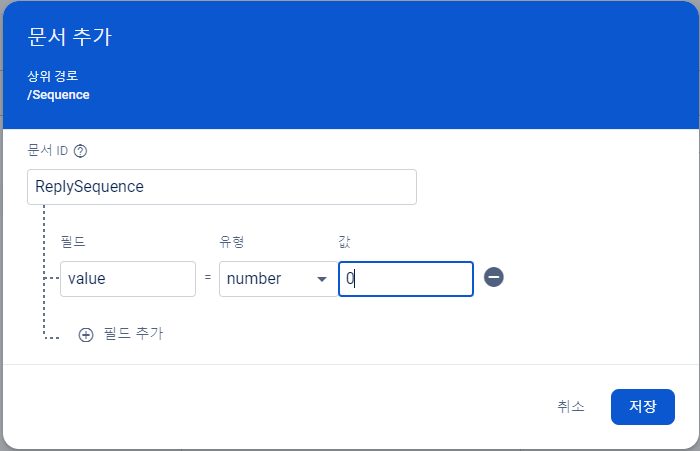
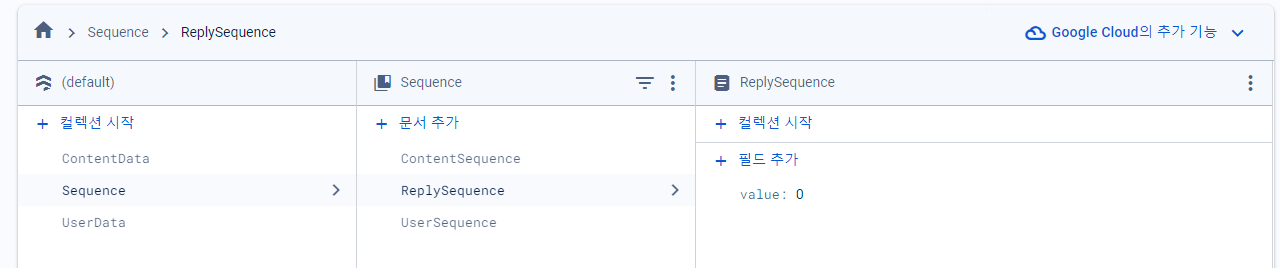
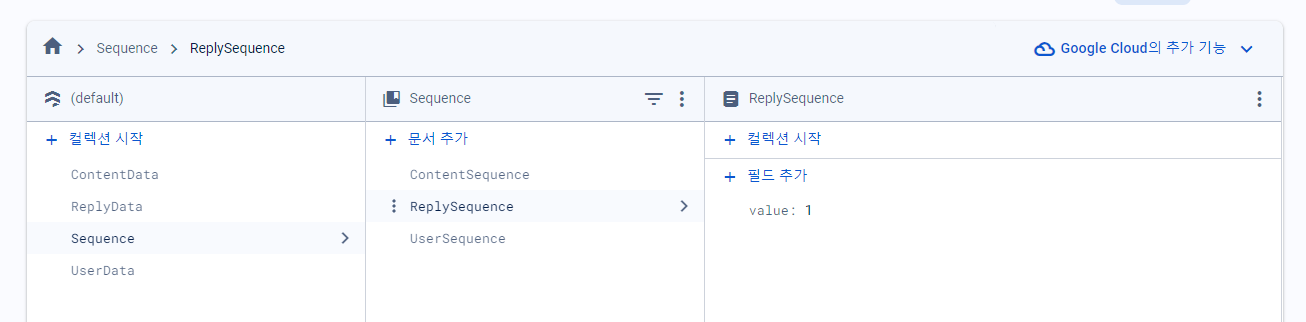
파이어베이스에 댓글 시퀀스 추가
ReplyDao 작성
ContentDao의 메서드를 그대로 수정해주면 된다
// ReplyDao.kt


class ReplyDao {
    companion object {
        // 댓글 번호 시퀀스값을 가져온다.
        suspend fun getReplySequence():Int{

            var replySequence = -1

            val job1 = CoroutineScope(Dispatchers.IO).launch {
                // 컬렉션에 접근할 수 있는 객체를 가져온다.
                val collectionReference = Firebase.firestore.collection("Sequence")
                // 댓글 번호 시퀀스 값을 가지고 있는 문서에 접근할 수 있는 객체를 가져온다.
                val documentReference = collectionReference.document("ReplySequence")
                // 문서내에 있는 데이터를 가져올 수 있는 객체를 가져온다.
                val documentSnapShot = documentReference.get().await()
                replySequence = documentSnapShot.getLong("value")?.toInt()!!
            }
            job1.join()

            return replySequence

        }

        // 댓글 시퀀스 값을 업데이트 한다.
        suspend fun updateReplySequence(replySequence:Int){
            val job1 = CoroutineScope(Dispatchers.IO).launch {
                // 컬렉션에 접근할 수 있는 객체를 가져온다.
                val collectionReference = Firebase.firestore.collection("Sequence")
                // 댓글 번호 시퀀스 값을 가지고 있는 문서에 접근할 수 있는 객체를 가져온다.
                val documentReference = collectionReference.document("ReplySequence")
                // 저장할 데이터를 담을 HashMap을 만들어준다.
                val map = mutableMapOf<String, Long>()
                map["value"] = replySequence.toLong()
                // 저장한다.
                documentReference.set(map)
            }
            job1.join()
        }

        // 댓글 정보를 저장한다.
        suspend fun insertReplyData(replyModel: ReplyModel){
            val job1 = CoroutineScope(Dispatchers.IO).launch {
                // 컬렉션에 접근할 수 있는 객체를 가져온다.
                val collectionReference = Firebase.firestore.collection("ReplyData")
                // 컬럭션에 문서를 추가한다.
                // 문서를 추가할 때 객체나 맵을 지정한다.
                // 추가된 문서 내부의 필드는 객체가 가진 프로퍼티의 이름이나 맵에 있는 데이터의 이름과 동일하게 결정된다.
                collectionReference.add(replyModel)
            }
            job1.join()
        }


    }
}
댓글 상태 값 정의
// Tools.kt


// 댓글 상태값
enum class ReplyState(var str:String, var num:Int){
    REPLY_STATE_NORMAL("정상", 1),
    REPLY_STATE_DELETE("삭제", 2)
}
댓글 입력 설정
댓글이 달릴 글 번호를 생성자 매개변수로 받아온다.
//ReadContentBottomFragment.kt

class ReadContentBottomFragment(var isContentWriter:Boolean, var contentIdx:Int) : BottomSheetDialogFragment() {


// ReadContentFragment.kt

    // 댓글을 보여불 BottomSheet를 띄워준다.
    fun showReplyBottomSheet(){
        val readContentBottomFragment = ReadContentBottomFragment(isContentWriter, contentIdx)
        readContentBottomFragment.show(contentActivity.supportFragmentManager, "ReplyBottomSheet")
    }x
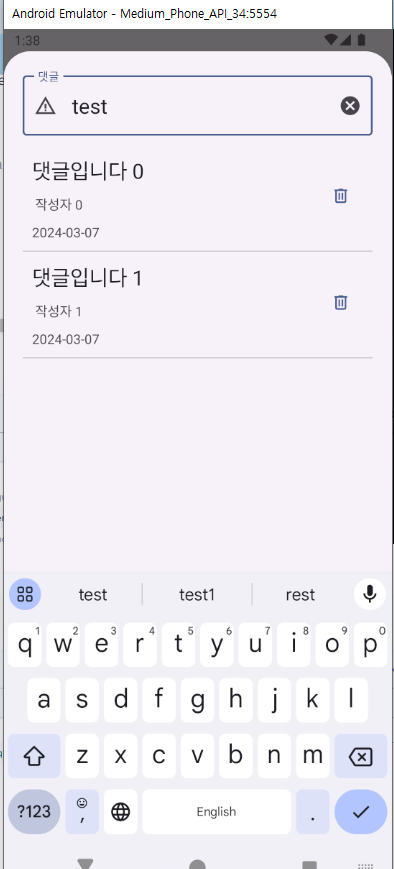
댓글창에서 엔터키를 입력하면 이벤트가 실행된다.
//ReadContentBottomFragment.kt


    // 입력 요소 설정
    fun settingTextField(){

        fragmentReadContentBottomBinding.apply {
            // 현재 글의 작성자가 로그인한 사람이라면..
            if(isContentWriter==true){
                // 자신의 글에는 댓글을 입력할 수 없다는 문구를 넣어준다.
                textFieldAddContentReply.setText("댓글을 달 수 없습니다")
                textFieldAddContentReply.isEnabled = false
            }else{
                textFieldAddContentReply.apply {
                    // 엔터키 이벤트를 설정한다.
                    setOnEditorActionListener { view, actionId, event ->

                        CoroutineScope(Dispatchers.Main).launch {
                            // 댓글 번호를 가져온다.
                            val replySequence = ReplyDao.getReplySequence()
                            // 댓글 번호를 업데이트 한다.
                            ReplyDao.updateReplySequence(replySequence + 1)
                            // 저장할 데이터를 담는다
                            val replyIdx = replySequence + 1
                            val replyWriterIdx = contentActivity.loginUserIdx
                            val simpmlDateFormat = SimpleDateFormat("yyyy-MM-dd")
                            val replyWriteDate = simpmlDateFormat.format(Date())
                            val replyContentIdx = contentIdx
                            val replyText = readContentBottomViewModel?.textFieldAddContentReply?.value!!
                            val replyState = ReplyState.REPLY_STATE_NORMAL.num

                            val replyModel = ReplyModel(replyIdx, replyWriterIdx, replyWriteDate, replyContentIdx, replyText, replyState)
                            // 저장한다.
                            ReplyDao.insertReplyData(replyModel)

                            // 입력 요소를 비워준다.
                            readContentBottomViewModel?.textFieldAddContentReply?.value = ""
                        }


                        // 반환값이 false면 키보드를 내린다.
                        false
                    }
                }
            }
        }
    }
안드로이드공부