
게시판 프로젝트
댓글 정보 가져와서 출력하기
댓글 뷰모델 작성
//RowReadContentReplyViewModel.kt


class RowReadContentReplyViewModel: ViewModel() {
    val textViewRowReplyText = MutableLiveData<String>()
    val textViewRowReplyNickName = MutableLiveData<String>()
    val textViewRowReplyDate = MutableLiveData<String>()
}
<layout xmlns:android="http://schemas.android.com/apk/res/android"
    xmlns:app="http://schemas.android.com/apk/res-auto">

    <data>
        <variable
            name="rowReadContentReplyViewModel"
            type="kr.co.lion.androidproject4boardapp.viewmodel.RowReadContentReplyViewModel" />
    </data>

    <LinearLayout
        android:layout_width="match_parent"
        android:layout_height="wrap_content"
        android:orientation="horizontal"
        android:padding="10dp">

        <LinearLayout
            android:layout_width="match_parent"
            android:layout_height="wrap_content"
            android:layout_weight="1"
            android:orientation="vertical">

            <TextView
                android:id="@+id/textViewRowReplyText"
                android:layout_width="match_parent"
                android:layout_height="wrap_content"
                android:text="@{rowReadContentReplyViewModel.textViewRowReplyText}"
                android:textAppearance="@style/TextAppearance.AppCompat.Large" />

            <TextView
                android:id="@+id/textViewRowReplyNickName"
                android:layout_width="match_parent"
                android:layout_height="wrap_content"
                android:layout_marginTop="10dp"
                android:text="@{rowReadContentReplyViewModel.textViewRowReplyNickName}" />

            <TextView
                android:id="@+id/textViewRowReplyDate"
                android:layout_width="match_parent"
                android:layout_height="wrap_content"
                android:layout_marginTop="10dp"
                android:text="@{rowReadContentReplyViewModel.textViewRowReplyDate}" />
        </LinearLayout>
댓글 정보를 가지는 리스트
// ReadContentBottomFragment.kt

class ReadContentBottomFragment(var isContentWriter:Boolean, var contentIdx:Int) : BottomSheetDialogFragment() {

    lateinit var fragmentReadContentBottomBinding: FragmentReadContentBottomBinding
    lateinit var contentActivity: ContentActivity
    lateinit var readContentBottomViewModel: ReadContentBottomViewModel
    // 댓글 정보를 가지고 있는 리스트
    var replyList = mutableListOf<ReplyModel>()
    var userList = mutableListOf<UserModel>()
댓글 리사이클러뷰 수정
// ReadContentBottomFragment.kt


    // 댓글 목록을 보여줄 RecyclerView의 어댑터
    inner class BottomRecyclerViewAdapter : RecyclerView.Adapter<BottomRecyclerViewAdapter.BottomViewHolder>(){

        inner class BottomViewHolder(rowReadContentReplyBinding: RowReadContentReplyBinding) : RecyclerView.ViewHolder(rowReadContentReplyBinding.root){
            val rowReadContentReplyBinding : RowReadContentReplyBinding

            init {
                this.rowReadContentReplyBinding = rowReadContentReplyBinding

                rowReadContentReplyBinding.root.layoutParams = ViewGroup.LayoutParams(
                    ViewGroup.LayoutParams.MATCH_PARENT,
                    ViewGroup.LayoutParams.WRAP_CONTENT
                )
            }
        }

        override fun onCreateViewHolder(parent: ViewGroup, viewType: Int): BottomViewHolder {
            // val rowReadContentReplyBinding = RowReadContentReplyBinding.inflate(layoutInflater)
            val rowReadContentReplyBinding = DataBindingUtil.inflate<RowReadContentReplyBinding>(layoutInflater, R.layout.row_read_content_reply, parent, false)
            val rowReadContentReplyViewModel = RowReadContentReplyViewModel()
            rowReadContentReplyBinding.rowReadContentReplyViewModel = rowReadContentReplyViewModel
            rowReadContentReplyBinding.lifecycleOwner = this@ReadContentBottomFragment

            val bottomViewHolder = BottomViewHolder(rowReadContentReplyBinding)
            return bottomViewHolder
        }

        override fun getItemCount(): Int {
            return replyList.size
        }

        override fun onBindViewHolder(holder: BottomViewHolder, position: Int) {
            holder.rowReadContentReplyBinding.rowReadContentReplyViewModel?.textViewRowReplyText?.value = replyList[position].replyText
            userList.forEach {
                if(it.userIdx == replyList[position].replyWriterIdx){
                    holder.rowReadContentReplyBinding.rowReadContentReplyViewModel?.textViewRowReplyNickName?.value = it.userNickName
                    return@forEach
                }
            }
            holder.rowReadContentReplyBinding.rowReadContentReplyViewModel?.textViewRowReplyDate?.value = replyList[position].replyWriteDate
        }
    }
댓글 목록을 가져오는 메서드
// ReplyDao.kt


        // 댓글 목록을 가져온다.
        suspend fun gettingReplyList(contentIdx:Int):MutableList<ReplyModel>{
            // 댓글 정보를 담을 리스트
            val replyList = mutableListOf<ReplyModel>()

            val job1 = CoroutineScope(Dispatchers.IO).launch {
                // 컬렉션에 접근할 수 있는 객체를 가져온다.
                val collectionReference = Firebase.firestore.collection("ReplyData")
                // 댓글 상태가 정상이고 댓글 번호를 기준으로 내림차순 정렬되게 데이터를 가져올 수 있는 Query를 생성한다.
                var query = collectionReference.whereEqualTo("replyState", ReplyState.REPLY_STATE_NORMAL.num)
                // 글 번호에 해당하는 것들만
                query = query.whereEqualTo("replyContentIdx", contentIdx)
                // 댓글 번호를 기준으로 내림차순 정렬
                query = query.orderBy("replyIdx", Query.Direction.DESCENDING)

                val querySnapshot = query.get().await()
                querySnapshot.forEach {
                    // 현재 번째의 문서를 객체로 받아온다.
                    val replyModel = it.toObject(ReplyModel::class.java)
                    // 객체를 리스트에 담는다.
                    replyList.add(replyModel)
                }
            }
            job1.join()

            return replyList
        }
서버로부터 댓글 데이터를 가져오고 리사이클러뷰를 갱신하는 메서드
// ReadContentBottomFragment.kt


    // 서버로부터 데이터를 가져와 리사이클러뷰를 갱신한다.
    fun gettingReplyData(){
        CoroutineScope(Dispatchers.Main).launch {
            // 댓글 정보를 가져온다.
            replyList = ReplyDao.gettingReplyList(contentIdx)
            // 사용자 정보를 가져온다.
            userList = UserDao.getUserAll()
            // 리사이클러뷰를 갱신한다.
            fragmentReadContentBottomBinding.recyclerViewAddContentReply.adapter?.notifyDataSetChanged()
        }
    }
파이어베이스 인덱스 작업
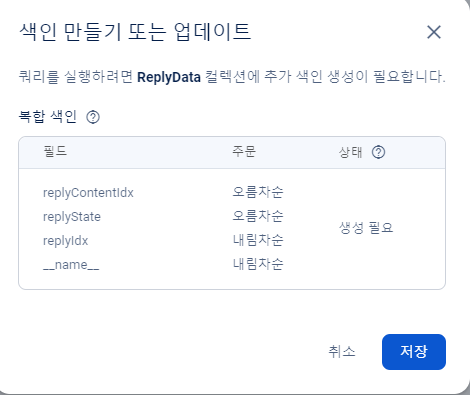
이대로 실행하면 인덱스를 만들라는 에러가 뜨므로 인덱스를 만드는 작업을 한다.
또는 쿼리빌더를 사용하면 된다고 한다.
댓글 상태 변경(삭제)
댓글의 상태를 변경하는 메서드
// ReplyDao.kt


        // 댓글의 상태를 변경하는 메서드
        suspend fun updateReplyState(replyIdx:Int, newState:ReplyState){
            val job1 = CoroutineScope(Dispatchers.IO).launch {
                // 컬렉션에 접근할 수 있는 객체를 가져온다.
                val collectionReference = Firebase.firestore.collection("ReplyData")
                // 컬렉션이 가지고 있는 문서들 중에 replyIdx 필드가 지정된 댓글 번호값하고 같은 Document들을 가져온다.
                val query = collectionReference.whereEqualTo("replyIdx", replyIdx).get().await()

                // 저장할 데이터를 담을 HashMap을 만들어준다.
                val map = mutableMapOf<String, Any>()
                map["replyState"] = newState.num.toLong()
                // 저장한다.
                // 가져온 문서 중 첫 번째 문서에 접근하여 데이터를 수정한다.
                query.documents[0].reference.update(map)
            }
            job1.join()
        }
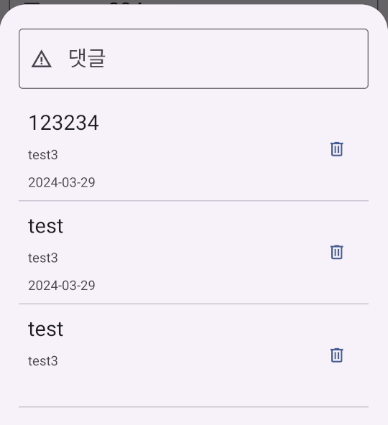
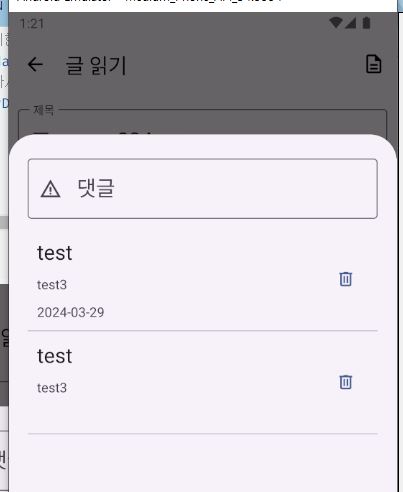
댓글 작성자에게만 삭제버튼이 보이게 한다.
        override fun onBindViewHolder(holder: BottomViewHolder, position: Int) {
            holder.rowReadContentReplyBinding.rowReadContentReplyViewModel?.textViewRowReplyText?.value = replyList[position].replyText
            userList.forEach {
                if(it.userIdx == replyList[position].replyWriterIdx){
                    holder.rowReadContentReplyBinding.rowReadContentReplyViewModel?.textViewRowReplyNickName?.value = it.userNickName
                    return@forEach
                }
            }
            holder.rowReadContentReplyBinding.rowReadContentReplyViewModel?.textViewRowReplyDate?.value = replyList[position].replyWriteDate

            // 로그인한 사람과 댓글 작성자가 같은 사람이 아니라면 삭제 버튼을 숨긴다.
            if(contentActivity.loginUserIdx != replyList[position].replyWriterIdx){
                holder.rowReadContentReplyBinding.buttonRowReplyDelete.isVisible = false
            } else {
                holder.rowReadContentReplyBinding.buttonRowReplyDelete.isVisible = true
            }
        }
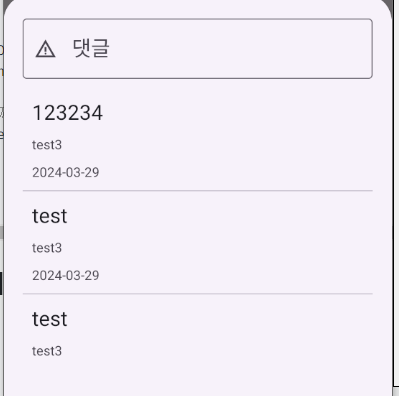
다른 아이디로 로그인 한 경우
본인 아이디로 로그인 한 경우
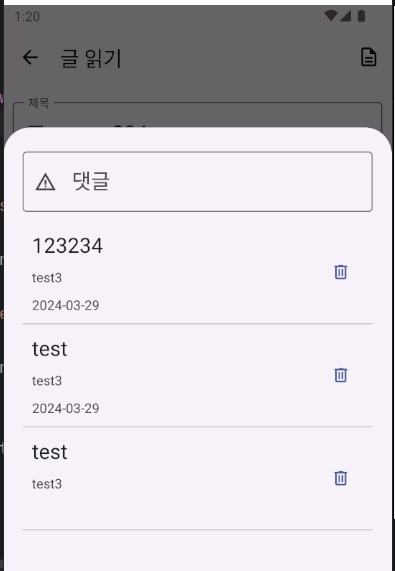
삭제 버튼을 누를 경우 삭제 처리
        override fun onBindViewHolder(holder: BottomViewHolder, position: Int) {
            holder.rowReadContentReplyBinding.rowReadContentReplyViewModel?.textViewRowReplyText?.value = replyList[position].replyText
            userList.forEach {
                if(it.userIdx == replyList[position].replyWriterIdx){
                    holder.rowReadContentReplyBinding.rowReadContentReplyViewModel?.textViewRowReplyNickName?.value = it.userNickName
                    return@forEach
                }
            }
            holder.rowReadContentReplyBinding.rowReadContentReplyViewModel?.textViewRowReplyDate?.value = replyList[position].replyWriteDate

            // 로그인한 사람과 댓글 작성자가 같은 사람이 아니라면 삭제 버튼을 숨긴다.
            if(contentActivity.loginUserIdx != replyList[position].replyWriterIdx){
                holder.rowReadContentReplyBinding.buttonRowReplyDelete.isVisible = false
                // 삭제 버튼에 대한 리스너를 제거한다.
                holder.rowReadContentReplyBinding.buttonRowReplyDelete.setOnClickListener(null)
            } else {
                holder.rowReadContentReplyBinding.buttonRowReplyDelete.isVisible = true
                // 삭제 버튼에 대한 리스너를 설정해준다.
                holder.rowReadContentReplyBinding.buttonRowReplyDelete.setOnClickListener {
                    CoroutineScope(Dispatchers.Main).launch {
                        // 댓글을 삭제한다.
                        ReplyDao.updateReplyState(replyList[position].replyIdx, ReplyState.REPLY_STATE_DELETE)
                        // 데이터를 다시 받아와 리사이클러뷰를 갱신한다.
                        gettingReplyData()
                    }
                }
            }
        }
notifyItemRemoved 버그
https://baldeagle.tistory.com/69
리사이클러뷰에 항목의 포지션이 0,1,2가 있을 때 1을 삭제하면 2가 1로 바뀌어 0,1이 되어야 하는데,
notifyItemRemoved를 사용하게되면 포지션이 바뀌지 않고 0,2로 남게된다.
참고 블로그 글에서는 notifyItemRemoved를 호출하고 바로 뒤에 notifyItemRangeRemoved를 이어서 호출하는 꼼수를 사용하면 된다고 한다.
안드로이드공부