Airflow 파이프라인를 정의하기 위한 예시를 소개하고, 예시를 기반으로 주요 concept에 대해 소개하는 글
Example Pipeline definition
import textwrap
from datetime import datetime, timedelta
# The Dag Object
from airflow.models.dag import DAG
# Operators
from airflow.operators.bash import BashOperator
with DAG(
dag_id="tutorial",
# These args will get passed on to each operator
# You can override them on a per-task basis during operator initialization
default_args={ # task마다 기본적으로 설정할 args를 설정
"depends_on_past": True, # 이전 실행의 성공 여부에 따라 현재 작업의 실행을 결정. True로 설정되면, 이전 작업이 성공해야만 다음 실행이 수행됨
"email": [
"airflow@example.com"
], # 작업 실패 또는 재시도 시 알림을 보낼 이메일 주소
"email_on_failure": False, # 작업 실패 시 메일을 보낼지 말지
"email_on_retry": False, # 작업 재 시도시 메일을 보낼지 말지
"retries": 1, # 작업 실패할 대 몇번까지 재시도 할지
"retry_delay": timedelta(
minutes=5
), # 작업이 실패하고 재시도하기 전에 기다리는 시간 정의
# 'queue': 'bash_queue', # 작업을 실행할 큐를 지정. 특정 작업을 다른 워커에서 실행하고 싶을때 유용
# 'pool': 'backfill', # 여러 DAG들이 동일한 리소스를 과도하게 사용하지 않도록 풀(pool)로 묶어서 관리.
# 'priority_weight': 10, # DAG 실행 순서를 결정할때 사용되는 우선순위 값. 높은 값은 가진 DAG가 먼저 실행됨
# 'end_date': datetime(2016, 1, 1), # DAG 작업이 종료될 날짜를 지정. 이후에는 작업이 실행되지 않음
# 'wait_for_downstream': False,
# 'sla': timedelta(hours=2),
# 'execution_timeout': timedelta(seconds=300), # 작업이 완료되기까지 허용된 최대 시간 설정. 무한정 실행되는 작업을 방지하기 위함으로서, 이 시간이 지나면 작업이 강제로 실패.
# 'on_failure_callback': some_function, # or list of functions # 작업이 실패, 성공, 재시도 될때 호출되는 콜백함수 정의
# 'on_success_callback': some_other_function, # or list of functions # 특정 작업이 실패했을때 추가로 처리해야할 작업이 있거나 성공 시 후속 작업이 필요한 경우 사용
# 'on_retry_callback': another_function, # or list of functions
# 'sla_miss_callback': yet_another_function, # or list of functions
# 'on_skipped_callback': another_function, #or list of functions
# 'trigger_rule': 'all_success' # 작업이 실행될 조건을 정의. 기본값은 `all_success`로, 모든 선행 작업이 성공했을때 실행됨. all_success, all_failed, all_done, one_success, one_failed 등 다양한 조건 설정 가능
},
description="A simple tutorial DAG",
schedule=timedelta(days=1),
start_date=datetime(2021, 1, 1),
catchup=False, # `True`인 경우, 실행 시점을 놓친 경우라도 이전 작업 백필(재실행). `False`인 경우, 이전 작업 백필 X.
tags=["example"],
) as dag:
# t1, t2 and t3 are examples of tasks created by instantiating operators
t1 = BashOperator(
task_id="print_date",
bash_command="date",
)
t2 = BashOperator(task_id="sleep", bash_command="sleep 5", retries=3)
t1.doc_md = textwrap.dedent(
"""\
#### Task Documentation
You can document your task using the attributes `doc_md` (markdown),
`doc` (plain text), `doc_rst`, `doc_json`, `doc_yaml` which gets
rendered in the UI's Task Instance Details page.
**Image Credit:** Randall Munroe, [XKCD](https://xkcd.com/license.html)
"""
)
dag.doc_md = (
__doc__ # providing that you have a docstring at the beginning of the DAG; OR
)
dag.doc_md = """
This is a documentation placed anywhere
""" # otherwise, type it like this
templated_command = textwrap.dedent(
"""
{% for i in range(5) %}
echo "{{ ds }}"
echo "{{ macros.ds_add(ds, 7)}}"
{% endfor %}
"""
)
t3 = BashOperator(
task_id="templated",
depends_on_past=False,
bash_command=templated_command,
)
t1 >> [t2, t3]1. 라이브러리 임포트
import textwrap
from datetime import datetime, timedelta
from airflow.models.dag import DAG
from airflow.operators.bash import BashOperator
2. DAG 정의
with DAG(
    "tutorial",
    default_args={
        "depends_on_past": False,
        "email": ["airflow@example.com"],
        "email_on_failure": False,
        "email_on_retry": False,
        "retries": 1,
        "retry_delay": timedelta(minutes=5),
    },
    description="A simple tutorial DAG",
    schedule=timedelta(days=1),
    start_date=datetime(2021, 1, 1),
    catchup=False,
    tags=["example"],
) as dag:
3. Task 정의
t1 = BashOperator(
    task_id="print_date",
    bash_command="date",
)
t2 = BashOperator(
task_id="sleep",
depends_on_past=False,
bash_command="sleep 5",
retries=3,
)t3 = BashOperator(
task_id="templated",
depends_on_past=False,
bash_command=templated_command,
)4. 의존성 정의
t1 >> [t2, t3]보너스. Task 문서화
dag.doc_md = (
__doc__ # providing that you have a docstring at the beginning of the DAG; OR
)
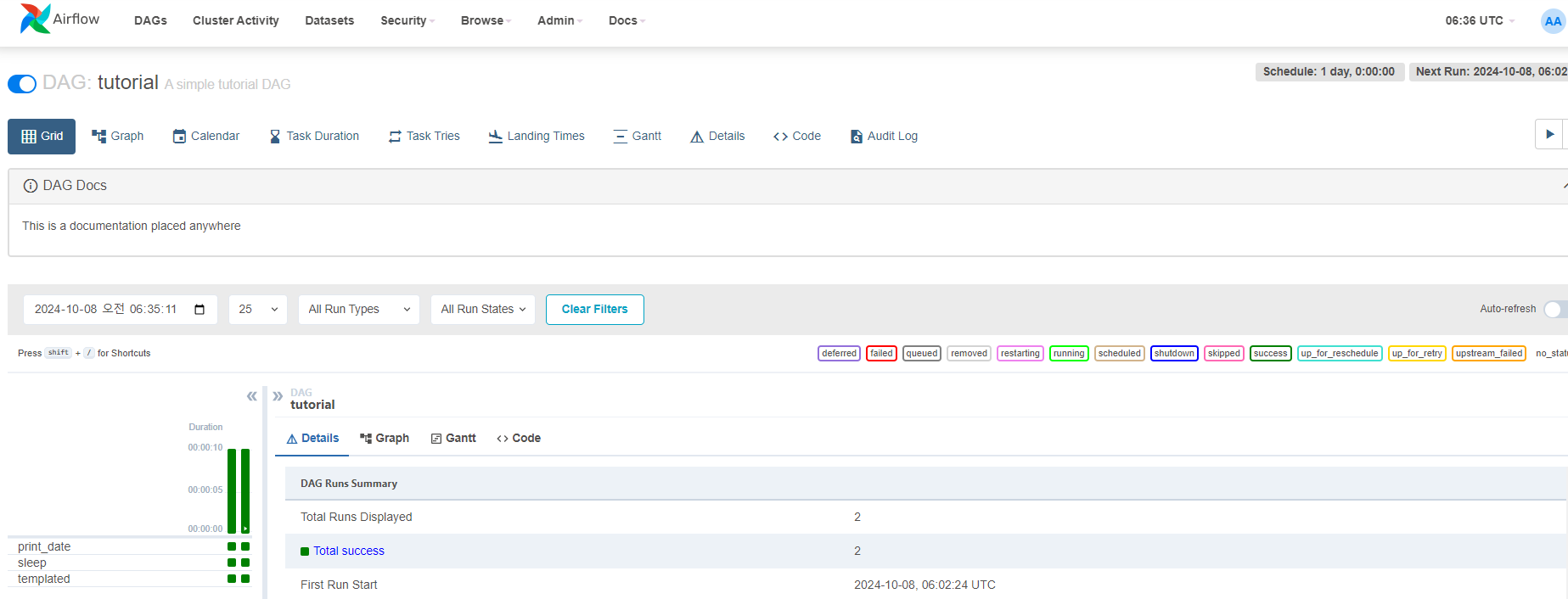
dag.doc_md = """
This is a documentation placed anywhere
""" 아래 사진과 같이 DAG Docs에 문서가 업데이트 됨
TASK 문서 작성
# task에 대한 문서 작성
t1.doc_md = textwrap.dedent(
"""\
#### Task Documentation
You can document your task using the attributes `doc_md` (markdown),
`doc` (plain text), `doc_rst`, `doc_json`, `doc_yaml` which gets
rendered in the UI's Task Instance Details page.

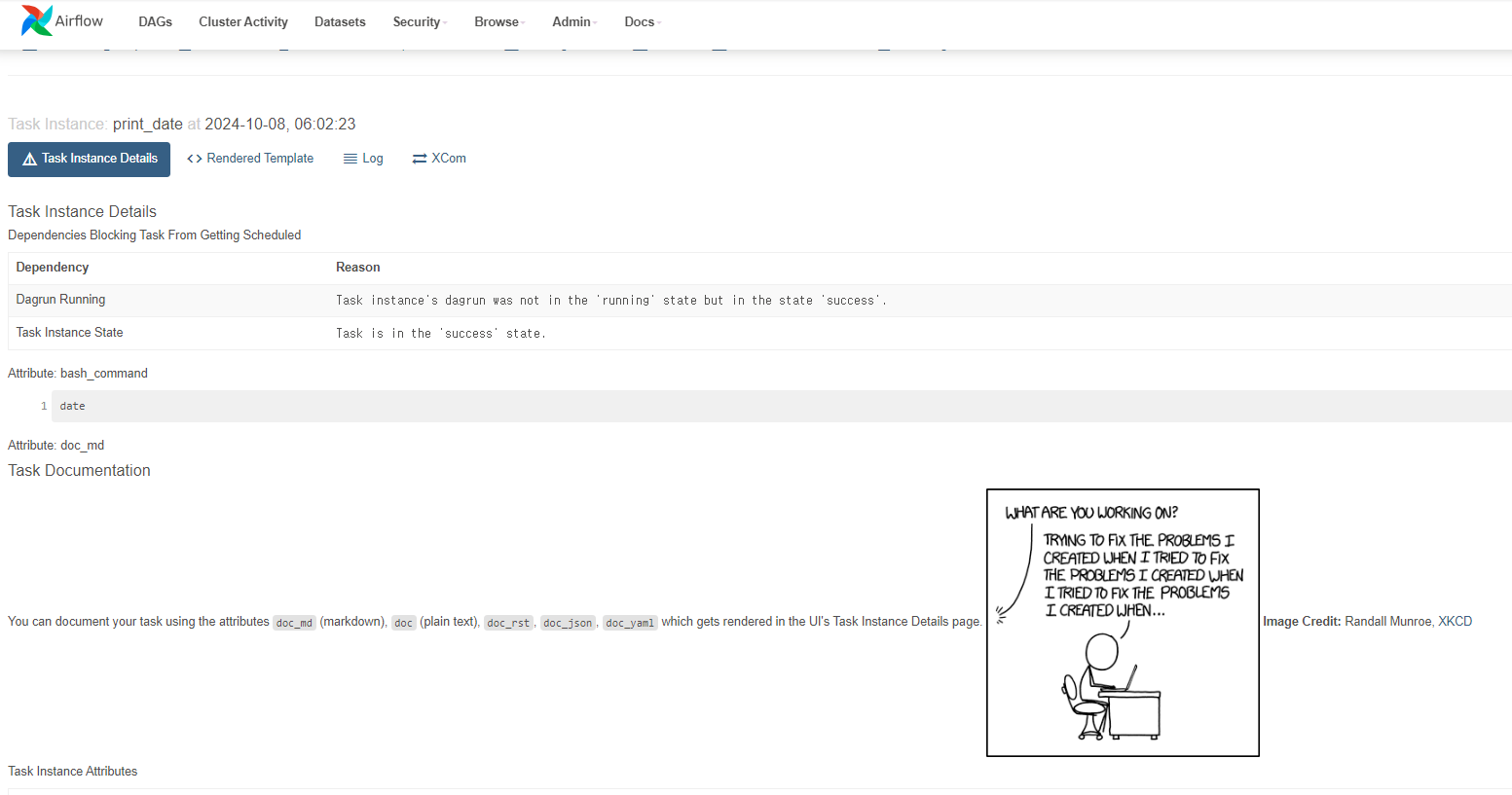
**Image Credit:** Randall Munroe, [XKCD](https://xkcd.com/license.html)
"""
)아래 사진과 같이 Task Docs에 문서가 업데이트 됨. 해당 task의 Details > More Details 를 클릭하면 Task Documentation를 확인할 수 있음
It's a DAG definition file
제목 그대로 위의 DAG definition file은 단지 DAG의 구조를 명세하는 파일로, task는 다른 worker에 의해 다른 시간대에 실행될 수 있다. 따라서 다른 worker에서 task의 데이터를 주고 받기 위해 XComs가 등장.
Tasks
- DAG안에서 operator를 사용하기 위해서는 연산자를 Task로 인스턴스화해야 함
- task의 인자로 넘어오는 값의 우선 순위 규칙은 아래와 같음
- 명시적으로 전달된 인자
default_args딕셔너리에 존재하는 값- 연산자의 기본값(존재하는 경우)
- task는 task_id and owner 값을 무조건 포함해야하는데 owner는 기본값으로 airflow 로 설정되기에, 일반적인 경우 task_id만 설정해주며 됨
Templating with Jinja
아래는 예시코드
templated_command = textwrap.dedent(
"""
{% for i in range(5) %}
echo "{{ ds }}"
echo "{{ macros.ds_add(ds, 7)}}"
{% endfor %}
"""
)
t3 = BashOperator(
    task_id="templated",
    depends_on_past=False,
    bash_command=templated_command,
)Adding DAG and Tasks documentaion
DAG documentation는 markdown만 지원하고, task documentation은 plain text, markdown, reStructuredText, json, and yaml을 지원한다
t1.doc_md = textwrap.dedent(
"""\
#### Task Documentation
You can document your task using the attributes `doc_md` (markdown),
`doc` (plain text), `doc_rst`, `doc_json`, `doc_yaml` which gets
rendered in the UI's Task Instance Details page.

**Image Credit:** Randall Munroe, [XKCD](https://xkcd.com/license.html)
"""
)
dag.doc_md = __doc__ # providing that you have a docstring at the beginning of the DAG; OR
dag.doc_md = """
This is a documentation placed anywhere
""" # otherwise, type it like thisSetting up Dependencies
아래 코드처럼 set_downstream, set_upstream 또는 >>, << 를 통해 Dependency 정의 가능
t1.set_downstream(t2)

# This means that t2 will depend on t1
# running successfully to run.
# It is equivalent to:
t2.set_upstream(t1)

# The bit shift operator can also be
# used to chain operations:
t1 >> t2

# And the upstream dependency with the
# bit shift operator:
t2 << t1

# Chaining multiple dependencies becomes
# concise with the bit shift operator:
t1 >> t2 >> t3

# A list of tasks can also be set as
# dependencies. These operations
# all have the same effect:
t1.set_downstream([t2, t3])
t1 >> [t2, t3]
[t2, t3] << t1
Using time zones
아래 예시(참조문서)처럼 timezone을 설정할 때, timezone이 아닌 pendulum을 사용하는 것을 권장
importpendulumdag = DAG("my_tz_dag", start_date=pendulum.datetime(2016, 1, 1, tz="Europe/Amsterdam"))
op = EmptyOperator(task_id="empty", dag=dag)
print(dag.timezone)# <Timezone [Europe/Amsterdam]>