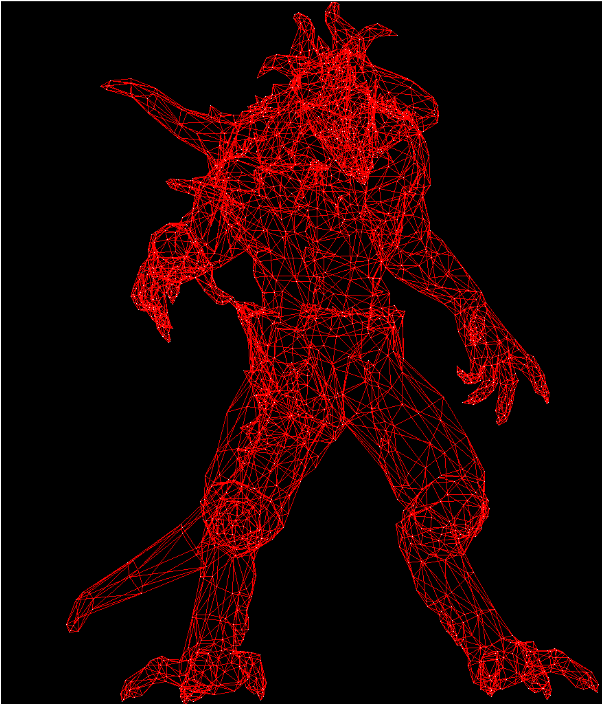
TinyRenderer를 보고 작성하는 글임
기본 점 찍기
#include <cmath>
#include "tgaimage.h"

constexpr TGAColor white   = {255, 255, 255, 255}; // attention, BGRA order
constexpr TGAColor green   = {  0, 255,   0, 255};
constexpr TGAColor red     = {  0,   0, 255, 255};
constexpr TGAColor blue    = {255, 128,  64, 255};
constexpr TGAColor yellow  = {  0, 200, 255, 255};

int main(int argc, char** argv) {
    constexpr int width  = 64 * 4;
    constexpr int height = 64 * 4;
    TGAImage framebuffer(width, height, TGAImage::RGB);

    int ax =  7 * 4, ay =  3 * 4;
    int bx = 12 * 4, by = 37 * 4;
    int cx = 62 * 4, cy = 53 * 4;

    framebuffer.set(ax, ay, white);
    framebuffer.set(bx, by, white);
    framebuffer.set(cx, cy, white);

    framebuffer.write_tga_file("framebuffer.tga");
    return 0;
}
그냥 프레임버퍼에 A, B, C를 흰색상의 픽셀로 찍고 tga로 변환하는거임
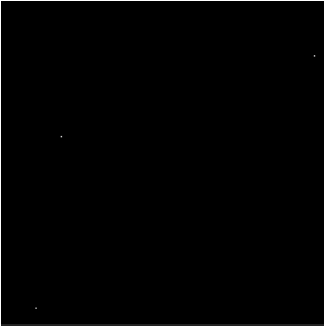
그럼 이런 작은 점 3개가 찍힘
Barycentric coordinates
무게중심 좌표라고 불림
: 보간 비율 (0~1)
이 개념은 두 점 A, B가 있고,
두 점 사이의 간격을 비율로 표현한거임
일때,
일때,
가 됨
물론 반대로 해도 되긴 한데,
이럼 시작점이 A가 아니라 B가 된다는 차이점만 잇지 ㅇㅇ
로 전개가 가능함
즉, 두 점 A,B를 잇는 선분 사이의 점 P의 좌표를 비율 t를 이용해 구하는 방법임
그리고 2차원 평면에서 진행되므로
와 로 표현할 수 있음
따라서 x와 y를 기준으로 살펴보면
가 성립함을 알 수 있음
그냥 선형보간 공식과 같음
void line(int ax, int ay, int bx, int by, TGAImage &framebuffer, TGAColor color)
{
    for (float t=0.; t<1.; t+=.02) {
        int x = std::round( ax + (bx-ax)*t );
        int y = std::round( ay + (by-ay)*t );
        framebuffer.set(x, y, color);
    }
}
이런 코드를 main.cpp에 선언해줌
그냥 0.1씩 더하면서, t를 비율로 보간해주는거임
그리고 색상은 원하는 색상으루 ㅇㅇ
int main(int argc, char** argv)
{
	// * 4 없앰
    constexpr int width  = 64;
    constexpr int height = 64;
    TGAImage framebuffer(width, height, TGAImage::RGB);

    int ax =  7, ay =  3;
    int bx = 12, by = 37;
    int cx = 62, cy = 53;

    line(ax, ay, bx, by, framebuffer, blue);
    line(cx, cy, bx, by, framebuffer, green);
    line(cx, cy, ax, ay, framebuffer, yellow);
    line(ax, ay, cx, cy, framebuffer, red);

    framebuffer.set(ax, ay, white);
    framebuffer.set(bx, by, white);
    framebuffer.set(cx, cy, white);

    framebuffer.write_tga_file("framebuffer.tga");
    return 0;
}
그리고 main.cpp를 이렇게 수정해줌
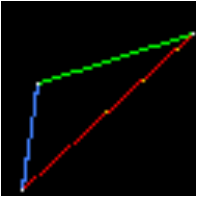
이런 결과가 나옴
빈틈이 보이고, 노란색 픽셀이 빨간선 위에 출력됨
문제가 뭘까?
- -> = 62 -> 7 = 55개의 픽셀
~ -> 0.02씩 인터벌 = 51개
즉, 총 55개의 픽셀이 필요한데, 51개만 그려지고 있으니 빈공간이 발생하게 되는거임
해결법. 보간 비율 t를 미리 정의하자
핵심 개념은 쉬움
두 점 가 있을때, 지금까지는 t를 반복처리 했음
근데 x 혹은 y 좌표를 반복처리 해서 구할수도 있음
두 점 에 대한 t의 비율은 다음처럼 나타낼 수 있음
: ax로부터의 x좌표의 거리
: bx로부터의 ax까지의 거리
로 나타낼 수 있음
이를 코드로 나타내면
void line(int ax, int ay, int bx, int by, TGAImage &framebuffer, TGAColor color)
{
    for (int x=ax; x<=bx; x++)
    {
        float t = (x-ax) / static_cast<float>(bx-ax);
        int y = std::round( ay + (by-ay)*t );
        framebuffer.set(x, y, color);
    }
}
이렇게 코드를 변경하게 되면
위에서 기본적으로 t를 반복할때 나타났던 문제인
- 픽셀의 갯수가 차이남
이 해결되게 됨
하지만 문제가 또 하나 발생함
만약 면?
따라서 이를 정렬해줘야함
항상 ax가 bx보다 작도록!
void line(int ax, int ay, int bx, int by, TGAImage &framebuffer, TGAColor color)
{
    if (ax > bx)
    {
        std::swap(ax, bx);
        std::swap(ay, by);
    }

    for (int x=ax; x<=bx; x++)
    {
        float t = (x-ax) / static_cast<float>(bx-ax);
        int y = std::round( ay + (by-ay)*t );
        framebuffer.set(x, y, color);
    }
}
이렇게 됨
파란쪽은 왜저럴까?
지금 우리는 x를 기준으로 샘플링을 하는 중임
즉, 두 x좌표의 차이가 적고, y좌표의 차이가 크면 y에 비해 x좌표의 샘플수가 적으므로 텅 비어버리는거임
즉
인 경우에 x와 y를 바꿔주면 되는거임
void line(int ax, int ay, int bx, int by, TGAImage &framebuffer, TGAColor color)
{
    bool is_x_smaller = std::abs(ax - bx) < std::abs(ay - by);

    if (is_x_smaller)
    {
        std::swap(ax, ay);
        std::swap(bx, by);
    }

    if (ax > bx)
    {
        std::swap(ax, bx);
        std::swap(ay, by);
    }

    for (int x=ax; x<=bx; x++)
    {
        float t = (x-ax) / static_cast<float>(bx-ax);
        int y = std::round( ay + (by-ay)*t );

        if (is_x_smaller)
        {
            framebuffer.set(y, x, color); //y, x 스왑된거 적용해주기
        }
        else
        {
            framebuffer.set(x, y, color);
        }
    }
}
이렇게 코드가 바뀜!

가 됐다!!
최적화
#include "tgaimage.h"
#include <chrono>
#include <iostream>
#include <cmath>
#include <cstdlib>
#include <ctime>
#include <algorithm>
#include <iomanip>

constexpr TGAColor white   = {255, 255, 255, 255}; // attention, BGRA order
constexpr TGAColor green   = {  0, 255,   0, 255};
constexpr TGAColor red     = {  0,   0, 255, 255};
constexpr TGAColor blue    = {255, 128,  64, 255};
constexpr TGAColor yellow  = {  0, 200, 255, 255};

void line(int ax, int ay, int bx, int by, TGAImage &framebuffer, TGAColor color)
{
    bool is_x_smaller = (std::abs(ax - bx) < std::abs(ay - by));

    if (is_x_smaller)
    {
        std::swap(ax, ay);
        std::swap(bx, by);
    }

    if (ax > bx)
    {
        std::swap(ax, bx);
        std::swap(ay, by);
    }

    for (int x=ax; x<=bx; x++)
    {
        float t = (x-ax) / static_cast<float>(bx-ax);
        int y = std::round( ay + (by-ay)*t );

        if (is_x_smaller)
        {
            framebuffer.set(y, x, color);
        }
        else
        {
            framebuffer.set(x, y, color);
        }
    }
}

int main(int argc, char** argv)
{
    // 1. start-time
    auto start_time = std::chrono::system_clock::now();
    std::time_t start_c = std::chrono::system_clock::to_time_t(start_time);

    constexpr int width  = 64;
    constexpr int height = 64;
    TGAImage framebuffer(width, height, TGAImage::RGB);

    std::srand(std::time(nullptr));
    for (int i=0; i<(1<<24); i++) {
        int ax = rand()%width, ay = rand()%height;
        int bx = rand()%width, by = rand()%height;
        line(ax, ay, bx, by, framebuffer,
        {
            static_cast<uint8_t>(rand() % 255),
            static_cast<uint8_t>(rand() % 255),
            static_cast<uint8_t>(rand() % 255),
            static_cast<uint8_t>(rand() % 255)
        });
    }

    framebuffer.write_tga_file("framebuffer.tga");

    // 2. end-time
    auto end_time = std::chrono::system_clock::now();
    std::time_t end_c = std::chrono::system_clock::to_time_t(end_time);

    // 3. total-time
    std::chrono::duration<double> execution_time = end_time - start_time;

    std::cout << "start time: " << std::put_time(std::localtime(&start_c), "%Y-%m-%d %H:%M:%S") << "\n";
    std::cout << "end time: " << std::put_time(std::localtime(&end_c), "%Y-%m-%d %H:%M:%S") << "\n";
    std::cout << "total time: " << execution_time.count() << " s\n";

    return 0;
}
이렇게 main문을 살짝 수정함
1<<24번의 반복문을 수행함
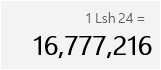
총 1600만번의 반복 * 픽셀계산이 합쳐짐
 이런 랜덤한 이미지가 완성됨
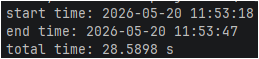
약 29초정도 소요됨ㅇㅇ
이걸 최적화 하려면?
1. y계산 최적화
void line(int ax, int ay, int bx, int by, TGAImage &framebuffer, TGAColor color)
{
    bool is_x_smaller = (std::abs(ax - bx) < std::abs(ay - by));

    if (is_x_smaller)
    {
        std::swap(ax, ay);
        std::swap(bx, by);
    }

    if (ax > bx)
    {
        std::swap(ax, bx);
        std::swap(ay, by);
    }

    for (int x=ax; x<=bx; x++)
    {
        float t = (x-ax) / static_cast<float>(bx-ax);
        int y = std::round( ay + (by-ay)*t );

        if (is_x_smaller)
        {
            framebuffer.set(y, x, color);
        }
        else
        {
            framebuffer.set(x, y, color);
        }
    }
}
이부분을 봐보자
그리고 2차원 평면에서 진행되므로
와 로 표현할 수 있음따라서 x와 y를 기준으로 살펴보면
가 성립함을 알 수 있음
두 점 가 있을때, 지금까지는 t를 반복처리 했음
근데 x 혹은 y 좌표를 반복처리 해서 구할수도 있음두 점 에 대한 t의 비율은 다음처럼 나타낼 수 있음
: ax로부터의 x좌표의 거리
: bx로부터의 ax까지의 거리
이렇게 두 개념을 위해 설명했음
코드를 보면 우리는 x좌표를 증가시키며 y좌표를 결정짓고 있음
그리고 round연산을 통해 cpu과부하가 걸림
로 나타낼 수 잇음
여기서 퀴즈
- 는 뭘 의미하는걸까?
정답 : 수열
으로 곱셈법칙을 이용해 바꿀 수 있음라고 했을때,
1. 일때,
2. 일때,
3. 일때,x가 증가함에 따라 이전 값에 누적합을 구해주면 되는거임
즉, y값을 초기화 시켜놓고, x가 반복문을 통해 증가될때마다 delta를 누적합 해주면 그게 y값이 되는거임!물론 min y값부터 시작해야함ㅇㅇㅇ
void line(int ax, int ay, int bx, int by, TGAImage &framebuffer, TGAColor color)
{
    bool is_x_smaller = (std::abs(ax - bx) < std::abs(ay - by));

    if (is_x_smaller)
    {
        std::swap(ax, ay);
        std::swap(bx, by);
    }

    if (ax > bx)
    {
        std::swap(ax, bx);
        std::swap(ay, by);
    }

	float y = ay;

    for (int x=ax; x<=bx; x++)
    {
        //float t = (x-ax) / static_cast<float>(bx-ax); //delete
        //int y = std::round( ay + (by-ay)*t ); //delete

        if (is_x_smaller)
			framebuffer.set(y, x, color);
		else
			framebuffer.set(x, y, color);

		y  += (by - ay) / static_cast<float>(bx - ax);
    }
}
이렇게 코드가 바뀜!!
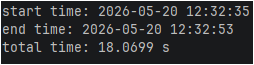
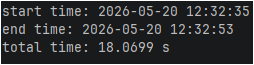
약 29초 -> 18초로 줄음!!!
2. 픽셀은 정수
먼저 코드부터 보자
void line(int ax, int ay, int bx, int by, TGAImage &framebuffer, TGAColor color)
{
    bool is_x_smaller = (std::abs(ax - bx) < std::abs(ay - by));

    if (is_x_smaller)
    {
        std::swap(ax, ay);
        std::swap(bx, by);
    }

    if (ax > bx)
    {
        std::swap(ax, bx);
        std::swap(ay, by);
    }

	int y = ay;
	float diff = 0;

    for (int x=ax; x<=bx; x++)
    {
        //float t = (x-ax) / static_cast<float>(bx-ax); //delete
        //int y = std::round( ay + (by-ay)*t ); //delete

        if (is_x_smaller)
			framebuffer.set(y, x, color);
		else
			framebuffer.set(x, y, color);

		diff  += (by - ay) / static_cast<float>(bx - ax);
		if (diff > 0.5f)
		{
			y += by > ay ? 1 : -1;
			diff -= 1;
		}
    }
}
컴퓨터 화면의 픽셀은 소숫점 단위가 아닌 정수 단위임
이렇게 진행된다는거임
화면은 2차원이지? 만약 5,5위치의 픽셀은 5 * 가로 픽셀 수 + 5개가 되는거임
하지만 이전의 코드는 y가 소숫점 단위임
화면은 어짜피 소숫점 단위의 픽셀에 점을 찍지 못하니 자동으로 round가 적용되어 불필요한 연산이 들어가게 되는거임
브레슨햄 알고리즘은 다음과 같은 개념임
- 두 좌표 사이의 기울기를 구함
- 기울기가 지나는 픽셀을 기준으로 절반(0.5)위쪽으로 지나가면 위의 픽셀에 점을 찍음
- 그게 아니라면 아래 픽셀에 점을 찍음
2차원에서의 두 좌표사이의 기울기는 쉽게 구할 수 있음
a = , b = 라고 할때,
int y = ay;
float diff = 0;

   for (int x=ax; x<=bx; x++)
   {
       if (is_x_smaller)
		framebuffer.set(y, x, color);
	else
		framebuffer.set(x, y, color);

	diff  += (by - ay) / static_cast<float>(bx - ax);
	if (diff > 0.5f)
	{
		y += by > ay ? 1 : -1;
		diff -= 1;
	}
}
이 코드에서
diff += (by - ay) / static_cast<float>(bx - ax);는 기울기의 누적 합이고,
해당 합이 0.5를 넘어가면 다음 픽셀에 점을 찍도록 하는거임
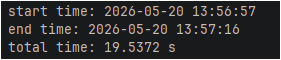
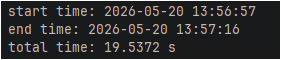
연산이 늘어났으므로 시간이 약 18초 -> 20초로 증가함
3. 완전한 bresenham algorithm
void line(int ax, int ay, int bx, int by, TGAImage &framebuffer, TGAColor color)
{
    //...

	int y = ay;
	float diff = 0;

    for (int x=ax; x<=bx; x++)
    {
        //...

		diff  += (by - ay) / static_cast<float>(bx - ax);
		if (diff > 0.5f)
		{
			y += by > ay ? 1 : -1;
			diff -= 1;
		}
    }
}라고 해보자
그럼 위의 코드를 다음과 같이 수식으로 나타낼 수 있음
이때 diff를 idiff라고 ㅏ면
가 됨
즉, diff가 관여하는 모든 계산에 dx를 곱하면 계산이 간소화 되는거임!
......
근데 문제가 있음
if (diff > 0.5f)
이 조건문 또한 diff의 영향을 받으므로 양변에 dx를 곱해줘야함
if (idiff > 0.5 * dx)가 됨
이때 dx가 3이라면 조건문의 조건은 1.5가 됨
따라서 완전한 정수연산이 불가능해짐
즉, 모든 diff가 참여하는 연산에dx가 아닌 2 * dx를 해주면 모든 연산이 정수연산이 되어
연산을 최적화 할 수 있음
void line(int ax, int ay, int bx, int by, TGAImage &framebuffer, TGAColor color)
{
    bool is_x_smaller = (std::abs(ax - bx) < std::abs(ay - by));

    if (is_x_smaller)
    {
        std::swap(ax, ay);
        std::swap(bx, by);
    }

    if (ax > bx)
    {
        std::swap(ax, bx);
        std::swap(ay, by);
    }

	int y = ay;
	int idiff = 0; //idiff = diff * 2 * dx

    for (int x=ax; x<=bx; x++)
    {
        if (is_x_smaller)
			framebuffer.set(y, x, color);
		else
			framebuffer.set(x, y, color);

		int dx = bx - ax;

		idiff  += 2 * (by - ay); //diff * 2 * dx = ((by - ay) / dx) * 2 * dx
		if (idiff > dx /* 0.5f * 2 * dx */ )
		{
			y += by > ay ? 1 : -1;
			idiff -= 2 * dx /* 1 * 2 * dx */;
		}
    }
}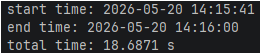
약간 빨라졌는데 1번의 최적화보다는 여전히 느림
사실 부동소수점 계산이 현대의 컴퓨터에서는 정수 계산과 큰 차이가 없음
4. if문 없애기
cpu는 파이프라이닝을 통해 구문들을 진행시킴
연산은 전부 명령어임
자세한건 cs공부를 하도록!
이때 기본적인 연산은 파이프라인 위에 탑승해서 병렬적으로 연산이 수행됨
한번에 하나의 연산만 하지는 않는다는 뜻임
근데 조건문, 특히 연산을 해야하는 조건문은 좀 얘기가 다름
- 연산 결과는 다른 연산이 끝날때까지 예측이 불가능함
- 따라서 먼저 true로 예측을 하고, 조건문 내부를 파이프라인에 올림
- 실제로 true면 그대로 진행
- false가 되면 파이프라인위의 조건문 내부 코드를 flush 후 다시 진행됨
이래서 특정 if문을 사용하면 느려지는거임
void line(int ax, int ay, int bx, int by, TGAImage &framebuffer, TGAColor color)
{
    bool is_x_smaller = (std::abs(ax - bx) < std::abs(ay - by));

    if (is_x_smaller)
    {
        std::swap(ax, ay);
        std::swap(bx, by);
    }

    if (ax > bx)
    {
        std::swap(ax, bx);
        std::swap(ay, by);
    }

	int y = ay;
	int idiff = 0;

    for (int x=ax; x<=bx; x++)
    {
        if (is_x_smaller)
			framebuffer.set(y, x, color);
		else
			framebuffer.set(x, y, color);

		int dx = bx - ax;

		idiff  += 2 * (by - ay);
		if (idiff > dx)
		{
			y += by > ay ? 1 : -1;
			idiff -= 2 * dx;
		}
    }
}
현재 우리의 코드에서 문제가 될만한 부분은 반복문 내부의 if조건문들임
is_x_smaller는 이미 동적으로 값이 변경되지 않음
즉, 호출되어도 결과가 100% false, true로 결정되므로 파이프라인 재조립이 필요없음
따라서 파이프라인에 올라가도 문제가 없음
idiff > dx는 동적으로 값이 계속 변경됨
따라서 파이프라인에 올라가있을때, 조건문의 결과에 따라 flush와 재연산이 계속 반복됨으로 연산 속도가 느려지게 됨
즉, 조건문을 없애고, 연산 결과에 조건문을 포함하는 트릭을 이용하면 연산 속도가 좋아지게 됨
핵심 개념은 cpp에서 bool값은 0 혹은 1이라는걸 이용하는거임
void line(int ax, int ay, int bx, int by, TGAImage &framebuffer, TGAColor color)
{
    bool is_x_smaller = (std::abs(ax - bx) < std::abs(ay - by));

    if (is_x_smaller)
    {
        std::swap(ax, ay);
        std::swap(bx, by);
    }

    if (ax > bx)
    {
        std::swap(ax, bx);
        std::swap(ay, by);
    }

    int dx = bx - ax;
    int dy = std::abs(by - ay);
    int y_step = (by > ay) ? 1 : -1;
    int idiff = 0;

    for (int x = ax; x <= bx; x++)
    {
        if (is_x_smaller)
            framebuffer.set(y, x, color);
        else
            framebuffer.set(x, y, color);

        idiff += 2 * dy;
        y += y_step * (idiff > dx);
		idiff -= 2 * dx * (idiff > dx);
    }
}
이렇게 코드를 변경시킬 수 있음
결과를 구해두고 동적으로 바뀌는 결과값에 따라
전체 연산을 0 혹은 기존 결과로 유지시키는 전략임
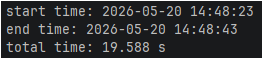
느리네...
결과
- 최적화 전
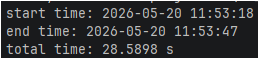
- y계산 최적화
- 브레슨햄 알고리즘 with float
-
브레슨햄 알고리즘 with int
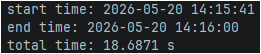
-
if브런치 파이프라이닝 제거
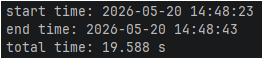
사실 이런결과가 나오는건 이유가 있음
코드는 컴파일러의 영향을 크게 받음
나는 젯브레인 라이더를 이용해서 테스트를 함
라이더에서는 vs 2026의 MSVC컴파일러를 이용하는 중임
최신의 컴파일러는 부동소수점 연산과 나눗셈 연산도 최적화를 해놓음
따라서, 조건문이 없는 2번의 y좌표 계산 최적화가 가장 빠른 속도를 내는거임
컴파일러의 성능에 따라 위의 다양한 최적화기법을 사용해볼 수 있다~~
정도로만 짚고 넘어가자