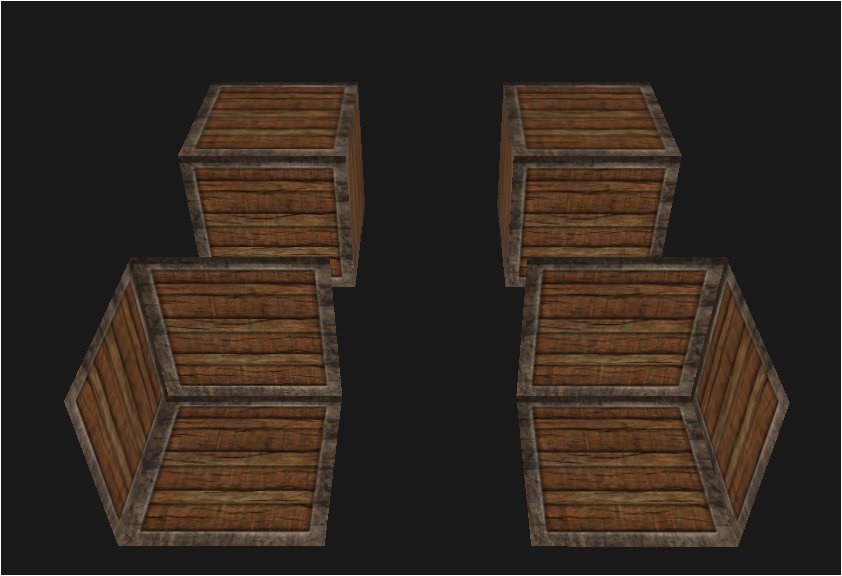
face culling
culling을 한국말로 표현하면
솎다임
솎다는 많은 물체에서 몇개를 뽑아 없애버린다는 뉘앙스로
머리 숱을 솎다, 씨앗을 솎다 이런식으로 사용함
그럼 face culling은 무슨뜻일까?
face는 표면, 면이라는 뜻으로 사용되니까
표면을 솎아내는 행위를 face culling이라고 부르는걸 알 수 있음
winding order
감기 순서?
뭘 감는거지? 뭘 감는 순서라는거임?
float positions[] =
{
    // positions
    0.0f,  0.5f,  0.0f, //0
    0.0f, -0.5f,  0.0f, //1
    1.0f, -0.5f,  0.0f, //2

    0.0f,  0.5f,  0.0f, //0
    1.0f, -0.5f,  0.0f, //1
    1.0f,  0.5f,  0.0f, //2
};
이렇게 2개의 삼각형으로 사각형을 렌더링한다고 해보자
1, 2번째 모든 삼각형의 3개의 좌표로 이루어진 삼각형을 보면
0->1->2로 이동했을때 방향을 그려보면 왼쪽으로 감기고 있다는걸 볼 수 있음
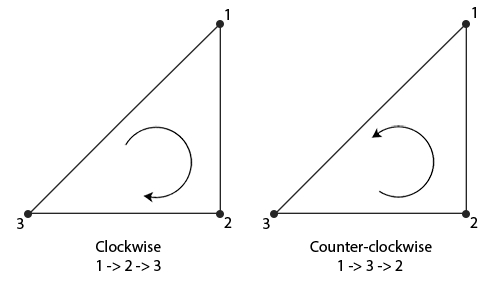
대충 좌표가 위 사진과 같을때는
저렇게 바뀌는거지
첫번째 삼각형의 정점 좌표를 기준으로 어느방향으로 회전중인지를 찾으면 되는거임
이는 좌표계와 관계없이
유저가 정면으로 삼각형을 정점 순서대로 바라볼때
정점이 어느방향으로 주어졌는지에 따라 달라지는거임
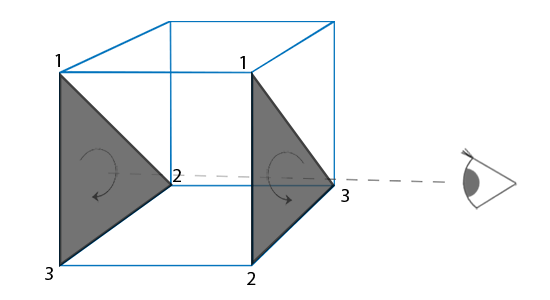
이 사진이 딱이야 아주그냥~
face culling 하는법
기본적으로 gl에서 culling은 disabled된 옵션임
따라서 먼저 설정을 켜줘야함
glEnabled(GL_CULL_FACE);그리고 두가지 옵션을 설정해주면 됨
glCullFace, glFrontFace
glCullFace는 어느 면을 culling하고 싶냐는거임
즉, 어느 면을 안보이도록 하고 싶냐는거라서,
| 옵션 | 설명 |
|---|---|
| GL_BACK | 뒷면 안보이게 |
| GL_FRONT | 앞면 안보이게 |
| GL_FRONT_AND_BACK | 앞뒷면 둘다 안보이게 |
glFrontFace는 정점이 어느 방향으로 회전하냐는거지
GL_CCW가 기본값, GL_CW도 사용가능~
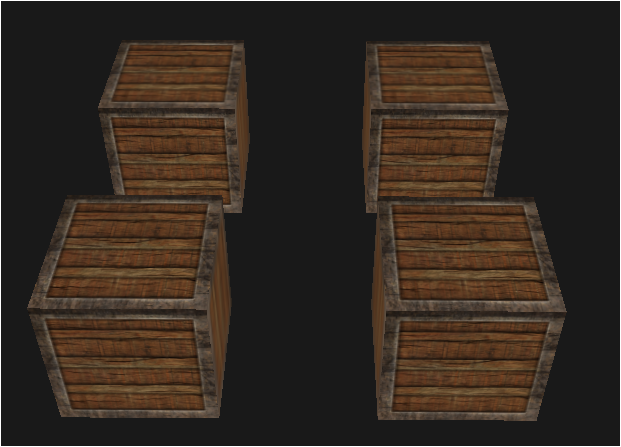
이런 오브젝트가 있음
//...

int main()
{
	//...

    float cubeVertices[] =
    {
        // positions          // texture Coords
        // Back face
        -0.5f, -0.5f, -0.5f,  0.0f, 0.0f, // Bottom-left
         0.5f,  0.5f, -0.5f,  1.0f, 1.0f, // top-right
         0.5f, -0.5f, -0.5f,  1.0f, 0.0f, // bottom-right
         0.5f,  0.5f, -0.5f,  1.0f, 1.0f, // top-right
        -0.5f, -0.5f, -0.5f,  0.0f, 0.0f, // bottom-left
        -0.5f,  0.5f, -0.5f,  0.0f, 1.0f, // top-left
        // Front face
        -0.5f, -0.5f,  0.5f,  0.0f, 0.0f, // bottom-left
         0.5f, -0.5f,  0.5f,  1.0f, 0.0f, // bottom-right
         0.5f,  0.5f,  0.5f,  1.0f, 1.0f, // top-right
         0.5f,  0.5f,  0.5f,  1.0f, 1.0f, // top-right
        -0.5f,  0.5f,  0.5f,  0.0f, 1.0f, // top-left
        -0.5f, -0.5f,  0.5f,  0.0f, 0.0f, // bottom-left
        // Left face
        -0.5f,  0.5f,  0.5f,  1.0f, 0.0f, // top-right
        -0.5f,  0.5f, -0.5f,  1.0f, 1.0f, // top-left
        -0.5f, -0.5f, -0.5f,  0.0f, 1.0f, // bottom-left
        -0.5f, -0.5f, -0.5f,  0.0f, 1.0f, // bottom-left
        -0.5f, -0.5f,  0.5f,  0.0f, 0.0f, // bottom-right
        -0.5f,  0.5f,  0.5f,  1.0f, 0.0f, // top-right
        // Right face
         0.5f,  0.5f,  0.5f,  1.0f, 0.0f, // top-left
         0.5f, -0.5f, -0.5f,  0.0f, 1.0f, // bottom-right
         0.5f,  0.5f, -0.5f,  1.0f, 1.0f, // top-right
         0.5f, -0.5f, -0.5f,  0.0f, 1.0f, // bottom-right
         0.5f,  0.5f,  0.5f,  1.0f, 0.0f, // top-left
         0.5f, -0.5f,  0.5f,  0.0f, 0.0f, // bottom-left
        // Bottom face
        -0.5f, -0.5f, -0.5f,  0.0f, 1.0f, // top-right
         0.5f, -0.5f, -0.5f,  1.0f, 1.0f, // top-left
         0.5f, -0.5f,  0.5f,  1.0f, 0.0f, // bottom-left
         0.5f, -0.5f,  0.5f,  1.0f, 0.0f, // bottom-left
        -0.5f, -0.5f,  0.5f,  0.0f, 0.0f, // bottom-right
        -0.5f, -0.5f, -0.5f,  0.0f, 1.0f, // top-right
        // Top face
        -0.5f,  0.5f, -0.5f,  0.0f, 1.0f, // top-left
         0.5f,  0.5f,  0.5f,  1.0f, 0.0f, // bottom-right
         0.5f,  0.5f, -0.5f,  1.0f, 1.0f, // top-right
         0.5f,  0.5f,  0.5f,  1.0f, 0.0f, // bottom-right
        -0.5f,  0.5f, -0.5f,  0.0f, 1.0f, // top-left
        -0.5f,  0.5f,  0.5f,  0.0f, 0.0f  // bottom-left
    };

    // cube VAO
    unsigned int cubeVAO, cubeVBO;
    glGenVertexArrays(1, &cubeVAO);
    glGenBuffers(1, &cubeVBO);
    glBindVertexArray(cubeVAO);
    glBindBuffer(GL_ARRAY_BUFFER, cubeVBO);
    glBufferData(GL_ARRAY_BUFFER, sizeof(cubeVertices), &cubeVertices, GL_STATIC_DRAW);
    glEnableVertexAttribArray(0);
    glVertexAttribPointer(0, 3, GL_FLOAT, GL_FALSE, 5 * sizeof(float), (void*)0);
    glEnableVertexAttribArray(1);
    glVertexAttribPointer(1, 2, GL_FLOAT, GL_FALSE, 5 * sizeof(float), (void*)(3 * sizeof(float)));

    // load textures
    unsigned int cubeTex = loadTexture("D:/01_Develope/CPP/learn_opengl/learn_opengl/Resources/container2_diffuse.png");

    std::vector<glm::vec3> cubePos
    {
        glm::vec3(-1.0f, 0.0f, 1.0f),//좌하단
        glm::vec3( -1.0f, 0.0f, -1.0f),//좌상단
        glm::vec3( 1.0f, 0.0f, 1.0f),//우하단
        glm::vec3( 1.0f, 0.0f, -1.0f),//우상단
    };


    shader.use();
    shader.setInt("texture1", 0);

    // render loop
    while (!glfwWindowShouldClose(window))
    {
    	//...

        // draw objects
        shader.use();
        glm::mat4 projection = glm::perspective(glm::radians(camera.Zoom), (float)SCR_WIDTH / (float)SCR_HEIGHT, 0.1f, 100.0f);
        glm::mat4 view = camera.GetViewMatrix();
        glm::mat4 model = glm::mat4(1.0f);
        shader.setMat4("projection", projection);
        shader.setMat4("view", view);

        // cubeTex
        glBindVertexArray(cubeVAO);
        glActiveTexture(GL_TEXTURE0);
        glBindTexture(GL_TEXTURE_2D, cubeTex);
        for (unsigned int i = 0; i < cubePos.size(); i++)
        {
            model = glm::mat4(1.0f);
            model = glm::translate(model, cubePos[i]);
            shader.setMat4("model", model);
            glDrawArrays(GL_TRIANGLES, 0, 36);
        }

        glfwSwapBuffers(window);
        glfwPollEvents();
    }

    glfwTerminate();
    return 0;
}
//...
대충 이런 코드의 결과임
이제 위에서 살펴본 culling코드를 추가해보자
먼저 렌더링 바깥에
glEnable(GL_CULL_FACE);를 추가해주고..
//rendering in...

// draw objects
shader.use();
glm::mat4 projection = glm::perspective(glm::radians(camera.Zoom), (float)SCR_WIDTH / (float)SCR_HEIGHT, 0.1f, 100.0f);
glm::mat4 view = camera.GetViewMatrix();
glm::mat4 model = glm::mat4(1.0f);
shader.setMat4("projection", projection);
shader.setMat4("view", view);

// grassTex
glBindVertexArray(cubeVAO);
glActiveTexture(GL_TEXTURE0);
glBindTexture(GL_TEXTURE_2D, cubeTex);
for (unsigned int i = 0; i < cubePos.size(); i++)
{
    if (i % 2 == 0)
    {
        glCullFace(GL_BACK);
        glFrontFace(GL_CW);
    }
    else
    {
        glCullFace(GL_FRONT);
    }

    model = glm::mat4(1.0f);
    model = glm::translate(model, cubePos[i]);
    shader.setMat4("model", model);
    glDrawArrays(GL_TRIANGLES, 0, 36);
}
렌더링 안쪽에서
cubePos의 인덱스마다 다른 컬링과 winding order를 정해줬음
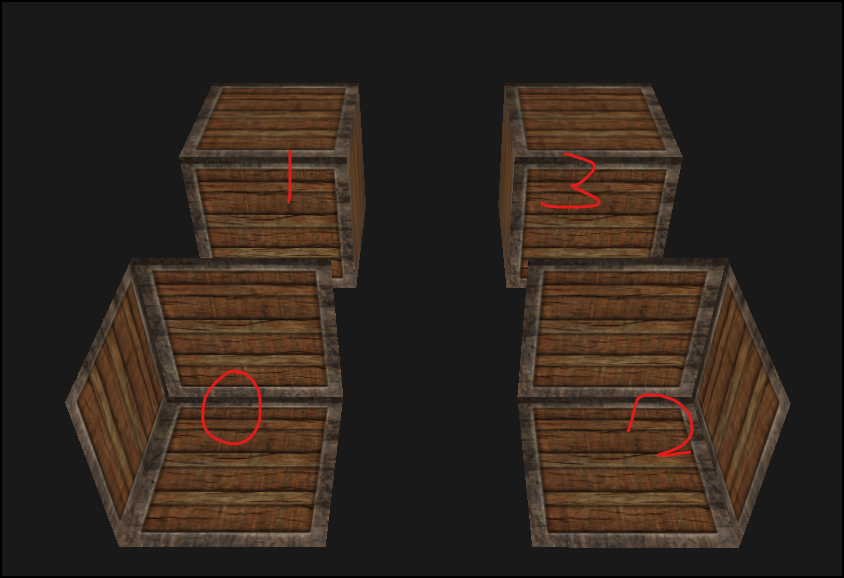
요로코롬 바뀌어버림ㅋㅎㅋㅎ
결론
glFrontFace를 이용해 CCW, CW로 정점의 룰을 정해주고
glCullFace를 이용해 해당 삼각형이 정해진 룰을 기준으로 앞면인지 뒷면인지 판단하고
지정한 컬링룰에 따라 앞면이면 컬링, 뒷면이면 컬링
이런식으로 정해버리면 됨