큐브맵
텍스쳐중에선 큐브맵이라고 불리는 텍스쳐가 있음
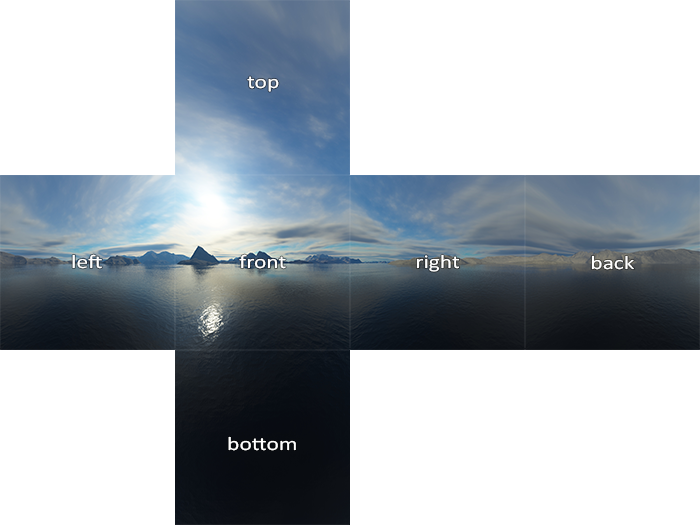
이렇게 매핑이 되는 면을 가지고 큐브형태로 감싸지는 텍스쳐임
큐브맵 매핑, 필터링, 사용 코드 예시
그리고 말그대로 큐브이기때문에 vertex를 큐브형태로 선언해서 사용하면 됨
그리고 결국 6개의 면으로 이루어진거라, glTexImage2D로 텍스쳐 매핑을 할때도 6번을 해야한다는거임
이때 사용하는게
| 텍스처 타겟 | 방향 |
|---|---|
| GL_TEXTURE_CUBE_MAP_POSITIVE_X | 오른쪽 |
| GL_TEXTURE_CUBE_MAP_NEGATIVE_X | 왼쪽 |
| GL_TEXTURE_CUBE_MAP_POSITIVE_Y | 위쪽 |
| GL_TEXTURE_CUBE_MAP_NEGATIVE_Y | 아래쪽 |
| GL_TEXTURE_CUBE_MAP_POSITIVE_Z | 뒤쪽 |
| GL_TEXTURE_CUBE_MAP_NEGATIVE_Z | 앞쪽 |
이렇게 X-Y-Z순서로 int값이 증가하면서 이루어진 enum값으로 텍스쳐를 매핑해주면 됨
그래서 사용예시는 아래와 같음
unsigned int textureID;
glGenTextures(1, &textureID);
glBindTexture(GL_TEXTURE_CUBE_MAP, textureID);

int width, height, nrChannels;
unsigned char *data;
for(unsigned int i = 0; i < textureFacesLoc.size(); i++)
{
    data = stbi_load(textureFacesLoc[i].c_str(), &width, &height, &nrChannels, 0);
    glTexImage2D(
        GL_TEXTURE_CUBE_MAP_POSITIVE_X + i,
        0, GL_RGB, width, height, 0, GL_RGB, GL_UNSIGNED_BYTE, data
    );
}
중요한 부분은 GL_TEXTURE_CUBE_MAP_POSITIVE_X + i부분임
위에서도 설명했듯이 enum값은 1씩 선형적으로 증가하므로, 큐브맵의 면의 개수만큼 증가시키면서 매핑을 해주면 되는거임
그리고 텍스쳐를 로딩했으면 텍스쳐를 어떻게 매핑하고 필터링해야하는지 알려줘야함
glTexParameteri(GL_TEXTURE_CUBE_MAP, GL_TEXTURE_MAG_FILTER, GL_LINEAR);
glTexParameteri(GL_TEXTURE_CUBE_MAP, GL_TEXTURE_MIN_FILTER, GL_LINEAR);
glTexParameteri(GL_TEXTURE_CUBE_MAP, GL_TEXTURE_WRAP_S, GL_CLAMP_TO_EDGE);
glTexParameteri(GL_TEXTURE_CUBE_MAP, GL_TEXTURE_WRAP_T, GL_CLAMP_TO_EDGE);
glTexParameteri(GL_TEXTURE_CUBE_MAP, GL_TEXTURE_WRAP_R, GL_CLAMP_TO_EDGE);
min,mag 필터는 그냥 선형적으로 처리를 하면 되고,
가로(S), 세로(T), 깊이(R)에 대해 GL_CLAMP_TO_EDGE래핑을 해, 항상 가장자리 반환을 하도록 하면 됨
그리고 glsl에서는 아래처럼 쓰면 됨
in vec3 textureDir; // direction vector representing a 3D texture coordinate
uniform samplerCube cubemap; // cubemap texture sampler

void main()
{
    FragColor = texture(cubemap, textureDir);
}
sampler2D가 아닌 samplerCube를 통해 샘플링하고
vec3값인 textureDir을 이용해서 fragment color를 결정하게 됨
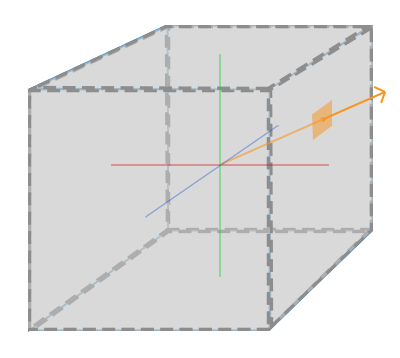
여기서 노란선이 textureDir이고,
해당 방향과 cubemap의 hit지점에 해당되는 색상을 결정짓는거라고 보면 됨
skybox
위에서 설명한걸 그대로 사용하는게 skybox라는 큐브맵임
이게 skybox큐브맵의 예시임
저렇게 6개의 면이 이어붙여져서 제공될수도 있음
그럴때는 각 면을 분리하는 작업을 수행해줘야함
보통은 각각의 면을 따로따로 제공해줌
위 skybox 큐브맵을 사용하고,
위에서 살펴본 매핑, 필터링, 사용예시 코드를 이용해 loadCube메서드와 실제로 사용을 해보겠음
1. skybox큐브맵 사용
먼저 모든 NDC좌표를 커버치는 skybox용 vertex를 정의해줌
그리고 vertex array에 바인딩해주고,
loadCubemap커스텀 메서드를 이용해 경로의 skybox텍스쳐를 로드해줄거임
	//...
	float skyboxVertices[] =
	{
        // positions
        -1.0f,  1.0f, -1.0f,
        -1.0f, -1.0f, -1.0f,
         1.0f, -1.0f, -1.0f,
         1.0f, -1.0f, -1.0f,
         1.0f,  1.0f, -1.0f,
        -1.0f,  1.0f, -1.0f,

        -1.0f, -1.0f,  1.0f,
        -1.0f, -1.0f, -1.0f,
        -1.0f,  1.0f, -1.0f,
        -1.0f,  1.0f, -1.0f,
        -1.0f,  1.0f,  1.0f,
        -1.0f, -1.0f,  1.0f,

         1.0f, -1.0f, -1.0f,
         1.0f, -1.0f,  1.0f,
         1.0f,  1.0f,  1.0f,
         1.0f,  1.0f,  1.0f,
         1.0f,  1.0f, -1.0f,
         1.0f, -1.0f, -1.0f,

        -1.0f, -1.0f,  1.0f,
        -1.0f,  1.0f,  1.0f,
         1.0f,  1.0f,  1.0f,
         1.0f,  1.0f,  1.0f,
         1.0f, -1.0f,  1.0f,
        -1.0f, -1.0f,  1.0f,

        -1.0f,  1.0f, -1.0f,
         1.0f,  1.0f, -1.0f,
         1.0f,  1.0f,  1.0f,
         1.0f,  1.0f,  1.0f,
        -1.0f,  1.0f,  1.0f,
        -1.0f,  1.0f, -1.0f,

        -1.0f, -1.0f, -1.0f,
        -1.0f, -1.0f,  1.0f,
         1.0f, -1.0f, -1.0f,
         1.0f, -1.0f, -1.0f,
        -1.0f, -1.0f,  1.0f,
         1.0f, -1.0f,  1.0f
    };

    unsigned int skyboxVAO, skyboxVBO;
    glGenVertexArrays(1, &skyboxVAO);
    glGenBuffers(1, &skyboxVBO);
    glBindVertexArray(skyboxVAO);
    glBindBuffer(GL_ARRAY_BUFFER, skyboxVBO);
    glBufferData(GL_ARRAY_BUFFER, sizeof(skyboxVertices), &skyboxVertices, GL_STATIC_DRAW);
    glEnableVertexAttribArray(0);
    glVertexAttribPointer(0, 3, GL_FLOAT, GL_FALSE, 3 * sizeof(float), (void*)0);

    //...
    vector<std::string> faces =
    {
        "Resources/skybox/right.jpg",
        "Resources/skybox/left.jpg",
        "Resources/skybox/top.jpg",
        "Resources/skybox/bottom.jpg",
        "Resources/skybox/front.jpg",
        "Resources/skybox/back.jpg"
    };
    unsigned int cubemapTexture = loadCubemap(faces);

	//...
    // render loop
    // -----------
    while (!glfwWindowShouldClose(window))
    {
		//...

        // draw skybox as last
        skyboxShader.use();
        skyboxShader.setMat4("view", view);
        skyboxShader.setMat4("projection", projection);
        // skybox cube
        glBindVertexArray(skyboxVAO);
        glActiveTexture(GL_TEXTURE0);
        glBindTexture(GL_TEXTURE_CUBE_MAP, cubemapTexture);
        glDrawArrays(GL_TRIANGLES, 0, 36);
        glBindVertexArray(0);

		//...
    }
대충 이런 코드가 완성이 됨
이제 vbo를 받아서 정점 처리를 해줄 glsl코드를 만들어보자
#version 330 core
layout (location = 0) in vec3 aPos;

out vec3 TexCoords;

uniform mat4 projection;
uniform mat4 view;

void main()
{
    TexCoords = aPos;
    gl_Position = projection * view * vec4(aPos, 1.0);
}

//---------------------------------------

#version 330 core
out vec4 FragColor;

in vec3 TexCoords;

uniform samplerCube skybox;

void main()
{
    FragColor = texture(skybox, TexCoords);
}
이렇게 하면 거의 끝~~
왜 거의 끝인지는 결과를 보고!
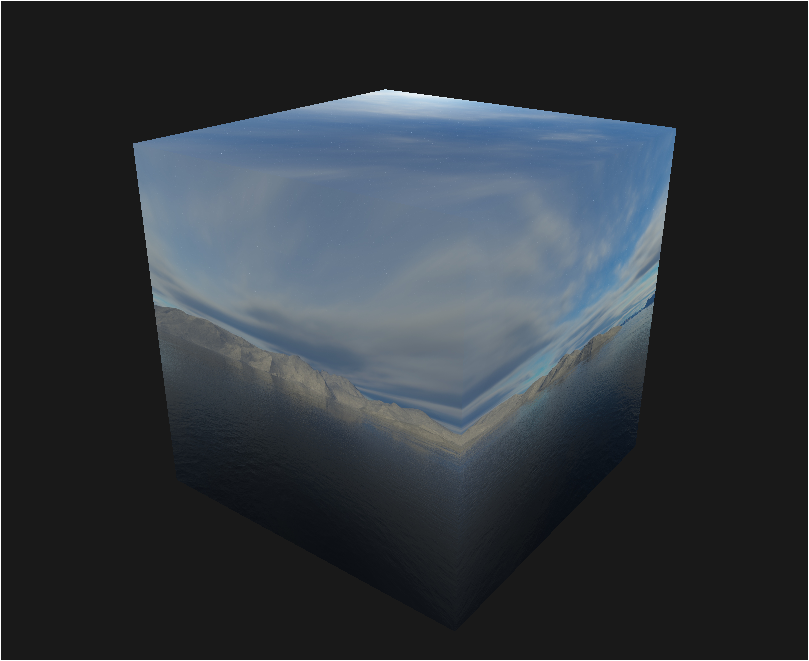
????
2. 특정 변환행렬 제거
이렇게 된건 이유가 있음
일단 문제점을 짚어보면
- 플레이어가 skybox외부에 존재함
- skybox는 플레이어 위치에 따라서 작아지고 커짐
즉,
skybox도 큐브이기 때문에 변환행렬의 영향을 받는거임
그럼 문제가 있는 변환은 뭘까?

이게 변환행렬을 통해 어떤 공간으로 오브젝트가 변환되는지를 순차적으로 나타낸거임
기억나지??
model에서 world변환행렬을 더하면 world공간으로 바뀜
world공간에서 view변환행렬을 더하면 camera공간으로 바뀜
camera공간에서 projection변환행렬을 더하면 clip공간으로 바뀜
여기서 world공간은 월드좌표니 필수,
clip공간은 말그대로 클리핑을 해서 사용자 화면에 출력만해주는거니 필수,
결국 문제는 view변환행렬이후 camera 공간으로 바뀌는게 문제라는걸 알 수 있음
그럼 뭐가 문제일까??
결국 플레이어가 움직인다는건 camera좌표에 따라서 물체가 회전, 이동, 크기등이 바뀐다는거임
플레이어가 움직임 == camera가 움직임 -> 사실 camera는 가만히 있고, camera주변의 물체들이 움직임
따라서 이렇게 camera에 의해 skybox가 움직이는 영향을 없애면 되는거임
그러니까, skybox의 위치는 고정하고, 회전만 따라하도록 하면 됨
glm::mat4 view = camera.GetViewMatrix();현재 view변환행렬은 다음과 같음
getViewMatrix는 4x4행렬임
이걸 3x3행렬로 바꾸고, 다시 4x4행렬로 바꾸면
변환행렬의 변환파트를 없앨 수 있음
그리고 depthfunc를 이용해 약간의 depth test를 손봐야함
만약 기본값인 GL_LESS를 이용하게 되면
skybox의 특정면이 무조건 다른 물체보다 depth가 작으므로,
skybox만 그려지게 되고, 다른 물체는 안그려짐
따라서 skybox를 그리기전에 depthFunc를 다른값으로 바꿔주고, 다시 기본값으로 돌려놔주면 됨
glDepthFunc(GL_LEQUAL);  // depth가 작거나 같을때 렌더링
skyboxShader.use();
view = glm::mat4(glm::mat3(camera.GetViewMatrix())); // remove translation from the view matrix
skyboxShader.setMat4("view", view);
skyboxShader.setMat4("projection", projection);
// skybox cube
glBindVertexArray(skyboxVAO);
glActiveTexture(GL_TEXTURE0);
glBindTexture(GL_TEXTURE_CUBE_MAP, cubemapTexture);
glDrawArrays(GL_TRIANGLES, 0, 36);
glBindVertexArray(0);
glDepthFunc(GL_LESS);
이렇게 코드가 완성됨
아래는 렌더링 전체코드임
//...

// settings
const unsigned int SCR_WIDTH = 1280;
const unsigned int SCR_HEIGHT = 720;

// camera
Camera camera(glm::vec3(0.0f, 0.0f, 3.0f));
float lastX = (float)SCR_WIDTH / 2.0;
float lastY = (float)SCR_HEIGHT / 2.0;
bool firstMouse = true;

// timing
float deltaTime = 0.0f;
float lastFrame = 0.0f;

int main()
{
    // glfw: initialize and configure
    // ------------------------------
    glfwInit();
    glfwWindowHint(GLFW_CONTEXT_VERSION_MAJOR, 3);
    glfwWindowHint(GLFW_CONTEXT_VERSION_MINOR, 3);
    glfwWindowHint(GLFW_OPENGL_PROFILE, GLFW_OPENGL_CORE_PROFILE);

    // glfw window creation
    // --------------------
    GLFWwindow* window = glfwCreateWindow(SCR_WIDTH, SCR_HEIGHT, "LearnOpenGL", NULL, NULL);
    if (window == NULL)
    {
        std::cout << "Failed to create GLFW window" << std::endl;
        glfwTerminate();
        return -1;
    }
    glfwMakeContextCurrent(window);
    glfwSetFramebufferSizeCallback(window, framebuffer_size_callback);
    glfwSetCursorPosCallback(window, mouse_callback);
    glfwSetScrollCallback(window, scroll_callback);

    // tell GLFW to capture our mouse
    glfwSetInputMode(window, GLFW_CURSOR, GLFW_CURSOR_DISABLED);

    // glad: load all OpenGL function pointers
    // ---------------------------------------
    if (!gladLoadGLLoader((GLADloadproc)glfwGetProcAddress))
    {
        std::cout << "Failed to initialize GLAD" << std::endl;
        return -1;
    }

    // configure global opengl state
    // -----------------------------
    glEnable(GL_DEPTH_TEST);

    // build and compile shaders
    // -------------------------
    Shader cubeShader("VertexShaders/CubeShader.vsh", "FragmentShaders/CubeShader.fsh");
    Shader skyboxShader("VertexShaders/SkyboxShader.vsh", "FragmentShaders/SkyboxShader.fsh");

    // set up vertex data (and buffer(s)) and configure vertex attributes
    // ------------------------------------------------------------------
    float cubeVertices[] = {
        // positions          // texture Coords
        -0.5f, -0.5f, -0.5f,  0.0f, 0.0f,
         0.5f, -0.5f, -0.5f,  1.0f, 0.0f,
         0.5f,  0.5f, -0.5f,  1.0f, 1.0f,
         0.5f,  0.5f, -0.5f,  1.0f, 1.0f,
        -0.5f,  0.5f, -0.5f,  0.0f, 1.0f,
        -0.5f, -0.5f, -0.5f,  0.0f, 0.0f,

        -0.5f, -0.5f,  0.5f,  0.0f, 0.0f,
         0.5f, -0.5f,  0.5f,  1.0f, 0.0f,
         0.5f,  0.5f,  0.5f,  1.0f, 1.0f,
         0.5f,  0.5f,  0.5f,  1.0f, 1.0f,
        -0.5f,  0.5f,  0.5f,  0.0f, 1.0f,
        -0.5f, -0.5f,  0.5f,  0.0f, 0.0f,

        -0.5f,  0.5f,  0.5f,  1.0f, 0.0f,
        -0.5f,  0.5f, -0.5f,  1.0f, 1.0f,
        -0.5f, -0.5f, -0.5f,  0.0f, 1.0f,
        -0.5f, -0.5f, -0.5f,  0.0f, 1.0f,
        -0.5f, -0.5f,  0.5f,  0.0f, 0.0f,
        -0.5f,  0.5f,  0.5f,  1.0f, 0.0f,

         0.5f,  0.5f,  0.5f,  1.0f, 0.0f,
         0.5f,  0.5f, -0.5f,  1.0f, 1.0f,
         0.5f, -0.5f, -0.5f,  0.0f, 1.0f,
         0.5f, -0.5f, -0.5f,  0.0f, 1.0f,
         0.5f, -0.5f,  0.5f,  0.0f, 0.0f,
         0.5f,  0.5f,  0.5f,  1.0f, 0.0f,

        -0.5f, -0.5f, -0.5f,  0.0f, 1.0f,
         0.5f, -0.5f, -0.5f,  1.0f, 1.0f,
         0.5f, -0.5f,  0.5f,  1.0f, 0.0f,
         0.5f, -0.5f,  0.5f,  1.0f, 0.0f,
        -0.5f, -0.5f,  0.5f,  0.0f, 0.0f,
        -0.5f, -0.5f, -0.5f,  0.0f, 1.0f,

        -0.5f,  0.5f, -0.5f,  0.0f, 1.0f,
         0.5f,  0.5f, -0.5f,  1.0f, 1.0f,
         0.5f,  0.5f,  0.5f,  1.0f, 0.0f,
         0.5f,  0.5f,  0.5f,  1.0f, 0.0f,
        -0.5f,  0.5f,  0.5f,  0.0f, 0.0f,
        -0.5f,  0.5f, -0.5f,  0.0f, 1.0f
    };
    float skyboxVertices[] = {
        // positions
        -1.0f,  1.0f, -1.0f,
        -1.0f, -1.0f, -1.0f,
         1.0f, -1.0f, -1.0f,
         1.0f, -1.0f, -1.0f,
         1.0f,  1.0f, -1.0f,
        -1.0f,  1.0f, -1.0f,

        -1.0f, -1.0f,  1.0f,
        -1.0f, -1.0f, -1.0f,
        -1.0f,  1.0f, -1.0f,
        -1.0f,  1.0f, -1.0f,
        -1.0f,  1.0f,  1.0f,
        -1.0f, -1.0f,  1.0f,

         1.0f, -1.0f, -1.0f,
         1.0f, -1.0f,  1.0f,
         1.0f,  1.0f,  1.0f,
         1.0f,  1.0f,  1.0f,
         1.0f,  1.0f, -1.0f,
         1.0f, -1.0f, -1.0f,

        -1.0f, -1.0f,  1.0f,
        -1.0f,  1.0f,  1.0f,
         1.0f,  1.0f,  1.0f,
         1.0f,  1.0f,  1.0f,
         1.0f, -1.0f,  1.0f,
        -1.0f, -1.0f,  1.0f,

        -1.0f,  1.0f, -1.0f,
         1.0f,  1.0f, -1.0f,
         1.0f,  1.0f,  1.0f,
         1.0f,  1.0f,  1.0f,
        -1.0f,  1.0f,  1.0f,
        -1.0f,  1.0f, -1.0f,

        -1.0f, -1.0f, -1.0f,
        -1.0f, -1.0f,  1.0f,
         1.0f, -1.0f, -1.0f,
         1.0f, -1.0f, -1.0f,
        -1.0f, -1.0f,  1.0f,
         1.0f, -1.0f,  1.0f
    };

    // cube VAO
    unsigned int cubeVAO, cubeVBO;
    glGenVertexArrays(1, &cubeVAO);
    glGenBuffers(1, &cubeVBO);
    glBindVertexArray(cubeVAO);
    glBindBuffer(GL_ARRAY_BUFFER, cubeVBO);
    glBufferData(GL_ARRAY_BUFFER, sizeof(cubeVertices), &cubeVertices, GL_STATIC_DRAW);
    glEnableVertexAttribArray(0);
    glVertexAttribPointer(0, 3, GL_FLOAT, GL_FALSE, 5 * sizeof(float), (void*)0);
    glEnableVertexAttribArray(1);
    glVertexAttribPointer(1, 2, GL_FLOAT, GL_FALSE, 5 * sizeof(float), (void*)(3 * sizeof(float)));
    // screen quad VAO
    unsigned int skyboxVAO, skyboxVBO;
    glGenVertexArrays(1, &skyboxVAO);
    glGenBuffers(1, &skyboxVBO);
    glBindVertexArray(skyboxVAO);
    glBindBuffer(GL_ARRAY_BUFFER, skyboxVBO);
    glBufferData(GL_ARRAY_BUFFER, sizeof(skyboxVertices), &skyboxVertices, GL_STATIC_DRAW);
    glEnableVertexAttribArray(0);
    glVertexAttribPointer(0, 3, GL_FLOAT, GL_FALSE, 3 * sizeof(float), (void*)0);

    // load textures
    // -------------
    unsigned int cubeTexture = loadTexture("D:/01_Develope/CPP/learn_opengl/learn_opengl/Resources/legacy/container2_diffuse.png");

    vector<std::string> faces =
    {
        "Resources/skybox/right.jpg",
        "Resources/skybox/left.jpg",
        "Resources/skybox/top.jpg",
        "Resources/skybox/bottom.jpg",
        "Resources/skybox/front.jpg",
        "Resources/skybox/back.jpg"
    };
    unsigned int cubemapTexture = loadCubemap(faces);

    // shader configuration
    // --------------------
    cubeShader.use();
    cubeShader.setInt("texture1", 0);

    skyboxShader.use();
    skyboxShader.setInt("skybox", 0);

    // render loop
    // -----------
    while (!glfwWindowShouldClose(window))
    {
        // per-frame time logic
        // --------------------
        float currentFrame = static_cast<float>(glfwGetTime());
        deltaTime = currentFrame - lastFrame;
        lastFrame = currentFrame;

        // input
        // -----
        processInput(window);


        // render
        // ------
        // 커스텀 프레임버퍼
        glClearColor(0.1f, 0.1f, 0.1f, 1.0f);
        glClear(GL_COLOR_BUFFER_BIT | GL_DEPTH_BUFFER_BIT);

        cubeShader.use();
        glm::mat4 model = glm::mat4(1.0f);
        glm::mat4 view = camera.GetViewMatrix();
        glm::mat4 projection = glm::perspective(glm::radians(camera.Zoom), (float)SCR_WIDTH / (float)SCR_HEIGHT, 0.1f, 100.0f);
        cubeShader.setMat4("model", model);
        cubeShader.setMat4("view", view);
        cubeShader.setMat4("projection", projection);
        // cubes
        glBindVertexArray(cubeVAO);
        glActiveTexture(GL_TEXTURE0);
        glBindTexture(GL_TEXTURE_2D, cubeTexture);
        glDrawArrays(GL_TRIANGLES, 0, 36);
        glBindVertexArray(0);

        // draw skybox as last
        glDepthFunc(GL_LEQUAL);  // change depth function so depth test passes when values are equal to depth buffer's content
        skyboxShader.use();
        view = glm::mat4(glm::mat3(camera.GetViewMatrix())); // remove translation from the view matrix
        skyboxShader.setMat4("view", view);
        skyboxShader.setMat4("projection", projection);
        // skybox cube
        glBindVertexArray(skyboxVAO);
        glActiveTexture(GL_TEXTURE0);
        glBindTexture(GL_TEXTURE_CUBE_MAP, cubemapTexture);
        glDrawArrays(GL_TRIANGLES, 0, 36);
        glBindVertexArray(0);
        glDepthFunc(GL_LESS);


        // glfw: swap buffers and poll IO events (keys pressed/released, mouse moved etc.)
        // -------------------------------------------------------------------------------
        glfwSwapBuffers(window);
        glfwPollEvents();
    }

    glDeleteVertexArrays(1, &cubeVAO);
    glDeleteBuffers(1, &cubeVBO);
    glDeleteVertexArrays(1, &skyboxVAO);
    glDeleteBuffers(1, &skyboxVBO);

    glfwTerminate();
    return 0;
}
/...
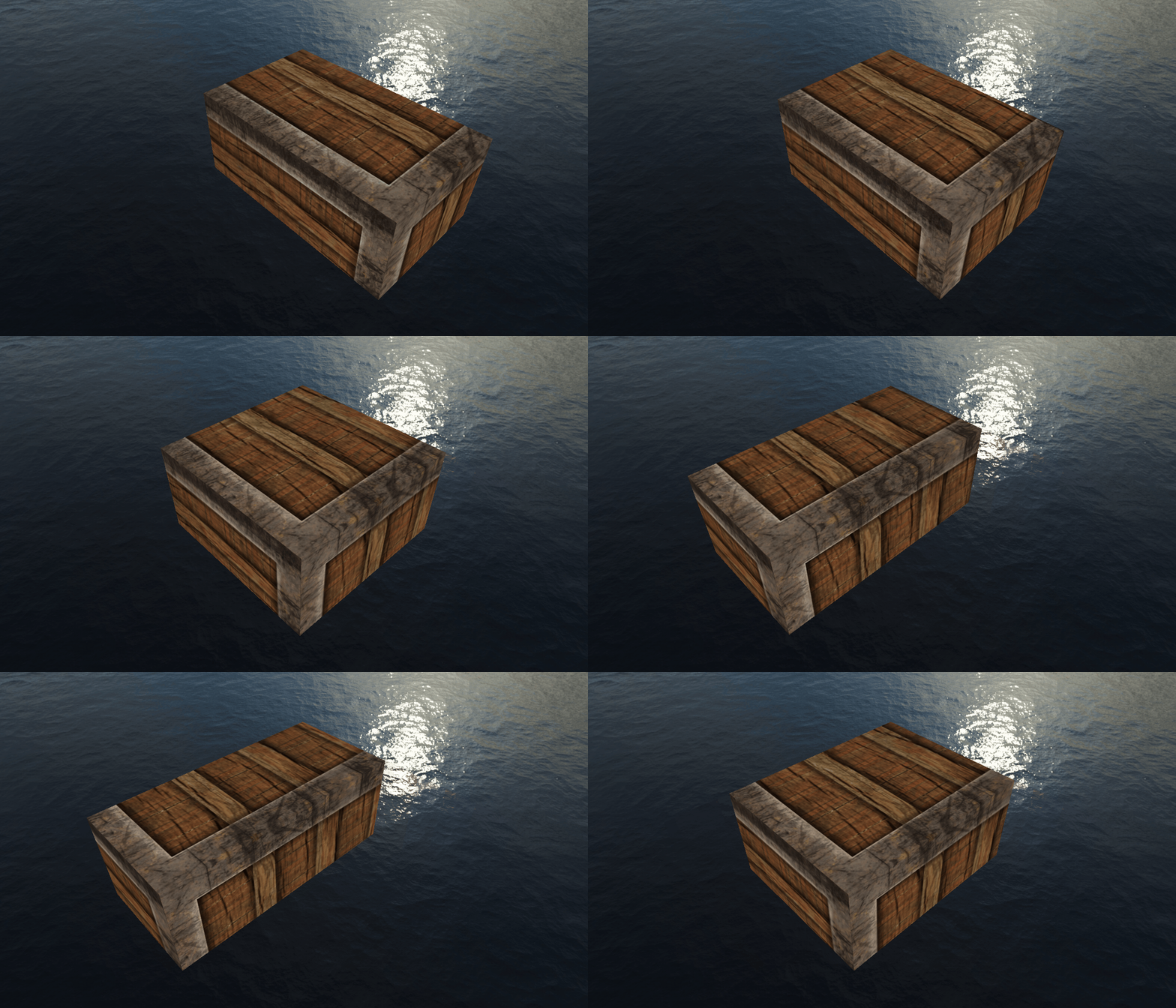
그럼 결과는 아래처럼 나옴
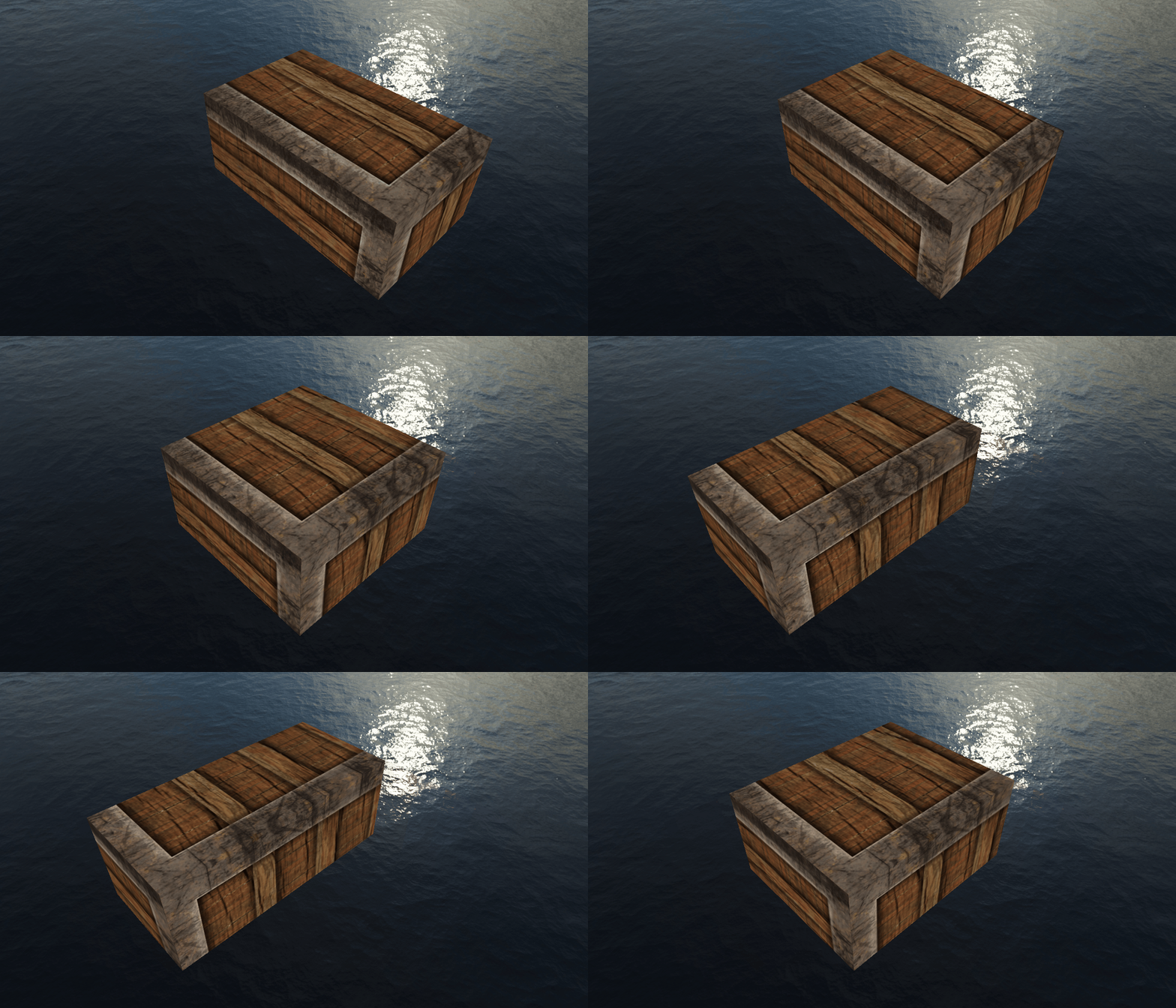
이게 머임???
skybox의 깊이값이 변해서 그럼
3. skybox깊이값 고정
skybox의 깊이값은 계속 변경될 필요가 없음
어짜피 특정 위치에 고정되어서 사용자가 그 공간내에 계속 위치하도록 하기만 하면 됨
#version 330 core
layout (location = 0) in vec3 aPos;

out vec3 TexCoords;

uniform mat4 projection;
uniform mat4 view;

void main()
{
    TexCoords = aPos;
    vec4 pos = projection * view * vec4(aPos, 1.0);
    gl_Position = pos.xyww;
}
vertex shader를 이렇게 고쳐줌
핵심 아이디어는
Texture에는 x,y,z값을 그대로 사용하고
정점에 대해서는 w값을 1.0으로 초기화하고
z(깊이)값을 해당 w값으로 사용해서,
depth testing시에 무조건 우선순위를 최하위로 가져가도록 하는거임
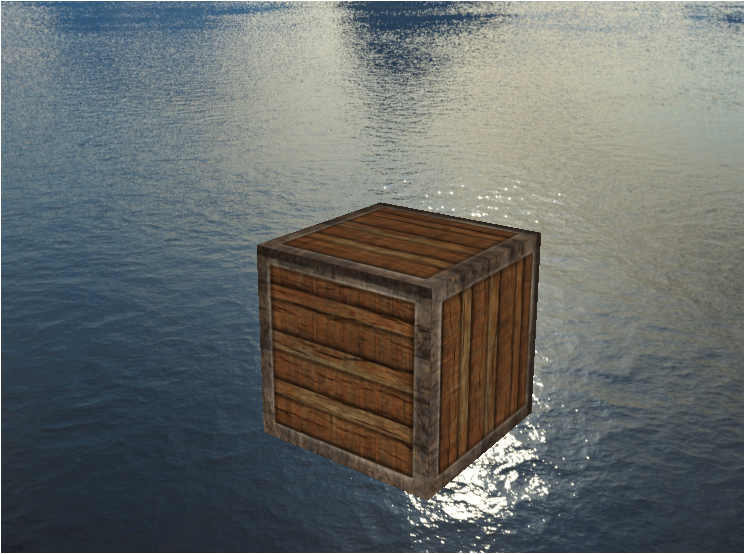
그럼 이렇게 잘 렌더링된 큐브를 볼 수 있지비~~
LearnOpenGL - Cubemaps/Environment mapping을 보고
추가적으로 환경반사, 굴절등을 구현해보는것도 좋다~~
난 이미 전에 다 알아봤으므로 패스~