- Room 퍼시스턴스 라이브러리는 안드로이드 아키텍처 컴포넌트에 포함되어 있으며, 안드로이드 아키텍처 가이드라인을 준수하면서 안드로이드 앱에 데이터베이스 저장소 지원을 쉽게 추가하기 위해 디자인되었다.
1. 모던 앱 아키텍처
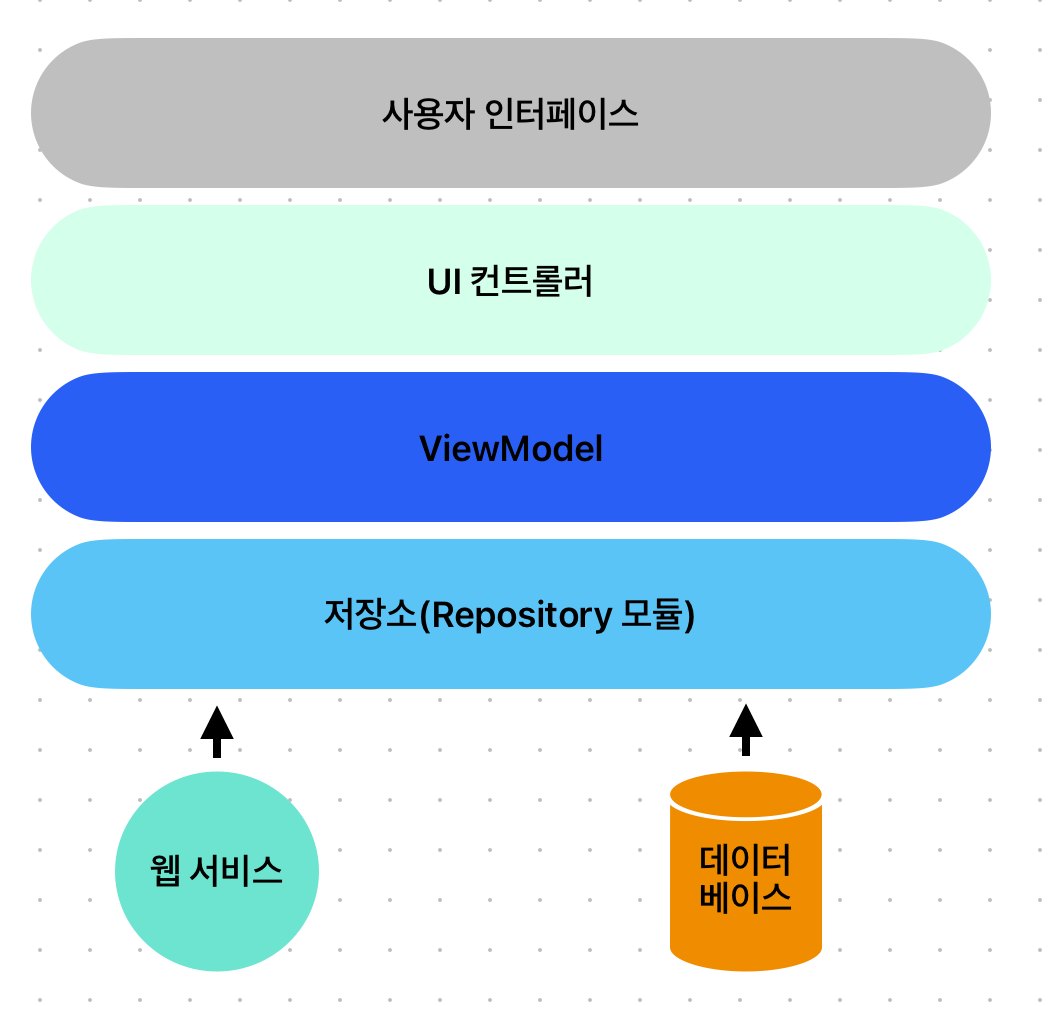
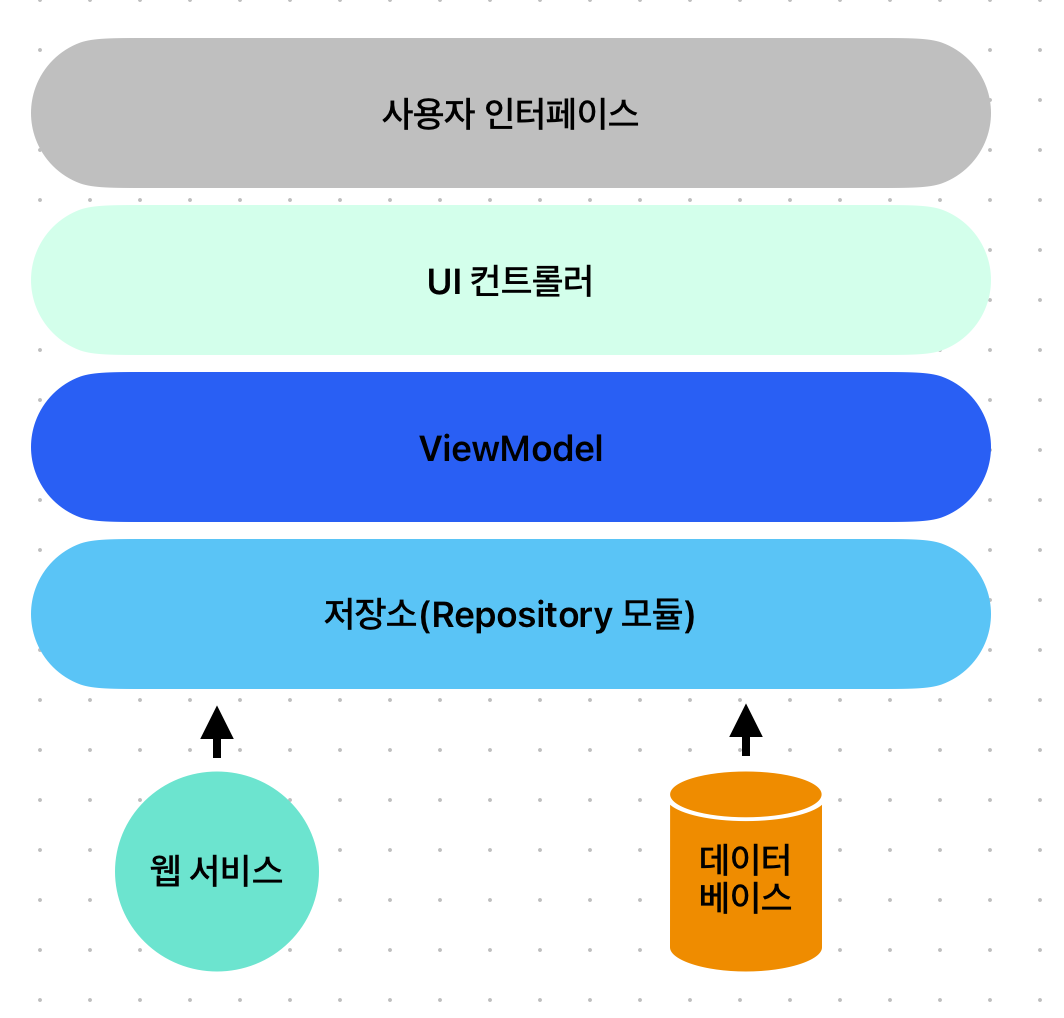
전형적인 안드로이드 앱 권장 아키텍쳐
2. Room 데이터베이스 퍼시스턴스의 핵심 요소
- Room 퍼시스턴스 라이브러리를 이용해 SQLite 데이터베이스를 다루는 것과 관련되 핵심요소를 알아보자
-
저장소
- repository 모듈은 앱이 사용하는 모든 데이터 소스를 직접 조작하는 데 필요한 모든 코드를 포함한다.
- UI 컨트롤러나 ViewModel이 데이터베이스나 웹 서비스 같은 소스에 직접 접근하는 코드를 포함하는 것을 방지한다.
-
Room 데이터베이스
- room 데이터베이스 객체는 내부 SQLite 데이터베이스에 대한 인터페이스를 제공한다.
- 또한 데이터 접근 객체(Data Access Object)에 접근할 수 있는 저장소를 제공한다.
-
데이터 접근 객체
- DAO는 SQLite 데이터베이스 안에서 데이터를 삽입, 추출, 삭제하는 저장소가 필요로 하는 SQL 구문들을 포함한다.
-
엔티티
- 엔티티는 데이터베이스 안의 테이블에 대한 스키마를 정의하는 클래스로 테이블 이름, 열, 이름, 데이터 타입을 정의하고 어떤 열이 기본 키인지 식별한다.
- SQL 쿼리 메서드 호출 결과로 DAO에 의해 저장소에 전달되는 데이터는 이 엔티티 클래스의 인스턴스 형태를 띤다.
-
SQLite 데이터베이스
- SQLite 데이터베이스는 데이터를 저장하고 데이터에 대한 접근을 제공한다.
- 저장소를 포함하는 앱 코드는 내부 데이터베이스에 직접 접근해서는 안된다.
- 모든 데이터베이스 조작은 Room 데이터베이스, DAO, 엔티티를 조합해서 수행한다.
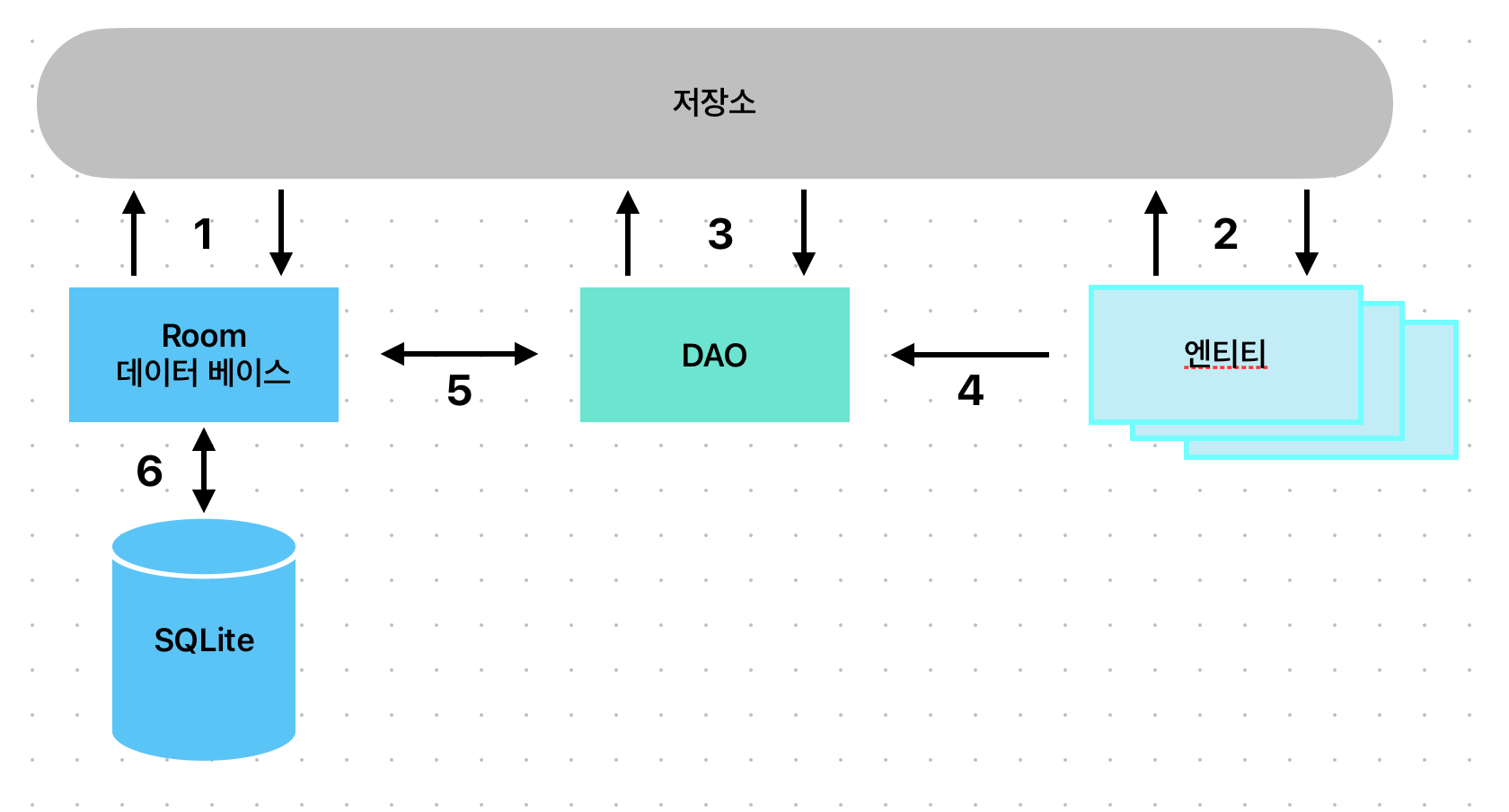
Room 기반 데이터베이스 저장소를 제공하는 방법
- 저장소는 Room 데이터베이스와 상호작용을 해서 데이터베이스 인스턴스를 얻고 이를 이용해 DAO인스턴스에 대한 참조를 얻는다.
- 저장소는 엔티티 인스턴스를 만들고 데이터를 설정한 뒤 DAO로 전달해 검색과 삽입 조작을 수행한다.
- 저장소는 데이터베이스에 삽입할 엔티티를 DAO에 전달해서 호출한다. 검색 쿼리의 응답으로 엔티티 인스턴스를 돌려받는다.
- DAO가 저장소에 반환할 결과를 가진 경우, 해당 결과들을 엔티티 객체에 패키징한다.
- DAO는 Room 데이터베이스와 상호작용해서 데이터베이스 조작을 시작하고, 결과를 처리한다.
- Room 데이터베이스는 쿼리를 전달하고 결과를 받는 등, 내부 SQLite와의 모든 저수준 인터랙션을 처리한다.
3. 엔티티 이해하기
@Entity(tableName = "customers")
class Customer {

    @PrimaryKey(autoGenerate = true)
    @NotNull
    @ColumInfo(name = "customerId")
    var id: Int = 0

    @ColumInfo(name = "customerName")
    var name : String? = null
    var address: String? = null

    constructor(){}

    constructor(id : Int, name : String, address : String){
        this.id = id
        this.name = name
        this.address = address
    }

    constructor(name : String, address : String){
        this.name = name
        this.address = address
    }

}- id를 기본키로 설정했으며 자동 증가를 하는 autoGenerate = true를 지정했다
- name음 행의 이름 중 customerName의 열 이름을 참조하도록 했다
- address는 열 이름을 할당하지 않았지만 같은 이름인 경우 데이터에 자동으로 저장이된다.
- 만약 데이터베이스에 저장하지 않아도 된다면 @Ignore 애너테이션을 추가하면 된다.
//데이터베이스에 저장하지 않을 때
@Ignore
var MyString : String? = null
4.데이터 접근 객체
- 데이터 접근 객체를 이용하면 SQLite 데이터베이스 안에 저장된 데이터에 접근할 수 있다. DAO는 표준 코틀린 인터페이스로 선언된다.
- @Dao 애너테이션을 이용해 DAO로 선언한다.
@Dao
interface CustomerDao{
	@Query("SELECT * FROM customers")
	fun getAllCustomers() : LiveData<List<Customer>>
}- @Query 애너테이션을 통해 해당 질의에 대한 데이터를 받아온다.
- @Insert 컨비니언스 애너테이션을 이용해 기본 삽입 조작을 할 수 있다.
@Insert
fun addCustomer(Customer customer)- @Delete 컨비니언스 애너테이션을 이요하여 삭제를 수행할 수 있다.
@Delete
fun deleteCustomers(Customer... customer)- @Update 컨비니언스 애너테이션을 이용하여 레코드를 업데이트할 수 있다.
@Update
fun updateCustomers(Customer... customers)
5. Room 데이터베이스
- Room 데이터베이스 클래스는 RoomDatabase 클래스를 확장해서 생성하며, 안드로이드 운영체제 안에 내장된 실제 SQLite 데이터베이스의 최상위 레이어로 동작한다.
- room 데이터베이스 인스턴스 생성 및 반환, 해당 데이터베이스와 관련된 DAO 인스턴스 접근 제공에 관한 책임을 진다.
@Database(entities = [(Customer::class)], version = 1)
abstract class CustomerRoomDatabse : RoomDatabase() {
	abstract fun customerDao() : CustomerDao companion object{
		private var INSTANCE : CustomerRoomDatabse? = null

		fun getInstance(context : Context) : CustomerRoomDatabse{
			synchronized(this){
				var instance = INSTANCE
				if(instacne == null){
					instance = Room.databaseBuilder(
						context.applicationContext,
						CustomerRoomDatabse::class.java,
						"customer_database"
					).fallbackToDestructiveMigration()
						.build()

						INSTANCE = instance
				}

				return instance
			}
		}

	}

}
6. 저장소
- 저장소는 데이터베이스 조작을 수행하는 DAO 메서드를 호출하는 코드를 포함한다.
class CustomerRepository(private val customerDao : CustomerDao){
		private val coroutineScope = CoroutineScope(Dispatchers.Main)

		//...

		fun insertCustomer(customer: Customer){
				coroutineScope.launch(Dispatchers.IO){
						customerDao.insertCustomer(customer)
				}
		}

		fun deleteCustomer(name : String){
				coroutineScope.launch(Dispatchers.IO){
						customerDao.deleteCustomer(name)
				}

		}

}- DAO 메서드를 호출할 때는 해당 메서드가 LiveData 인스턴스를 반환하지 않으면, 해당 조작을 앱의 메인 스레드에서 수행할 수 없다는 점에서 주의해야한다.
7. 인메모리 데이터베이스
- Room 데이터베이스 퍼시스턴스 라이브러리는 인메모리 데이터베이스도 지원한다. 이 데이터베이스는 메모리 안에 존재하며 앱이 종료되면 사라진다.
- 인메모리 데이터베이스를 이용할 때는 Room.databaseBuilder() 대신 Room 데이터베이스 클래스의 Room.inMemoryDatabaseBuilder()메서드만 호출하면 된다.
//파일 젖아소 기반 데이터베이스를 생성
instance = Room.databaseBuilder(
		context.applicationContext,
		CustomerRoomDatabase::class.java,
		"customer_database").fallbackToDestructiveMigration()
		.build()

//인메모리 데이터베이스를 생성한다.
instance = Room.inMemoryDatabaseBuilder(
		context.applicationContext,
		CustomerRoomDatabase::class.java)
			.fallbackToDestructivMigration()
			.build()
실습 코드를 이용해 간단한 프로젝트 제작
- 먼저 룸과 livedata를 이용하기 위해서는 앱 모듈에서 빌드 환경을 설정해야한다.
plugins {
    id 'com.android.application'
    id 'org.jetbrains.kotlin.android'
		//추가하기
    id 'kotlin-kapt'
}

//...

dependencies {

		//room과 livedata 환경 빌드
    implementation 'androidx.room:room-runtime:2.5.2'
    implementation 'androidx.room:room-ktx:2.5.2'
    implementation 'androidx.compose.runtime:runtime-livedata:1.4.3'
    annotationProcessor "androidx.room:room-compiler:2.5.2"
}- 엔티티 개체
import androidx.room.ColumnInfo
import androidx.room.Entity
import androidx.room.PrimaryKey
import org.jetbrains.annotations.NotNull

@Entity(tableName = "products")
class Product {

    @PrimaryKey(autoGenerate = true)
    @NotNull
    @ColumnInfo(name = "productId")
    var id : Int = 0

    @ColumnInfo(name = "productName")
    var productName : String = ""
    var quantity : Int  = 0

    constructor()

    constructor(productName : String, quantity : Int){
        this.productName  = productName
        this.quantity = quantity
    }

}- Dao 인터페이스 구현
import androidx.lifecycle.LiveData
import androidx.room.Dao
import androidx.room.Insert
import androidx.room.Query

@Dao
interface ProductDao {
    @Insert
    fun insertProduct(product: Product)

    @Query("SELECT * FROM products WHERE productName = :name")
    fun findProduct(name : String) : List<Product>

    @Query("DELETE FROM products WHERE productName = :name")
    fun deleteProduct(name : String)

    @Query("SELECT * FROM products")
    fun getAllProducts() : LiveData<List<Product>>
}- Room 데이터베이스
import android.content.Context
import androidx.room.Database
import androidx.room.Room
import androidx.room.RoomDatabase

@Database(entities = [Product::class], version = 1)
abstract class ProductRoomDatabase : RoomDatabase() {

    abstract fun productDao(): ProductDao

    companion object {
        private var INSTANCE: ProductRoomDatabase? = null

        fun getInstance(context: Context): ProductRoomDatabase {
            synchronized(this) {
                var instance = INSTANCE

                if (instance == null) {
                    instance = Room.databaseBuilder(
                        context.applicationContext,
                        ProductRoomDatabase::class.java,
                        "product_database"
                    ).fallbackToDestructiveMigration().build()


                    INSTANCE = instance
                }

                return instance
            }

        }
    }

}- 코루틴을 사용하기 위해 앱 모듈 그래들 추가하기
//코루틴
    implementation 'org.jetbrains.kotlinx:kotlinx-coroutines-core:1.6.1'
implementation 'org.jetbrains.kotlinx:kotlinx-coroutines-android:1.6.1'- 저장소
class ProductRepository(private val productDao: ProductDao) {
		val allProducts : LiveData<List<Product>> = productDao.getAllProducts()
    val searchResult = MutableLiveData<List<Product>>()

    private val coroutineScope = CoroutineScope(Dispatchers.Main)

    fun insertProduct(newprodect : Product){
        coroutineScope.launch(Dispatchers.IO) {
            productDao.insertProduct(newprodect)
        }
    }

    fun deleteProduct(name : String){
        coroutineScope.launch(Dispatchers.IO){
            productDao.deleteProduct(name)
        }
    }

    fun fileProduct(name : String){
        coroutineScope.launch(Dispatchers.Main) {
            searchResult.value = asyncFind(name).await()
        }
    }

    private fun asyncFind(name : String) : Deferred<List<Product>?> = coroutineScope.async(Dispatchers.IO){
        return@async productDao.findProduct(name)
    }

}- ViewModel 추가하기
//ViewModel 추가하기
implementation 'androidx.lifecycle:lifecycle-viewmodel-compose:2.6.1'
import android.app.Application
import androidx.lifecycle.LiveData
import androidx.lifecycle.MutableLiveData
import androidx.lifecycle.ViewModel
class MainViewModel(application : Application) : ViewModel() {
val allProducts : LiveData<List<Product>>
private val repository : ProductRepository
val searchResults : MutableLiveData<List<Product>>
init {
val productDb = ProductRoomDatabase.getInstance(application)
val productDao = productDb.productDao()
repository = ProductRepository(productDao)
allProducts = repository.allProducts
searchResults = repository.searchResult
}
fun insertProduct(product: Product){
repository.insertProduct(product)
}
fun findProduct(name : String){
repository.findProduct(name)
}
fun deleteProduct(name : String){
repository.deleteProduct(name)
}
}- 인터페이스 디자인하기
@Composable
fun TitleRow(head1: String, head2: String, head3: String) {
    Row(
        modifier = Modifier
            .background(MaterialTheme.colors.primary)
            .fillMaxWidth()
            .padding(5.dp)
    ) {
        Text(head1, color = Color.White, modifier = Modifier.weight(0.1f))
        Text(head2, color = Color.White, modifier = Modifier.weight(0.2f))
        Text(head3, color = Color.White, modifier = Modifier.weight(0.2f))
    }
}

@Composable
fun ProductRow(id: Int, name: String, quantity: Int) {
    Row(
        modifier = Modifier
            .fillMaxWidth()
            .padding(5.dp)
    ) {
        Text(text = id.toString(), modifier = Modifier.weight(0.1f))
        Text(text = name, modifier = Modifier.weight(0.2f))
        Text(text = quantity.toString(), modifier = Modifier.weight(0.2f))
    }
}

@Composable
fun CustomTextField(
    title: String,
    textState: String,
    onTextChange: (String) -> Unit,
    keyboardType: KeyboardType
) {
    OutlinedTextField(
        value = textState,
        onValueChange = onTextChange,
        keyboardOptions = KeyboardOptions(keyboardType = keyboardType),
        singleLine = true,
        label = {
            Text(
                text = title
            )
        },
        modifier = Modifier.padding(10.dp),
        textStyle = TextStyle(fontWeight = FontWeight.Bold, fontSize = 30.sp)
    )
}- ViewModelProvider Factory 클래스 작성
class MainViewModel(application : Application) : ViewModel() {

    val allProducts : LiveData<List<Product>>
    private val repository : ProductRepository
    val searchResults : MutableLiveData<List<Product>>

    init {
        val productDb = ProductRoomDatabase.getInstance(application)
        val productDao = productDb.productDao()

        repository = ProductRepository(productDao)
        allProducts = repository.allProducts
        searchResults = repository.searchResult
    }

    fun insertProduct(product: Product){
        repository.insertProduct(product)
    }

    fun findProduct(name : String){
        repository.findProduct(name)
    }

    fun deleteProduct(name : String){
        repository.deleteProduct(name)
    }
}- MainActivity.kt 전체 코드
import android.annotation.SuppressLint
import android.app.Application
import android.os.Bundle
import androidx.activity.ComponentActivity
import androidx.activity.compose.setContent
import androidx.compose.foundation.background
import androidx.compose.foundation.layout.*
import androidx.compose.foundation.lazy.LazyColumn
import androidx.compose.foundation.lazy.items
import androidx.compose.foundation.text.KeyboardOptions
import androidx.compose.material.*
import androidx.compose.runtime.Composable
import androidx.compose.runtime.getValue
import androidx.compose.runtime.livedata.observeAsState
import androidx.compose.runtime.mutableStateOf
import androidx.compose.runtime.remember
import androidx.compose.ui.Modifier
import androidx.compose.ui.graphics.Color
import androidx.compose.ui.platform.LocalContext
import androidx.compose.ui.text.TextStyle
import androidx.compose.ui.text.font.FontWeight
import androidx.compose.ui.text.input.KeyboardType
import androidx.compose.ui.tooling.preview.Preview
import androidx.compose.ui.unit.dp
import androidx.compose.ui.unit.sp
import androidx.lifecycle.ViewModel
import androidx.lifecycle.ViewModelProvider
import androidx.lifecycle.viewmodel.compose.LocalViewModelStoreOwner
import androidx.lifecycle.viewmodel.compose.viewModel
import com.example.chap43_roomdatabase.ui.theme.Chap43_RoomDatabaseTheme
import androidx.compose.runtime.getValue
import androidx.compose.runtime.setValue
import androidx.compose.ui.Alignment

class MainActivity : ComponentActivity() {
    override fun onCreate(savedInstanceState: Bundle?) {
        super.onCreate(savedInstanceState)
        setContent {
            Chap43_RoomDatabaseTheme {
                // A surface container using the 'background' color from the theme
                Surface(
                    modifier = Modifier.fillMaxSize(),
                    color = MaterialTheme.colors.background
                ) {

                    val owner = LocalViewModelStoreOwner.current

                    owner?.let {
                        val viewModel : MainViewModel = viewModel(
                            it,
                            "MainViewModel",
                            MainViewModelFactory(LocalContext.current.applicationContext as Application)
                        )

                        ScreenSetup(viewModel)
                    }
                }
            }
        }
    }
}

class MainViewModelFactory(val application : Application) : ViewModelProvider.Factory {
    override fun <T : ViewModel> create(modelClass: Class<T>): T {
        return MainViewModel(application) as T
    }
}

@Composable
fun ScreenSetup(viewModel : MainViewModel) {

    val allProducts by viewModel.allProducts.observeAsState(listOf())
    val searchResults by viewModel.searchResults.observeAsState(listOf())

    MainScreen(allProducts, searchResults, viewModel)
}

@SuppressLint("SuspiciousIndentation")
@Composable
fun MainScreen(allProducts : List<Product>, searchResults : List<Product>, viewModel: MainViewModel) {
    var productName by remember {
        mutableStateOf("")
    }

    var productQuantity by remember {
        mutableStateOf("")
    }

    var searching by remember {
        mutableStateOf(false)
    }

    val onProductTextChange = { text : String ->
        productName = text
    }

    val onQuantityTextChange = { text : String ->
        productQuantity = text
    }

    Column(horizontalAlignment = Alignment.CenterHorizontally, modifier = Modifier.fillMaxWidth()) {
        CustomTextField(
            title = "Product Name",
            textState = productName,
            onTextChange = onProductTextChange,
            keyboardType = KeyboardType.Text
        )

        CustomTextField(
            title = "Quantity",
            textState = productQuantity,
            onTextChange = onQuantityTextChange,
            keyboardType = KeyboardType.Number
        )

        Row(
            horizontalArrangement = Arrangement.SpaceEvenly,
            modifier = Modifier
                .fillMaxWidth()
                .padding(10.dp)
        ) {
            Button(onClick = {
                if(productQuantity.isNotEmpty())
                    viewModel.insertProduct(Product(productName, productQuantity.toInt()))
                    searching = false
            }) {
                Text(text = "Add")
            }

            Button(onClick = {
                searching = true
                viewModel.findProduct(productName)
            }) {
                Text(text = "Search")
            }

            Button(onClick = {
                searching = false
                viewModel.deleteProduct(productName)
            }) {
                Text(text = "Delete")
            }

            Button(onClick = {
                searching = false
                productName = ""
                productQuantity =  ""
            }) {
                Text(text = "Clear")
            }
        }

        LazyColumn(
            Modifier
                .fillMaxWidth()
                .padding(10.dp)){
            val list = if(searching) searchResults else allProducts

            item{
                TitleRow(head1 = "ID", head2 = "Product", head3 = "Quantity")
            }

            items(list){ product ->
                ProductRow(id = product.id, name = product.productName, quantity = product.quantity)
            }

        }
    }

}

@Composable
fun TitleRow(head1: String, head2: String, head3: String) {
    Row(
        modifier = Modifier
            .background(MaterialTheme.colors.primary)
            .fillMaxWidth()
            .padding(5.dp)
    ) {
        Text(head1, color = Color.White, modifier = Modifier.weight(0.1f))
        Text(head2, color = Color.White, modifier = Modifier.weight(0.2f))
        Text(head3, color = Color.White, modifier = Modifier.weight(0.2f))
    }
}

@Composable
fun ProductRow(id: Int, name: String, quantity: Int) {
    Row(
        modifier = Modifier
            .fillMaxWidth()
            .padding(5.dp)
    ) {
        Text(text = id.toString(), modifier = Modifier.weight(0.1f))
        Text(text = name, modifier = Modifier.weight(0.2f))
        Text(text = quantity.toString(), modifier = Modifier.weight(0.2f))
    }
}

@Composable
fun CustomTextField(
    title: String,
    textState: String,
    onTextChange: (String) -> Unit,
    keyboardType: KeyboardType
) {
    OutlinedTextField(
        value = textState,
        onValueChange = onTextChange,
        keyboardOptions = KeyboardOptions(keyboardType = keyboardType),
        singleLine = true,
        label = {
            Text(
                text = title
            )
        },
        modifier = Modifier.padding(10.dp),
        textStyle = TextStyle(fontWeight = FontWeight.Bold, fontSize = 30.sp)
    )
}

@Preview(showBackground = true)
@Composable
fun DefaultPreview() {
    Chap43_RoomDatabaseTheme {

    }
}
실행 영상
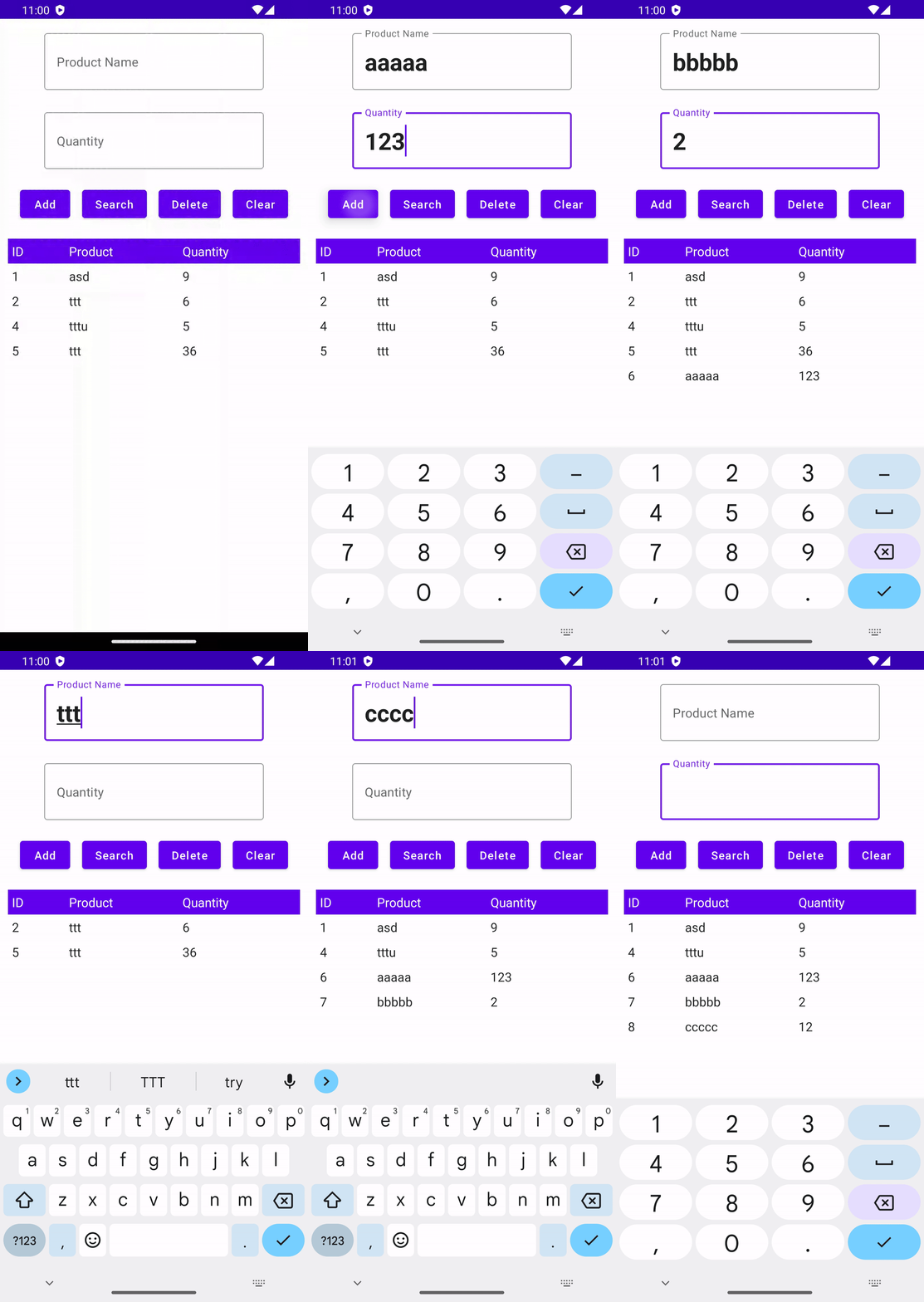
Room Database를 이용하여 앱을 종료하고 다시 실행해도 저장된 데이터가 있다.
발견된 오류들
- 버전 오류
This version (1.2.0) of the Compose Compiler requires Kotlin version 1.7.0 but you appear to be using Kotlin version 1.9.0-RC which is not known to be compatible.
위와같은 오류가 발생했다. 이유는 1.7.0 버전을 사용해야하는데 1.9.0-RC 버전을 사용하고 있다며 오류가 발생한다.
[해결방법]
먼저 오류 버전 1.2.0은 낮은 버전으로 되어있다. 공식 문서에 보면 해당 날짜 기준 1.4.3 사용을 하는 것으로 되어있다.
https://developer.android.com/jetpack/androidx/releases/compose-compiler?hl=ko#kts
그래서 해당 부분을 1.4.3으로 변경했다.
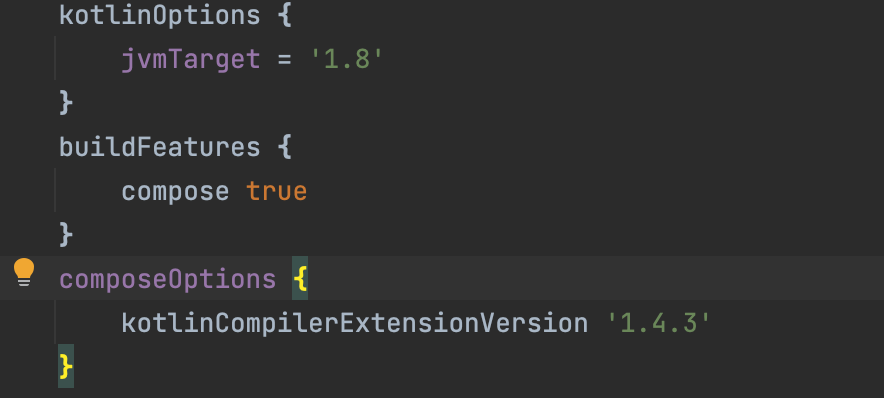
앱 모듈 그래들 파일 안에 있는 코드 부분을 1.4.3으로 변경한다.
그런데도 아마 똑같은 오류가 발생할 것이다. 이유는 1.9.0-RC를 사용해서 그럴 것이다. 내용을 보면 변경되어 1.8.10으로 바꾸라고 오류 내용이 나올 것이다.
그러면 이제 프로젝트 그래들파일에 가서 코틀린 버전을 1.8.10으로 바꿔주면 된다.
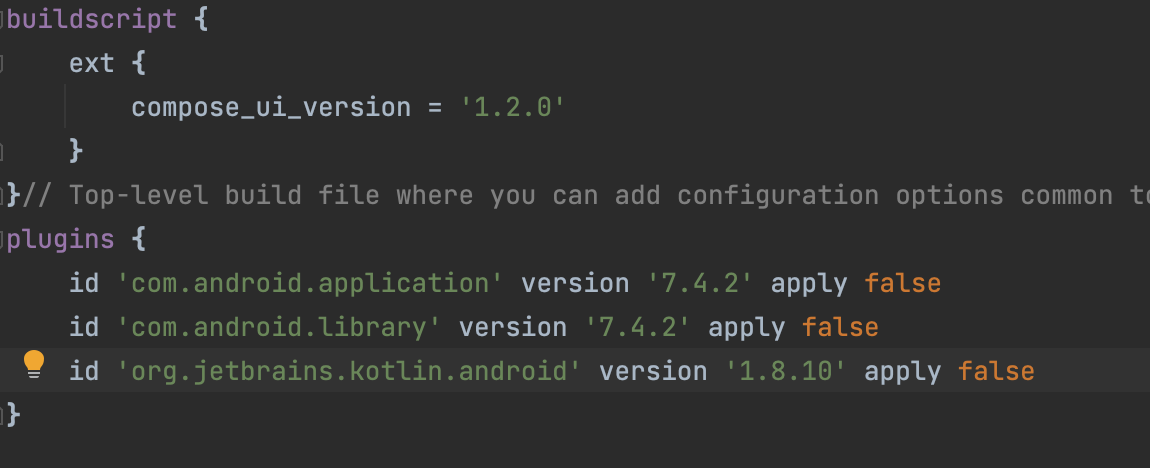
프로젝트 그래들 파일
- Room 데이터파일이 존재하지 않는 오류
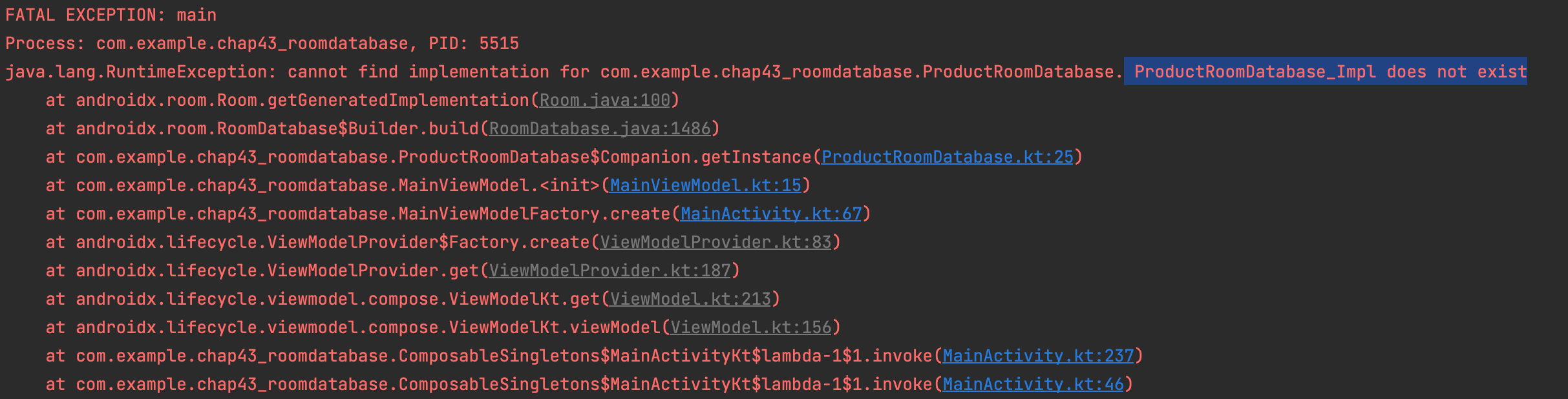
위와같이 does not exist라는 오류가 발생했다.
처음에는 최신버전이라 책에 있는 버전으로 바꾸었으나 똑같은 오류가 발생했다.
그래서 Room 라이브러리 공식 문서를 확인을 했는데 하나 의존성 주입을 빼먹었다.
공식 문서 사이트 : https://developer.android.com/topic/libraries/architecture/room?hl=ko
위 공식 문서 사이트 중에
		// To use Kotlin annotation processing tool (kapt)
    kapt("androidx.room:room-compiler:$room_version")
    // To use Kotlin Symbol Processing (KSP)
    ksp("androidx.room:room-compiler:$room_version")
본인은 kapt를 등록했으므로 첫 번째 부분을 추가하면 된다. room_version은 의존성 주입한 버전과 맞춰 하면 된다.