State와 State Hoisting
- 코드를 보면 remember를 이용한 상태를 가진 변수가 있다.
- 이를 이용하여 간단한 평수와 제곱미터를 구하는 코드를 보자
예제1
@Composable
fun StateStateHoisting() {
    var pyeong by rememberSaveable {
        mutableStateOf("23")
    }
    var squaremeter by rememberSaveable {
        mutableStateOf((23 * 3.306).toString())
    }

    Column(modifier = Modifier.padding(16.dp)) {
        OutlinedTextField(
            value = pyeong,
            onValueChange = {
                if (it.isBlank()) {
                    pyeong = ""
                    squaremeter = ""
                    return@OutlinedTextField
                }
                val numericValue = it.toFloatOrNull() ?: return@OutlinedTextField
                pyeong = it
                squaremeter = (numericValue * 3.306).toString()
            },
            label = { Text(text = "평") }
        )

        OutlinedTextField(
            value = squaremeter,
            onValueChange = {

            },
            label = { Text(text = "제곱미터") }
        )
    }
}- 위 코드를 보면 텍스트가 변화할 때마다 제곱미터가 구해지는 값이다.
- 이런 상태 변수가 가지고 있는 경우 Stateful한 컴포저블이다.
- State Hoisting은 반대로 Stateless하도록 만들어진 디자인 패턴이다.
- State Hoisting으로 만들기 위해서는 State 상태를 가진 변수와 사용하는 부분을 분리하는 것이다.
- 요약하면 State Hoisting은 자식 컴포저블의 State를 호출부로 끌어올리는 것을 말한다.
- State Hoisting을 이용해 얻는 장점
- UI의 재사용성
- UI 테스트가 용이해진다.
예제2
@Composable
fun StateStateHoisting() {
    var pyeong by rememberSaveable {
        mutableStateOf("23")
    }
    var squaremeter by rememberSaveable {
        mutableStateOf((23 * 3.306).toString())
    }

    PyeongToSquareMeterStateless(pyeong = pyeong, squareMeter = squaremeter) {
        if (it.isBlank()) {
            pyeong = ""
            squaremeter = ""
            return@PyeongToSquareMeterStateless
        }
        val numericValue = it.toFloatOrNull() ?: return@PyeongToSquareMeterStateless
        pyeong = it
        squaremeter = (numericValue * 3.306).toString()
    }
}

@Composable
fun PyeongToSquareMeterStateless(
    pyeong: String,
    squareMeter: String,
    onPyeongChange: (String) -> Unit
) {

    Column(modifier = Modifier.padding(16.dp)) {
        OutlinedTextField(
            value = pyeong,
            onValueChange = {
                onPyeongChange
            },
            label = { Text(text = "평") }
        )

        OutlinedTextField(
            value = squareMeter,
            onValueChange = {

            },
            label = { Text(text = "제곱미터") }
        )
    }

}- 예제2는 상태부분과 UI부분을 분리하여 State와 StateHoisting으로 나누어 구현한 것이다.
- 이렇게하면 나중에 PyeongToSquareMeterStateless은 다른 상태와 onPyeongChange를 사용하여 다른 방식의 계산을 이용하여 값을 구할 수 있게 된다.
- 이 때문에 UI의 재사용성이 증가해지며 상태가 들어가 있지 않기 때문에 테스트에도 용이해지는 것이다.
- 물론 아직 간단한 예제라 해당 코드에 state 상태가 있지만 후에 ViewModel을 이용하여 해당 상태를 정의하면 해당 상태에 따른 StateHoisting을 많이 사용하여 구현할 수 있을 것이다.
다른 상태와 재구성에 대한 설명
- 상태는 컴포즈 시스템 구현의 초석이므로, 뛰어난 컴포즈 개발자가 되려면 상태에 관해 명확하게 이해해야 한다.
1. 상태
- 컴포즈 같은 선언적 언어에서 일반적으로 상태는 ‘시간에 따라 변경될 수 있는 값’이라 불린다. 상태는 두 가지 면에서 표준 변수와 크게 다르다.
- 컴포저블 함수에서 상태 변수에 할당된 값은 기억되어야 한다.
- 상태 변수의 변경은 사용자 인터페이스를 구성하는 컴포저블 함수 계층 트리 전체에 영향을 미친다.
2. 재구성
- 한 컴포저블 함수에서 다른 함수로 전달된 데이터는 대부분 부모 함수에서 상태로서 선언된다. 이는 부모 컴포저블의 상탯값 변화가 모든 자식 컴포저블에 반영되며, 해당 상태가 전달된다는 것을 의미한다. 컴포즈에서는 이를 재구성이라는 도작으로 실행한다.
3. 단방향 데이터 흐름
- 앱 개발에서 단방향 데이터 흐름 접근 방식이란, 한 컴포저블에 저장된 상태는 자식 컴포저블 함수들에 의해 직접 변경되어시는 안 된다는 개념이다.
//단방향 데이터 흐름
@Composable
fun FunctionA(){
    var switchState by remember {
        mutableStateOf(true)
    }

    val onSwitchChange = {value : Boolean ->
        switchState = value
    }

    FunctionB(
        switchState,
        onSwitchChange
    )
}

@Composable
fun FunctionB(switchState : Boolean, onSwitchChange : (Boolean) -> Unit){
    Switch(checked = switchState, onCheckedChange = onSwitchChange)
}
FunctionA()에 이벤트 핸들러 선언과 자식 컴포저블에 상탯값을 FunctionB의 파라미터로 전달한다. FunctionB 안의 Switch는 스위치가 변경될 때마다 해당 이벤트 핸들러를 호출하고, 현재 설정값을 전달하도록 설정된다.
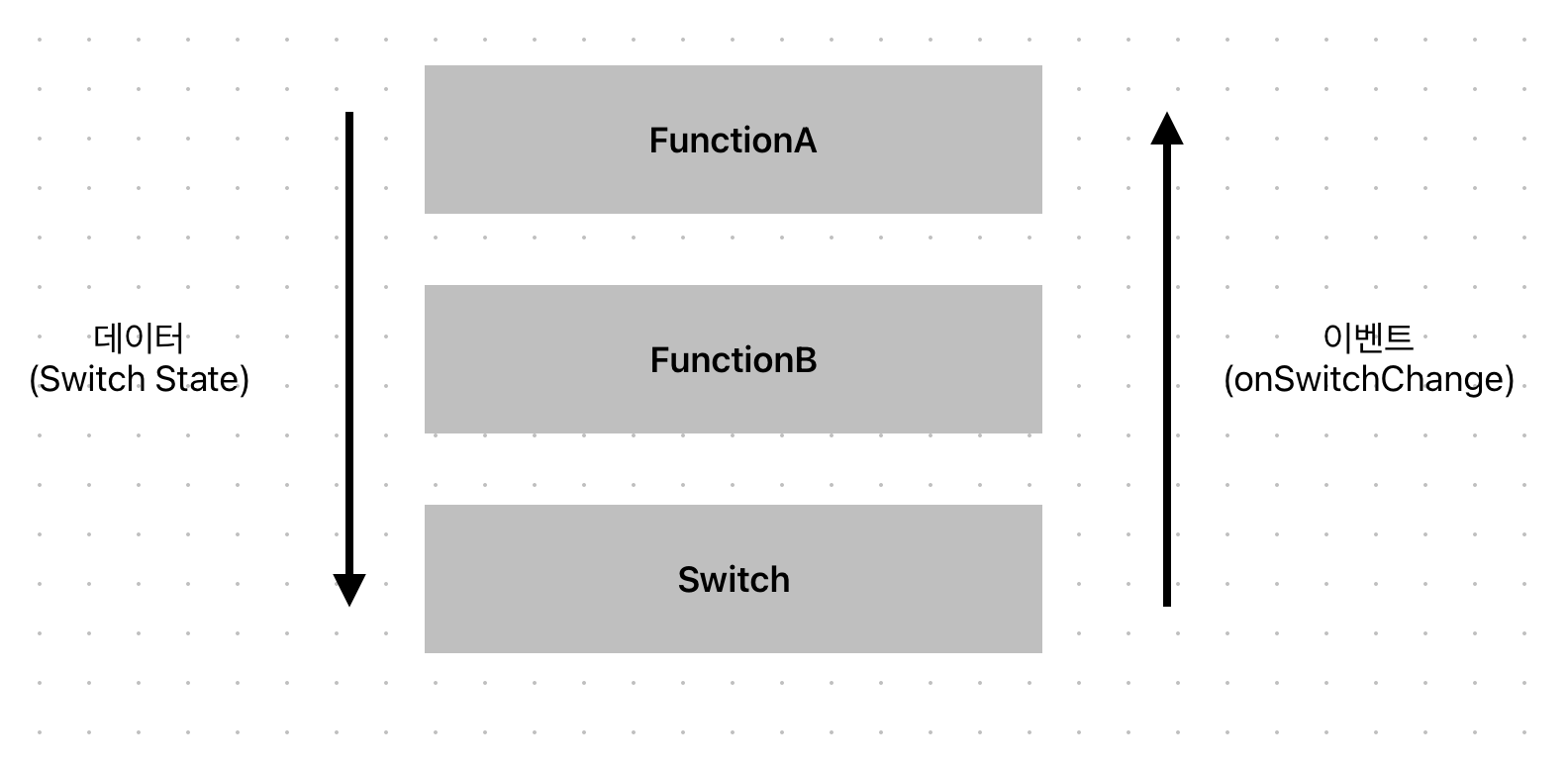
위 사진과 같이 단방향으로 데이터의 흐름이 진행된다.
4. 상태 호이스팅
- 상태 호이스팅은 상태를 자식 컴포저블에서 이를 호출한 컴포저블로 들어 올린다는 유사한 의미를 갖는다.
- 부모 컴포저블에서 작식 컴포저블을 호출하면 이벤트 핸들러와 함께 상태가 전달된다. 자식 컴포저블에서 상태 업데이트가 피요한 이벤트가 발생하면, 앞에서 설명한 것처럼 새로운 값을 전달하는 이벤트 핸들러가 호출된다. 결과적으로 자식 컴포저블을 비상태 컴포저블로 만들 수 있기 때문에 재사용성이 높아진다
예제 코드
class MainActivity : ComponentActivity() {
    override fun onCreate(savedInstanceState: Bundle?) {
        super.onCreate(savedInstanceState)
        setContent {
            Chap20_StateExampleTheme {
                // A surface container using the 'background' color from the theme
                Surface(
                    modifier = Modifier.fillMaxSize(),
                    color = MaterialTheme.colors.background
                ) {
                    DemoScreen()
                }
            }
        }
    }
}

@Composable
fun DemoScreen() {

    //1.
    //var textState = remember { mutableStateOf("") }

    //2.
    //위와 같은 방법이지만 좀 더 간결한 접근 방식인 by 키워드를 사용.
    //by 키워드를 통해 코틀린 프로퍼티를 위임하는 것이다.
    //by 키워드를 사용하면 .value를 사용하지 않아도 된다.
//    var textState by remember {
//        mutableStateOf("")
//    }

    //3. MutableState 객에체 대한 접근을 값과 세터 함수로 바꾸기
    var (textValue, setText) = remember {
        mutableStateOf("")
    }

    val onTextChange = {text : String ->
        //1. textState.value = text
        //2. textState = text
        setText(text)
    }

    MyTextField(textValue, onTextChange)
}

@Composable
fun MyTextField(textValue : String, onTextChange : (String) -> Unit){

    //1. TextField(value = textState.value, onValueChange = onTextChange)
    //2. TextField(value = textState, onValueChange = onTextChange)
    TextField(value = textValue, onValueChange = onTextChange)
}

//단방향 데이터 흐름
@Composable
fun FunctionA(){
    var switchState by remember {
        mutableStateOf(true)
    }

    val onSwitchChange = {value : Boolean ->
        switchState = value
    }

    FunctionB(
        switchState,
        onSwitchChange
    )
}

@Composable
fun FunctionB(switchState : Boolean, onSwitchChange : (Boolean) -> Unit){
    Switch(checked = switchState, onCheckedChange = onSwitchChange)
}

@Preview(showBackground = true)
@Composable
fun DefaultPreview() {
    Chap20_StateExampleTheme {
        DemoScreen()
        FunctionA()
    }
}
좋은 개발자가 되기까지