
Next.js 를 프론트로 Spring Boot 를 백엔드로 구성했을때의 API 통신 테스트 샘플
// ExampleController.java
package com.example.playground;

import java.util.Map;
import org.springframework.web.bind.annotation.GetMapping;
import org.springframework.web.bind.annotation.PostMapping;
import org.springframework.web.bind.annotation.RequestBody;
import org.springframework.web.bind.annotation.RequestMapping;
import org.springframework.web.bind.annotation.RestController;

@RestController // RESTful 웹서비스를 만들기 위한 Annotation
@RequestMapping("/api")
public class ExampleController {

  @GetMapping("/hello")
  public String hello() {
    return "Hello, Next.js";
  }

  @PostMapping("/data")
  public Map<String, String> data(@RequestBody Map<String, String> data) {
    return data;
  }
}
// app/hello/page.tsx
'use client';

import {useEffect, useState} from 'react';

export default function Home() {
  const [data, setData] = useState('');
  const [error, setError] = useState(null);

  useEffect(() => {
    fetch('http://localhost:8080/api/hello') // Spring Boot API URL
    .then((response) => {
      if (!response.ok) {
        throw new Error(`HTTP error! status: ${response.status}`);
      }
      return response.text();
    })
    .then((result) => setData(result))
    .catch((error) => {
      console.error('Error fetching data:', error);
      setError('데이터를 불러오지 못했습니다.');
    });
  }, []);

  return (
      <div>
        <h1>Next.js + Spring Boot API 호출 테스트</h1>
        {error ? <p>{error}</p> : <p>백엔드 응답: {data}</p>}
      </div>
  );
}
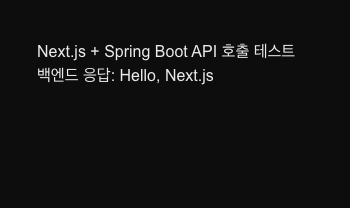
정상적으로 통신이 된다면 http://localhost:3000/hello 에 접속하면 아래와 같이 나올 것이다.
CORS 에러가 발생한다면
WebConfig.java파일을 생성하여 아래와 같이 작성해 준다.
package com.example.playground;

import org.springframework.context.annotation.Bean;
import org.springframework.context.annotation.Configuration;
import org.springframework.web.servlet.config.annotation.CorsRegistry;
import org.springframework.web.servlet.config.annotation.WebMvcConfigurer;

@Configuration
public class WebConfig {

  @Bean
  public WebMvcConfigurer corsConfigurer() {
    return new WebMvcConfigurer() {
      @Override
      public void addCorsMappings(CorsRegistry registry) {
        registry.addMapping("/**") // 모든 경로 허용
            .allowedOrigins("http://localhost:3000") // Next.js 개발 서버 주소
            .allowedMethods("GET", "POST", "PUT", "DELETE") // 허용할 HTTP 메서드
            .allowedHeaders("*"); // 모든 헤더 허용
      }
    };
  }
}

공부하고 또 공부하고 또 공부하고