layout 7
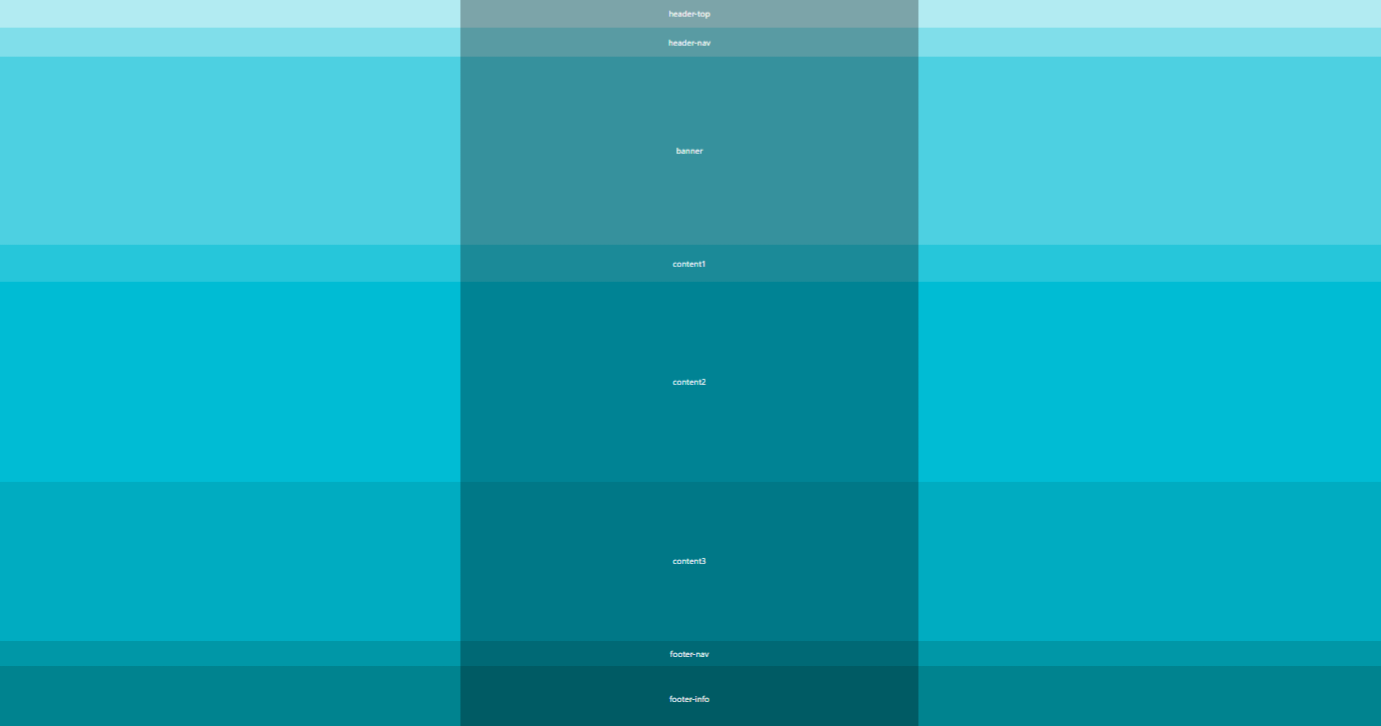
구조 (총 8개의 박스)
header-top
header-nav
banner
content1
content2
content3
footer-nav
footer-info
** layout 7은 layout 6의 세분화된 version
-> header(1, 2)
contents(1, 2, 3)
footer(1, 2)
실습 코드 1
: 생략x version
<!DOCTYPE html>
<html lang="ko">
<head>
    <meta charset="UTF-8">
    <title>layout7</title>
    <style>
        /* 리셋 */
        * {margin: 0; padding: 0;}

        /* 전체 레이아웃 */
        #wrap {width: 100%; font-size: 20px; color: #fff; text-align: center;}
        #header {width: 100%; height: 140px;}
        #banner {width: 100%; height: 450px; line-height: 450px; background: #4dd0e1;}
        #contents {width: 100%; height: 950px;}
        #footer {width: 100%; height: 220px;}


        /* 레이아웃 */
        #header-top {height: 70px; line-height: 70px; background: #b2ebf2;}
        #header-nav {height: 70px; line-height: 70px; background: #80deea;}
        #content1 {height: 90px; line-height: 90px; background-color: #26c6da; }
        #content2 {height: 480px; line-height: 480px; background-color: #00bcd4 }
        #content3 {height: 380px; line-height: 380px; background-color: #00acc1; }
        #footer-nav {height: 60px; line-height: 60px; background-color: #0097a7; }
        #footer-info {height: 160px; line-height: 160px; background-color: #00838f; }
        /* 컨테이너 */
        .container {width: 1100px; margin: 0 auto; height: inherit; background: rgba(0,0,0,0.3);}
    </style>
</head>
<body>
    <div id="wrap">
        <div id="header">
            <div id="header-top">
                <div class="container">header-top</div>
            </div>
            <div id="header-nav">
                <div class="container">header-nav</div>
            </div>
        </div>
        <!-- //header -->
        <div id="banner">
            <div class="container">banner</div>
        </div>
        <!-- //banner -->
        <div id="contents">
            <div id="content1">
                <div class="container">content1</div>
            </div>
            <div id="content2">
                <div class="container">content2</div>
            </div>
            <div id="content3">
                <div class="container">content3</div>
            </div>
        </div>
        <!-- //contents -->
        <div id="footer">
            <div id="footer-nav">
                <div class="container">footer-nav</div>
            </div>
            <div id="footer-info">
                <div class="container">footer-info</div>
            </div>
        </div>
        <!-- //footer -->
    </div>
    <!-- //wrap -->
</body>
</html>
실습 코드 2
: 코드 간결한 version
<!DOCTYPE html>
<html lang="ko">
<head>
    <meta charset="UTF-8">
    <title>layout7</title>
    <style>
        /* 리셋 */
        * {margin: 0; padding: 0;}

        /* 전체 레이아웃 */
        #wrap {font-size: 20px; color: #fff; text-align: center;}
        #header { }
        #banner {line-height: 450px; background: #4dd0e1;}
        #contents { }
        #footer { }


        /* 레이아웃 */
        #header-top {height: 70px; line-height: 70px; background: #b2ebf2;}
        #header-nav {height: 70px; line-height: 70px; background: #80deea;}
        #content1 {height: 90px; line-height: 90px; background-color: #26c6da; }
        #content2 {height: 480px; line-height: 480px; background-color: #00bcd4 }
        #content3 {height: 380px; line-height: 380px; background-color: #00acc1; }
        #footer-nav {height: 60px; line-height: 60px; background-color: #0097a7; }
        #footer-info {height: 160px; line-height: 160px; background-color: #00838f; }
        /* 컨테이너 */
        .container {width: 1100px; margin: 0 auto; height: inherit; background: rgba(0,0,0,0.3);}
    </style>
</head>
<body>
    <div id="wrap">
        <div id="header">
            <div id="header-top">
                <div class="container">header-top</div>
            </div>
            <div id="header-nav">
                <div class="container">header-nav</div>
            </div>
        </div>
        <!-- //header -->
        <div id="banner">
            <div class="container">banner</div>
        </div>
        <!-- //banner -->
        <div id="contents">
            <div id="content1">
                <div class="container">content1</div>
            </div>
            <div id="content2">
                <div class="container">content2</div>
            </div>
            <div id="content3">
                <div class="container">content3</div>
            </div>
        </div>
        <!-- //contents -->
        <div id="footer">
            <div id="footer-nav">
                <div class="container">footer-nav</div>
            </div>
            <div id="footer-info">
                <div class="container">footer-info</div>
            </div>
        </div>
        <!-- //footer -->
    </div>
    <!-- //wrap -->
</body>
</html>
참고할 내용
-
주석(/* */) 사용
-> 소스 간결해짐, 수정하기에 용이 -> 효율성 업 -
height 값도 width 값처럼 아래에 적혀있으면 (위의) 상위 박스에는 안 적어도 됨(생략 가능)
-
전체적인 틀 잡을 때는 id를 많이 쓰고 세부적으로 반복되는 부분은 class를 많이 씀