pico의 온도 값을 application level에서 반복적으로 요청해도 되지만 interrupt 방식으로 처리해보고 싶어 endpoint를 추가하였다.
interrupt endpoint 추가
vendor specific interface에 interrupt endpoint를 추가한 뒤, 다시 장치 인식을 시켜주었다.
const uint8_t desc_configuration[] = {
    // Config number, interface count, string index, total length, attribute, power in mA
    TUD_CONFIG_DESCRIPTOR(1, ITF_NUM_TOTAL, 0, CONFIG_TOTAL_LEN, 0x00, 100),

    // CDC first (IAD is automatically included by TUD_CDC_DESCRIPTOR)
    TUD_CDC_DESCRIPTOR(ITF_NUM_CDC_CMD, 0, EPNUM_CDC_NOTIF, 8, EPNUM_CDC_OUT, EPNUM_CDC_IN, 64),

    // 2. Vendor Interface (수동 정의)
    // Interface Descriptor
    9, TUSB_DESC_INTERFACE, ITF_NUM_VENDOR, 0, 3, // bNumEndpoints를 3으로 설정 (Bulk 2 + Int 1)
    TUSB_CLASS_VENDOR_SPECIFIC, 0x00, 0x00, 0,    // Vendor Class, Subclass, Protocol, String Index

    // Endpoint: Bulk IN
    7, TUSB_DESC_ENDPOINT, EPNUM_VENDOR_IN, TUSB_XFER_BULK, 64, 0, 0,
    // Endpoint: Bulk OUT
    7, TUSB_DESC_ENDPOINT, EPNUM_VENDOR_OUT, TUSB_XFER_BULK, 64, 0, 0,
    // Endpoint: Interrupt IN (온도 데이터용)
    7, TUSB_DESC_ENDPOINT, EPNUM_VENDOR_INT_IN, TUSB_XFER_INTERRUPT, 8, 0, 10
};
장치 관리자에서 정상으로 인식이 되어, usbview로 확인해보았다.
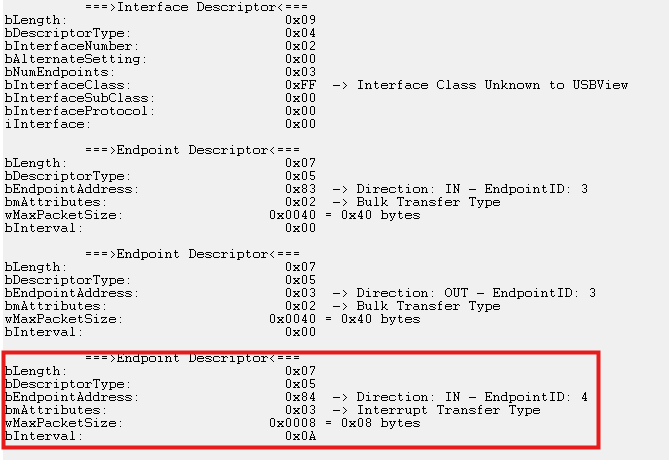
정상적으로 Endpoint가 추가된 것을 확인할 수 있다.
온도 센서 보내기
문제가 발생하였다.
void send_temperature_data_interrupt(float temperature)
    {
        static uint8_t data[3];
        data[0] = 0xBB;                                                  // Different marker for interrupt data
        data[1] = (uint8_t)temperature;                                  // Integer part
        data[2] = (uint8_t)((temperature - (uint8_t)temperature) * 100); // Fractional part

        // Use low-level endpoint transfer API for interrupt endpoint
        if (!usbd_edpt_busy(0, EPNUM_VENDOR_INT_IN))
        {
            usbd_edpt_xfer(0, EPNUM_VENDOR_INT_IN, data, sizeof(data));
            printf("[TEMP] Interrupt sent: %.2f°C\n", temperature);
            fflush(stdout);
        } else {
            printf("EP 0x84 is busy!\n");
            fflush(stdout);
        }
    }
위처럼 코딩을 한 뒤, main loop에서 1초마다 호출하도록 설정했는데 장치가 인식을 하지 못하였다. usbd_edpt_xfer 함수를 주석하니 아래와 같이 cdc로 로그를 확인할 수 있었다.
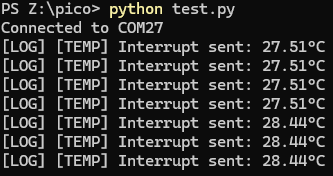
온도 센서로부터 정상으로 데이터를 읽어 보내주는 것을 확인하였다. interrupt가 bulk랑 같이 동시에 잘 동작하는지 확인하기 위해서 얼굴 인식 추론을 하였다.
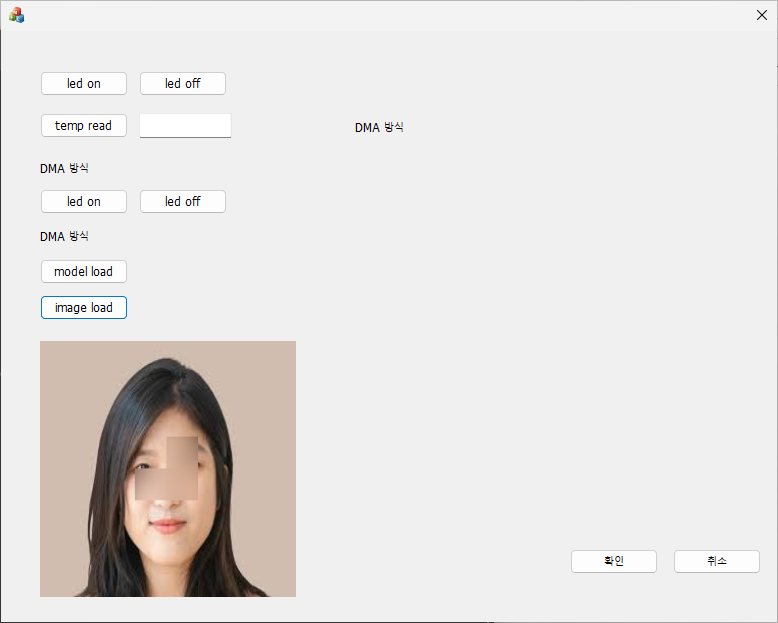
이미지의 얼굴 부분을 얼추 인식하여 블러처리한 결과이다. 그런데 로그를 확인해보니 이상한 점을 발견하였다.
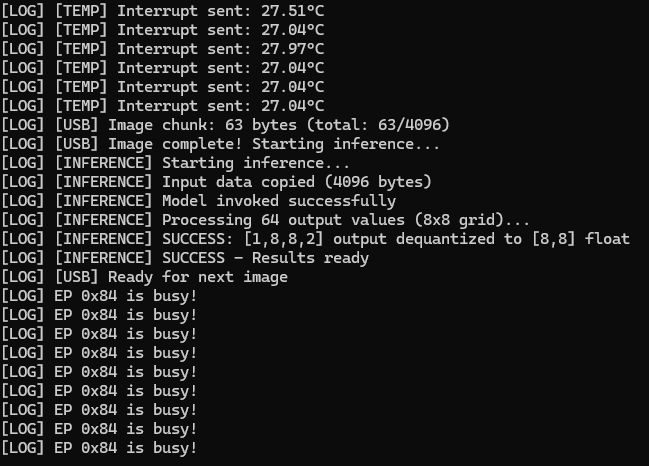
분명 bulk endpoint를 통해서 추론 결과 값을 전달해주는데 interrupt endpoint가 busy한 상태가 되었다.
곰곰히 생각을 해보니 endpoint를 추가해주면서 kmdf driver 단에서 read pipe에 문제가 생겼을 수 있다는 생각을 하였다. pico_driver 코드를 확인해보니 역시나 read pipe가 interrupt endpoint로 설정되고 있었다.
// Get pipes
for (pipeIndex = 0; pipeIndex < numEndpoints; pipeIndex++) {
    WDF_USB_PIPE_INFORMATION pipeInfo;
    WDFUSBPIPE pipe;

    WDF_USB_PIPE_INFORMATION_INIT(&pipeInfo);
    pipe = WdfUsbInterfaceGetConfiguredPipe(usbInterface, pipeIndex, &pipeInfo);

    if (pipe != NULL) {
        DbgPrint("Pipe %d: EndpointAddress=0x%02x, Direction=%s\n",
            pipeIndex,
            pipeInfo.EndpointAddress,
            USB_ENDPOINT_DIRECTION_IN(pipeInfo.EndpointAddress) ? "IN" : "OUT");

        // Store bulk IN and OUT pipes
        if (USB_ENDPOINT_DIRECTION_IN(pipeInfo.EndpointAddress)) {
            pDeviceContext->ReadPipe = pipe;
            DbgPrint("Stored READ pipe (IN endpoint 0x%02x)\n", pipeInfo.EndpointAddress);
        }
        else {
            pDeviceContext->WritePipe = pipe;
            DbgPrint("Stored WRITE pipe (OUT endpoint 0x%02x)\n", pipeInfo.EndpointAddress);
        }
    }
}
windbg로 로그를 확인해 보니 아래와 같다.
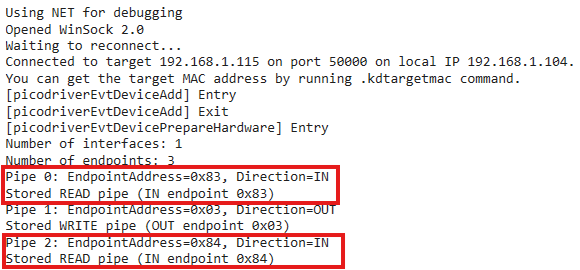
마지막에 read pipe로 0x84를 저장하는 것을 확인했다. interrupt read pipe를 context에 저장하도록 로직을 변경해 주면 될 것 같다.
kmdf 소스 수정
if (pipe != NULL) {
    DbgPrint("Pipe %d: EndpointAddress=0x%02x, Direction=%s\n",
        pipeIndex,
        pipeInfo.EndpointAddress,
        USB_ENDPOINT_DIRECTION_IN(pipeInfo.EndpointAddress) ? "IN" : "OUT");

    // Store bulk IN and OUT pipes
    if (USB_ENDPOINT_DIRECTION_IN(pipeInfo.EndpointAddress)) {
        if (pipeInfo.EndpointAddress == 0x83) {
            pDeviceContext->ReadPipe = pipe;
            DbgPrint("Stored READ pipe (IN endpoint 0x%02x)\n", pipeInfo.EndpointAddress);
        }
        else if (pipeInfo.EndpointAddress == 0x84) {
            pDeviceContext->InterruptReadPipe = pipe;
            DbgPrint("Stored Interrupt READ pipe (IN endpoint 0x%02x)\n", pipeInfo.EndpointAddress);
        }
    }
    else {
        pDeviceContext->WritePipe = pipe;
        DbgPrint("Stored WRITE pipe (OUT endpoint 0x%02x)\n", pipeInfo.EndpointAddress);
    }
}
typedef struct _DEVICE_CONTEXT
{
    WDFUSBDEVICE UsbDevice;
    WDFUSBINTERFACE UsbInterface;
    WDFUSBPIPE WritePipe;
    WDFUSBPIPE ReadPipe;
    WDFUSBPIPE InterruptReadPipe;
    ULONG PrivateDeviceData;  // just a placeholder

} DEVICE_CONTEXT, *PDEVICE_CONTEXT;InterruptReadPipe를 추가해 주었다. windbg로 로그를 확인해 보면 정상적으로 잘 저장된 것을 확인할 수 있다.
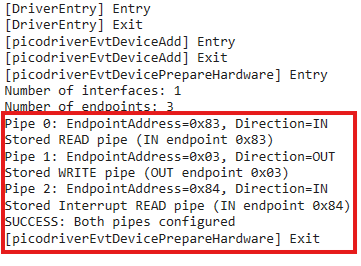
interrupt endpoint와 bulk endpoint가 각각 동작하는지 테스트해 보았다.
사소한 이슈가 하나 더 발생하였다. 시작부터 busy가 발생하였다. 문제는 pico 쪽에서 사용하는 tud_vendor_n_write 함수에 있었다. vendor_specific의 경우 기본적으로 out endoint 1, in endpoint 1로 구성하는 게 기본이다. 현재 2개의 in endpoint가 설정되어 있기에 늦게 설정된 0x84 interrupt endpoint로 내보내고 있던 것이었다.
따라서 api가 아닌 더 저수준의 함수를 호출하도록 변경했다.
if (!usbd_edpt_busy(0, 0x83)) {
    usbd_edpt_claim(0, 0x83);
    usbd_edpt_xfer(0, 0x83, response, 64);
}
다시 테스트를 진행하엿다.
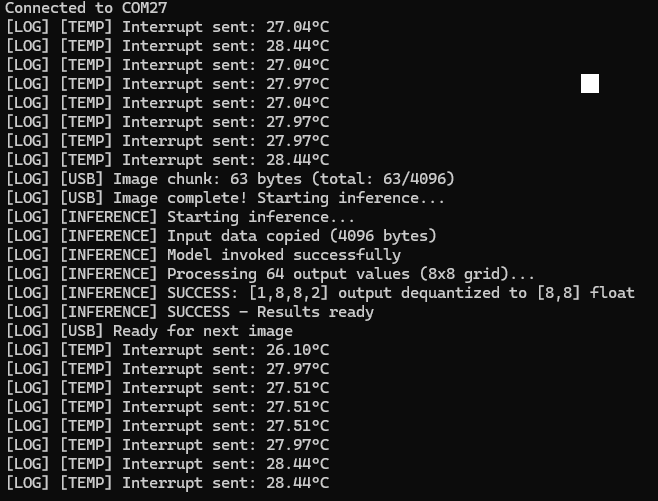
bulk endoint와 interrupt endpoint가 각각의 transfer 통로로 동작하는 것을 확인하였다.
문제점2
여전히 busy가 발생하며 통신이 되지 않았다. 찾아보니 usb 인터럽트는 장치가 호스트를 방해해서 먼저 말을 거는 게 아니라, 호스트가 아주 짧은 간격으로 계속 물어봐 주는 정기점검 방식이라고 한다. 완전 착각하고 있었다.
즉, kmdf pico driver에서 interrupt read pipe로 읽고 있지 않아서 발생한 문제라고 판단했다.
UNREFERENCED_PARAMETER(Device);
NTSTATUS status;
WDF_USB_CONTINUOUS_READER_CONFIG readerConfig;
ULONG bufferSize = 64;  // Typical interrupt endpoint size

DbgPrint("[picodriverStartInterruptRead] Starting interrupt continuous reader\n");

// Configure continuous reader
WDF_USB_CONTINUOUS_READER_CONFIG_INIT(&readerConfig,
                                     picodriverEvtInterruptReadComplete,
                                     DeviceContext,
                                     bufferSize);

// Set number of reader buffers (WDF will manage multiple buffers)
readerConfig.NumPendingReads = 2;

// Start the continuous reader (configure it first)
status = WdfUsbTargetPipeConfigContinuousReader(
    DeviceContext->InterruptReadPipe,
    &readerConfig
);

if (!NT_SUCCESS(status)) {
    DbgPrint("[picodriverStartInterruptRead] WdfUsbTargetPipeConfigContinuousReader failed 0x%x\n", status);
    return status;
}

DbgPrint("[picodriverStartInterruptRead] Continuous reader configured\n");

// CRITICAL: Start the I/O target to actually begin polling the interrupt endpoint
// Without this, the host will NOT send IN tokens to the device
status = WdfIoTargetStart(WdfUsbTargetPipeGetIoTarget(DeviceContext->InterruptReadPipe));

if (!NT_SUCCESS(status)) {
    DbgPrint("[picodriverStartInterruptRead] WdfIoTargetStart failed 0x%x\n", status);
    return status;
}

DbgPrint("[picodriverStartInterruptRead] I/O Target started - polling interrupt endpoint (0x84)\n");
return STATUS_SUCCESS;WdfUsbTargetPipeConfigContinuousReader를 등록해 주고 WdfIoTargetStart을 호출해 주면 pico 쪽에서 설정한 주기로 읽어온다고 한다.
테스트를 해보았다.
windbg driver log
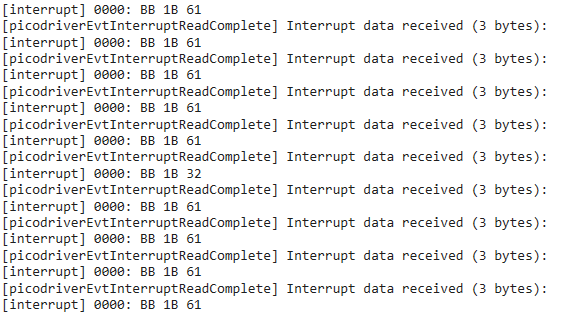
pico 0x84 interrupt endpoint send
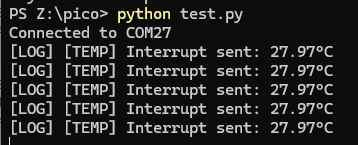
정상으로 보내는 것을 확인했다.
변경된 소스는 깃헙에서 확인할 수 있다.
https://github.com/wangki-kyu/pico_usb_vendor
https://github.com/wangki-kyu/pico_driver
결론
usb 인터럽트는 일반적으로 하드웨어 인터럽트와는 다른 개념인 것 같다. 문제를 해결해 나가는 게 정말 재밌는 것 같다. 이제 어플리케이션 레벨에서 실시간 온도를 읽어서 gui로 보여주는 것을 개발하고 마무리하려고 한다.