- 없는 값 제외해주기(SQL에서는 사용할 수 없는 값은 0으로 대체하여 계산하기 때문에 필요 없는 값은 제외해주어야 한다.
select restaurant_name,
avg(rating) avg_rating,
avg(if(rating <> 'Not given', rating, null)) avg_rating2
from food_orders
group by 1 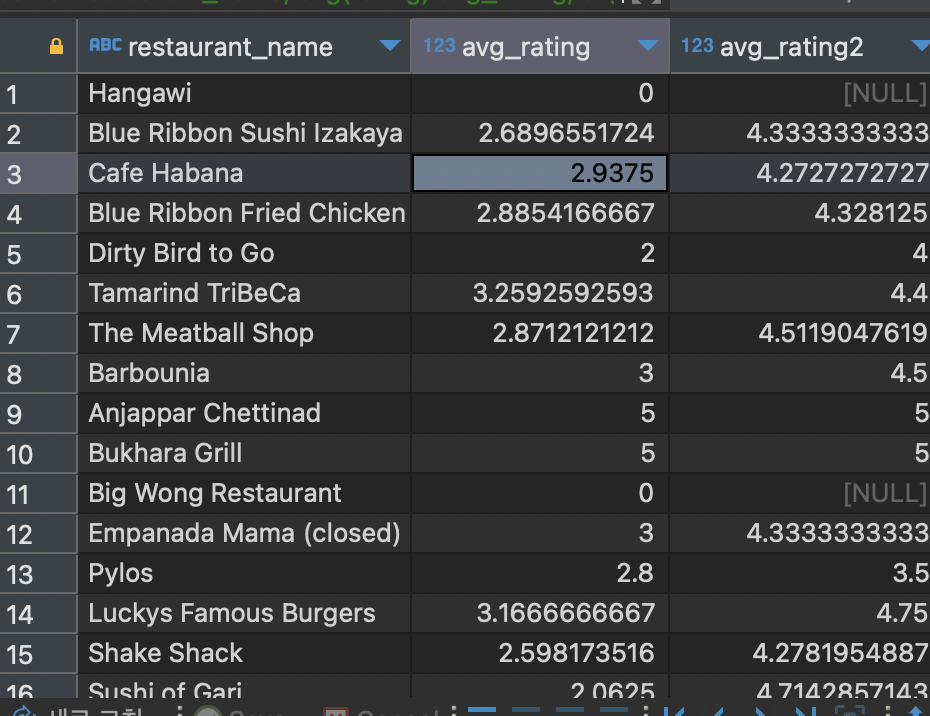
- null 값은 제외하여 연산하려면 where 절을 통해 null을 제거해줌
select restaurant_name,
avg_rating2
from
(
select restaurant_name,
avg(rating) avg_rating,
avg(if(rating <> 'Not given', rating, null)) avg_rating2
from food_orders
group by 1
) a
where avg_rating2 is not null
group by 1 
- 값 대체하기(null을 다른 값으로 대체)
select a.order_id,
       a.customer_id,
       a.restaurant_name,
       a.price,
       b.name,
       b.age,
       coalesce(b.age, 20) "null 제거",
       b.gender
from food_orders a left join customers b on a.customer_id=b.customer_id
where b.age is null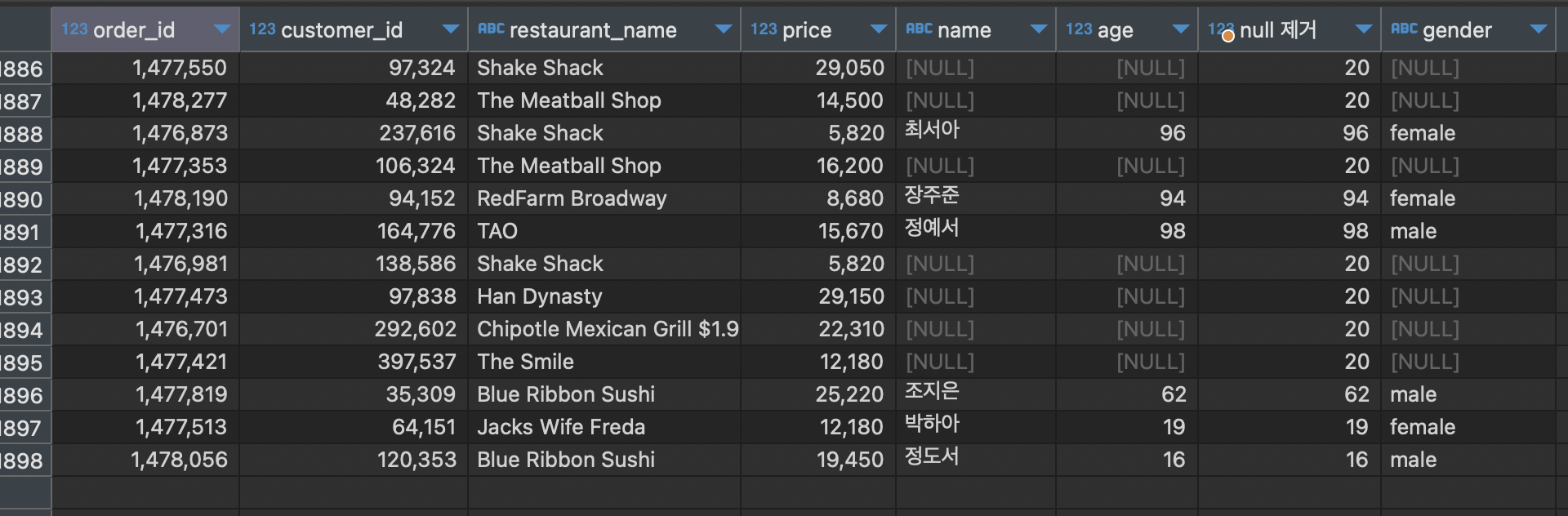
-
pivot table
[실습] 음식 타입별로 주문 건수가 가장 많은 상점 3개씩 조회하기
1) 음식 타입별, 음식점별 주문 건수 집계하기select cuisine_type, restaurant_name, count(1) count_order from food_orders group by 1, 22) Rank 함수 적용하기
select
cuisine_type,
restaurant_name,
rank() over (partition by cuisine_type  order by order_count desc) rank_order,
order_count
from
(
select cuisine_type,
restaurant_name,
count(1) order_count
from food_orders
group by 1, 2
) a
3) 3위까지 조회하고, 음식 타입별, 순위별로 정렬하기
select cuisine_type, restaurant_name, order_count, rank_order from (select cuisine_type, restaurant_name, rank() over (partition by cuisine_type order by order_count desc) rank_order, order_count from ( select cuisine_type, restaurant_name, count(1) order_count from food_orders group by 1, 2 ) a ) b where rank_order <= 3 order by 1, 4 -
날짜 데이터로 바꾸기
yyyy-mm-dd 형식의 컬럼을 date type 으로 변경하기
select date,
date(date) date_type
from payments
date type 을 date_format 을 이용하여 년, 월, 일, 주 로 조회해보기
select
date_format(date_type, '%Y') "년",
date_format(date_type, '%m') "월",
date_format(date_type, '%d') "일",
date_format(date_type, '%w') "요일"
from
(
select date,
date(date) date_type
from payments
) a
요일은 0 : 일요일 1 : 월요일 순으로 구해진다.
월은 %M 대문자로 쓰면 영문월로 표기된다.
[실습2] 년도별 3월의 주문건수 구하기select date_format(date_type, '%Y') "년", date_format(date_type, '%m') "월", date_format(date_type, '%d') "일", date_format(date_type, '%w') "요일" from ( select date, date(date) date_type from payments ) a where date_format(date_type, '%m') = '03' group by 1 order by 1
[실습] 음식 타입별, 연령별 주문건수 pivot view 만들기 (연령은 10~59세 사이)
- 주문테이블, 고객테이블 inner join
- where 연령조건 생성
- 음식타입별, 연령별 조건, 주문건수 생성
- 주문건수 sum을 통해 피봇테이블 생성
select cuisine_type,
max(sum() over (partition by '10대' order by count_order) 10,
max(sum() over (partition by '20대' order by count_order) 20,
max(sum() over (partition by '30대' order by count_order) 30,
max(sum() over (partition by '40대' order by count_order) 40,
max(sum() over (partition by '50대' order by count_order) 50,
from
(
select cuisine_type,
case when age between 10 and 19 then "10대"
     when age between 20 and 29 then "20대"
     when age between 30 and 39 then "30대"
     when age between 40 and 49 then "40대"
     when age between 50 and 59 then "50대"
     end part_age,
count(1) count_order
from food_orders f inner join customers c on f.customer_id=c.customer_id
where age between 10 and 59
group by 1, 2
) a
subquery는 잘 썼는데 피봇하는 과정에서 완전 틀림
피봇은 첫컬럼 -> 엑셀의 열, 두번째~ -> 엑셀의 행이라 생각해보자.
sum over, count over은 카테고리별 합, 건수!를 구할 때 쓰는 것!!select cuisine_type, max(if(part_age=10, count_order, 0)) "10대", max(if(part_age=20, count_order, 0)) "20대", max(if(part_age=30, count_order, 0)) "30대", max(if(part_age=40, count_order, 0)) "40대", max(if(part_age=50, count_order, 0)) "50대" from ( select cuisine_type, case when age between 10 and 19 then 10 when age between 20 and 29 then 20 when age between 30 and 39 then 30 when age between 40 and 49 then 40 when age between 50 and 59 then 50 end part_age, count(1) count_order from food_orders f inner join customers c on f.customer_id=c.customer_id where age between 10 and 59 group by 1, 2 ) a group by 1

잘 하고 있는겨?