SQL Project Planning
- HackerRank 문제 중 SQL Project Planning이라는 문제를 풀어보며 MySQL에서 변수를 사용하는 방법에 대해 알아보자.
You are given a table, Projects, containing three columns: Task_ID, Start_Date and End_Date.

It is guaranteed that the difference between the End_Date and the Start_Date is equal to 1 day
for each row in the table.

Write a query to output the start and end dates of projects listed by the number of days it took
to complete the project in ascending order.
If there is more than one project that have the same number of completion days,
then order by the start date of the project.- sample input, output
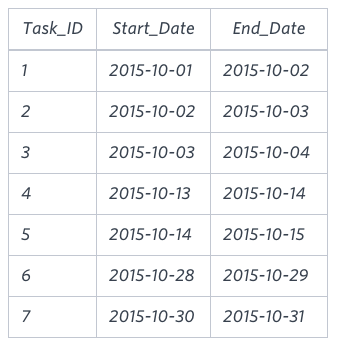
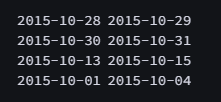
-
문제를 해결하기 위해서 다음과 같은 절차를 밟아야 한다
-
- End_Date가 연속적인 Task들을 하나의 프로젝트 그룹으로 만들어준다.
샘플에서 [1,2,3], [4,5], [6], [7]을 각각 다른 그룹으로 설정해야 한다.
- End_Date가 연속적인 Task들을 하나의 프로젝트 그룹으로 만들어준다.
-
- 1에서 만들어낸 프로젝트 그룹에서 프로젝트 시작 날짜와 종료 날짜를 찾는다.
-
- 결과를 (총 프로젝트 기간)과 (프로젝트 시작 날짜) 순서로 정렬하여 출력한다
-
변수를 사용하지 않는 쿼리
WITH CTE_ProjectGroup AS (
    SELECT Task_ID, Start_Date, End_Date,
        CASE WHEN
        LAG(End_Date) OVER (ORDER BY Start_Date) = Start_Date THEN 0
        ELSE 1
        END AS IsNewProject
    	FROM Projects),
    CTE_GroupedProjects AS (
        SELECT Task_ID, Start_Date, End_Date,
        SUM(IsNewProject) OVER (ORDER BY Start_Date ROWS UNBOUNDED PRECEDING) AS ProjectGroup
        FROM CTE_ProjectGroup)

SELECT MIN(Start_Date) AS ProjectStartDate, MAX(End_Date) AS ProjectEndDate
FROM CTE_GroupedProjects
GROUP BY ProjectGroup
ORDER BY Datediff(ProjectEndDate, ProjectStartDate), ProjectStartDate;-
CTE_ProjectGroup
- task 시작 날짜를 기준으로 정렬한 후, LAG() 함수를 이용해 새로운 프로젝트에는 1, 전 task와 연결되는 프로젝트는 0으로 flag(=IsNewProject)를 남겨준다
-
CTE_GroupedProjects
- task 시작 날짜를 기준으로 정렬하여 flag의 누적 합계를 계산하여 ProjectGroup을 만들어준다.
-
메인 쿼리
- CTE_GroupedProjects에서 만들어낸 ProjectGroup를 기준으로 GROUP BY를 실행 후, MIN(), MAX()를 사용하여 프로젝트 시작과 종료 날짜를 구한다. 또한, (총 프로젝트 기간)과 (프로젝트 시작 날짜) 순서로 정렬하여 출력한다
MySQL system variables
-
위 문제를 MySQL 세션 변수를 사용하여 풀어보기 앞서, 사용법에 대해 알아보자.
-
1. User-defined variables
-
Scope : 사용자 정의 변수는 다른 세션과 공유하지 못하고 해당 세션에서만 사용 가능하다.
-
Type : 별도의 타입을 지정하지 않으며, 저장하는 값에 따라 타입이 정해진다
-
Declare
-- top of query set @var := 'string' -- in select select @var := 1 -
tips
- 변수 사용마다 initialize 해줘야 side effect가 없다
- 1번만 실행되는 FROM 절의 in-line view에서 선언하는 것이 가장 안전하다
- 서버 버전간 호환성을 보장하지 않으며, 안정적인 결과를 보증하지 않는다
-
-
2. Local variables
-
Scope : 선언한 procedure
-
Type : 타입을 직접 선언해 줘야한다
-
Declare
-- in the procedure ... CREATE PROCEDURE test(var1 INT) BEGIN DECLARE start_row INT unsigned DEFAULT 1; ... END; ... CALL test(5); -
tips
- 특정 procedure의 parameter로 사용 가능하다
- 선언시 DEFAULT 값이 없다면 자동으로 NULL로 설정된다
-
-
3. Server System Variables
-
Scope : global과 session으로 나뉜다
-
Type : 미리 정의된 값들이 정해져 있다 (e.g., integer, boolean, string)
-
Declare
-- global set GLOBAL max_connections = 200; SET @@global.max_connections = 200; --session SET SESSION sort_buffer_size = 1000000; SET @@sort_buffer_size = 1000000; -
tips
- 전역 변수 변경 시 재시작해야 적용되는 경우도 있다
- 서버 버전간 호환성을 보장하지 않는다
- 전역 변수를 변경하려면 보통 SUPER 권한과 같은 고급 권한이 필요하다
-
사용자 정의 변수를 사용한 쿼리
SELECT MIN(Start_Date), MAX(End_Date)
FROM(
    SELECT @group := IF(Start_Date = @prev_end_date, @group, @group + 1) AS grp,
        @prev_end_date := End_Date,
        Start_Date,
        End_Date
    FROM
        (SELECT * FROM Projects ORDER BY Start_Date) AS ordered_projects,
        (SELECT @prev_end_date := NULL, @group := 0) AS vars
) AS grouped_projects
GROUP BY grp
ORDER BY DATEDIFF(MAX(End_Date), MIN(Start_Date)), MIN(Start_Date)-
- FROM절에서 사용자 정의 변수 @prev_end_date의 초기값을 NULL로, @group를 0으로 초기화 한다.
-
- task 시작 날짜를 기준으로 정렬되어 있는 레코드를 확인하여 @prev_end_date와 현재 레코드의 Start_Date과 같다면 기존과 같은 그룹을 컬럼(grp)에 추가, 다를 경우는 @group + 1을 컬럼(grp)에 추가한다.
-
- @prev_end_date 변수를 현재 레코드의 End_Date로 업데이트 한다
-
- 2~3을 반복하여 모든 레코드를 살펴보고, 그룹 컬럼을 완성한다
두 쿼리의 성능 비교 (프로젝트 그룹 생성 까지만 비교)
-
사용자 정의 변수를 사용한 쿼리
ID Select Type Table Partitions Type Possible Keys Key Key Length Ref Rows Filtered Extra 1 PRIMARY derived3 NULL system NULL NULL NULL NULL 1 100.00 NULL 1 PRIMARY derived2 NULL ALL NULL NULL NULL NULL 21 100.00 NULL 3 DERIVED NULL NULL NULL NULL NULL NULL NULL NULL NULL No tables used 2 DERIVED Projects NULL ALL NULL NULL NULL NULL 21 100.00 Using filesort 가장 비용이 큰 부분은 ordered_projects 서브쿼리에서 전체 filesort를 하는 부분이다.
-
변수를 사용하지 않은 쿼리
ID Select Type Table Partitions Type Possible Keys Key Key Length Ref Rows Filtered Extra 1 PRIMARY derived2 NULL ALL NULL NULL NULL NULL 14 100.00 NULL 2 DERIVED derived3 NULL ALL NULL NULL NULL NULL 14 100.00 Using filesort 3 DERIVED Projects NULL ALL NULL NULL NULL NULL 14 100.00 Using filesort -
해당 쿼리에서도 가장 비용이 큰 부분은 filesort를 하는 부분이다.
-
CTE 내부에서 LAG()와 SUM() OVER를 사용하여 연속적인 값들(date)을 효율적으로 처리 가능하다. 따라서, filesort에서 처리하는 row수가 21에서 14로 줄어드는 최적화가 가능하다.
-
최적화가 진행 되었어도 변수를 사용하지 않는 경우가 더 많은 row를 처리해야 한다. 따라서, 변수를 사용하는 쿼리보다 전체적인 성능이 떨어질 수 있다.
-
결론
-
MySQL에서 변수를 사용하는 것을 권장하지는 않는 것 같다.(호환성, 관리, 가시성, ...). 하지만, 위에서 살펴본 것과 같이 변수를 적절하게 사용한다면 복잡한 쿼리를 단순화하여 작성할 수 있고 성능의 최적화도 가능하다.
-
변수 사용의 단점들과 장점들의 trade-off를 잘 생각하여 쿼리를 작성하는 것이 중요할 것 같다.
앞으로 작성할 것들 정리
-
지금까지 HackerRank, LeetCode (무료), 프로그래머스에서 제공하는 SQL 문제는 모두 풀어봤다. 지금까지 진행하며 favorite에 추가해 놓았던 문제들을 성능 비교에 중점을 두고 다양한 방식으로 풀어보는 것이 좋을 것 같다. 해당 과정이 모두 끝나면 LeetCode 유료 결제를 통해 더 많은 문제를 풀어 볼 예정이다.
-
또한, REGEXP, PROCEDURE과 관련된 내용도 정리해서 velog에 올릴 예정이다