# YAML 파일 다운로드
curl -O https://s3.ap-northeast-2.amazonaws.com/cloudformation.cloudneta.net/kans/**kans-7w.yaml**

aws cloudformation deploy --template-file **kans-7w.yaml** --stack-name **mylab** --parameter-overrides KeyName=daeuk SgIngressSshCidr=$(curl -s ipinfo.io/ip)/32 --region ap-northeast-2

# CloudFormation 스택 배포 완료 후 작업용 EC2 IP 출력
aws cloudformation describe-stacks --stack-name **mylab** --query 'Stacks[*].**Outputs[0]**.OutputValue' --output text --region ap-northeast-2

# [모니터링] CloudFormation 스택 상태 : 생성 완료 확인
**while true; do
  date
  AWS_PAGER="" aws cloudformation list-stacks \
    --stack-status-filter CREATE_IN_PROGRESS CREATE_COMPLETE CREATE_FAILED DELETE_IN_PROGRESS DELETE_FAILED \
    --query "StackSummaries[*].{StackName:StackName, StackStatus:StackStatus}" \
    --output table
  sleep 1
done**

# 배포된 aws ec2 유동 공인 IP 확인
**aws ec2 describe-instances --query "Reservations[*].Instances[*].{PublicIPAdd:PublicIpAddress,InstanceName:Tags[?Key=='Name']|[0].Value,Status:State.Name}" --filters Name=instance-state-name,Values=running --output text**
k3s-s	3.38.151.222	running
k3s-w1	15.165.75.117	running
k3s-w2	3.39.223.99	running
testpc	54.180.243.135	running

# EC2 SSH 접속 : 바로 접속하지 말고, 3~5분 정도 후에 접속 할 것
ssh -i *daeuk.pem* **ubuntu**@$(aws cloudformation describe-stacks --stack-name **mylab** --query 'Stacks[*].Outputs[0].OutputValue' --output text --region ap-northeast-2)
...
*(⎈|default:N/A) root@k3s-s:~# <- kubeps 가 나오지 않을 경우 ssh logout 후 다시 ssh 접속 할 것!*
Service Mesh
-
등장 배경 : 마이크로서비스 아키텍처 환경의 시스템 전체 모니터링의 어려움, 운영 시 시스템 장애나 문제 발생할 때 원인과 병목 구간 찾기 어려움
- 내부망 진입점에 역할을 하는 GW(예. API Gateway) 경우 모든 동작 처리에 무거워지거나, 내부망 내부 통신 제어는 어려움
-
개념 : 마이크로서비스 간에 매시 형태의 통신이나 그 경로를 제어 - 예) 이스티오(Istio), 링커드(Linkerd)
-
기본 동작 : 파드 간 통신 경로에 프록시를 놓고 트래픽 모니터링이나 트래픽 컨트롤 → 기존 애플리케이션 코드에 수정 없이 구성 가능!
-
기존 통신 환경

-
애플리케이션 수정 없이, 모든 애플리케이션 통신 사이에 Proxy 를 두고 통신 해보자
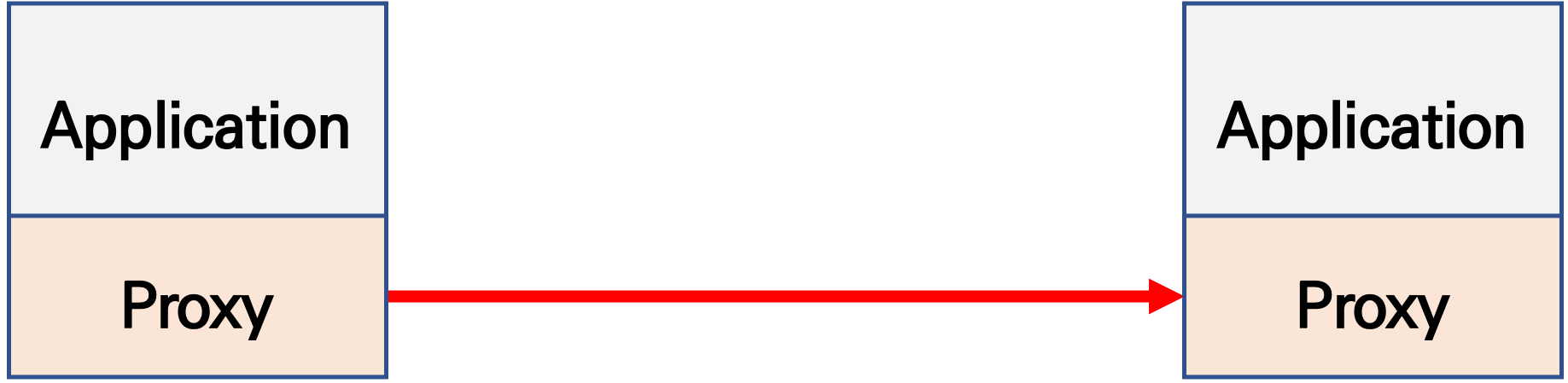
- 파드 내에 사이드카 컨테이너로 주입되어서 동작
- Proxy 컨테이너가 Application 트래픽을 가로채야됨 → iptables rule 구현 ⇒ 가능한 이유는?
-
Proxy 는 결국 DataPlane 이니, 이를 중앙에서 관리하는 ControlPlane을 두고 중앙에서 관리를 하자
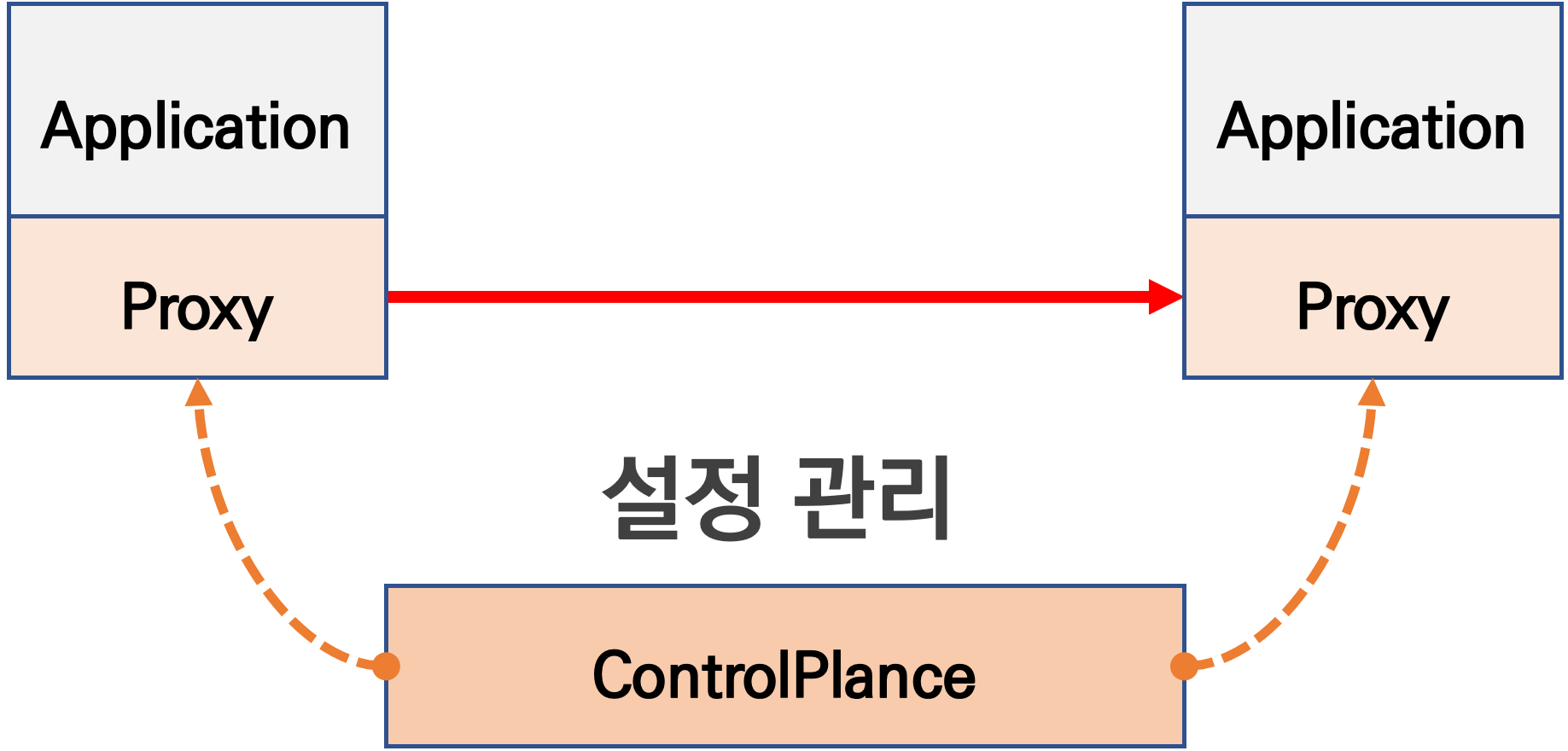
컨트롤 플레인 - 데이터가 전달되는 방식을 제어하는 네트워크의 일부
데이터 플레인 - 실제 전달 프로세스- Proxy 는 중앙에서 설정 관리가 잘되는 툴을 선택. 즉, 원격에서 동적인 설정 관리가 유연해야함 → 풍부한 API 지원이 필요 ⇒ Envoy
- '구글 IBM 리프트(Lyft)'가 중심이 되어 개발하고 있는 오픈 소스 소프트웨어이며, C++ 로 구현된 고성능 Proxy 인 엔보이(Envoy)
- 네트워크의 투명성을 목표, 다양한 필터체인 지원(L3/L4, HTTP L7), 동적 configuration API 제공, api 기반 hot reload 제공
- 중앙에서 어떤 동작/설정을 관리해야 될까? 라우팅, 보안 통신을 위한 mTLS 관련, 동기화 상태 정보 등
- Proxy 는 중앙에서 설정 관리가 잘되는 툴을 선택. 즉, 원격에서 동적인 설정 관리가 유연해야함 → 풍부한 API 지원이 필요 ⇒ Envoy
-
-
트래픽 모니터링 : 요청의 '에러율, 레이턴시, 커넥션 개수, 요청 개수' 등 메트릭 모니터링, 특정 서비스간 혹은 특정 요청 경로로 필터링 → 원인 파악 용이!
-
트래픽 컨트롤 : 트래픽 시프팅(Traffic shifting), 서킷 브레이커(Circuit Breaker), 폴트 인젝션(Fault Injection), 속도 제한(Rate Limit)
- 트래픽 시프팅(Traffic shifting) : 예시) 99% 기존앱 + 1% 신규앱 , 특정 단말/사용자는 신규앱에 전달하여 단계적으로 적용하는 카니리 배포 가능
- 서킷 브레이커(Circuit Breaker) : 목적지 마이크로서비스에 문제가 있을 시 접속을 차단하고 출발지 마이크로서비스에 요청 에러를 반환 (연쇄 장애, 시스템 전제 장애 예방)
- 폴트 인젝션(Fault Injection) : 의도적으로 요청을 지연 혹은 실패를 구현
- 속도 제한(Rate Limit) : 요청 개수를 제한
Istio
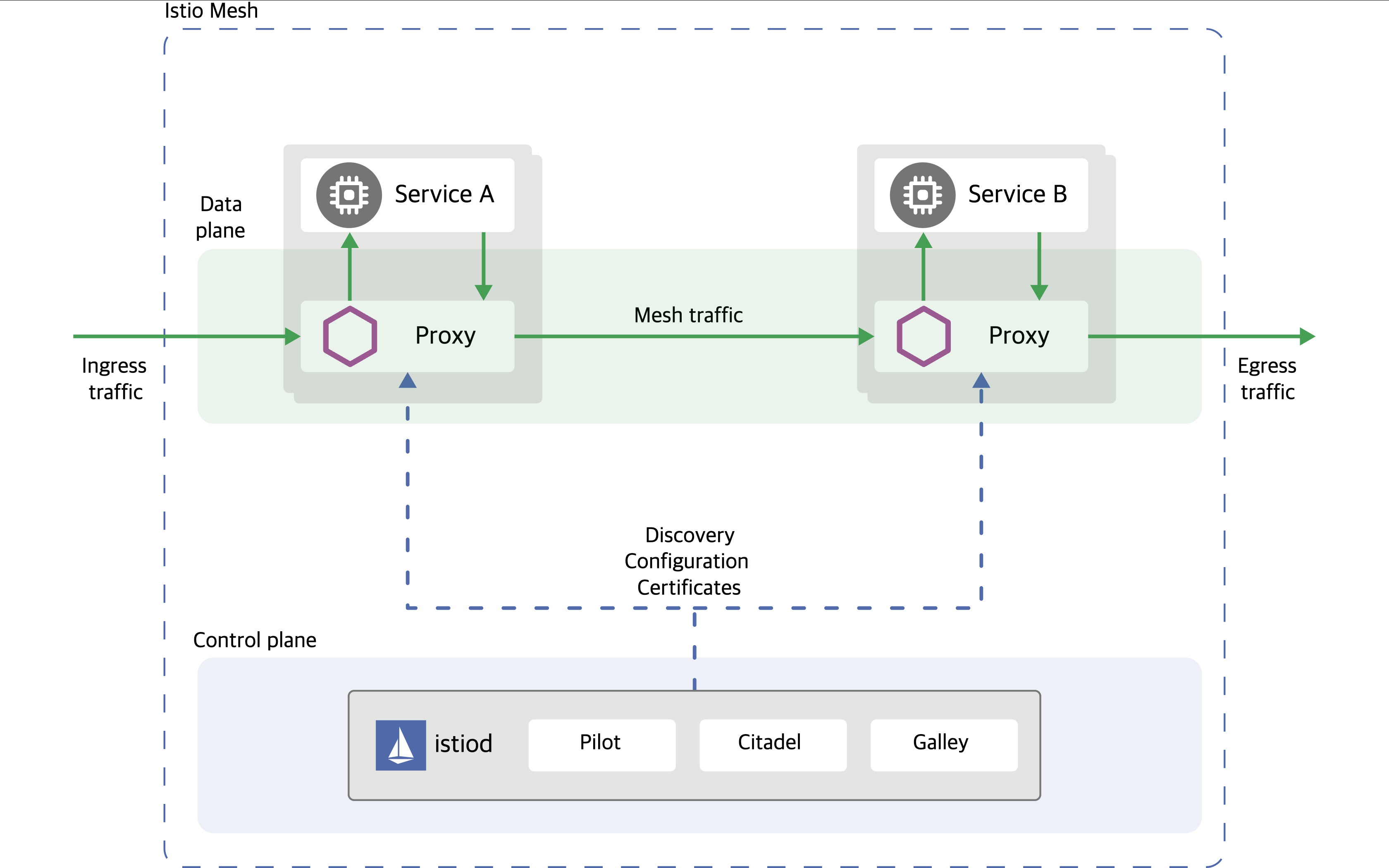
- 파일럿(Pilot): 모든 Envoy 사이드카에서 프록시 라우팅 규칙을 관리하며, 서비스 디스커버리와 로드 밸런싱 설정을 제공합니다.
- 시타델(Citadel): 보안 기능을 담당하며, TLS 인증서 발급 및 관리를 통해 서비스 간 통신의 암호화를 수행합니다.
- 갤리(Galley): Istio와 쿠버네티스(TLS 연결 및 파일럿에 필요한 설정)를 연결해 주는 역할을 합니다. 서비스 메시 구성 데이터를 검증하고 변환합니다.
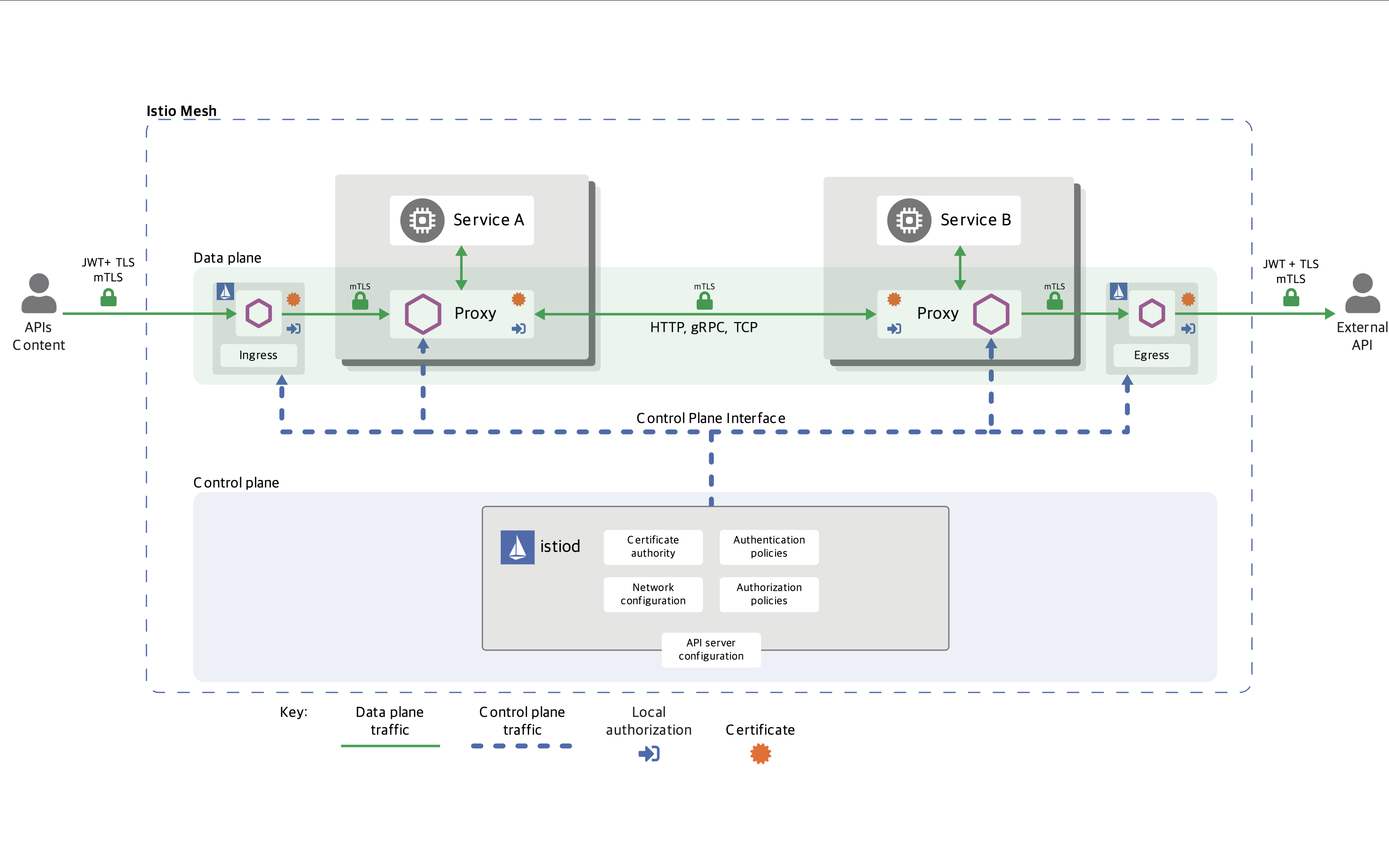
Istio 구성요소와 envoy : 컨트롤 플레인(istiod) , 데이터 플레인(istio-proxy > envoy)
- istiod : Pilot(데이터 플레인과 통신하면서 라우팅 규칙을 동기화, ADS), Gally(Istio 와 K8S 연동, Endpoint 갱신 등), Citadel(연결 암호화, 인증서 관리 등)
-
Istio proxy : Golang 으로 작성되었고 envoy 래핑한 Proxy, istiod와 통신하고 서비스 트래픽을 통제, 옵저버빌리티를 위한 메트릭 제공
-
이스티오는 각 파드 안에 사이드카로 엔보이 프록시가 들어가 있는 형태
-
모든 마이크로서비스간 통신은 엔보이를 통과하여, 메트릭을 수집하거나 트래픽 컨트롤을 할 수 있음
-
트래픽 컨트롤을 하기위해 엔보이 프록시에 전송 룰을 설정 → 컨트롤 플레인의 이스티오가 정의된 정보를 기반으로 엔보이 설정을 하게 함
-
마이크로서비스 간의 통신을 mutual TLS 인증(mTLS)으로 서로 TLS 인증으로 암호화 할 수 있음
-
각 애플리케이션은 파드 내의 엔보이 프록시에 접속하기 위해 localhost 에 TCP 접속을 함
Envoy
https://www.anyflow.net/sw-engineer/istio-internals-by-xds
https://www.envoyproxy.io/docs/envoy/latest/intro/life_of_a_request
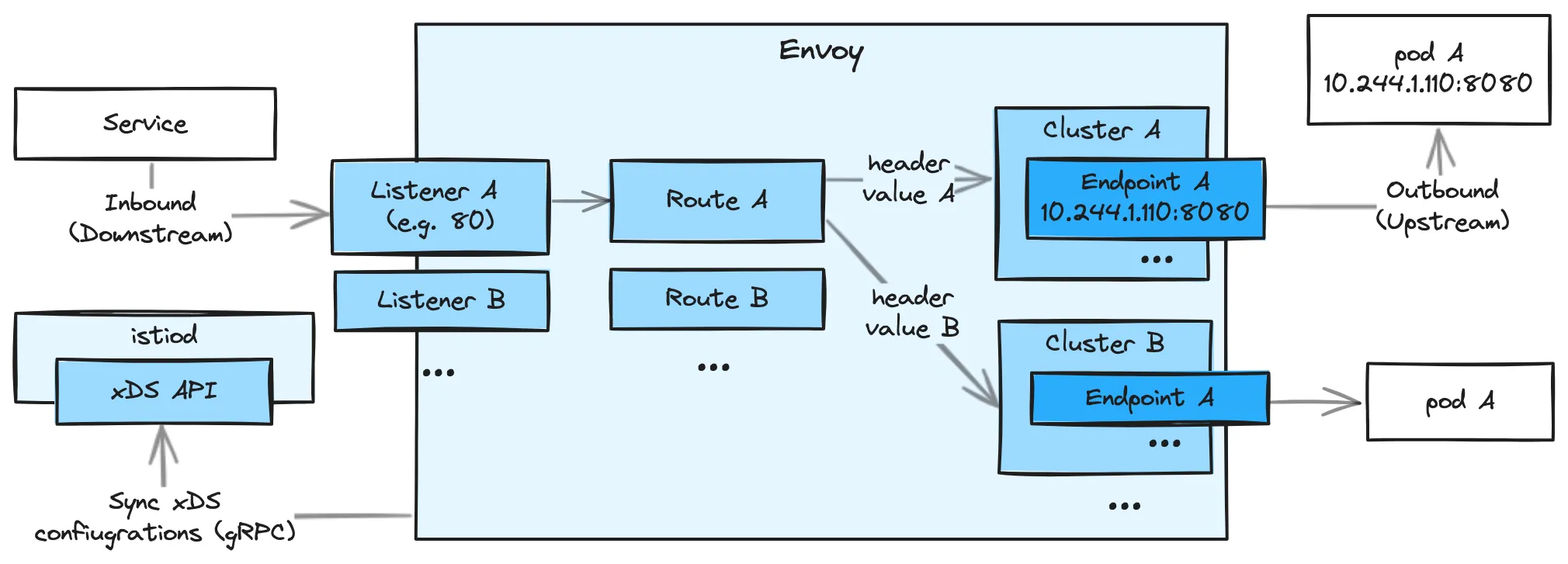
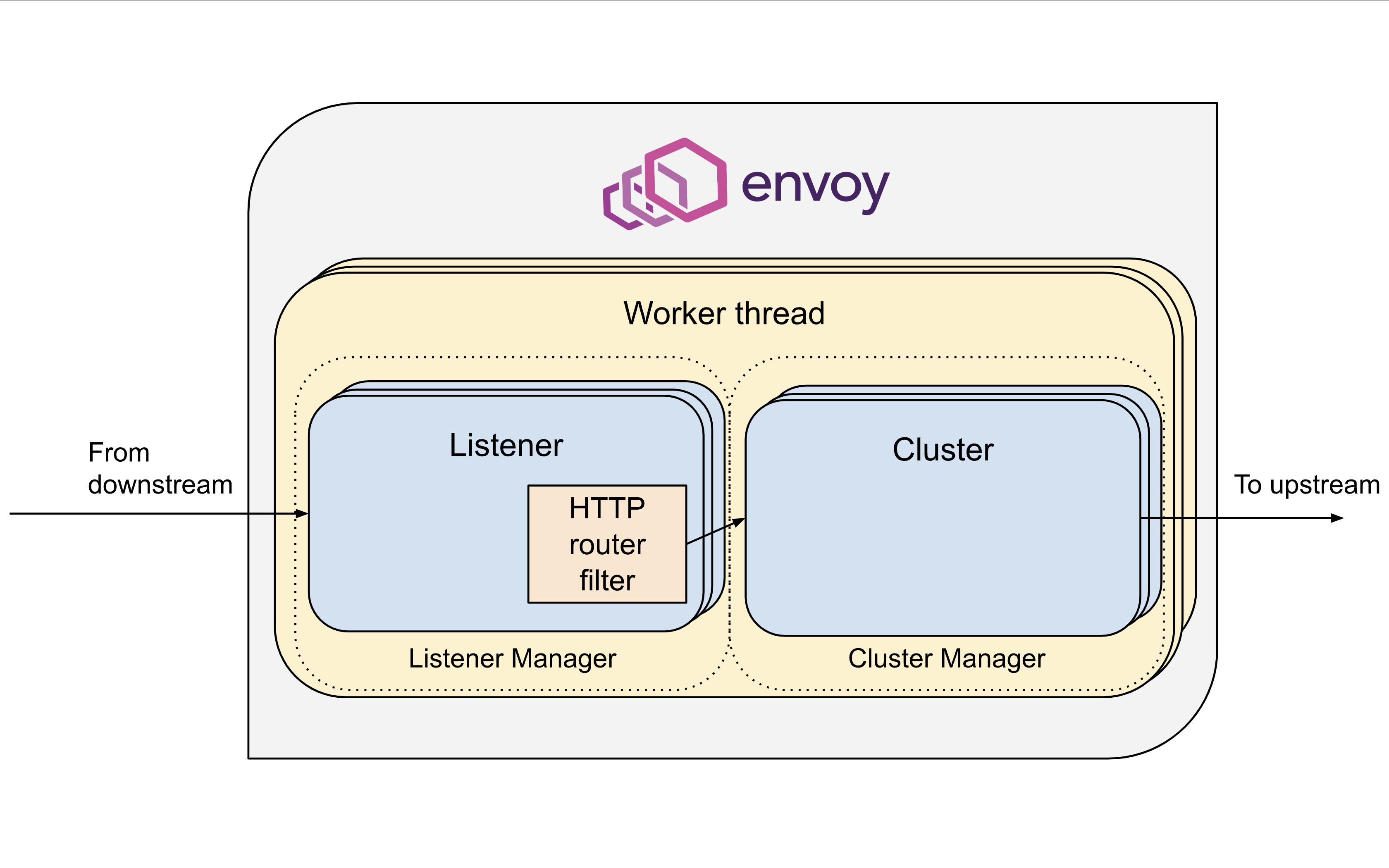
- Listener : 무엇을 받을지 그리고 어떻게 처리할지 IP/Port 를 바인딩하고, 요청 처리 측면에서 다운스트림을 조정하는 역할.
- Route : Listener 로 들어온 요청을 어디로 라우팅할 것인지를 정의. 라우팅 대상은 일반적으로 Cluster 라는 것에 대해 이뤄지게 된다.
- Cluster : envoy 가 트래픽을 포워드할 수 있는 논리적인 서비스 (엔드포인트 세트), 실제 요청이 처리되는 IP 또는 엔드포인트의 묶음을 의미.
- Endpoint : IP 주소, 네트워크 노드로 클러스터로 그룹핑됨, 실제 접근이 가능한 엔드포인트를 의미. 엔드포인트가 모여서 하나의 Cluster 가 된다.
- Filter : Listener 로부터 서비스에 트래픽을 전달하기까지 요청 처리 파이프라인
- UpStream : envoy 요청을 포워딩해서 연결하는 백엔드 네트워크 노드 - 사이드카일때 application app, 아닐때 원격 백엔드
- DownStream : An entity connecting to envoy, In non-sidecar models this is a remote client
Envoy는 구성을 동적으로 관리하기 위한 강력한 API를 제공이 중요합니다.
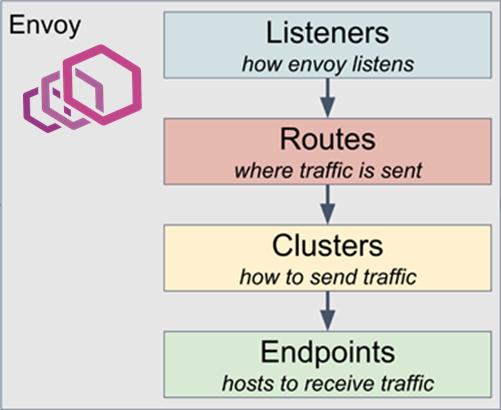
- Service Mesh 솔루션이나, Gateway API 구현체들을 Enovy를 내부적으로 사용하고 있으며, Envoy가 제공하는 동적 구성을 위한 API (xDS Sync API)를 이용하여 다양한 네트워크 정책을 구성하게 됩니다.
- Envoy의 xDS Sync API는 아래와 같은 레이어에서 동작하게 됩니다.
- LDS - Listener Discovery Service
- RDS - Route Discovery Service
- CDS - Cluseter Discovery Service
- EDS - Endpoint Discovery Service
설치
# 설치
wget -O- https://apt.envoyproxy.io/signing.key | sudo gpg --dearmor -o /etc/apt/keyrings/envoy-keyring.gpg
echo "deb [signed-by=/etc/apt/keyrings/envoy-keyring.gpg] https://apt.envoyproxy.io **jammy** main" | sudo tee /etc/apt/sources.list.d/envoy.list
sudo apt-get update && sudo apt-get install envoy -y
# 정보 확인
ss -tnlp
# 접속 테스트
curl -s http://127.0.0.1:10000 | grep -o "<title>.*</title>"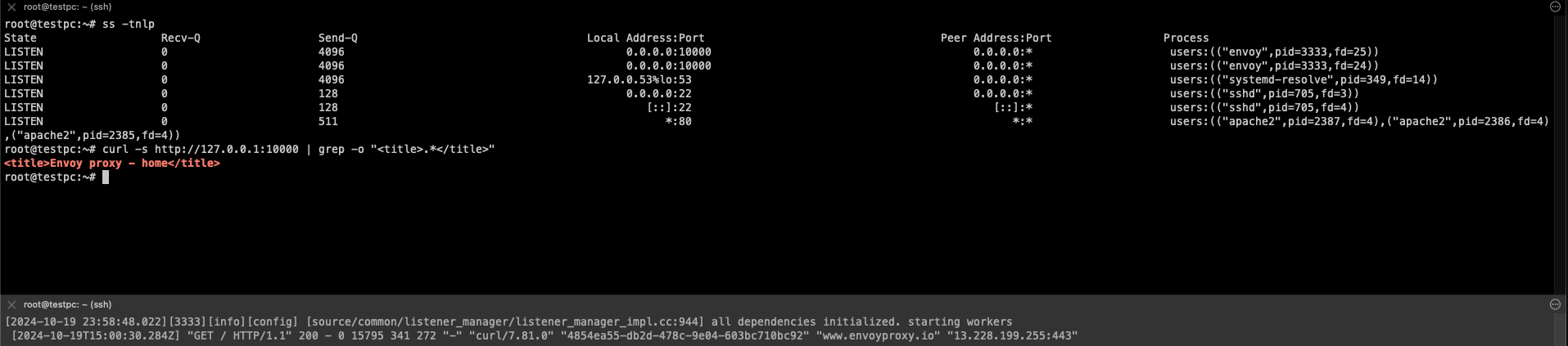
# 외부 접속 정보 출력
echo -e "http://$(curl -s ipinfo.io/ip):10000"
**
# k3s-s 에서 접속 테스트
curl -s http://192.168.10.200:10000 | grep -o "<title>.*</title>" 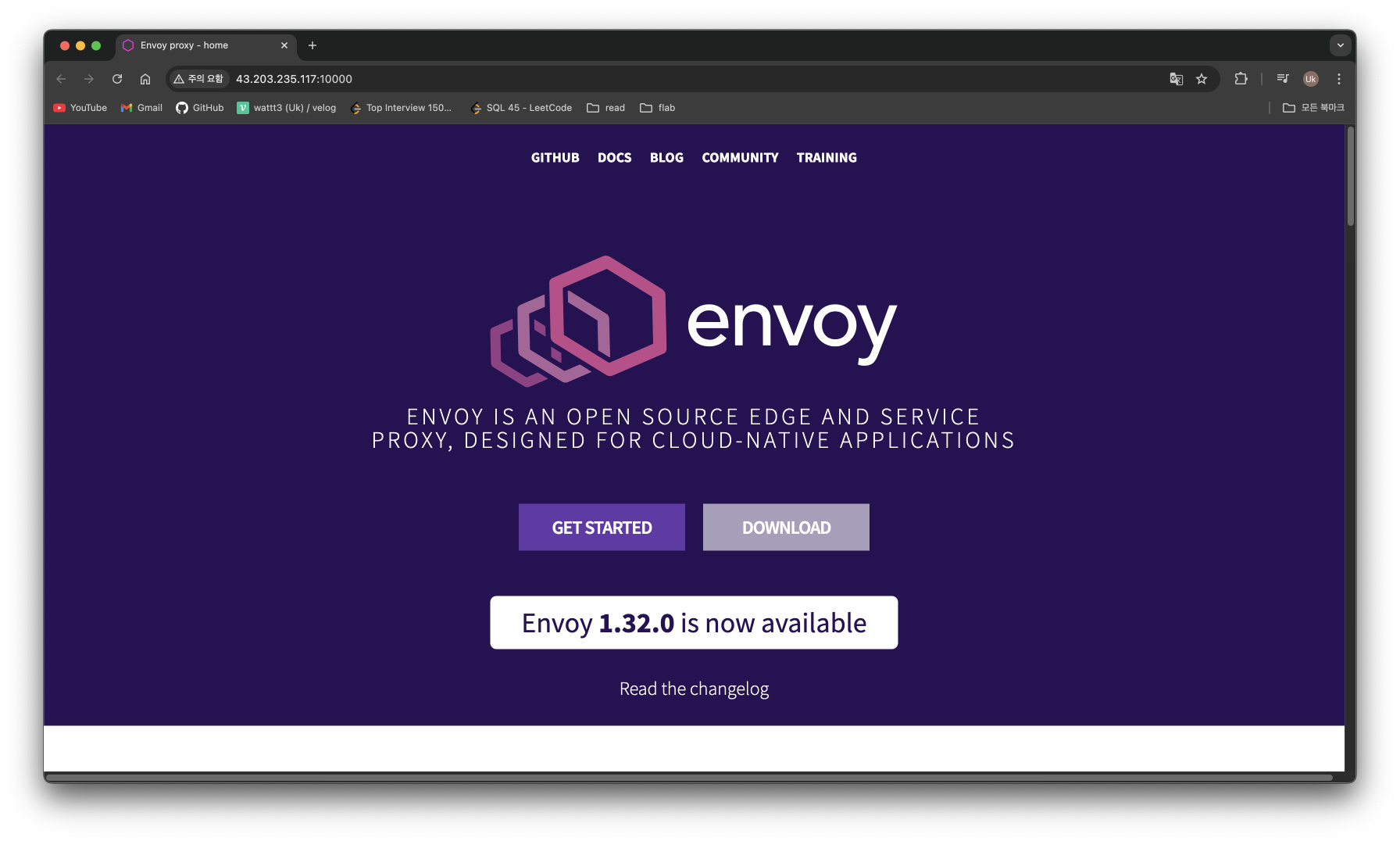
⇒ Envoy Proxy 가 L7 대리자 역할로 Envoy 사이트로 전달
# (터미널1) envoy 실행 취소(CTRL+C) 후 (관리자페이지) 설정 덮어쓰기 - [링크](https://www.envoyproxy.io/docs/envoy/latest/start/quick-start/run-envoy#override-the-default-configuration)
cat <<EOT> envoy-override.yaml
**admin**:
  address:
    socket_address:
      address: **0.0.0.0**
      port_value: **9902**
EOT
envoy -c envoy-demo.yaml --config-yaml "$(cat envoy-override.yaml)"

# envoy 관리페이지 외부 접속 정보 출력
echo -e "http://$(curl -s ipinfo.io/ip):9902"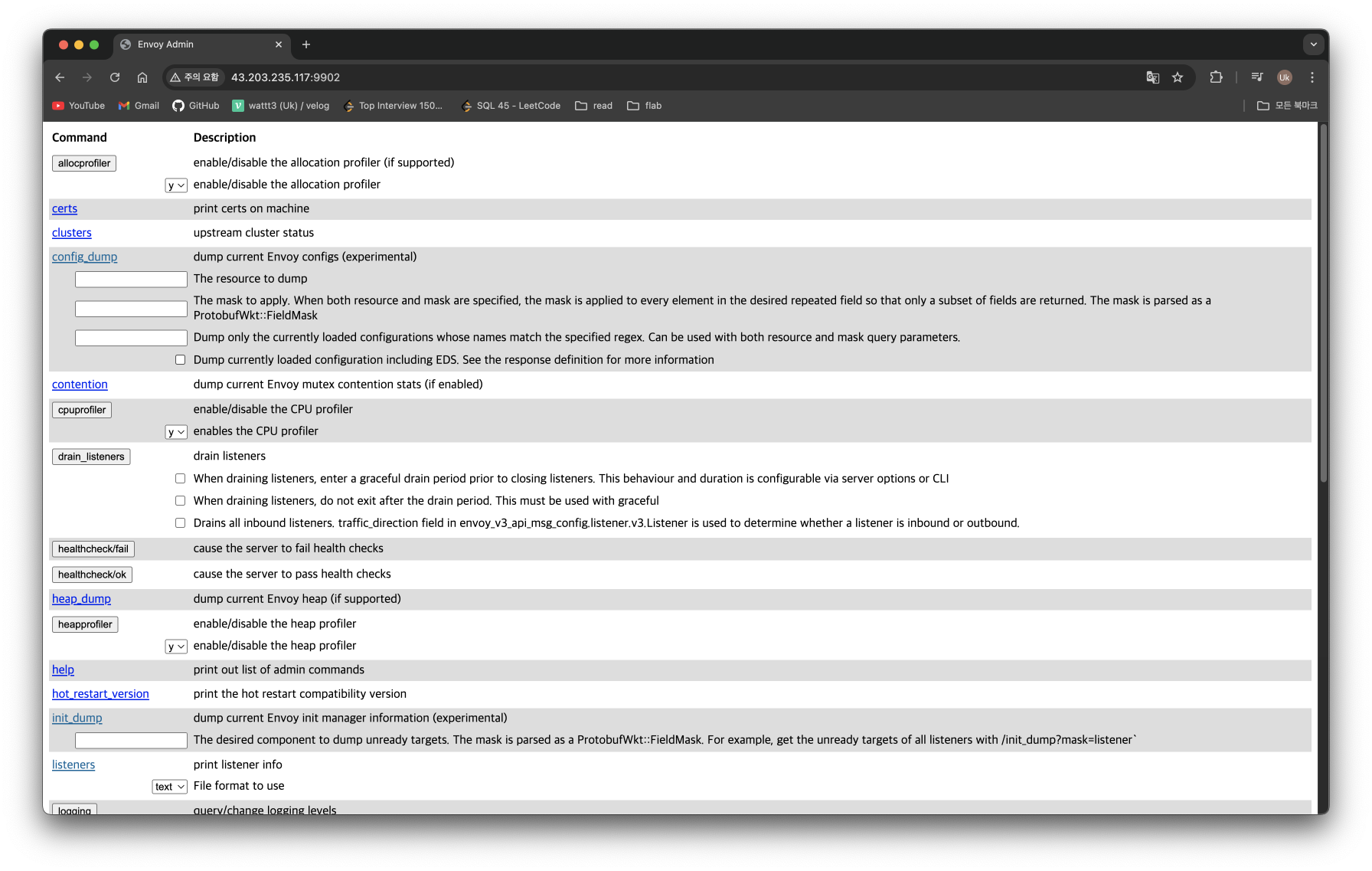
Istio 설치
**# istioctl 설치**
export **ISTIOV=1.23.2
echo "**export **ISTIOV=1.23.2" >> /etc/profile
curl -s -L https://istio.io/downloadIstio | ISTIO_VERSION=$ISTIOV TARGET_ARCH=x86_64 sh -**
tree istio-$ISTIOV -L 2 # sample yaml 포함
**cp istio-$ISTIOV/bin/istioctl /usr/local/bin/istioctl**
istioctl version --remote=false

# (demo 프로파일) 컨트롤 플레인 배포 - [링크](https://istio.io/latest/docs/setup/additional-setup/config-profiles/) [Customizing](https://istio.io/latest/docs/setup/additional-setup/customize-installation/)
# The istioctl command supports the full IstioOperator API via command-line options for individual settings or for passing a yaml file containing an IstioOperator custom resource (CR).
istioctl profile list
istioctl profile dump **default**
istioctl profile dump --config-path components.ingressGateways
istioctl profile dump --config-path values.gateways.istio-ingressgateway
istioctl profile dump **demo**

istioctl profile dump demo > demo-profile.yaml
vi demo-profile.yaml # 복잡성을 줄이게 실습 시나리오 환경 맞춤
--------------------
    egressGateways:
    - enabled: **false**
--------------------

**istioctl install -f demo-profile.yaml** -y

# 설치 확인 : istiod, istio-ingressgateway
kubectl get all,**svc**,ep,sa,cm,secret,pdb -n istio-system
**kubectl get crd | grep istio.io | sort**

# istio-ingressgateway 의 envoy 버전 확인
**kubectl exec -it deploy/istio-ingressgateway -n istio-system -c istio-proxy -- envoy --version**
envoy  version: 6c72b2179f5a58988b920a55b0be8346de3f7b35/**1.31.2**-dev/Clean/RELEASE/BoringSSL

# istio-ingressgateway 서비스 NodePort로 변경
kubectl patch **svc** -n istio-system **istio-ingressgateway** -p '{"spec":{"type":"NodePort"}}'

# istio-ingressgateway 서비스 확인
**kubectl get svc,ep -n istio-system istio-ingressgateway**

## istio-ingressgateway 서비스 포트 정보 확인
**kubectl get svc -n istio-system istio-ingressgateway -o jsonpath={.spec.ports[*]} | jq**

## istio-ingressgateway 디플로이먼트 파드의 포트 정보 확인
**kubectl get deploy/istio-ingressgateway -n istio-system -o jsonpath={.spec.template.spec.containers[0].ports[*]} | jq**
**kubectl get deploy/istio-ingressgateway -n istio-system -o jsonpath={.spec.template.spec.containers[0].readinessProbe} | jq**

# istiod(컨트롤플레인) 디플로이먼트 정보 확인
(⎈|default:N/A) root@k3s-s:~# kubectl exec -it deployment.apps/istiod -n istio-system -- ss -tnlp
kubectl exec -it deployment.apps/istiod -n istio-system -- ss -tnp
kubectl exec -it deployment.apps/istiod -n istio-system -- ps -ef
State                   Recv-Q                  Send-Q                                   Local Address:Port                                    Peer Address:Port                  Process
LISTEN                  0                       4096                                         127.0.0.1:9876                                         0.0.0.0:*                      users:(("pilot-discovery",pid=1,fd=8))
LISTEN                  0                       4096                                                 *:15017                                              *:*                      users:(("pilot-discovery",pid=1,fd=12))
LISTEN                  0                       4096                                                 *:15014                                              *:*                      users:(("pilot-discovery",pid=1,fd=9))
LISTEN                  0                       4096                                                 *:15012                                              *:*                      users:(("pilot-discovery",pid=1,fd=10))
LISTEN                  0                       4096                                                 *:15010                                              *:*                      users:(("pilot-discovery",pid=1,fd=11))
LISTEN                  0                       4096                                                 *:8080                                               *:*                      users:(("pilot-discovery",pid=1,fd=3))
State                Recv-Q                Send-Q                                      Local Address:Port                                         Peer Address:Port                 Process
ESTAB                0                     0                                              172.16.1.2:52676                                         10.10.200.1:443                   users:(("pilot-discovery",pid=1,fd=7))
ESTAB                0                     0                                     [::ffff:172.16.1.2]:15012                                 [::ffff:172.16.1.4]:49666                 users:(("pilot-discovery",pid=1,fd=15))
ESTAB                0                     0                                     [::ffff:172.16.1.2]:15012                                 [::ffff:172.16.1.4]:49650                 users:(("pilot-discovery",pid=1,fd=14))
UID          PID    PPID  C STIME TTY          TIME CMD
istio-p+       1       0  0 15:23 ?        00:00:01 /usr/local/bin/pilot-discove
istio-p+      27       0  0 15:30 pts/2    00:00:00 ps -ef

# istio-ingressgateway 디플로이먼트 정보 확인
(⎈|default:N/A) root@k3s-s:~# kubectl exec -it deployment.apps/istio-ingressgateway -n istio-system -- ss -tnlp
kubectl exec -it deployment.apps/istio-ingressgateway -n istio-system -- ss -tnp
kubectl exec -it deployment.apps/istio-ingressgateway -n istio-system -- ps -ef
State                   Recv-Q                  Send-Q                                     Local Address:Port                                      Peer Address:Port                  Process
LISTEN                  0                       4096                                             0.0.0.0:15090                                          0.0.0.0:*                      users:(("envoy",pid=15,fd=21))
LISTEN                  0                       4096                                             0.0.0.0:15090                                          0.0.0.0:*                      users:(("envoy",pid=15,fd=20))
LISTEN                  0                       4096                                             0.0.0.0:15021                                          0.0.0.0:*                      users:(("envoy",pid=15,fd=23))
LISTEN                  0                       4096                                             0.0.0.0:15021                                          0.0.0.0:*                      users:(("envoy",pid=15,fd=22))
LISTEN                  0                       4096                                           127.0.0.1:15000                                          0.0.0.0:*                      users:(("envoy",pid=15,fd=18))
LISTEN                  0                       4096                                           127.0.0.1:15004                                          0.0.0.0:*                      users:(("pilot-agent",pid=1,fd=12))
LISTEN                  0                       4096                                                   *:15020                                                *:*                      users:(("pilot-agent",pid=1,fd=3))
State                 Recv-Q                 Send-Q                                      Local Address:Port                                         Peer Address:Port                  Process
ESTAB                 0                      0                                              172.16.1.4:49666                                       10.10.200.134:15012                  users:(("pilot-agent",pid=1,fd=14))
ESTAB                 0                      0                                               127.0.0.1:45494                                           127.0.0.1:15020                  users:(("envoy",pid=15,fd=34))
ESTAB                 0                      0                                               127.0.0.1:45510                                           127.0.0.1:15020                  users:(("envoy",pid=15,fd=36))
ESTAB                 0                      0                                              172.16.1.4:49650                                       10.10.200.134:15012                  users:(("pilot-agent",pid=1,fd=10))
ESTAB                 0                      0                                      [::ffff:127.0.0.1]:15020                                  [::ffff:127.0.0.1]:45494                  users:(("pilot-agent",pid=1,fd=16))
ESTAB                 0                      0                                      [::ffff:127.0.0.1]:15020                                  [::ffff:127.0.0.1]:45510                  users:(("pilot-agent",pid=1,fd=18))
UID          PID    PPID  C STIME TTY          TIME CMD
istio-p+       1       0  0 15:23 ?        00:00:00 /usr/local/bin/pilot-agent p
istio-p+      15       1  0 15:23 ?        00:00:01 /usr/local/bin/envoy -c etc/
istio-p+      41       0  0 15:30 pts/1    00:00:00 ps -ef

kubectl exec -it deployment.apps/istio-ingressgateway -n istio-system -- cat /etc/istio/proxy/envoy-rev.json
kubectl exec -it deployment.apps/istio-ingressgateway -n istio-system -- ss -**xnlp**
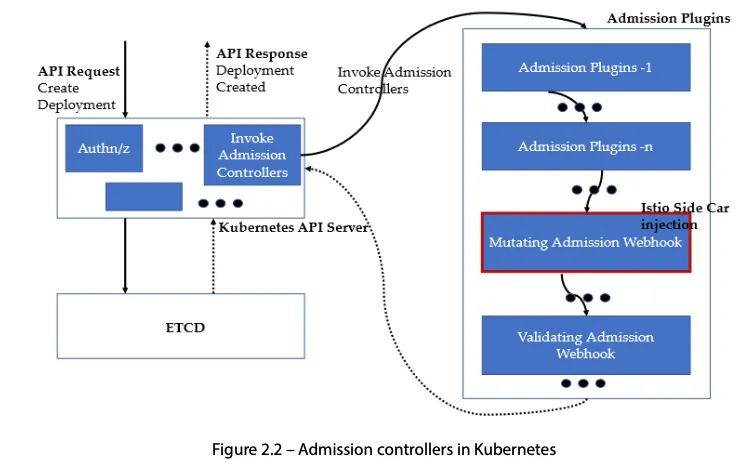
kubectl exec -it deployment.apps/istio-ingressgateway -n istio-system -- ss -xnp- Auto Injection with namespace label : 해당 네임스페이스에 생성되는 모든 파드들은 istio 사이드카가 자동으로 injection 됨
# mutating Webhook admisstion controller 사용
**kubectl label namespace default istio-injection=enabled**
kubectl get ns -L istio-injection
NAME              STATUS   AGE     ISTIO-INJECTION
default           Active   58m     enabled
...
- Istio 접속 테스트를 위한 변수 지정
# k3s-s
# istio ingress gw NodePort(HTTP 접속용) 변수 지정
export IGWHTTP=$(kubectl get service -n istio-system istio-ingressgateway -o jsonpath='{.spec.ports[1].nodePort}')
echo $IGWHTTP

export MYDOMAIN=www.daeuk.dev
echo -e "192.168.10.10 $MYDOMAIN" >> /etc/hosts
echo -e "export MYDOMAIN=$MYDOMAIN" >> /etc/profile

# istio ingress gw 접속 테스트 : 아직은 설정이 없어서 접속 실패가 된다
curl -v -s $MYDOMAIN:$IGWHTTP
# testpc
# 아래 변수는 각자 자신의 값을 직접 입력 할 것
IGWHTTP=<출력된 NodePort>
export MYDOMAIN=www.daeuk.dev
echo -e "192.168.10.10 $MYDOMAIN" >> /etc/hosts
echo -e "export MYDOMAIN=$MYDOMAIN" >> /etc/profile
# istio ingress gw 접속 테스트 : 아직은 설정이 없어서 접속 실패가 된다
curl -v -s $MYDOMAIN:$IGWHTTP# 자신의 PC
# 아래 변수는 각자 자신의 값을 직접 입력 할 것 : ISTIONODEIP는 3개의 노드 중 아무거나 입력
IGWHTTP=<각자 출력된 NodePort>
ISTIONODEIP=<k3s-s 의 유동 공인 IP>
MYDOMAIN=www.daeuk.dev
echo "$ISTIONODEIP $MYDOMAIN" | sudo tee -a /etc/hosts
# istio ingress gw 접속 테스트 : 아직은 설정이 없어서 접속 실패가 된다
curl -v -s $MYDOMAIN:$IGWHTTPIstio 통한 외부 노출
# 로그 모니터링
kubectl get pod -n istio-system -l app=istiod
kubetail -n istio-system -l app=istiod -f

kubectl get pod -n istio-system -l app=istio-ingressgateway
kubetail -n istio-system -l app=istio-ingressgateway -f
cat <<EOF | kubectl create -f -
apiVersion: v1
kind: ServiceAccount
metadata:
name: kans-nginx
---
apiVersion: apps/v1
kind: Deployment
metadata:
name: deploy-websrv
spec:
replicas: 1
selector:
matchLabels:
app: deploy-websrv
template:
metadata:
labels:
app: deploy-websrv
spec:
serviceAccountName: kans-nginx
terminationGracePeriodSeconds: 0
containers:
- name: deploy-websrv
image: nginx:alpine
ports:
- containerPort: 80
---
apiVersion: v1
kind: Service
metadata:
name: svc-clusterip
spec:
ports:
- name: svc-webport
port: 80
targetPort: 80
selector:
app: deploy-websrv
type: ClusterIP
EOF# 사이드카 컨테이너 배포 확인
kubectl get pod,svc,ep,sa -o wide
NAME READY STATUS RESTARTS AGE IP NODE NOMINATED NODE READINESS GATES
deploy-websrv-7d7cf8586c-rhhv8 2/2 Running 0 29s 172.16.2.6 k3s-w2 <none> <none>
...
kc describe pod
- Istio Gateway/VirtualService 설정 - Host 기반 트래픽 라우팅 설정
- 클라이언트 PC → (Service:NodePort) Istio ingressgateway 파드 → (Gateway, VirtualService, Service 는 Bypass) → Endpoint(파드 : 사이드카 - Application 컨테이너)
- Gateway : 지정한 인그레스 게이트웨이로부터 트래픽이 인입, 프로토콜 및 포트, HOSTS, Proxy 등 설정 가능
 https://istio.io/latest/docs/setup/additional-setup/gateway/
- VirtualService : 인입 처리할 hosts 설정, L7 PATH 별 라우팅, 목적지에 대한 정책 설정 가능 (envoy route config)
cat <<EOF | kubectl create -f -
apiVersion: networking.istio.io/v1
kind: Gateway
metadata:
  name: test-gateway
spec:
  selector:
    istio: ingressgateway
  servers:
  - port:
      number: 80
      name: http
      protocol: HTTP
    hosts:
    - "*"
---
apiVersion: networking.istio.io/v1
kind: VirtualService
metadata:
  name: nginx-service
spec:
  hosts:
  - "$MYDOMAIN"
  gateways:
  - test-gateway
  http:
  - route:
    - destination:
        host: svc-clusterip
        port:
          number: 80
EOF
# Istio Gateway(=gw)/VirtualService(=vs) 설정 정보를 확인
kc explain gateways.networking.istio.io
kc explain virtualservices.networking.istio.io
kubectl api-resources | grep istio
# virtual service 는 다른 네임스페이스의 서비스(ex. svc-nn.<ns>)도 참조할 수 있다
(⎈|default:N/A) root@k3s-s:~# kubectl get gw,vs
NAME AGE
gateway.networking.istio.io/test-gateway 64s
NAME GATEWAYS HOSTS AGE
virtualservice.networking.istio.io/nginx-service ["test-gateway"] ["www.daeuk.dev"] 64s
# Retrieves last sent and last acknowledged xDS sync from Istiod to each Envoy in the mesh
# istioctl proxy-status command was improved to include the time since last change, and more relevant status values.
istioctl proxy-status # 단축어 ps
(⎈|default:N/A) root@k3s-s:~# istioctl ps
NAME CLUSTER CDS LDS EDS RDS ECDS ISTIOD VERSION
deploy-websrv-778ffd6947-xj2qh.default Kubernetes SYNCED (7m49s) SYNCED (7m49s) SYNCED (7m49s) SYNCED (7m49s) IGNORED istiod-7f8b586864-wf2bz 1.23.2
istio-ingressgateway-5f9f654d46-jptn4.istio-system Kubernetes SYNCED (114s) SYNCED (114s) SYNCED (7m49s) SYNCED (114s) IGNORED istiod-7f8b586864-wf2bz 1.23.2- Istio 통한 Nginx 파드 접속 테스트
# istio ingress gw 를 통한 접속 테스트
curl -s $MYDOMAIN:$IGWHTTP | grep -o "<title>.*</title>"
curl -v -s $MYDOMAIN:$IGWHTTP

(⎈|default:N/A) root@k3s-s:~# kubetail -n istio-system -l app=istio-ingressgateway -f
Will tail 1 logs...
istio-ingressgateway-5f9f654d46-jptn4
[istio-ingressgateway-5f9f654d46-jptn4] [2024-10-19T16:16:59.092Z] "GET / HTTP/1.1" 200 - via_upstream - "-" 0 615 20 19 "172.16.0.0" "curl/8.7.1" "1e0b2a50-a275-9865-8e9e-9f8870e66cf2" "www.daeuk.dev:30808" "172.16.2.3:80" outbound|80||svc-clusterip.default.svc.cluster.local 172.16.1.4:59706 172.16.1.4:8080 172.16.0.0:42571 - -
[istio-ingressgateway-5f9f654d46-jptn4] [2024-10-19T16:16:59.147Z] "GET / HTTP/1.1" 200 - via_upstream - "-" 0 615 1 1 "172.16.0.0" "curl/8.7.1" "8cd2d113-7d42-9e85-8d00-e7919f876808" "www.daeuk.dev:30808" "172.16.2.3:80" outbound|80||svc-clusterip.default.svc.cluster.local 172.16.1.4:59706 172.16.1.4:8080 172.16.0.0:10417 - -
# 출력 로그 정보 확인 kubetail -n istio-system -l app=istio-ingressgateway -f kubetail -l app=deploy-websrv# istioctl proxy-status NAME CLUSTER CDS LDS EDS RDS ECDS ISTIOD VERSION deploy-websrv-7d7cf8586c-l22cs.default Kubernetes SYNCED (22m) SYNCED (22m) SYNCED (22m) SYNCED (22m) IGNORED istiod-7f8b586864-mv944 1.23.2 istio-ingressgateway-5f9f654d46-c4g7s.istio-system Kubernetes SYNCED (5m19s) SYNCED (5m19s) SYNCED (5m19s) SYNCED (5m19s) IGNORED istiod-7f8b586864-mv944 1.23.2 # Envoy config dump : all, cluster, endpoint, listener 등 istioctl proxy-config --help istioctl proxy-config all deploy-websrv-7d7cf8586c-l22cs istioctl proxy-config all deploy-websrv-7d7cf8586c-l22cs -o json | jq istioctl proxy-config route deploy-websrv-7d7cf8586c-l22cs -o json | jq- pilot : istio-proxy 내 uds 로 envoy 와 grpc 통신, istiod 받아온 dynamic config 를 envoy 에 전달
# istio-proxy 사용자 정보 확인 : uid(1337):gid(1337) 확인 -> iptables rule 에서 사용됨 kubectl exec -it deploy/deploy-websrv -c istio-proxy -- tail -n 3 /etc/passwd ubuntu:x:1000:1000:Ubuntu:/home/ubuntu:/bin/bash tcpdump:x:100:102::/nonexistent:/usr/sbin/nologin istio-proxy:x:1337:1337::/home/istio-proxy:/bin/sh # envoy 설정 정보 확인 : dynamic_resources , static_resources - listeners : 출력되는 IP가 누구인지 확인 해보자 kubectl exec -it deploy/deploy-websrv -c istio-proxy -- cat /etc/istio/proxy/envoy-rev.json kubectl exec -it deploy/deploy-websrv -c istio-proxy -- ss -nlp kubectl exec -it deploy/deploy-websrv -c istio-proxy -- ss -np kubectl exec -it deploy/deploy-websrv -c istio-proxy -- netstat -np Active Internet connections (w/o servers) Proto Recv-Q Send-Q Local Address Foreign Address State PID/Program name tcp 0 0 172.16.1.10:15021 172.16.1.1:49548 TIME_WAIT - tcp 0 0 172.16.1.10:15006 172.16.2.4:37814 ESTABLISHED 12/envoy tcp 0 0 172.16.1.10:15021 172.16.1.1:43138 TIME_WAIT - tcp 0 0 127.0.0.1:39158 127.0.0.1:15020 ESTABLISHED 12/envoy tcp 0 0 172.16.1.10:15021 172.16.1.1:42948 TIME_WAIT - tcp 0 0 172.16.1.10:51370 10.10.200.82:15012 ESTABLISHED 1/pilot-agent tcp 0 0 172.16.1.10:15021 172.16.1.1:39522 TIME_WAIT - tcp 0 0 172.16.1.10:51360 10.10.200.82:15012 ESTABLISHED 1/pilot-agent tcp 0 0 127.0.0.1:39172 127.0.0.1:15020 ESTABLISHED 12/envoy tcp6 0 0 127.0.0.1:15020 127.0.0.1:39158 ESTABLISHED 1/pilot-agent tcp6 0 0 127.0.0.1:15020 127.0.0.1:39172 ESTABLISHED 1/pilot-agent Active UNIX domain sockets (w/o servers) Proto RefCnt Flags Type State I-Node PID/Program name Path unix 3 [ ] STREAM CONNECTED 151002 1/pilot-agent var/run/secrets/workload-spiffe-uds/socket unix 3 [ ] STREAM CONNECTED 152729 - unix 3 [ ] STREAM CONNECTED 152723 - unix 3 [ ] STREAM CONNECTED 152727 - unix 3 [ ] STREAM CONNECTED 150129 12/envoy unix 3 [ ] STREAM CONNECTED 152726 - unix 3 [ ] STREAM CONNECTED 152724 - unix 3 [ ] STREAM CONNECTED 152722 - unix 3 [ ] STREAM CONNECTED 150979 12/envoy unix 3 [ ] STREAM CONNECTED 152728 - unix 3 [ ] STREAM CONNECTED 152725 - unix 3 [ ] STREAM CONNECTED 150120 1/pilot-agent etc/istio/proxy/XDS # kubectl exec -it deploy/deploy-websrv -c istio-proxy -- ps -ef UID PID PPID C STIME TTY TIME CMD istio-p+ 1 0 0 07:11 ? 00:00:00 /usr/local/bin/pilot-agent proxy sidecar --domain default.svc.cluster.local --p istio-p+ 12 1 0 07:11 ? 00:00:02 /usr/local/bin/envoy -c etc/istio/proxy/envoy-rev.json --drain-time-s 45 --drai istio-p+ 91 0 0 07:21 pts/0 00:00:00 ps -ef # 출력되는 IP가 누구인지 확인 해보자 kubectl get pod,svc -A -owide kubectl exec -it deploy/deploy-websrv -c istio-proxy -- netstat -antp Active Internet connections (servers and established) Proto Recv-Q Send-Q Local Address Foreign Address State PID/Program name tcp 0 0 0.0.0.0:80 0.0.0.0:* LISTEN - tcp 0 0 127.0.0.1:15004 0.0.0.0:* LISTEN 1/pilot-agent tcp 0 0 127.0.0.1:15000 0.0.0.0:* LISTEN 12/envoy tcp 0 0 0.0.0.0:15090 0.0.0.0:* LISTEN 12/envoy tcp 0 0 0.0.0.0:15090 0.0.0.0:* LISTEN 12/envoy tcp 0 0 0.0.0.0:15021 0.0.0.0:* LISTEN 12/envoy tcp 0 0 0.0.0.0:15021 0.0.0.0:* LISTEN 12/envoy tcp 0 0 0.0.0.0:15006 0.0.0.0:* LISTEN 12/envoy tcp 0 0 0.0.0.0:15006 0.0.0.0:* LISTEN 12/envoy tcp 0 0 0.0.0.0:15001 0.0.0.0:* LISTEN 12/envoy tcp 0 0 0.0.0.0:15001 0.0.0.0:* LISTEN 12/envoy tcp 0 0 172.16.1.10:15006 172.16.2.4:37814 ESTABLISHED 12/envoy tcp 0 0 172.16.1.10:15021 172.16.1.1:42632 TIME_WAIT - tcp 0 0 127.0.0.1:39158 127.0.0.1:15020 ESTABLISHED 12/envoy tcp 0 0 172.16.1.10:15021 172.16.1.1:55752 TIME_WAIT - tcp 0 0 172.16.1.10:51370 10.10.200.82:15012 ESTABLISHED 1/pilot-agent tcp 0 0 172.16.1.10:15021 172.16.1.1:50394 TIME_WAIT - tcp 0 0 172.16.1.10:51360 10.10.200.82:15012 ESTABLISHED 1/pilot-agent tcp 0 0 172.16.1.10:15021 172.16.1.1:49496 TIME_WAIT - tcp 0 0 127.0.0.1:39172 127.0.0.1:15020 ESTABLISHED 12/envoy tcp6 0 0 :::80 :::* LISTEN - tcp6 0 0 :::15020 :::* LISTEN 1/pilot-agent tcp6 0 0 127.0.0.1:15020 127.0.0.1:39158 ESTABLISHED 1/pilot-agent tcp6 0 0 127.0.0.1:15020 127.0.0.1:39172 ESTABLISHED 1/pilot-agent # istiod 정보 같이 확인 : 출력되는 IP가 누구인지 확인 해보자 kubectl get pod,svc -A -owide kubectl exec -it deploy/istiod -n istio-system -- ps -ef kubectl exec -it deploy/istiod -n istio-system -- netstat -antp kubectl exec -it deploy/istiod -n istio-system -- ss -nlp kubectl exec -it deploy/istiod -n istio-system -- ss -np - (참고) istio-proxy, Istiod 가 각각 사용하는 포트 정보
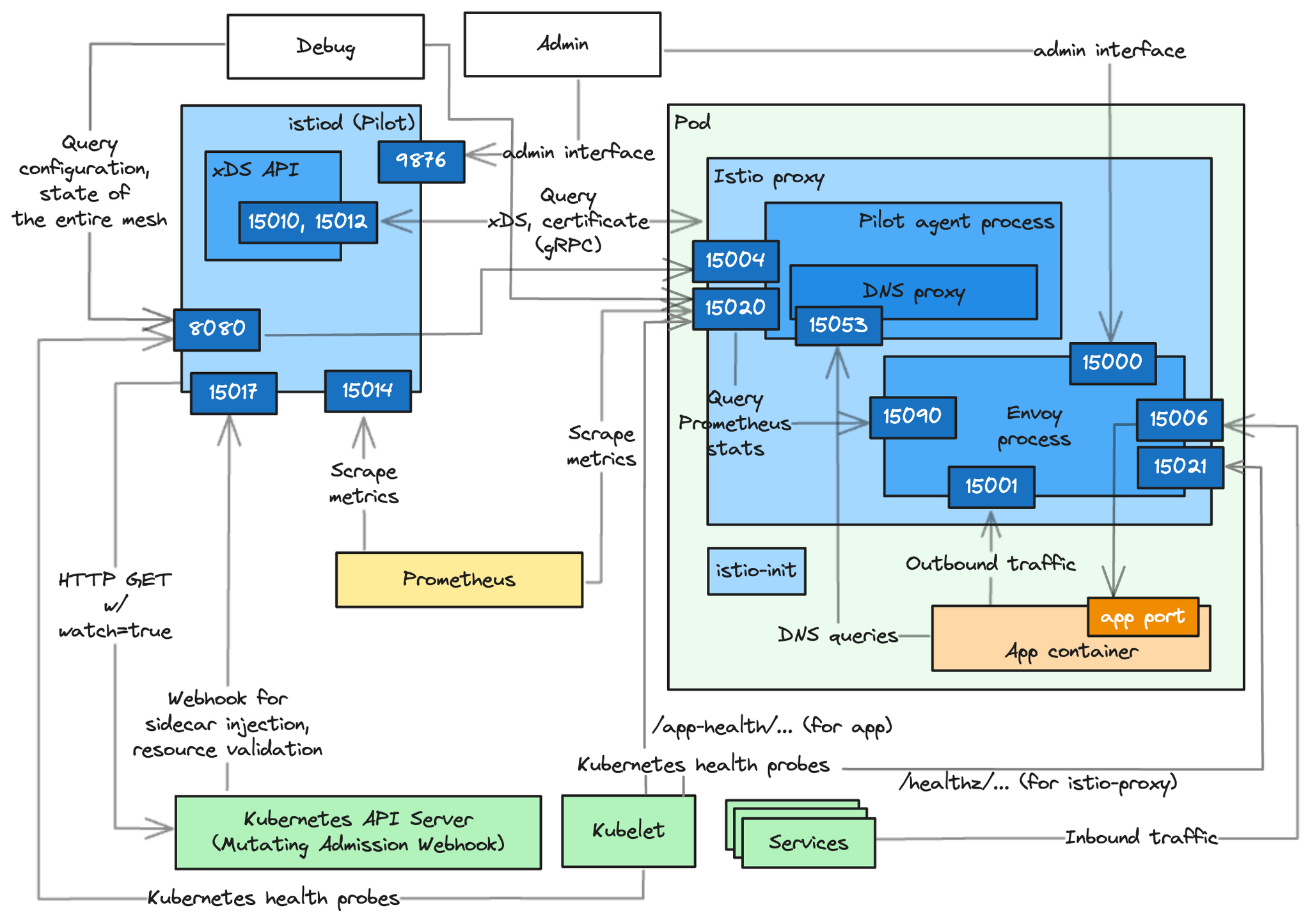 https://www.anyflow.net/sw-engineer/istio-internals-by-port
- pilot : istio-proxy 내 uds 로 envoy 와 grpc 통신, istiod 받아온 dynamic config 를 envoy 에 전달
Bookinfo 실습 & Istio 기능
Bookinfo 애플리케이션 소개 : 4개의 마이크로서비스로 구성 : Productpage, reviews, ratings, details
- ProductPage 페이지에서 요청을 받으면, 도서 리뷰를 보여주는 Reviews 서비스와 도서 상세 정보를 보여주는 Details 서비스에 접속하고,
- ProductPage 는 Reviews 와 Details 결과를 사용자에게 응답한다.
- Reviews 서비스는 v1, v2, v3 세 개의 버전이 있고 v2, v3 버전의 경우 Ratings 서비스에 접소갛여 도서에 대한 5단계 평가를 가져옴.
- Reviews 서비스의 차이는, v1은 Rating 이 없고, v2는 검은색 별로 Ratings 가 표시되며, v3는 색깔이 있는 별로 Ratings 가 표시됨.
# 모니터링
watch -d 'kubectl get pod -owide;echo;kubectl get svc'

# Bookinfo 애플리케이션 배포
echo $ISTIOV
cat ~/istio-$ISTIOV/samples/bookinfo/platform/kube/bookinfo.yaml
kubectl apply -f ~/istio-$ISTIOV/samples/bookinfo/platform/kube/bookinfo.yaml

# 확인
kubectl get all,sa

# product 웹 접속 확인
kubectl exec "$(kubectl get pod -l app=ratings -o jsonpath='{.items[0].metadata.name}')" -c ratings -- curl -sS productpage:9080/productpage | grep -o "<title>.*</title>"

(⎈|default:N/A) root@k3s-s:~# kubectl exec "$(kubectl get pod -l app=ratings -o jsonpath='{.items[0].metadata.name}')" -c ratings -- curl -sS productpage:9080/productpage | grep -o "<title>.*</title>"
<title>Simple Bookstore App</title>

# 로그
kubetail -l app=productpage -f

Every 2.0s: kubectl get pod -owide;echo;kubectl get svc
NAME                             READY   STATUS    RESTARTS   AGE   IP           NODE     NOMINATED NODE   READINESS GATES
details-v1-65cfcf56f9-l8f4q      2/2     Running   0          35s   172.16.2.4   k3s-w2   <none>           <none>
productpage-v1-d5789fdfb-d2xhb   2/2     Running   0          35s   172.16.1.7   k3s-w1   <none>           <none>
ratings-v1-7c9bd4b87f-9n79f      2/2     Running   0          35s   172.16.1.5   k3s-w1   <none>           <none>
reviews-v1-6584ddcf65-h7trb      2/2     Running   0          35s   172.16.1.6   k3s-w1   <none>           <none>
reviews-v2-6f85cb9b7c-n8x22      2/2     Running   0          35s   172.16.2.5   k3s-w2   <none>           <none>
reviews-v3-6f5b775685-85cr4      2/2     Running   0          35s   172.16.2.6   k3s-w2   <none>           <none>

NAME          TYPE        CLUSTER-IP      EXTERNAL-IP   PORT(S)    AGE
details       ClusterIP   10.10.200.231   <none>        9080/TCP   35s
kubernetes    ClusterIP   10.10.200.1     <none>        443/TCP    16m
productpage   ClusterIP   10.10.200.17    <none>        9080/TCP   35s
ratings       ClusterIP   10.10.200.144   <none>        9080/TCP   35s
reviews       ClusterIP   10.10.200.150   <none>        9080/TCP   35s
# Istio Gateway/VirtualService 설정
cat ~/istio-$ISTIOV/samples/bookinfo/networking/bookinfo-gateway.yaml
kubectl apply -f ~/istio-$ISTIOV/samples/bookinfo/networking/bookinfo-gateway.yaml
# 확인
kubectl get gw,vs
istioctl proxy-status
NAME CLUSTER CDS LDS EDS RDS ECDS ISTIOD VERSION
details-v1-65cfcf56f9-4drsk.default Kubernetes SYNCED (7m4s) SYNCED (7m4s) SYNCED (6m57s) SYNCED (7m4s) IGNORED istiod-7f8b586864-mv944 1.23.2
istio-ingressgateway-5f9f654d46-c4g7s.istio-system Kubernetes SYNCED (3m7s) SYNCED (3m7s) SYNCED (6m57s) SYNCED (3m7s) IGNORED istiod-7f8b586864-mv944 1.23.2
productpage-v1-d5789fdfb-5cr6m.default Kubernetes SYNCED (6m59s) SYNCED (6m59s) SYNCED (6m57s) SYNCED (6m59s) IGNORED istiod-7f8b586864-mv944 1.23.2
ratings-v1-7c9bd4b87f-9q4nv.default Kubernetes SYNCED (7m3s) SYNCED (7m3s) SYNCED (6m57s) SYNCED (7m3s) IGNORED istiod-7f8b586864-mv944 1.23.2
reviews-v1-6584ddcf65-rqgp7.default Kubernetes SYNCED (7m2s) SYNCED (7m2s) SYNCED (6m57s) SYNCED (7m2s) IGNORED istiod-7f8b586864-mv944 1.23.2
reviews-v2-6f85cb9b7c-h6m7p.default Kubernetes SYNCED (7m2s) SYNCED (7m2s) SYNCED (6m57s) SYNCED (7m2s) IGNORED istiod-7f8b586864-mv944 1.23.2
reviews-v3-6f5b775685-rprpb.default Kubernetes SYNCED (6m58s) SYNCED (6m58s) SYNCED (6m57s) SYNCED (6m58s) IGNORED istiod-7f8b586864-mv944 1.23.2
# productpage 파드의 istio-proxy 로그 확인 Access log 가 출력 - Default access log format : [링크](https://istio.io/latest/docs/tasks/observability/logs/access-log/#default-access-log-format)
kubetail -l app=productpage -c istio-proxy -f- k3s-s NodePort 접속 확인
# export IGWHTTP=$(kubectl get service -n istio-system istio-ingressgateway -o jsonpath='{.spec.ports[1].nodePort}') echo $IGWHTTP 32759 # 접속 확인 kubectl get svc -n istio-system istio-ingressgateway curl -s http://localhost:$IGWHTTP/productpage curl -s http://192.168.10.101:$IGWHTTP/productpage curl -s http://192.168.10.102:$IGWHTTP/productpage # 정보 확인 echo $MYDOMAIN cat /etc/hosts # curl -s http://$MYDOMAIN:$IGWHTTP/productpage - 자신의 PC에서 접속 확인
❓ 자신의 PC 에서 도메인으로 접속이 되지 않을 경우, 노드의 http://IP:port 로 변경해서 접속 할 것.# echo $MYDOMAIN $IGWHTTP cat /etc/hosts # curl -v -s $MYDOMAIN:$IGWHTTP/productpage ~~echo -e "http://$MYDOMAIN:$IGWHTTP/productpage"~~ # aws ec2 describe-instances --query "Reservations[*].Instances[*].{PublicIPAdd:PublicIpAddress,InstanceName:Tags[?Key=='Name']|[0].Value,Status:State.Name}" --filters Name=instance-state-name,Values=running --output text - testpc 에서 접속 실행*
# istio ingress gw 를 통한 접속 테스트
curl -s $MYDOMAIN:$IGWHTTP/productpage | grep -o "<title>.*</title>"
while true; do curl -s $MYDOMAIN:$IGWHTTP/productpage | grep -o "<title>.*</title>" ; echo "--------------" ; sleep 1; done
for i in {1..100};  do curl -s $MYDOMAIN:$IGWHTTP/productpage | grep -o "<title>.*</title>" ; done
모니터링
- Kiali
- observability console for Istio, Prometheus 혹은 Grafana와 연동 가능
- Jaeger와 통합하여 Distributed tracing 제공
- Pod의 헬스체크를 Kiali가 직접 IstioD 파드에 체크
# Install Kiali and the other addons and wait for them to be deployed. : Kiali dashboard, along with Prometheus, Grafana, and Jaeger.
tree ~/istio-$ISTIOV/samples/addons/
kubectl apply -f ~/istio-$ISTIOV/samples/addons # 디렉터리에 있는 모든 yaml 자원을 생성
kubectl rollout status deployment/kiali -n istio-system

# 확인
kubectl get all,sa,cm -n istio-system
kubectl get svc,ep -n istio-system

# kiali 서비스 변경
kubectl patch svc -n istio-system kiali -p '{"spec":{"type":"NodePort"}}'

# kiali 웹 접속 주소 확인
KIALINodePort=$(kubectl get svc -n istio-system kiali -o jsonpath={.spec.ports[0].nodePort})
echo -e "KIALI UI URL = http://$(curl -s ipinfo.io/ip):$KIALINodePort"

# Grafana 서비스 변경
kubectl patch svc -n istio-system grafana -p '{"spec":{"type":"NodePort"}}'

# Grafana 웹 접속 주소 확인 : 7개의 대시보드
GRAFANANodePort=$(kubectl get svc -n istio-system grafana -o jsonpath={.spec.ports[0].nodePort})
echo -e "Grafana URL = http://$(curl -s ipinfo.io/ip):$GRAFANANodePort"

# Prometheus 서비스 변경
kubectl patch svc -n istio-system prometheus -p '{"spec":{"type":"NodePort"}}'

# Prometheus 웹 접속 주소 확인
PROMENodePort=$(kubectl get svc -n istio-system prometheus -o jsonpath={.spec.ports[0].nodePort})
echo -e "Prometheus URL = http://$(curl -s ipinfo.io/ip):$PROMENodePort"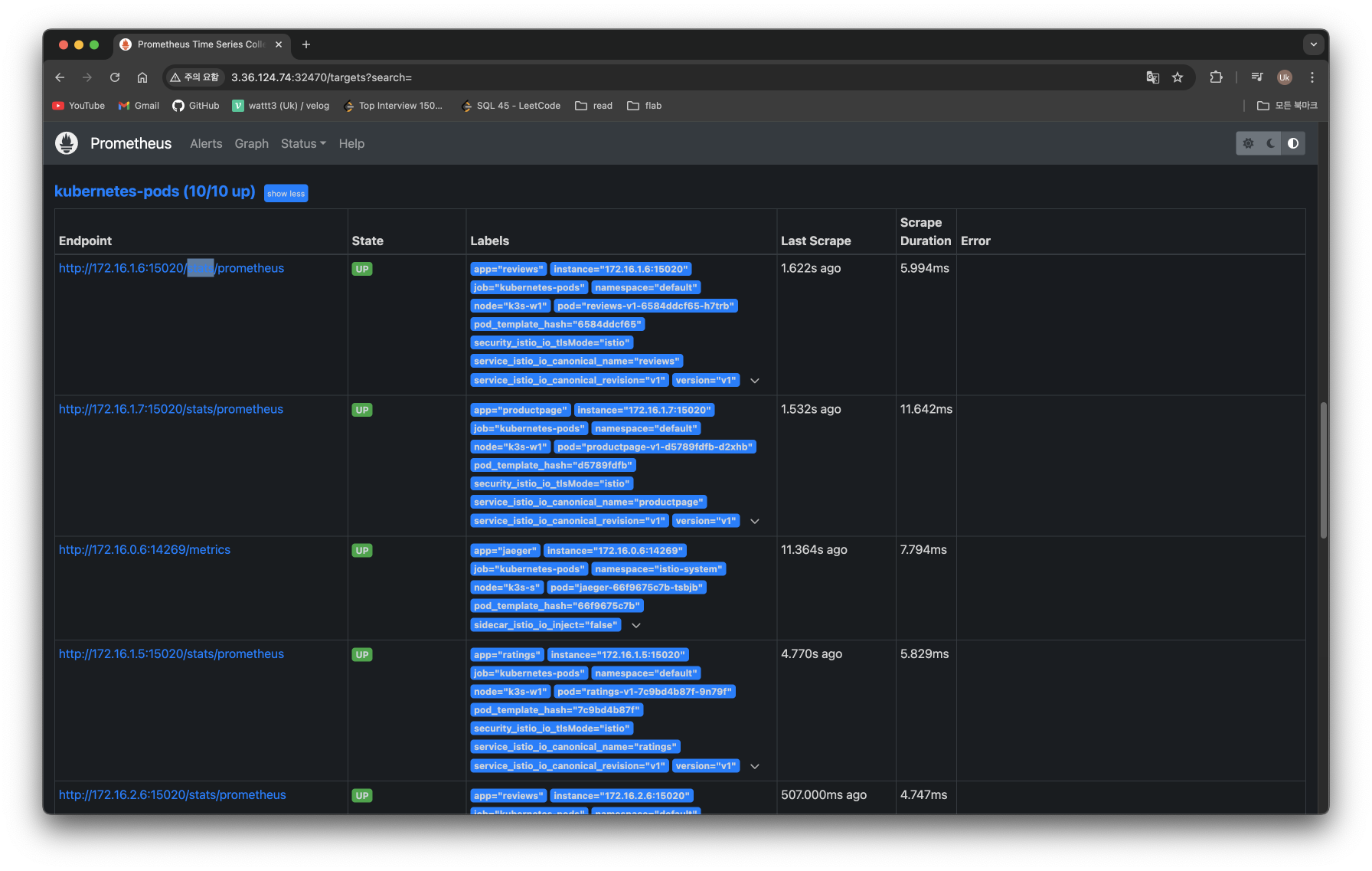
Traffic Management
트래픽 컨트롤은 VirtualService 와 DestinationRule 설정을 통해서 동작한다
클라이언트 PC → Istio ingressgateway 파드 → (Gateway, VirtualService + DestinationRule) → Cluster(Endpoint - 파드)
- Gateway : 지정한 인그레스 게이트웨이로부터 트래픽이 인입, 프로토콜 및 포트, HOSTS, Proxy 등 설정 가능
- VirtualService : 인입 처리할 hosts 설정, L7 PATH 별 라우팅, 목적지에 대한 정책 설정 가능 (envoy route config) - 링크
- 사용 예시 : 헤더 매칭에 따라서, 각기 다른 destination 으로 라우팅
apiVersion: networking.istio.io/v1alpha3 kind: **VirtualService** metadata: name: reviews spec: hosts: - reviews http: - **match**: - headers: end-user: exact: jason route: - **destination**: host: reviews subset: **v2** - route: - **destination**: host: reviews subset: **v3** - VirtualService 는 DestinationRule 에서 설정된 서브셋(subset)을 사용하여 트래픽 컨트롤을 할 수 있다
- hosts 필드 : 목적지 주소 - IP address, a DNS name (FQDN), 혹은 k8s svc 이름 , wildcard (”*”) prefixes
- Routing rules : HTTP 경우 - Match 필드(예, 헤더) , Destination(istio/envoy 에 등록된 대상, subnet 에 DestinationRule 활용)
- HTTPRoute : redirect , rewrite , fault(장애 주입) , mirror(복제, 기본 100%) , corsPolicy(CORS 삽입) , headers(헤더 조작) 등 - 링크
- Routing rule precedence : Routing rules are evaluated in sequential order from top to bottom - 위에서 순차적 적용
- 사용 예시 : 헤더 매칭에 따라서, 각기 다른 destination 으로 라우팅
- DestinationRule : 실제 도착지(서비스와 1:1 연결)의 정교한 정책(부하분산, 연결 옵션, 서킷 브레이크, TLS 등)을 설정 - 링크
- 사용 예시 : 3개의 subsets for the
my-svcdestination service 에 3개의 subsets 이 있고, 이중 v1/v3 은 RAMDOM 이고 v2 는 ROUND_ROBINapiVersion: networking.istio.io/v1alpha3 kind: DestinationRule metadata: name: my-destination-rule spec: host: my-svc trafficPolicy: loadBalancer: simple: RANDOM **subsets**: - name: v1 labels: version: v1 - name: v2 labels: version: v2 trafficPolicy: loadBalancer: simple: ROUND_ROBIN - name: v3 labels: version: v3 - Load balancing options : Round robin(기본값) , Random , Weighted , Least requests - 링크
- Destination Rule : TrafficPolicy , Subset , ConnectionPoolSettings 등 - 링크
- 서브셋(subsets)을 정의할 수 있어 마이크로서비스 버전별로 라우팅할 때 사용한다
- 사용 예시 : 3개의 subsets for the
Istio 트래픽 흐름
-
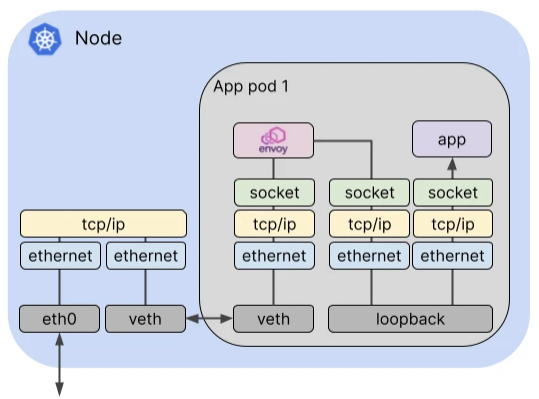
Istio 통신 : 호스트의 tcp/ip 와 iptables 과 파드 내에 iptables 와 envoy 를 경유
-
달리기에 비유하자면, Istio 가 없을 경우를 운동장 한바퀴라면, istio 사용 시 대략 운동장 세바퀴라고 볼 수 있습니다.
-
Istio 사용 시 장점도 있지만, 없을 경우 대비 비용(지연 추가, 프로세싱 추가, 복잡한 구조 등)이 추가됩니다.
-
-
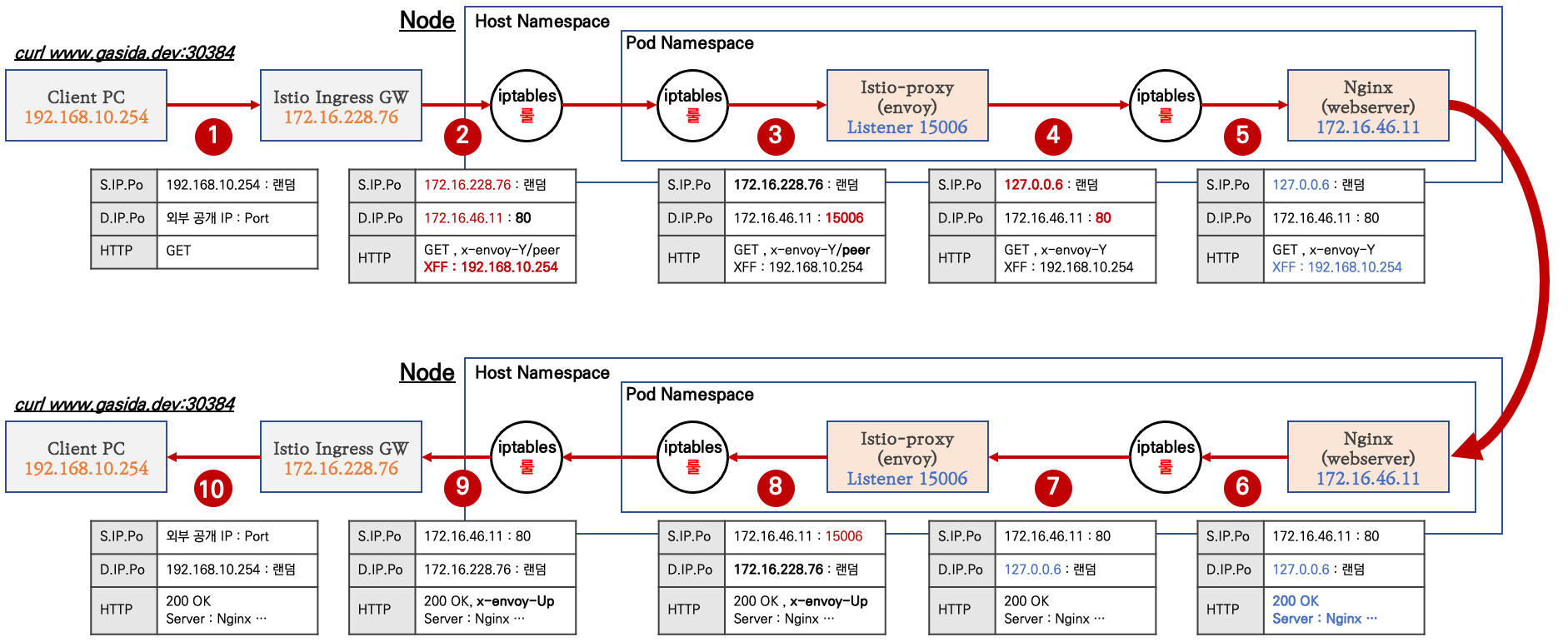
외부 클라이언트 PC에서 K8S 파드(웹서버)로 접속 과정
-
실습을 위한 환경 설정 및 배포 : nginx-app 로 향하는 통신의 경우 peer 간 mtls 끄기
cat <<EOF | kubectl apply -f -
apiVersion: v1
kind: Pod
metadata:
  name: nginx-pod
  labels:
    app: nginx-app
spec:
  terminationGracePeriodSeconds: 0
  containers:
  - name: nginx-container
    image: nginx
    ports:
    - containerPort: 80
---
apiVersion: v1
kind: Service
metadata:
  name: svc-nginx
spec:
  ports:
    - name: svc-nginx
      port: 80
      targetPort: 80
  selector:
    app: nginx-app
  type: ClusterIP
---
apiVersion: networking.istio.io/v1alpha3
kind: Gateway
metadata:
  name: test-gateway
spec:
  selector:
    istio: ingressgateway
  servers:
  - port:
      number: 80
      name: http
      protocol: HTTP
    hosts:
    - "*"
---
apiVersion: networking.istio.io/v1alpha3
kind: VirtualService
metadata:
  name: nginx-service
spec:
  hosts:
  - "$MYDOMAIN"
  gateways:
  - test-gateway
  http:
  - route:
    - destination:
        host: svc-nginx
        port:
          number: 80
EOF
# 모니터링
watch -d "kubectl get svc -n istio-system -l app=istio-ingressgateway;echo;kubectl get pod -n istio-system -o wide -l app=istio-ingressgateway;echo;kubectl get pod -owide nginx-pod"
watch -d "kubectl get pod -n istio-system -o wide -l app=istio-ingressgateway;echo;kubectl get pod -owide nginx-pod"# 서비스 중 app: nginx-app 로 향하는 통신의 경우 peer 간 mtls 끄기(istio-ingressgw 와 목적지 워커노드의 파드에 istio-proxy 간)
cat <<EOF | kubectl create -f -
apiVersion: security.istio.io/v1beta1
kind: **PeerAuthentication**
metadata:
name: "example-workload-policy"
spec:
selector:
matchLabels:
app: nginx-app
portLevelMtls:
80:
mode: DISABLE
EOF# istio-ingressgateway 서비스 externalTrafficPolicy 설정 : 점검
kubectl patch svc -n istio-system istio-ingressgateway -p '{"spec":{"externalTrafficPolicy": "Local"}}'
# testpc 에 /etc/hosts 에 istio-ingressgateway 파드가 배포된 ec2의 private ip 로 도메인 변경
vi /etc/hosts클라이언트(요청) → 파드(인입)
- 외부 클라이언트 PC에서 k8s 클러스터 내부의 웹 서버 파드로 인입 시 트래픽 흐름입니다.

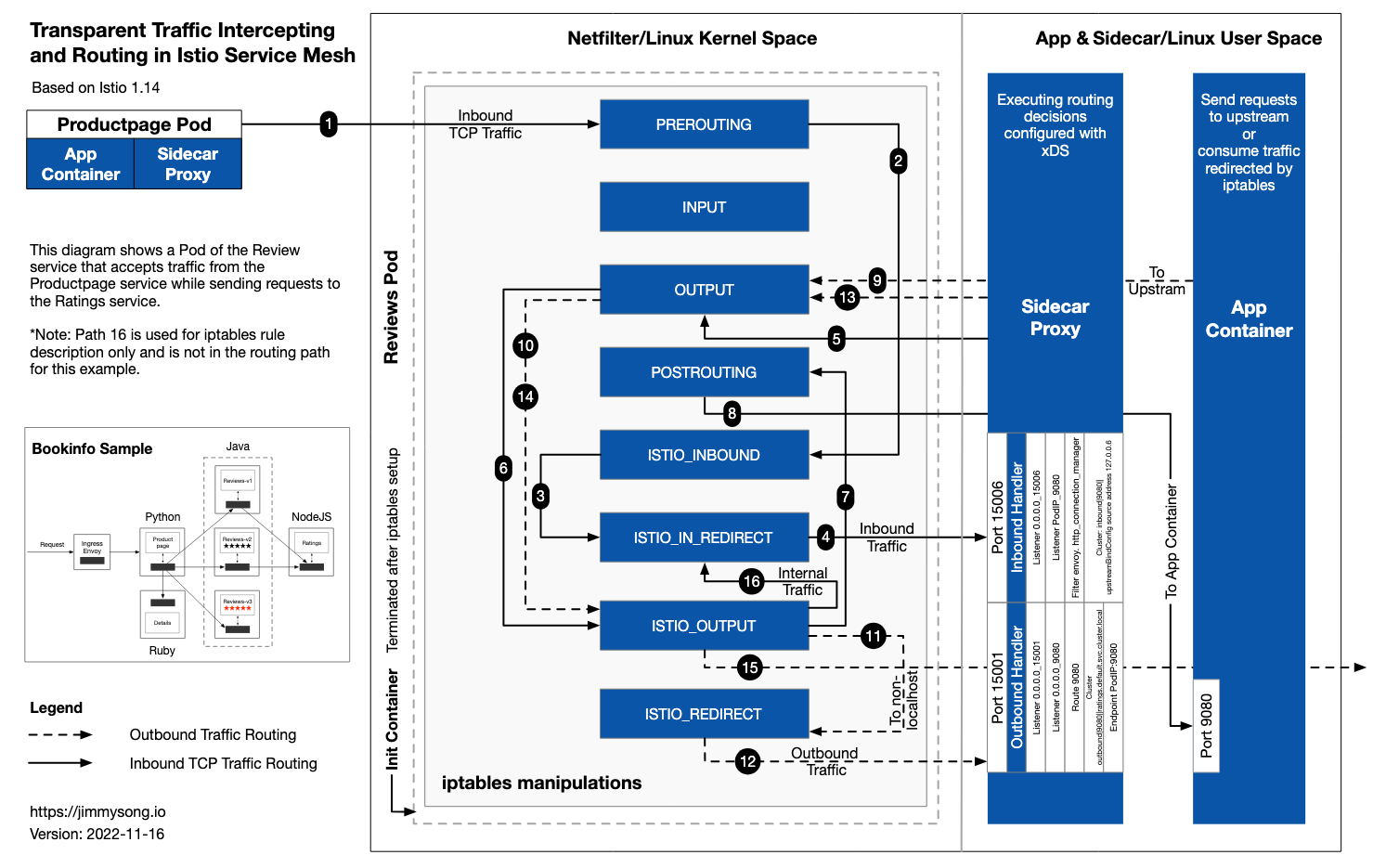
파드 내 IPTables 적용 흐름 : 아래 (1) ~ (8) 까지의 과정을 먼저 설명합니다.
-
Client PC → Istio IngressGateway 파드 구간
# 아래 처럼 정상적으로 웹 서버 접속 정보 출력 확인 curl -s -v $MYDOMAIN:$IGWHTTP curl -s $MYDOMAIN:$IGWHTTP | grep -o "<title>.*</title>" while true; do curl -s $MYDOMAIN:$IGWHTTP | grep -o "<title>.*</title>" ; echo "--------------" ; sleep 1; done while true; do curl -s $MYDOMAIN:$IGWHTTP | grep -o "<title>.*</title>" ; echo "--------------" ; sleep 0.1; done curl -s --user-agent "IPHONE" $MYDOMAIN:$IGWHTTP | grep -o "<title>.*</title>" while true; do curl -s $MYDOMAIN:$IGWHTTP | grep -o "<title>.*</title>"; date "+%Y-%m-%d %H:%M:%S" ; echo "--------------" ; sleep 1; done # 로그 확인 kubetail -l app=nginx-app -f -
Istio IngressGateway 파드 → 노드 인입
- Istio IngressGateway(envoy) 파드는 클라이언트 PC의 IP를 HTTP
XFF(X-Forwarded-for) 헤더에 담아서 전달합니다. - Istio IngressGateway(envoy) 파드 x-envoy-Y 헤더를 추가해서 전달합니다.
- Istio IngressGateway(envoy) 파드는 클라이언트 PC의 IP를 HTTP
-
[파드 내부] IPTables 적용 → Istio-proxy 컨테이너 인입
- 'PAUSE 컨테이너'가 파드 네트워크 네임스페이스를 생성하여 제공하며, 'Init 컨테이너'는 Istio-proxy가 트래픽을 가로챌 수 있게 파드 내에 iptables rules 설정을 완료합니다.
# 참고로, NAT Tables 만 설정되고, 그외(filter, mangle, raw 등)은 설정하지 않습니다. (istio-k8s:default) root@k8s-m:~# kubectl logs nginx-pod -c istio-init * nat -N ISTIO_INBOUND -N ISTIO_REDIRECT -N ISTIO_IN_REDIRECT -N ISTIO_OUTPUT -A ISTIO_INBOUND -p tcp --dport 15008 -j RETURN -A ISTIO_REDIRECT -p tcp -j REDIRECT --to-ports 15001 -A ISTIO_IN_REDIRECT -p tcp -j REDIRECT --to-ports 15006 -A PREROUTING -p tcp -j ISTIO_INBOUND -A ISTIO_INBOUND -p tcp --dport 22 -j RETURN -A ISTIO_INBOUND -p tcp --dport 15090 -j RETURN -A ISTIO_INBOUND -p tcp --dport 15021 -j RETURN -A ISTIO_INBOUND -p tcp --dport 15020 -j RETURN -A ISTIO_INBOUND -p tcp -j ISTIO_IN_REDIRECT -A OUTPUT -p tcp -j ISTIO_OUTPUT -A ISTIO_OUTPUT -o lo -s 127.0.0.6/32 -j RETURN -A ISTIO_OUTPUT -o lo ! -d 127.0.0.1/32 -m owner --uid-owner 1337 -j ISTIO_IN_REDIRECT -A ISTIO_OUTPUT -o lo -m owner ! --uid-owner 1337 -j RETURN -A ISTIO_OUTPUT -m owner --uid-owner 1337 -j RETURN -A ISTIO_OUTPUT -o lo ! -d 127.0.0.1/32 -m owner --gid-owner 1337 -j ISTIO_IN_REDIRECT -A ISTIO_OUTPUT -o lo -m owner ! --gid-owner 1337 -j RETURN -A ISTIO_OUTPUT -m owner --gid-owner 1337 -j RETURN -A ISTIO_OUTPUT -d 127.0.0.1/32 -j RETURN -A ISTIO_OUTPUT -j ISTIO_REDIRECT COMMIT- 파드 내 IPTables Chains/Rules 적용 (NAT 테이블) → 'Istio-proxy 컨테이너'로 인입됩니다.
- PREROUTING → ISTIO_INBOUND → ISTIO_IN_REDIRECT (redir ports 15006)
nginx 파드가 배치된 노드에서 아래 실행 # 아래 확인은 istio-proxy 대신 pause 에서 iptables 확인 해보자... # 변수 지정 : C1(Istio-proxy, Envoy , 단축키 지정 lsns -t net ps -ef |grep istio 1337 347173 347155 0 18:52 ? 00:00:01 /usr/local/bin/envoy -c etc/istio/proxy/envoy-rev.json --drain-time-s 45 --drain-strategy immediate --local-address-ip-version v4 --file-flush-interval-msec 1000 --disable-hot-restart --allow-unknown-static-fields -l warning --component-log-level misc:error --concurrency 2 C1PID=347173 alias c1="nsenter -t $C1PID -n" ~~crictl ps CONTAINER IMAGE CREATED STATE NAME ATTEMPT POD ID POD b6a2265bd4e09 25eeeeca367cf 6 minutes ago Running istio-proxy 0 adfe596135f4e nginx-pod adbc8a95a979f 7f553e8bbc897 6 minutes ago Running nginx-container 0 adfe596135f4e nginx-pod fee76dda9c16d f9095e2f0444d About an hour ago Running grafana 0 79122dcc70e1c grafana-7f76bc9cdb-jqs29 ef150da585889 a342234ebb356 5 hours ago Running discovery 0 549480847b6d1 istiod-7f8b586864-mv944 31fecdd35c503 5d221316a3c61 6 hours ago Running local-path-provisioner 0 c1fe2cf4bd962 local-path-provisioner-6795b5f9d8-64b8j crictl exec -it b6a2265bd4e09 ip -c a alias c1="crictl exec -it b6a2265bd4e09" sudo crictl exec -it b6a2265bd4e09 ip -c a~~ # Istio-proxy 컨테이너의 iptables 확인 c1 iptables -t nat --zero # 패킷 카운트 초기화 # 트래픽 인입 시 TCP 경우 모든 트래픽을 15006 으로 리다이렉트한다, 일부 포트는 제외(22, 15008, 15020, 15021, 15090) c1 iptables -t nat -L -n -v Chain PREROUTING (policy ACCEPT 44 packets, 2640 bytes) pkts bytes target prot opt in out source destination 45 2700 ISTIO_INBOUND tcp -- * * 0.0.0.0/0 0.0.0.0/0 Chain ISTIO_INBOUND (1 references) pkts bytes target prot opt in out source destination ... 1 60 ISTIO_IN_REDIRECT tcp -- * * 0.0.0.0/0 0.0.0.0/0 Chain ISTIO_IN_REDIRECT (3 references) pkts bytes target prot opt in out source destination 1 60 REDIRECT tcp -- * * 0.0.0.0/0 0.0.0.0/0 redir ports 15006 # 모니터링 >> 아래 ss 소켓 강제 Reset 참고 c1 iptables -t nat --zero c1 iptables -t nat -S | grep 15006 c1 iptables -v --numeric --table nat --list ISTIO_IN_REDIRECT watch -d "nsenter -t $C1PID -n iptables -v --numeric --table nat --list PREROUTING ; echo ; nsenter -t $C1PID -n iptables -v --numeric --table nat --list ISTIO_INBOUND; echo ; nsenter -t $C1PID -n iptables -v --numeric --table nat --list ISTIO_IN_REDIRECT" watch -d "nsenter -t $C1PID -n iptables -t nat -L -n -v" - Istio-proxy 컨테이너'의 15006 Listener 확인
# ss (socket statistics)로 시스템 소켓 상태 확인 : 15006 은 envoy 프로세스가 Listen 하고 있다
root@k8s-w2:~# c1 ss -tpnl '( dport = :15006 or sport = :15006 )'
State      Recv-Q      Send-Q           Local Address:Port            Peer Address:Port     Process
LISTEN     0           4096                   0.0.0.0:15006                0.0.0.0:*         users:(("envoy",pid=3928,fd=37))
LISTEN     0           4096                   0.0.0.0:15006                0.0.0.0:*         users:(("envoy",pid=3928,fd=36))

# 확인 예시
c1 ss -tpnt '( dport = :15006 or sport = :15006 or sport = :80 or dport = :80 )'
watch -d "nsenter -t $C1PID -n  ss -tpnt '( dport = :15006 or sport = :15006 or sport = :80 or dport = :80 )'"

# 연결된 소켓 강제 Reset
# c0 ss -K dst 172.16.228.66 dport = 44526
c1 ss -K dst 172.16.228.66
c1 ss -K dst 172.16.46.13
- PREROUTING → ISTIO_INBOUND → ISTIO_IN_REDIRECT (redir ports 15006)
-
[파드 내부] Istio-proxy 컨테이너 → IPTables 적용
- 'Istio-proxy 컨테이너' 는 대리인(Proxy) 역할로, 출발지 IP를 127.0.0.6 으로 변경하여 'Nginx 컨테이너'와 연결을 한다
-
[파드 내부] IPTables 적용 → Nginx 컨테이너 인입
- 파드 내에 IPTables 는 전역(?)으로 적용되므로, 'Istio-proxy' 의 인/아웃 시 트래픽 구별이 중요하다.
- 'Istio-proxy' 를 빠져나올때는 출발지 IP가 127.0.0.6 이므로 ISTIO_OUTPUT 에 적용되어 리턴되어 POSTROUTING 를 통해 nginx 로 도착한다
- IPTables 확인 : istio-proxy → OUTPUT → ISTIO_OUTOUT(맨 상단 Rule 매칭으로 RETURN) -> POSTROUTING -> NGINX 컨테이너
- 최종적으로 nginx 컨테이너에 클라이언트의 요청 트래픽이 도착한다.
- 파드 내에 IPTables 는 전역(?)으로 적용되므로, 'Istio-proxy' 의 인/아웃 시 트래픽 구별이 중요하다.
파드(리턴 트래픽) → 클라이언트
- nginx (웹 서버)컨테이너에서 리턴 트래픽(응답, 200 OK)를 클라이언트에 전달합니다.
- IPTables CT(Connection Table)에 정보를 참고해서 역변환 등이 적용되어 전달됩니다.
파드(요청) → 외부 웹서버
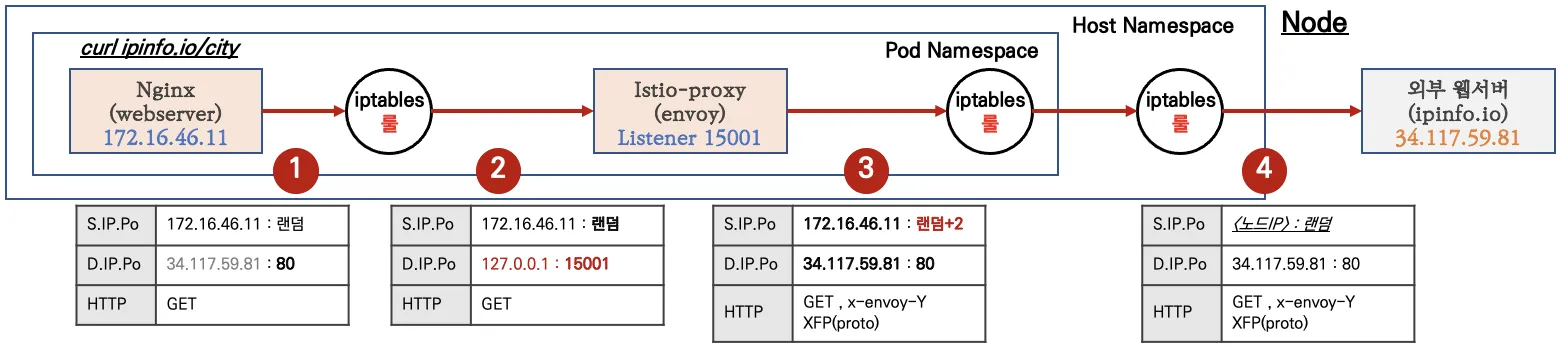
- [파드 내부] Client PC → Istio IngressGateway 파드 구간
- 'nginx 컨테이너' 에서 외부 웹서버 요청을 합니다.
- [파드 내부] IPTables → Istio-proxy 컨테이너 인입
- 파드 내 IPTables Chains/Rules 적용 (NAT 테이블) → 'Istio-proxy 컨테이너'로 인입됩니다.
- OUTPUT → ISTIO_OUTPUT → ISTIO_REDIRECT (redir ports 15001)
# iptables 확인
c1 iptables -t nat --zero
c1 iptables -v --numeric --table nat --list ISTIO_REDIRECT
watch -d "nsenter -t $C1PID -n iptables -v --numeric --table nat --list OUTPUT; echo ; nsenter -t $C1PID -n iptables -v --numeric --table nat --list ISTIO_OUTPUT; echo ; nsenter -t $C1PID -n iptables -v --numeric --table nat --list ISTIO_REDIRECT"
watch -d "nsenter -t $C1PID -n iptables -t nat -L -n -v"

# nginx 파드에서 TCP 트래픽 요청으로 인입 시, **ISTIO_REDIRECT** 에서 **redir ports 15001** 되어 '**Istio-proxy 컨테이너**'로 **인입**됩니다.
**c1 iptables -t nat -L -n -v**
Chain **OUTPUT** (policy ACCEPT 5 packets, 455 bytes)
 pkts bytes target        prot opt in     out     source               destination
    0     0 ISTIO_OUTPUT  tcp  --  *      *       0.0.0.0/0            0.0.0.0/0

Chain **ISTIO_OUTPUT** (1 references)
 pkts bytes target          prot opt in     out     source               destination
 ...
    0     0 ISTIO_REDIRECT  all  --  *      *       0.0.0.0/0            0.0.0.0/0

Chain **ISTIO_REDIRECT** (1 references)
 pkts bytes target     prot opt in     out     source               destination
    0     0 **REDIRECT**   tcp  --  *      *       0.0.0.0/0            0.0.0.0/0            **redir ports 15001**
- OUTPUT → ISTIO_OUTPUT → ISTIO_REDIRECT (redir ports 15001)
- 파드 내 IPTables Chains/Rules 적용 (NAT 테이블) → 'Istio-proxy 컨테이너'로 인입됩니다.
- [파드 내부] Istio-proxy 컨테이너 → 노드의 호스트 네임스페이스
- 'Istio-proxy 컨테이너' 는 대리인(Proxy) 역할로, 출발지 포트를 변경(+2) 후 외부 웹서버에 연결을 한다
- 파드를 빠져나가기 전, 다시 한번 더 IPTables 적용 된다 ⇒ 이때, 이전 트래픽과 매칭되는 Rule 이 다른 것은 UID 1337 때문
- OUTPUT → ISTIO_OUTPUT
- istio 애플리케이션 요구 사항 중 일부
- Application UIDs: Ensure your pods do not run applications as a user with the user ID (UID) value of
1337because1337is reserved for the sidecar proxy.
- Application UIDs: Ensure your pods do not run applications as a user with the user ID (UID) value of
- 노드 → 외부
- 노드에 SNAT(masquerading) 설정이 되어 있을 경우, 출발지 IP 를 노드의 NIC IP로 변환하여 외부 웹서버에 요청을 전달합니다.
외부 웹서버(리턴 트래픽) → 파드
웹 서버에서 리턴 트래픽이 파드에 돌아오는 과정은 1.2 에서 알아본 흐름과 유사합니다.
다만, 파드 내로 인입 시 목적지 포트(+2) 이므로, ‘Nginx 컨테이너’ 로 바로 가지 않고, 'Istio-proxy 컨테이너' 로 먼저 가게 됩니다.