Step 3
왼쪽 클릭 지정
MineSearch.jsx
export const START_GAME = 'START_GAME';
export const OPEN_CELL = 'OPEN_CELL';

const reducer = (state, action) => {
    switch (action.type) {
        case START_GAME:
            return {
                ...state,
                tableData: plantMine(action.row, action.cell, action.mine)
            };
        case OPEN_CELL: {
            const tableData = [...state.tableData];
            tableData[action.row] = [...state.tableData[action.row]];
            tableData[action.row][action.cell] = CODE.OPENED;
            return {
                ...state,
                tableData,
            }
        }

        default:
            return state;
    }
}
OPEN_CELL 액션을 만들어 주고 리듀서에 추가 해준다
const tableData = [...state.tableData];
tableData[action.row] = [...state.tableData[action.row]];
이렇게 한건 불변성 때문!
Td.jsx
const Td = ({ rowIndex, cellIndex }) => {
    const { tableData, dispatch } = useContext(TableContext);

    const onClickTd = useCallback(() => {
        dispatch( {type: OPEN_CELL, row: rowIndex, cell: cellIndex} );
    }, []);

    return (
        <td
            style={getTdStyle(tableData[rowIndex][cellIndex])}
            onClick={onClickTd}
        >{getTdText(tableData[rowIndex][cellIndex])}
        </td>
    )

}
Td에서 onClick을 dispatch를 통해 인덱스를 전달해주면
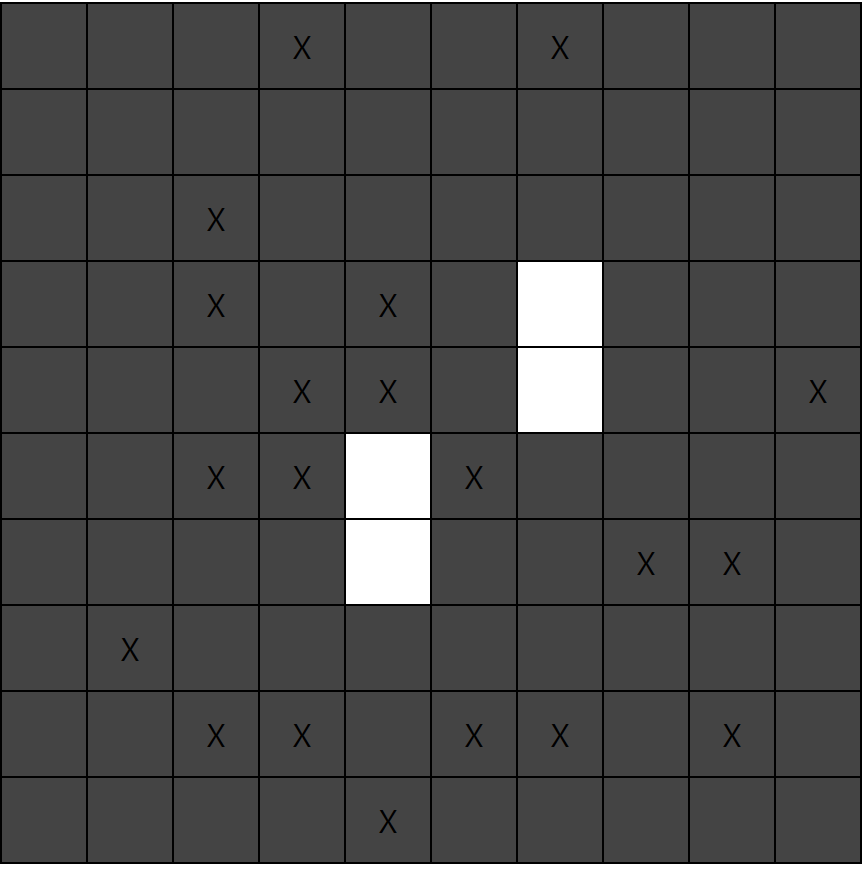
이렇게 클릭시 흰색이 된다.
tableData 값에 따라 다르게 dispatch를 해주기위해 switch문으로 분류하고
const Td = ({ rowIndex, cellIndex }) => {
    const { tableData, dispatch } = useContext(TableContext);

    const onClickTd = useCallback(() => {
        switch (tableData[rowIndex][cellIndex]) {
            case CODE.OPENED:
            case CODE.FLAG_MINE:
            case CODE.FLAG:
            case CODE.QUESTION_MINE:
            case CODE.QUESTION:
                return;
            case CODE.NORMAL:
                dispatch( {type: OPEN_CELL, row: rowIndex, cell: cellIndex} );
                return;
            case CODE.MINE:
                dispatch( {type: CLICK_MINE, row: rowIndex, cell: cellIndex} );
                return;
            default:
                return;
        }

    }, []);

    return (
        <td
            style={getTdStyle(tableData[rowIndex][cellIndex])}
            onClick={onClickTd}
        >{getTdText(tableData[rowIndex][cellIndex])}
        </td>
    )

}
스타일과 텍스트도 코드에따라 분류해준다.
const getTdStyle = (code) => {
    switch (code) {
        case CODE.NORMAL:
        case CODE.MINE:
            return {
                background: '#444',
            };
        case CODE.CLICKED_MINE:
        case CODE.OPENED:
            return {
                background: 'white',
            };
        case CODE.QUESTION_MINE:
        case CODE.QUESTION:
            return {
                background: 'yellow',
            }
        case CODE.FLAG_MINE:
        case CODE.FLAG:
            return {
                background: 'red',
            }
        default:
            return {
                background: 'white',
            };
    }
};

const getTdText = (code) => {
    switch (code) {
        case CODE.NORMAL:
            return ' ';
        case CODE.MINE:
            return 'X';
        case CODE.CLICKED_MINE:
            return '펑';
        case CODE.FLAG_MINE:
        case CODE.FLAG:
            return '!';
        case CODE.QUESTION_MINE:
        case CODE.QUESTION:
            return '?';
        default:
            return ' ';
    }

};
다시 MineSearch의 리듀서로가서
export const CLICK_MINE = 'CLICK_MINE';

[...]
case CLICK_MINE: {
            const tableData = [...state.tableData];
            tableData[action.row] = [...state.tableData[action.row]];
            tableData[action.row][action.cell] = CODE.CLICKED_MINE;
            return {
                ...state,
                tableData,
            }
        }
[...]
이 액션을 추가해주면 지뢰를 눌렀을 때 펑하고 바뀐다.
그리고
export const TableContext = createContext({
    tableData: [],
    dispatch: () => {},
    halted: true,
});

const initialState = {
    tableData: [],
    timer: 0,
    result: '',
    halted: true,
}
halted라는 state를 추가시켜 지뢰를 클릭했을때 게임을 멈추게 한다
case START_GAME:
            return {
                ...state,
                tableData: plantMine(action.row, action.cell, action.mine),
                halted: false,
            };
case CLICK_MINE: {
            const tableData = [...state.tableData];
            tableData[action.row] = [...state.tableData[action.row]];
            tableData[action.row][action.cell] = CODE.CLICKED_MINE;
            return {
                ...state,
                tableData,
                halted: true,
            }
        }
리듀서에 시작과 지뢰클릭도 저렇게 바꿔주고
const MineSearch = () => {
    const [state, dispatch] = useReducer(reducer, initialState);
    const { tableData, halted, timer, result } = state;
    //useMemo로 캐싱을 해줘야 contextAPI 사용시 계속되는 렌더링을 막을 수 있다.
    const value = useMemo(() => ({ tableData: tableData, halted: halted, dispatch }), [tableData, halted]);

    return (
        //value = {{ tableData: state.tableData, dispatch }} 원래는 이렇게 들어가지만 useMemo로 캐싱해줌
        <TableContext.Provider value = {value}>
            <Form />
            <div>{timer}</div>
            <Table />
            <div>{result}</div>
        </TableContext.Provider>
    )
}
useMemo 도 바꿔주자 뒤에 배열 파라미터도 꼭! 넣어주고
state.tableData, stable.halted 등등 이름이 길어지니까 state로 묶어 구조화 시켜줬다.
Td.jsx에서
const onClickTd = useCallback(() => {
        if (halted) {
            return;
        }
        switch (tableData[rowIndex][cellIndex]) {
            case CODE.OPENED:
            case CODE.FLAG_MINE:
            case CODE.FLAG:
            case CODE.QUESTION_MINE:
            case CODE.QUESTION:
                return;
            case CODE.NORMAL:
                dispatch( {type: OPEN_CELL, row: rowIndex, cell: cellIndex} );
                return;
            case CODE.MINE:
                dispatch( {type: CLICK_MINE, row: rowIndex, cell: cellIndex} );
                return;
            default:
                return;
        }

    }, [tableData[rowIndex][cellIndex], halted]);
halted이면 아무것도 동작안하게 해준다.
그리고 useCallback사용시 꼭! 뒤에 배열 파라미터에 바뀌는 값 넣어주는 것을 습관화한다.
오른쪽 클릭 지정
Td.jsx
const onRightClickTd = useCallback((e) => {
        e.preventDefault(); // 디폴트로 메뉴가 뜨는것을 방지

        if (halted) {
            return;
        }
        switch (tableData[rowIndex][cellIndex]) {
            case CODE.OPENED:
                return;
            case CODE.NORMAL:
            case CODE.MINE:
                dispatch( {type: FLAG_CELL, row: rowIndex, cell: cellIndex} );
                return;
            case CODE.FLAG_MINE:
            case CODE.FLAG:
                dispatch( {type: QUESTION_CELL, row: rowIndex, cell: cellIndex} );
                return;
            case CODE.QUESTION_MINE:
            case CODE.QUESTION:
                dispatch( {type: NORMAL_CELL, row: rowIndex, cell: cellIndex} );
                return;
            default:
                return;
        }
    }, [tableData[rowIndex][cellIndex], halted]);

    return (
        <td
            style={getTdStyle(tableData[rowIndex][cellIndex])}
            onClick={onClickTd}
            onContextMenu={onRightClickTd}
        >{getTdText(tableData[rowIndex][cellIndex])}
        </td>
    )
onContextMenu를 통해 오른쪽 클릭 지정을 해줄 수 있다.
코드가
일반 or 지뢰 >> ! or !(지뢰) >> ? or ?(지뢰) >> 일반 or 지뢰
이렇게 순환하는 구조이다.
이제 MineSearch에서
FLAG_CELLQUESTION_CELLNORMAL_CELL
이 세개의 액션을 만들어 줘야한다.
MineSearch.jsx
export const FLAG_CELL = 'FLAG_CELL';
export const QUESTION_CELL = 'QUESTION_CELL';
export const NORMAL_CELL = 'NORMAL_CELL';

const reducer = (state, action) => {
    switch (action.type) {
        [...]
        case FLAG_CELL: {
            const tableData = [...state.tableData];
            tableData[action.row] = [...state.tableData[action.row]];
            tableData[action.row][action.cell] = tableData[action.row][action.cell]===CODE.MINE?CODE.FLAG_MINE:CODE.FLAG;
            return {
                ...state,
                tableData,
            }
        }
        case QUESTION_CELL: {
            const tableData = [...state.tableData];
            tableData[action.row] = [...state.tableData[action.row]];
            tableData[action.row][action.cell] = tableData[action.row][action.cell]===CODE.FLAG_MINE?CODE.QUESTION_MINE:CODE.QUESTION;
            return {
                ...state,
                tableData,
            }
        }
        case NORMAL_CELL: {
            const tableData = [...state.tableData];
            tableData[action.row] = [...state.tableData[action.row]];
            tableData[action.row][action.cell] = tableData[action.row][action.cell]===CODE.QUESTION_MINE?CODE.MINE:CODE.NORMAL;
            return {
                ...state,
                tableData,
            }
        }
        default:
            return state;
    }
}
FLAG_CELL 이 들어오면 일반인지 지뢰인지에 따라 그냥 깃발인지 지뢰깃발인지 분기처리한다.
QUESTION_CELL 이 들어오면 그냥 깃발인지 지뢰깃발인지에 따라 물음표인지 지뢰 물음표인지 분기처리한다.
NORMAL_CELL 이 들어오면 물음표인지 지뢰 물음표인지에 따라 일반인지 지뢰인지 분기처리 한다.
이처럼 순환구조를 가지게 작성함
여기까지 다하고 나면
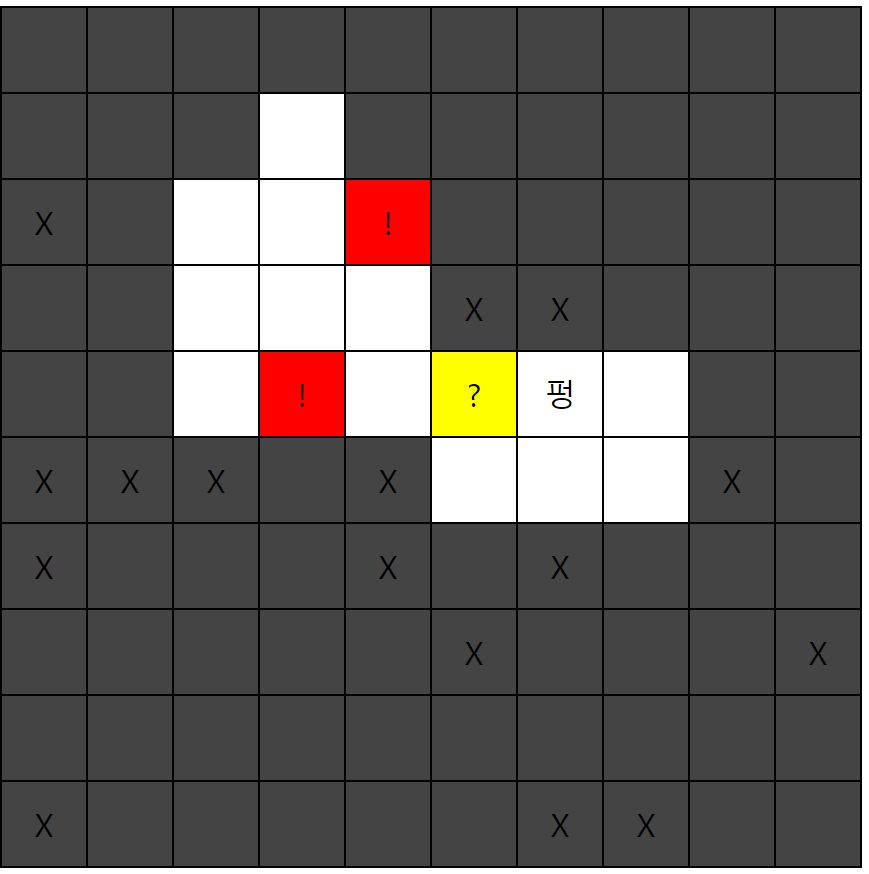
오른쪽 클릭시 ! >> ? >> 검정 으로 돌아가면서 표시되고
지뢰 클릭시 펑되면서 아무것도 동작 안 한다.
