Rotaion and Layouts
- Rotation causes a configuration change to the device
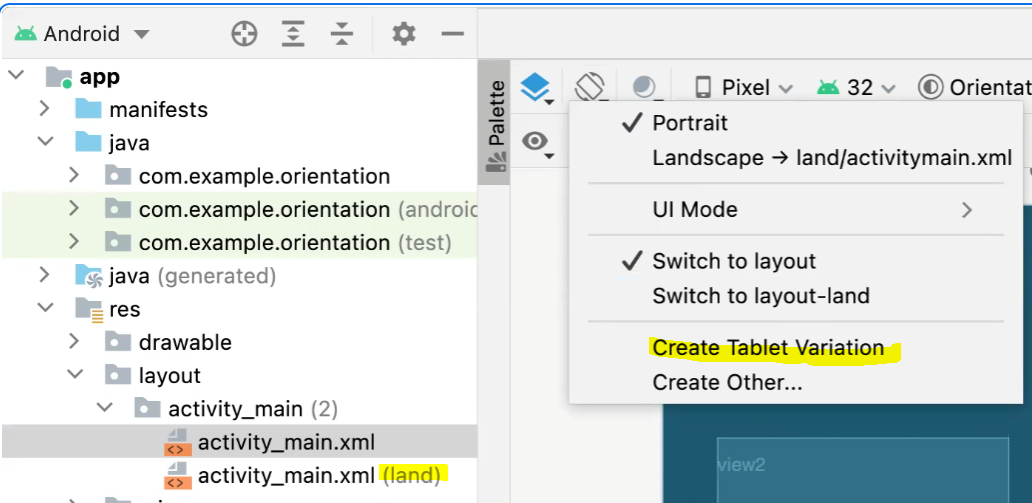
- land-scape version of layout is just a different XML layout
- it can be created as follows from intelliJ
User Interface Style Language
CSS is most well-known example
Android Themes and Styles
create <style> definitions in “res/values/styles.xml”
<resources>
  <style name="BigCentred" parent="TextAppearance.AppCompat">
    <item name="android:textSize">28sp</item>
    <item name="android:background">#cccccc</item>
    <item name="android:text">default</item>
  	...
  </style>
  <style name="BigCentred.Blue">
    <item name="android:background">#0000ff</item>
    <item name="android:text">blue</item>
  </style>
  ...
</resources>
apply styles to views in layout
<TextView style="@style/BigCentred" />
<TextView style="@style/BigCentred.Blue" />
Multi-Screen Applications with Activities
Android travels between activities through Intent
val intent = Intent(this, OtherActivity::class.java)
startActivity(intent)
You can pass key-value pairs to the activities
intent.putExtra("key", value)
////////
// use whatever is applicable getIntExtra, etc.
intent.getStringExtra("key")
You can get result from the activity
val startForResult = registerForActivityResult(StartActivityForResult()){ result ->
	// result.data is of type intent
    ...
}

startForResult.launch(intent)
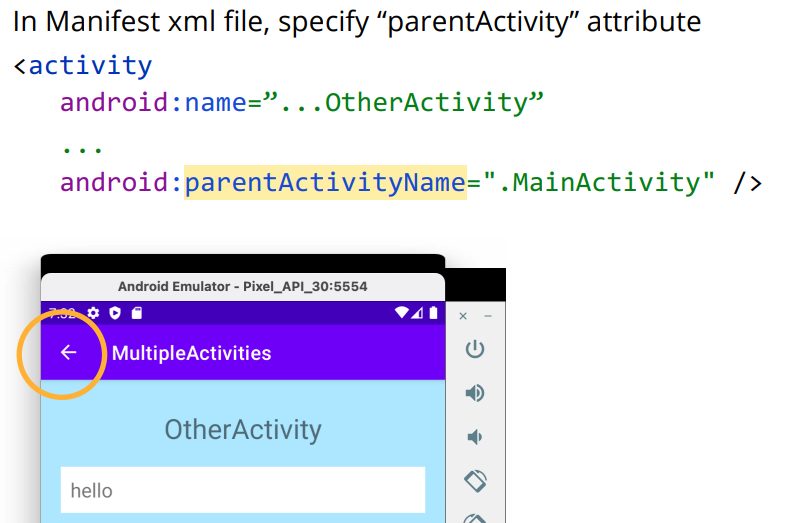
Return to previous activity
you can open other applications using intents
val intent = Intent(Intent.ACTION_VIEW, Uri.parse("geo:0,0?q=honolulu"))
startActivity(intent)
** geo: is a deeplink of google map
Save state
on configuration change, or when application goes to background, the app can be killed and recreated when it gets pull back to the foreground.
so there needs a way to save application state independent from the application's life cycle.
methods of saving states:
- viewModel - saved in memory
- save instance state - save data to 'disk'
- persistent storage - save data to 'disk'
How to save data using the second method - save instance state
var counter = 0
...
override fun onCreate(inState: Bundle?) {
  ...
  if (inState != null) {
    with (inState) {
      counter = getInt("COUNTER")
  }
}

override fun onSaveInstanceState(outState: Bundle) {
  with (outState) {
  	putInt("COUNTER", counter)
  }
  super.onSaveInstanceState(outState)
}

override fun onRestoreInstanceState(inState: Bundle) {
  super.onRestoreInstanceState(inState)
  with (inState) {
  	counter = getInt("COUNTER")
  }
}