[5월 16-17일]
1.position
[3가지 체크사항]
1)부모 자식 간 마진이 병합 가능한지
---자식태그에 마진을 주었을때 부모태그에도 자동 적용되는지 확인
2)top,right,bottom,left 속성 사용 가능한지
---top 속성을 사용했을 때 적용되는지 확인
3) 자식 높이가 부모 높이에 영향을 주는지
---부모높이를 설정하지 않고 자식 높이만 설정했을 때 부모에도 적용이 되는지
(1)static
:요소를 문서의 흐름에 맞추어 배치
-기본값(설정하지 않아도 기본 적용)
-2차원 속성 -> float 사용하면 위치 지정가능
[3가지 체크사항]
1)부모 자식 간 마진이 병합 가능한지 ------ O
2)top,right,bottom,left 속성 사용 가능한지------ X
3) 자식 높이가 부모 높이에 영향을 주는지 ------ O
    <style>
        .parent-static{
            width: 300px;
            height: 300px; /* 체크사항 3번 확인-주석처리하면 자식의 높이를 따라감*/
            background-color: antiquewhite;
        }
        .child-static{
            position: static; /* 기본값이므로 아무 변화없음 */
            width: 100px;
            height: 100px;
            background-color: blueviolet;
            margin-top:100px; /* 체크사항 1번 - 부모에도 적용됨*/
            top:100px /* 체크사항 2번 - 적용안됨 */
        }
    </style>
(2)fixed
:지정한 위치에 고정해 배치 화면에서 요소가 잘릴 수 있음
-top버튼,스크롤해도 내려오는 메뉴
-3차원 속성 -> float 사용하면 위치 지정 가능
[3가지 체크사항]
1)부모 자식 간 마진이 병합 가능한지 ------ X
2)top,right,bottom,left 속성 사용 가능한지------ O (브라우저 기준)
3) 자식 높이가 부모 높이에 영향을 주는지 ------ X
    <style>
        .box1{
            width:300px;
            height:300px;
            background-color: palegreen;
        }
        .parent-fixed{
            width: 300px;
            height:300px; /* 체크사항 3번 확인-주석처리하면 보이지 않게 됨*/
            background-color: antiquewhite;
        }
        .child-fixed{
            position:fixed;
            width: 100px;
            height:100px;
            background-color: blueviolet;
            margin-top: 100px;  /* 체크사항 1번 - 부모에는 적용안됨 */
            top:100px; /* 체크사항 2번 - 적용됨 */
        }
        .box2{
            width:300px;
            height:500px;
            background-color: plum;
        }
    </style>
(3)relative
:이전 요소에 자연스럽게 연결해 배치하되 위지 지정 가능
-큰 레이아웃 작성시에 자주 사용
[3가지 체크사항]
1)부모 자식 간 마진이 병합 가능한지 ------ O
2)top,right,bottom,left 속성 사용 가능한지------ O (자기위치 기준)
3) 자식 높이가 부모 높이에 영향을 주는지 ------ O
    <style>
        .box1{
            width:300px;
            height:300px;
            background-color: palegreen;
        }
        .parent-relative{
            width: 300px;
            height:300px; /* 체크사항 3번 확인-주석처리하면 자식의 높이를 따라감*/
            background-color: antiquewhite;
        }
        .child-relative{
            position:relative;
            width: 100px;
            height:100px;
            background-color: blueviolet;
            margin-top: 100px;  /* 체크사항 1번 - 부모에도 적용됨 */
            top:100px; /* 체크사항 2번 - 적용됨 */
        }
    </style>
(4)absolute
:원하는 위치를 지정해 배치
[3가지 체크사항]
1)부모 자식 간 마진이 병합 가능한지 ------ X
2)top,right,bottom,left 속성 사용 가능한지------ O (브라우저 기준)
3) 자식 높이가 부모 높이에 영향을 주는지 ------ X
    <style>
        .box1{
            width:300px;
            height:300px;
            background-color: palegreen;
        }
        .parent-absolute{
            width: 300px;
            height:300px; /* 체크사항 3번 확인-주석처리하면 보이지 않게 됨*/
            background-color: antiquewhite;
            /* position:relative;  */
            /* 좌표(top)사용시 이동 기준을 브라우저에서 원위치로 바꾸고 싶을때 부모요소에 position을 relative로 설정*/
        }
        .child-absolute{
            position:absolute;
            width: 100px;
            height:100px;
            background-color: blueviolet;
            margin-top: 100px;  /* 체크사항 1번 - 부모에는 적용안됨 */
            top:100px; /* 체크사항 2번 - 적용됨 */
        }
    </style>
2.z-index
:요소를 쌓는 순서
-z축의 높이를 조정한다.
(기본) z-index:0
(큰 수)위로>>>>>(작은수)아래로
<style>
      .box1{
          width: 100px;
          height: 200px;
          background-color: aqua;
          position:absolute;
          z-index: 3;
      }
      .box2{
          width: 200px;
          height: 100px;
          background-color: yellow;
          position: absolute;
          z-index: 2;
      }
  </style>
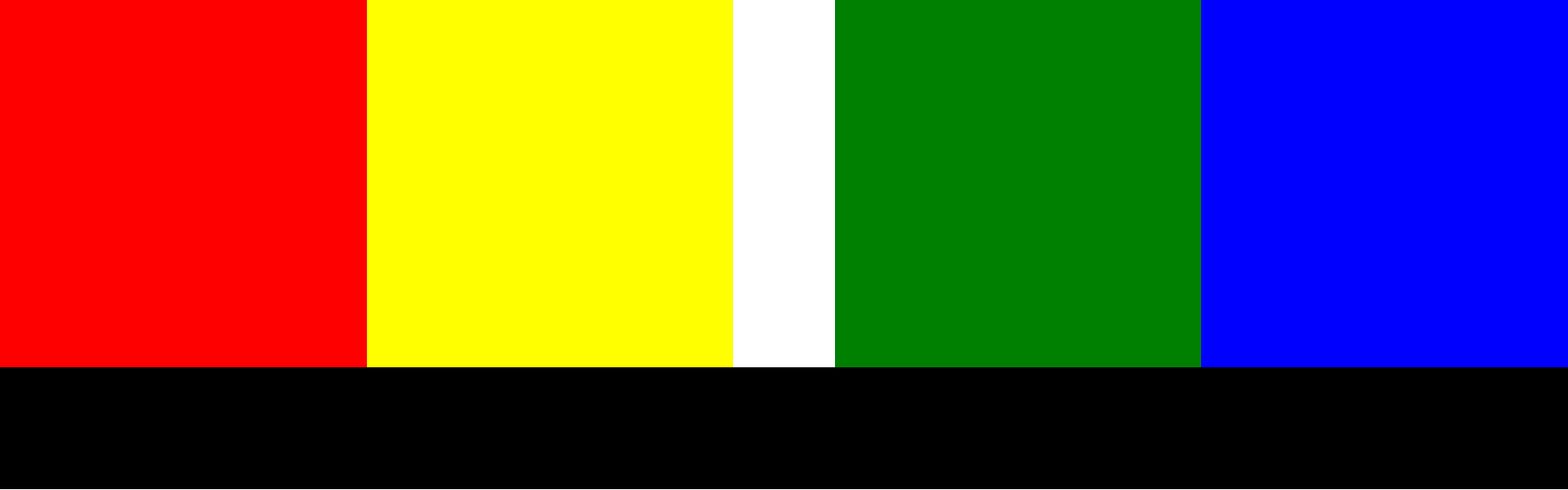
3. float
    <style>
        .left1{
            width: 300px;
            height: 300px;
            background-color: red;
            float: left;
        }
        .left2{
            width: 300px;
            height: 300px;
            background-color: yellow;
            float: left;
        }
        /* <body>에 right1이 먼저 적혀있으므로 right1의 css가 먼저 적용 */
        .right2{
            width: 300px;
            height: 300px;
            background-color: green;
            float: right;
        }
        .right1{
            width: 300px;
            height: 300px;
            background-color: blue;
            float: right;
        }
        footer{
            width: 100%;
            height: 100px;
            background-color: black;
            clear: both; /* clear: left | right | both */
        }
    </style>
body에 left1, left2, right1, right2 순으로 적혀있으므로
그 순서대로 style 태그 안 내용이 적용된다.
4.layout
-index.html, style.css 등을 이용해 레이아웃 만들기