Collection
- 기존 Array 배열에 비해 동적인 배열크기 변경과 Item을 더하거나 제거가 가능.
- non-generic 과 generic collection으로 구분된다.
- ArrayList :
。System.Collections namespace에서 정의된 class
。다른 type의 data를 저장할 수 있다.
。값형식을 참조형식으로 변환(boxing) , 참조형식을 값형식으로 변환(unboxing)이 이뤄진다. -> 비효율적ArrayList ml1 = new ArrayList(); ml.Add(3); // boxing ml.Add("k"); foreach(var v in ml /*unboxing*/ ) { Console.WriteLine(v); }
- List<> :
。System.Collections.Generic에서 정의된 class.
。type parameter 에 정의된 type 의 data만 저장이 가능.
。boxing-unboxing이 발생하지 않는다.List<int> ml2 = new List<int>();
List<> 배열
- List<>[] : 각 요소는 type을 저장할 수 있는 List.
class Student
{
    public string Name { get; set; }
    public double Score { get; set; }
}
internal class Program
{
    static void Main(string[] args)
    {
        List<Student> students = new List<Student>
        {
             new Student() { Name = "Peter", Score = 88.5 },
             new Student() { Name = "Paul", Score = 74.2 },
             new Student() { Name = "Mary", Score = 92.3 },
             new Student() { Name = "John", Score = 82.8 },
             new Student() { Name = "Michael", Score = 100 },
             new Student() { Name = "Lisa", Score = 62.5 }
        };
        List<Student>[] grpSt = new List<Student>[4];
        for (int i = 0; i < grpSt.Length; i++)
        {
            grpSt[i] = new List<Student>();
        }
        foreach (var s in students)
        {
            int tempScore = (int)s.Score / 10;
            switch (tempScore)
            {
                case 6:
                    grpSt[0].Add(s); break;
                case 7:
                    grpSt[1].Add(s);break;
                case 8:
                    grpSt[2].Add(s);break;
                case 9:
                case 10:
                    grpSt[3].Add(s);break;
            }
        }
        int temp = 6;
        foreach(var s in grpSt)
        {
            Console.WriteLine($"{temp*10} ~ {temp*10+10}");
            foreach (var v in s)
            {
                Console.WriteLine("{0,-5} : {1}", v.Name,v.Score);
            }
            temp++;
        }
    }
}
List의 List
- List<List<>> : List 배열과 달리 크기를 정의를 안해도 된다.
List<List<Student>> grpSt = new List<List<Student>>();
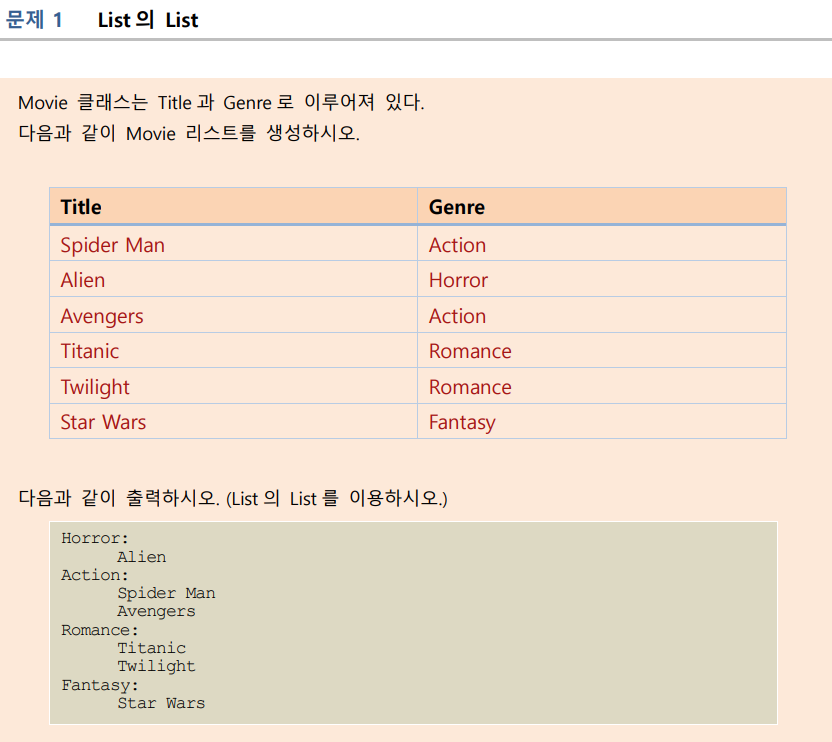
class Movie
{
    public string Title;
    public string Genre;
}
internal class Program
{
    static void Main(string[] args)
    {
        List<Movie> lst1 = new List<Movie>
        {
            new Movie{Title="Spider Man",Genre="Action"},
            new Movie{Title="Alien",Genre="Horror"},
            new Movie{Title="Avengers",Genre="Action"},
            new Movie{Title="Titanic",Genre="Romance"},
            new Movie{Title="Twilight",Genre="Romance"},
            new Movie{Title="Star Wars",Genre="Fantasy"},
        };
        List<List<Movie>> lstlst = new List<List<Movie>>()
        {
            new List<Movie>(),
            new List<Movie>(),
            new List<Movie>(),
            new List<Movie>()
        };
        foreach(Movie movie in lst1)
        {
            switch (movie.Genre)
            {
                case "Action":
                    lstlst[0].Add(movie); break;
                case "Horror":
                    lstlst[1].Add(movie); break;
                case "Romance":
                    lstlst[2].Add(movie);break;
                case "Fantasy":
                    lstlst[3].Add(movie);break;
            }
        }
        foreach (List<Movie> m in lstlst)
        {
            Console.WriteLine("{0} :", m[0].Genre);
            foreach (Movie movie in m)
            {
                Console.WriteLine("\t{0}",movie.Title);
            }
        }
    }
}
공부기록 블로그