Spring Security 활용
Access Control Check:
。Client가 Application의 특정Resource에 접근할 수 있는지를 확인하는 보안절차.
▶ 보안정책을 준수하고 권한이 없는 Client로부터의 Access를 차단하는 중요한 역할을 수행.Access Control Check의 주요개념
- 인증 (
Authentication) :
。사용자의 신원을 증명하는 과정 ( ex.ID/PW 로그인,JWT등 )
▶ 로그인 정보를 받아 인증된 Authentication을 구축.
- 인가 (
Authorization) :
。Authenticated된 사용자가 Server의 특정 Resource에 접근가능한지 확인하는 과정.
Spring Security 학습 내용
。로그인 양식 하드코딩
。MVC , Spring MVC
。Spring Security - 1 : 로그인 양식 사용 설정
。Spring Security - 2 : Filter Chain 관련 설정
。Spring Security - 3
。Spring Securty - 기초 및 원리
- Spring Security를 활용한 로그인 양식 작성하기.
。Spring Security는 기본적으로 log-in, log-out의 전용 URL을 제공.
▶ 따로 log-in , log-out의 url 및JSPpage를 구현할 필요는 없다.
하드코딩 : 로그인 양식
- 기존 하드코딩된 로그인 기능은 Spring Security가 담당 SpringSecurity - DB로그인기능설정
。login.jsp,AuthenticationService.java등 하드코딩 로그인 기능 관련 파일 삭제.
。필요한 source :welcome.jsp, 해당 jsp를 Mapping 하는 Controller (gotoLoginPage.java)// gotoLoginPage.java import org.springframework.stereotype.Controller; import org.springframework.ui.ModelMap; import org.springframework.web.bind.annotation.RequestMapping; import org.springframework.web.bind.annotation.RequestMethod; import org.springframework.web.bind.annotation.SessionAttributes; @Controller @SessionAttributes("name") public class gotoLoginPage { @RequestMapping(value="/", method=RequestMethod.GET) public String gotoLoginPageGET(ModelMap model) { model.addAttribute("name","wjdtn747"); return "welcome"; } }。
welcome.jsp는Form Backing Object에 의한 Data Binding에 의해Spring Bean이 필요하므로 임시로Model객체을 생성해서 바인딩 되도록함.
- Spring Security dependency 추가하기
  <dependency>
            <groupId>org.springframework.boot</groupId>
            <artifactId>spring-boot-starter-security</artifactId>
   </dependency>
。 dependency를 추가 후
spring application을 재실행 시 console의 log창에 개발용 자격증명의PW가 생성되어 표시.
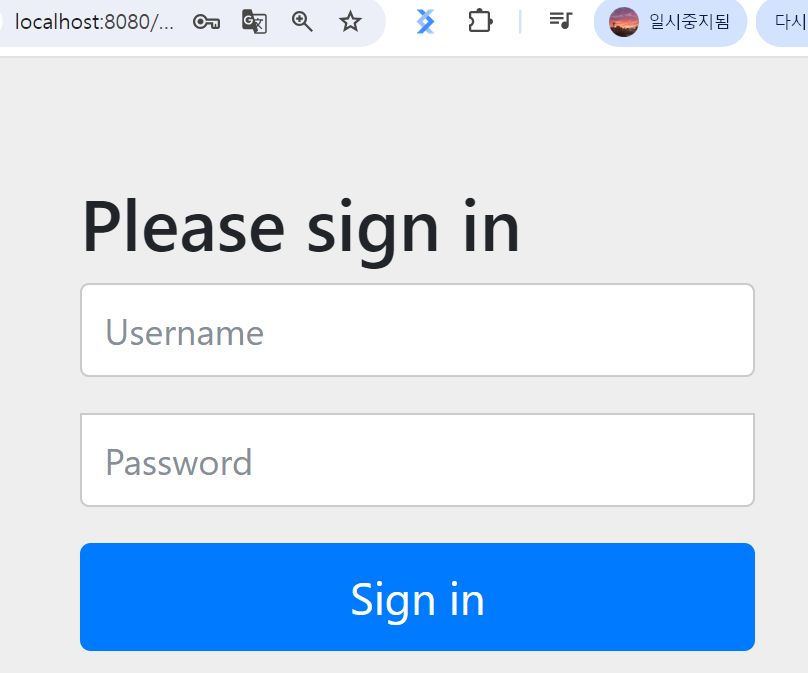
。Spring SecurityFramework의 dependency를 추가하는 경우 Spring application의Controller가 mapping하는 모든 url로 연결 시 화면과 같은 로그인 창이 도출.
Controller Method에 의해 Mapping된 모든 url은Spring Security에 의해 보호되고있으므로, 자격증명에 log-in을 해야 사용이 가능함.
Spring Security의 개발용 자격증명
Spring Security는 해당 Framework의 Dependency만 정의하더라도 Controller에 의해 Mapping된 URL 접속 시 Spring Security의 기본인증폼을 전송하며, Auto-Configuration에 의해 다음 개발용 자격증명을 자동 생성.
。Console에 표시된 PW는 Application이 재실행될때마다 초기화
。ID :user
。PW :console에 표시된 PW
- 개발용 자격증명의 Username과 Password 변경방법
。application.properties에 다음 구문을 추가.spring.security.user.name=user123 spring.security.user.password=pw456。해당 구문 추가 후 로그인 시 변경된 개발용 자격증명에 로그인이 가능.
▶ 해당application.properties에서 정의된 개발용자격증명의 경우In-Memory DB에 저장되므로,TEST용도로만 활용된다.
- 사용자자격증명 (
User Credential) 저장소
In-Memory DB:
。개발용 Local DB로 사용이 용이한RDMBS.
。Memory에 저장되는 방식으로 Application 재가동 시 초기화되는 특징을 지니므로Production환경에 적용하기에는 매우 부적합한 특징을 지님.
。Local또는Test환경에서 주로 사용됨.
DB:
。JDBC또는JPA를 통해 DB로 자격증명을 Access 하도록 설정.
LDAP( Lightweight Directory Access Protocol )
。Directory Service에 접근하기위한 Protocol.
▶ 사용자, 그룹, 네트워크장비 등의 정보를 중앙에서 관리할 수 있도록 도와주는 프로토콜.
Directory Service: 조직 내 사용자, 부서, 프린터, 서버 등의 정보를 저장하고 검색하는 서비스
LDAP특징
- 중앙 집중식 사용자 관리
。사용자 계정 및 권한을 한 곳에서 관리
Tree구조 ( 계층적 데이터모델 ) :
。조직 내 계정, 그룹 등을 체계적으로 저장.
- 경량 프로토콜 :
。TCP/IP기반에서 빠르고 효율적으로 동작.
- 인증 및 권한 부여.
。로그인 인증, 접근 제어 등에 활용됨.
- 사용자가 임의로 지정한 ID와 PW로 계정을 생성하여 Spring Security 접근하기.
。 ID, PW 등의 정보를UserDetailsinstance에 저장 및 해당 instance를 저장한InMemoryUserDetailsManagerinstance를 생성하여Spring Beaninstance로서 설정하여 로그인 계정 생성.
▶ 임의의 사용자 지정 ID와 PW를 저장 시LDAP혹은DB를 활용해야하지만, 현재 과정에서는InMemoryUserDetailsManager을 사용.
User.Builder()로UserDetails의 instance 생성
InMemoryUserDetailsManager객체 생성
。@ConfigurationClass를 생성 후InMemoryUserDetailsManagerinstance를 생성하여 Spirng Bean으로 return하는@BeanMethod를 생성
▶InMemoryUserDetailsManager()의 생성자는 가변매개변수를 받을 수 있으므로, 여러개의UserDetailsinstance를 넣을수 있음.import org.springframework.context.annotation.Bean; import org.springframework.context.annotation.Configuration; import org.springframework.security.core.userdetails.User; import org.springframework.security.core.userdetails.UserDetails; import org.springframework.security.crypto.bcrypt.BCryptPasswordEncoder; import org.springframework.security.crypto.password.PasswordEncoder; import org.springframework.security.provisioning.InMemoryUserDetailsManager; @Configuration // Spring Bean을 생성 후 return 하는 역할. public class SpringSecurityConfiguration { @Bean public InMemoryUserDetailsManager createUserDetailsManager(){ UserDetails userDetails = User.builder() .passwordEncoder(input -> passwordEncoderB().encode(input)) .username("wjdtn") .password("123456") .roles("USER","ADMIN") // 특정 작업을 수행하기 위한 역할 설정 .build(); return new InMemoryUserDetailsManager(userDetails); } @Bean public PasswordEncoder passwordEncoderB(){ return new BCryptPasswordEncoder(); } }。
UserDetailsinstance 생성 시.passwordEncoder(람다식)을 통해passwordEncoderB()에 의해BCrypt알고리즘으로 비밀번호가 인코딩되는 람다식을 정의하여PasswordEncoder정의.
。UserClass를 통해UserDetailsinstance를 생성 후InMemoryUserDetailsManager의 생성자매개변수로 전달된InMemoryUserDetailsManagerinstance를 생성하여Spring Beaninstance로 return.
。 이후 Spring Application을 실행하여 해당 생성된 username과 password을 입력 시 정상적으로 로그인됨.
- 새로운 사용자 계정을 추가하기
。Extract Method기능을 수행하여UserDetails의 instance를 생성하는 method를 하나 따로 구축 한 후 각각의 ID,PW를 담은UserDetails객체를 생성하여new InMemoryUserDetailsManager()의 생성자 가변매개변수에 추가하기.@Bean public InMemoryUserDetailsManager createUserDetailsManager(){ return new InMemoryUserDetailsManager( getUserDetails("wjdtn1","123456"), getUserDetails("wjdtn2","123456")); } private UserDetails getUserDetails(String username ,String password) { UserDetails userDetails = User.builder() .passwordEncoder(input -> passwordEncoder().encode(input)) .username(username) .password(password) .roles("USER","ADMIN") // 특정 작업을 수행하기 위한 역할 설정 .build(); return userDetails; }import org.springframework.context.annotation.Bean; import org.springframework.context.annotation.Configuration; import org.springframework.security.core.userdetails.User; import org.springframework.security.core.userdetails.UserDetails; import org.springframework.security.crypto.bcrypt.BCryptPasswordEncoder; import org.springframework.security.crypto.password.PasswordEncoder; import org.springframework.security.provisioning.InMemoryUserDetailsManager; // 생성한 자격증명의 role 지정 용도의 Enum enum roles { ADMIN,USER } @Configuration public class SpringSecurityConfig { @Bean public InMemoryUserDetailsManager inMemoryUserDetailsManager() { // User Class의 User.roles() 설정용 Role은 Enum으로 설정하는게 좋다. roles role1 = roles.USER; roles role2 = roles.ADMIN; return new InMemoryUserDetailsManager( getUserDetails("wjdtn1","1234", role1), getUserDetails("wjdtn2","4567", role2) ); } private UserDetails getUserDetails(String username, String password,roles role){ return User.builder().passwordEncoder((input)-> passwordEncoderB().encode(input) ).username(username).password(password).roles(role.toString()).build(); } @Bean public PasswordEncoder passwordEncoderB() { return new BCryptPasswordEncoder(); } }。
User객체.roles(역할)설정 시Enum을 활용하여 Role을 지정하는게 좋다.
▶Enum객체.toString()으로 문자열로 변경하여 지정.
Controller method의 Model에 하드코딩된 문자열ID가 아닌InMemoryUserDetailsManager의 ID로 Refactoring 하여 표현하기.
。Spring Security의SecurityContextHolder활용.
- 실행중인 thread의
SecurityContext의Authenticationinstance에서username를 가져오는 Method 생성
Process: System에서 실행중인 프로그램을 의미
thread: 하나의 Process 내부에서 독립적으로 실행되는 작은 실행 단위.
import org.springframework.security.core.Authentication;
import org.springframework.security.core.context.SecurityContextHolder;
  private String getLoggedinUsername(){
        Authentication authentication =
                SecurityContextHolder.getContext().getAuthentication();
        // 실행중인 thread의 SecurityContext의 Authentication을 return.
        return authentication.getName(); // 사용자 ID Return.
 }
Controller method의model.put()에 하드코딩으로 기입한 문자열ID를 실행중인 thread의Authenticationinstance에서 추출한 ID로 대체하기// gotoLoginPage.java import org.springframework.security.core.Authentication; import org.springframework.security.core.context.SecurityContextHolder; import org.springframework.stereotype.Controller; import org.springframework.ui.ModelMap; import org.springframework.web.bind.annotation.RequestMapping; import org.springframework.web.bind.annotation.RequestMethod; import org.springframework.web.bind.annotation.SessionAttributes; @Controller @SessionAttributes("name") public class gotoLoginPage { @RequestMapping(value="/", method=RequestMethod.GET) public String gotoLoginPageGET(ModelMap model) { model.addAttribute("name",getLoggedinUsername()); return "welcome"; } private String getLoggedinUsername(){ Authentication auth = SecurityContextHolder.getContext().getAuthentication(); return auth.getName(); } }。
localhost:8080/으로 접속 시getLoggedinUsername()method로 실행중인 thread의Authenticationinstance에서 추출한 ID값을@SessionAttribute에 의해Model에 "name"이라는 변수명으로Session에 저장하여 다른 Controller Class의Model에 전달되어 사용이 가능.
。기존 하드코딩된 ID로Model에 작성 시 다른 url로(localhost:8080/list-todo) 최초 접속 시에는Session에 해당 변수가Model로부터 생성되지않아 전달되지 않으므로, 다른 Controller에서의Model은 해당 변수를 사용이 불가능하다.
▶ 다른 URL을 Mapping하는Controller Class의Controller Method에 기존Model의 하드코딩 부분을Extract Method( Method로 추출하는 기능 :getLoggedinUsername())를 생성하여Spring Security를 이용하여Authentication에서 추출한 ID로 대체하여 사용.
▶ 이때,Extract MethodgetLoggedinUsername()는 해당Controller method의Modelinstance를 매개변수로 받아야한다.// 수정 전 @RequestMapping("list-todo") public String ListAllTodos(ModelMap model){ List<Todo> todos = todoService.findByUsername("wjdtn747"); model.put("todos",todos); return "listTodos"; }// 수정 후 @RequestMapping("list-todo") public String ListAllTodos(ModelMap map){ String userName = getLoggedInUserName(map); List<Todo> todos = todoService.findByUsername(userName); map.addAttribute("todos",todos); return "listTodos"; } // Extract Method에 Controller method의 Model instance를 매개변수로 받아옴. private static String getLoggedInUserName(ModelMap map) { Authentication authentication = SecurityContextHolder.getContext().getAuthentication(); return authentication.getName(); }▶
"wjdtn1"이라는username을 가진 Spring Bean( =Todoinstance )들이Static List에서 정상적으로 조회됨.
Authentication:
。사용자의 인증 정보를 지시하는 Interface.
▶ 접근하는 해당 사용자의 정보와 권한을 담음.
。Authentication객체는 인증 시 id와 password를 포함하여 인증 검증을 위해 전달되며 인증이 성공할 경우 해당 시스템에 대한 액세스 권한을 부여받고SecurityContext에 저장 및 전역적으로 참조가 된다.
Authentication객체.getName():
사용자 id를 return.
Authenticationinterface 구조
- principal : 사용자 ID
- credentials : 사용자 PW
- authorities : 사용자가 보유한 권한 목록
- details : 인증에 관한 부가 정보
- Authenticated : boolean type으로서 인증 여부
SecurityContext:
。인증된Authenticationinstance의 저장소
。해당 Context는ThreadLocal에 저장 및 동일Thread일 경우 전역적으로 참조됨.
Thread Local:
。Java에서 지원하는 Thread Safe한 기술로서 멀티스레드 환경에서 각각의 Thread에게 별도 저장공간을 할당하여 필요한 정보를 저장할 수 있도록 설정.
SecurityContextHolder:
。SecurityContext의 세부정보를 저장 및 추출할 수 있는 기능을 제공.
SecurityContextHolder.getContext().getAuthentication():
。실행중인thread의SecurityContext의Authenticationinstance를 return.
- SpringContextHolder를 통해 SecurityContext에 접근
- SecurityContext를 통해 Authentication에 접근.