
Today
-
AJAX (Ajax(Asynchronous JavaScript and XML)

-
고전적인 웹통신 방법(페이지 일부만 갱신하기 위해 페이지 전체를 다 받아와야하는 방식)을 개선할 수 있는 방법
=> 페이지 재갱신 (Reload) 없이 페이지 일부만을 갱신하여, 웹서버와 데이터를 교환하는 방식 (비동기 통신) -
AJAX 동작과정
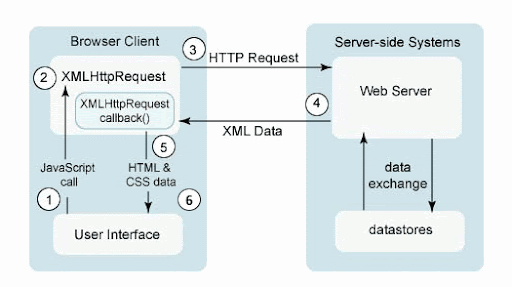
- 이벤트 발생에 의해 이벤트 핸들러역할의 JS 함수를 호출
- 핸들러 함수에서 XMLHttpRequest 객체를 생성한다. 요청이 종료되었을 때 처리할 기능을 콜백함수로 등록
- XMLHttpRequest 객체를 통해 서버로 요청을 보냄
- 요청을 받은 서버는 요청 결과를 적당한 데이터로 구성하여 응답.
- XMLHttpRequest 객체에 의해 등록된 콜백함수를 호출하여 응답 결과를 현재 웹 페이지에 반영
-
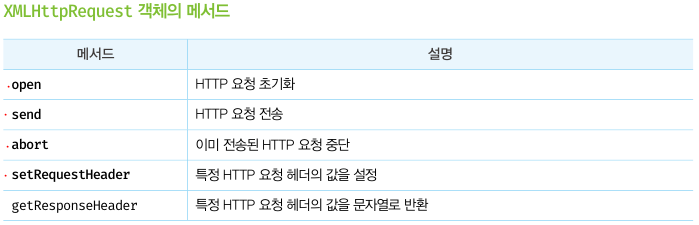
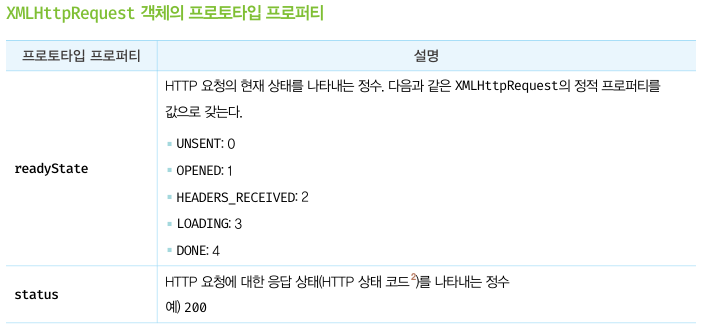
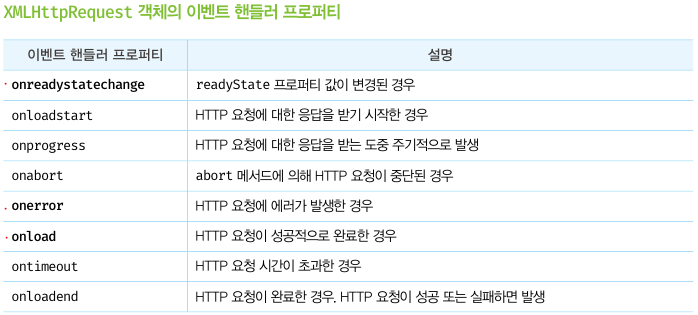
XMLHttpRequest 객체
- XMLHttpRequest 객체를 이용해서 서버와의 통신을 JS에서 제어할 수 있게되며, 서버측과 비동기 통신이 가능하게 한다.
- XMLHttpRequest 객체 생성 -> new XMLHttpRequest()
-
실습 : 기본적인 AJAX 통신 이용해보기 (제이쿼리 없이)
<!DOCTYPE html> <html lang="en"> <head> <meta charset="UTF-8"> <meta name="viewport" content="width=device-width, initial-scale=1.0"> <title>AJAX 통신 테스트</title> </head> <body> <h1>AJAX 통신 테스트</h1> <a href="contents/html1.html">링크로 직접 요청</a> <button onclick="location.href = 'contents/html1.html';">버튼을 클릭하여 요청</button> <hr> <button onclick="requestAjax()">버튼 클릭하여 AJAX 통신</button> <div id="result"> </div> <script> function requestAjax() { const xhr = new XMLHttpRequest(); xhr.open("GET", "contents/html1.html", true); // 요청방식 결정 xhr.send(); // 요청 전송 xhr.onload = function() { // onreadystatechange와 동일 const result = document.querySelector("#result"); result.innerHTML = xhr.responseText + "<hr>"; }; } </script> </body> </html> -
실습2 : xml 파싱해오기
<!DOCTYPE html> <html lang="en"> <head> <meta charset="UTF-8"> <meta name="viewport" content="width=device-width, initial-scale=1.0"> <title>XML 응답 처리</title> </head> <body> <h2>XML 응답 처리</h2> <hr> <script> const xhr = new XMLHttpRequest(); xhr.open("GET", "contents/sample.xml", true); xhr.send(); xhr.onload = () => { if (xhr.status == 200) { //요청성공 const xml = xhr.responseXML; const rootE = xml.getElementsByTagName("testxml"); let output = ""; for(i=1;i<rootE[0].childNodes.length; i+=2) { // xml 의 노드는 2개씩 차지함 => 따라서 증감을 2개씩 함 output += `<h3>${rootE[0].childNodes[i].firstChild.nodeValue}</h3>`; // 오랜만에 써보는 JS 백틱+ } document.body.innerHTML = output; } else { //요청실패 document.body.innerHTML = "<h3>요청실패</h3>"; } } </script> </body> </html> -
실습3 : JSON 파싱해오기
<!DOCTYPE html> <html lang="en"> <head> <meta charset="UTF-8"> <meta name="viewport" content="width=device-width, initial-scale=1.0"> <title>AJAX 테스트</title> <script> const xhr = new XMLHttpRequest(); xhr.open("GET", "contents/sample.json", true); xhr.send(); xhr.onload = (e)=> { const str = xhr.responseText; const result = JSON.parse(str); // JSON 받아올때는 TEXT => OBJ로 변환해주기 for(let objKey in result) { document.body.innerHTML += `<h3>${result[objKey]}</h3>`; } }; </script> </head> <body> <h2>JSON 응답</h2> <hr> </body> </html> -
실습 4 : 시간마다 돌아가는 동적 코드 작성해보기
<!DOCTYPE html> <html lang="en"> <head> <meta charset="UTF-8"> <meta name="viewport" content="width=device-width, initial-scale=1.0"> <title>AJAX 테스트</title> <script> let num = 1; setInterval(() => { // 일정시간마다 작성한 내용을 실행하는 메서드 const xhr = new XMLHttpRequest(); xhr.open("GET", `contents/news${num}.json`, true); xhr.send(); xhr.onload = (e)=> { if(xhr.status == 200) { const str = xhr.responseText; const obj = JSON.parse(str); const target = document.querySelector("#news"); target.innerHTML = obj.news; } else { } }; num ++; num = (num > 3) ? 1 : num; }, 2000); // 2000 => 2초 </script> </head> <body> <h2>2초 간 뉴스 출력</h2> <table> <tr> <th>뉴스 내용</th> </tr> <tr> <td id="news">대기중</td> </tr> </table> </body> </html> -
실습5 : 영화 api 갖고와서 파싱해보기
<!DOCTYPE html> <html lang="en"> <head> <meta charset="UTF-8"> <meta name="viewport" content="width=device-width, initial-scale=1.0"> <title>AJAX 요청 테스트</title> </head> <body> <h1>AJAX 요청 테스트</h1> <hr> <div id="target"> </div> <script> let url = "http://www.kobis.or.kr/kobisopenapi/webservice/rest/boxoffice/searchDailyBoxOfficeList.json?key=75474bdfc6c0a4eb738939dd66c101b5&targetDt=20240401"; const xhr = new XMLHttpRequest(); xhr.open("GET", url, true); xhr.send(); xhr.addEventListener("load", ()=> { let text = JSON.parse(xhr.responseText); let rank = text.boxOfficeResult.dailyBoxOfficeList; let r = 1; for (let e in rank) { document.querySelector("#target").innerHTML += (r) +"위 :"+ rank[e].movieNm + "<br>"; r++; } // document.querySelector("#target").textContent = text.boxOfficeResult.dailyBoxOfficeList[0].movieNm; }) </script> </body> </html> -
실습6 : fetch() 기본방식으로 사용해보기
<!DOCTYPE html>
<html lang="en">
<head>
  <meta charset="UTF-8">
  <meta name="viewport" content="width=device-width, initial-scale=1.0">
  <title>JSON 응답</title>
</head>
<body>
  <h2>fetch() 함수 사용</h2>
  <hr>
  <script>
    function json2Str(obj) {
      for (let e in obj) {
        document.body.innerHTML += `<h3>${obj[e]}</h3>`;
      }
    }
    fetch('contents/sample.json')  // 얘도 비동기 통신 방법 중 하나
    .then(response => {
      return response.json();
    })
    .then(obj => json2Str(obj));
  </script>
</body>
</html>
-
-
웹소켓(Web Socket)
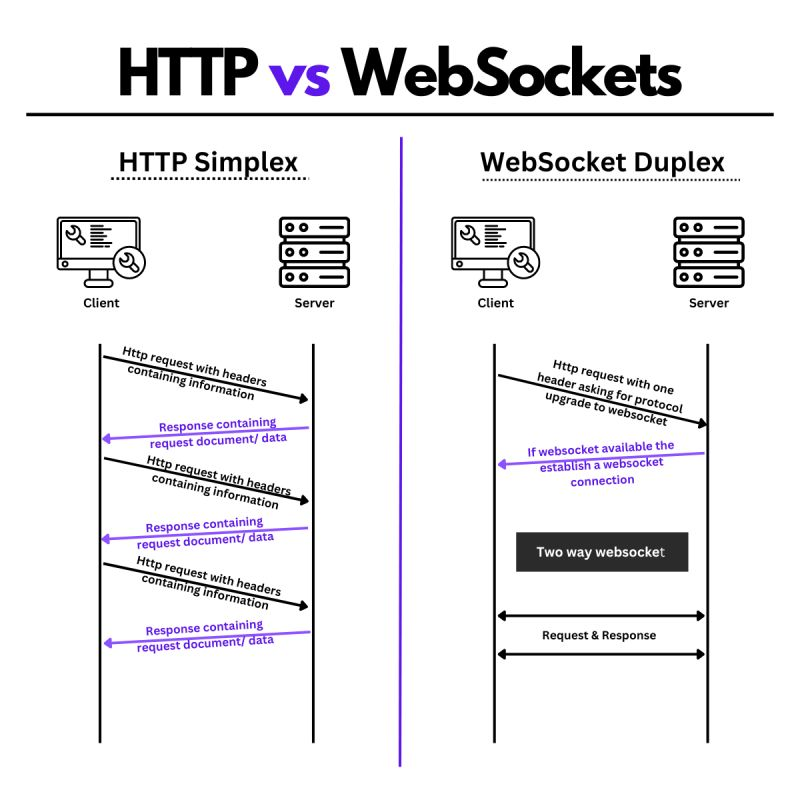
- 웹소켓이란, HTML5 표준기술로(웹개발 모든 언어에서 지원!) HTTP 환경에서 클라이언트와 서버 사이의 하나의 TCP 연결을 통해 실시간 전이중 통신을 가능하게 하는 프로토콜!
* 전이중 통신 : 무전기 같이 송신 또는 수신만이 가능한 단방향 통신과 달리 전화와같이 양방향으로 송/수신이 가능한 것 - 실시간 알림/채팅 등 실시간 키워드가 들어가는 기능들을 위해서는 대부분 웹소켓 기술이 필요
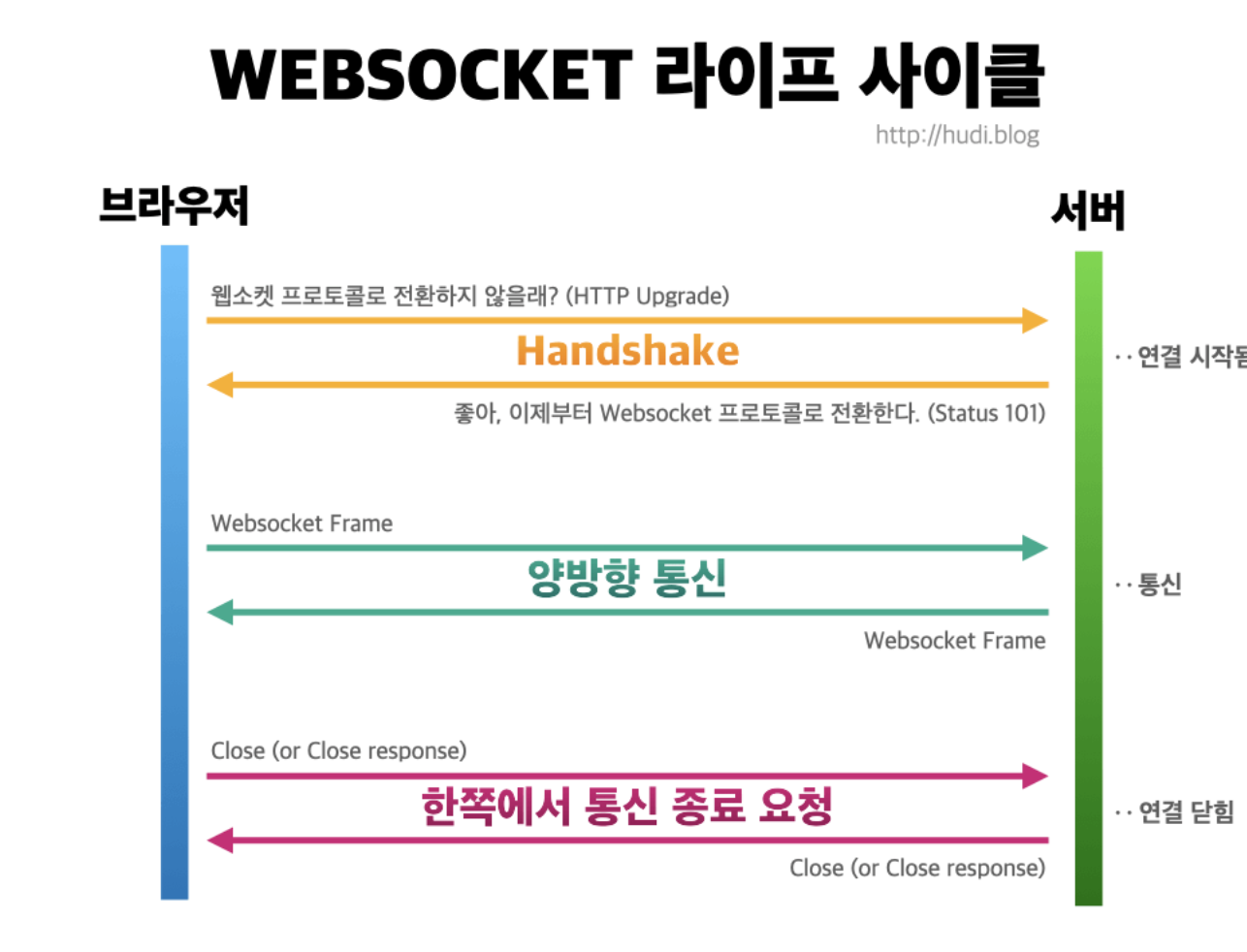
- 웹 소켓은 데이터 전송의 신뢰성을 보장하기 위해 Handshake 과정을 진행한다.
- 사용법
- 서버연결 : let ws = new WebSocket("웹소켓 URL");
- 데이터 송신 : ws.send("전송하려는 메시지");
- 웹 소켓 관련 이벤트
- open : 웹소켓 서버와 접속이 일어나면 발생하는 이벤트 (처음 오픈될 때만!!)
- close : 웹소켓 서버와 접속이 해제되면 발생되는 이벤트
- message : 웹소켓 서버로 부터 메시지가 수신되면 발생되는 이벤트 (오픈 후 이걸로 메시지 전송하고 받고 함)
- error : 웹 소켓 오류가 생기면 발생되는 이벤트
- 실습 1 : 웹소켓으로 실시간 웹 채팅 서비스 만들기
<!-- 메인 -->
<%@ page language="java" contentType="text/html; charset=UTF-8" pageEncoding="UTF-8"%>
<%@ page trimDirectiveWhitespaces="true" %>
<!DOCTYPE html>
<html>
<head>
<meta charset="UTF-8">
<title>채팅서비스 메인페이지</title>
<script>
    function openChatWin() {
        const chatId = document.querySelector("#chatId");
        if(!chatId.value) {
            alert("대화명을 입력하세요");
            chatId.focus();
            return;
        }

        window.open("ChatWin.jsp?chatId=" + chatId.value , "", "top=200, left=200, width = 510, height = 520, menubar = no, toolbar = no, location = no, status = no, scrollbars = no");
    }
</script>
</head>
<body>
    <div>
        <div>
            <h2>웹소켓 채팅 - 대화명 입력</h2>
            <span>대화명 : </span>
            <input type="text" name="chatId" id="chatId" value="" maxlength="20">
            <button id="btnAcess" onclick="openChatWin()">채팅참여</button>
        </div>
    </div>
</body>
</html>
<!-- 채팅 창 --> <%@ page language="java" contentType="text/html; charset=UTF-8" pageEncoding="UTF-8"%> <%@ page trimDirectiveWhitespaces="true" %> <!DOCTYPE html> <html> <head> <meta charset="UTF-8"> <title>채팅창</title> <script> const webSocket = new WebSocket("ws://localhost:8080/ws/ChatServer"); let chatWin, chatId, chatMsg; window.onload = () => { chatWin = document.querySelector("#chatWin"); chatId = document.querySelector("#chatId"); chatMsg = document.querySelector("#chatMsg"); }; webSocket.onopen = (e) => { if(chatWin == null) { chatWin = document.querySelector("#chatWin"); } chatWin.innerHTML += "웹소켓 서버와 연결 되었습니다. <br>"; chatWin.innerHTML += "${param.chatId}님이 입장하셨습니다. <br>"; }; webSocket.onmessage = (e) => { let arrMsg = e.data.split("|"); // 대화명과 메시지로 분리해서 사용 let sender = arrMsg[0]; let msg = arrMsg[1]; if(msg) { // 귓속말일 경우 if(msg.match("\/")) { const tmpMsg = chatId.value + "\/"; if(msg.match(tmpMsg)) { let tmpTO = msg.replace(tmpMsg, "[귓속말] :"); chatWin.innerHTML += "<div class='chatMsg'>"+ sender + " " + tmpTO + "</div>"; } } else { // 일반대화일 경우 chatWin.innerHTML += "<div class='chatMsg'>" + sender + " : " + msg + "</div>"; } } chatWin.scrollTop = chatWin.scrollHeight; }; webSocket.onclose = (e) => { chatWin.innerHTML += "${param.chatId}님이 퇴장하셨습니다. <br>"; chatWin.innerHTML += "웹소켓 서버와의 연결이 종료되었습니다. <br>"; }; function keyPress() { if(window.event.keyCode == 13) { sendMsg(); } } function sendMsg() { chatWin.innerHTML += "<div style='width : 100%; text-align:right;'><span class='myMsg'>"+chatMsg.value+"</sapn></div>"; webSocket.send(chatId.value + "|" + chatMsg.value); chatMsg.value = ""; chatWin.scrollTop = chatWin.scrollHeight; } function socketClose() { const flag = confirm("채팅을 종료합니다."); if(flag) { webSocket.close(); window.close(); } } </script> <style> #chatWin { width : 100%; height : 300px; overflow : scrolll; border : 1px solid #000; } .myMsg { background : pink; } .chatMsg { background : #eee; } </style> </head> <body> <div> <div> <span>대화명 : </span> <input type="text" name="chatId" id="chatId" value="${param.chatId}" readonly> <button id="btnClose" onclick="socketClose()">채팅 종료</button> </div> <div id="chatWin"> </div> <div> <input type="text" name="chatMsg" id="chatMsg" onkeyup="keyPress()"> <button id="btnSend" onclick="sendMsg()">전송</button> </div> </div> </body> </html>// 채팅 서버 package ws; import java.io.IOException; import java.util.Collections; import java.util.HashSet; import java.util.Set; import jakarta.websocket.OnClose; import jakarta.websocket.OnError; import jakarta.websocket.OnMessage; import jakarta.websocket.OnOpen; import jakarta.websocket.Session; import jakarta.websocket.server.ServerEndpoint; @ServerEndpoint("/ChatServer") public class ChatServer { private static Set<Session> clients = Collections.synchronizedSet(new HashSet<Session>()); @OnOpen public void onOpen(Session session) { System.out.println("웹소켓 연결 : " + session.getId()); clients.add(session); } @OnMessage public void onMessage(String msg, Session session) throws IOException { System.out.println( String.format("메시지 전송 -> %s : %s", session.getId(), msg) ); synchronized(clients) { for(Session client : clients) { if(!client.equals(session)) { client.getBasicRemote().sendText(msg); } } } } @OnClose public void onClose(Session session) { System.out.println("웹소켓 종료 : " + session.getId()); clients.remove(session); } @OnError public void onErroer(Throwable e) { System.out.println("에러 발생 : " + e.getMessage()); e.printStackTrace(); } /* 기본적으로 채팅 서비스는 이 구조가 다임 * 단, 이모티큰이라던지, 이미지 전송 등을 할려면 추가 작업이 필요합니다. * 예외 처리라던지 용량 제한이러던지 상용화 채팅 서비스에서는 추가 작업이 많이 필요 함. * */ - 웹소켓이란, HTML5 표준기술로(웹개발 모든 언어에서 지원!) HTTP 환경에서 클라이언트와 서버 사이의 하나의 TCP 연결을 통해 실시간 전이중 통신을 가능하게 하는 프로토콜!
Review
- 웹소켓을 이용한 채팅 서비스 구현 신기했음 -> 다음에 혼자 플젝을 하게된다면 이 기능을 꼭 다뤄보고싶음
- AJAX를 제이쿼리 없이 쓰는게 된다는걸 처음 알아서 신기함.
- 정처기 실기 공부가 시급함.

블로그 이전 했습니다. 아래 블로그 아이콘(🏠) 눌러서 놀러오세요