
페이지 구분 위한 모드 추가
this.state = {
      mode: 'welcome',
      welcome: {title: 'Welcome', desc: 'Hello, React!!'},
      ...
}
❤render() 함수
- 어떤 html을 그릴 것인가 결정하는 함수
- props, state의 값이 바뀌면 해당되는 컴포넌트의 render함수 호출되도록 호출,
즉 props, state의 값 변경되면 화면이 다시 그려진다.
render() {
    var _title, _desc = null;

    // === (같다): 리액트 문법
    if(this.state.mode === 'read') {
      _title = this.state.welcome.title;
      _desc = this.state.welcome.desc;
    } else if(this.state.mode === 'read') {
      _title = this.state.contents[0].title;
      _desc = this.state.contents[0].desc;
    }
    return (
      <div className='App'>
        ...
        <Content title={_title} desc={_desc}></Content>
      </div>
    );
  }
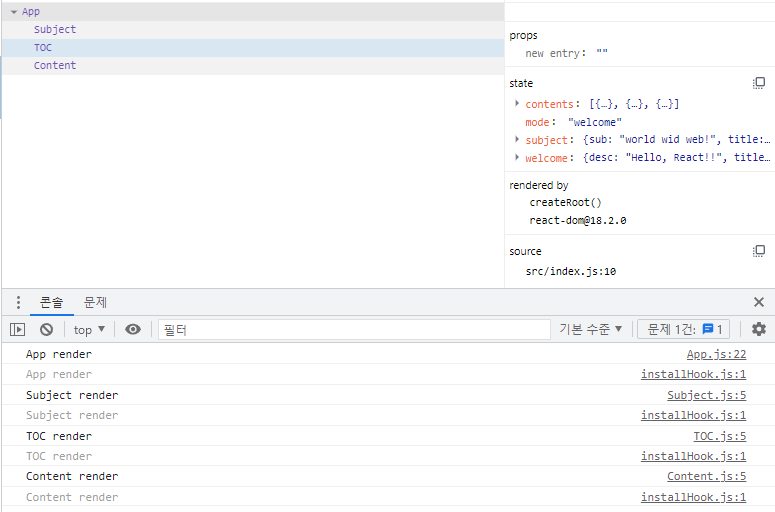
1) mode가 wlecome 일 때 console.log
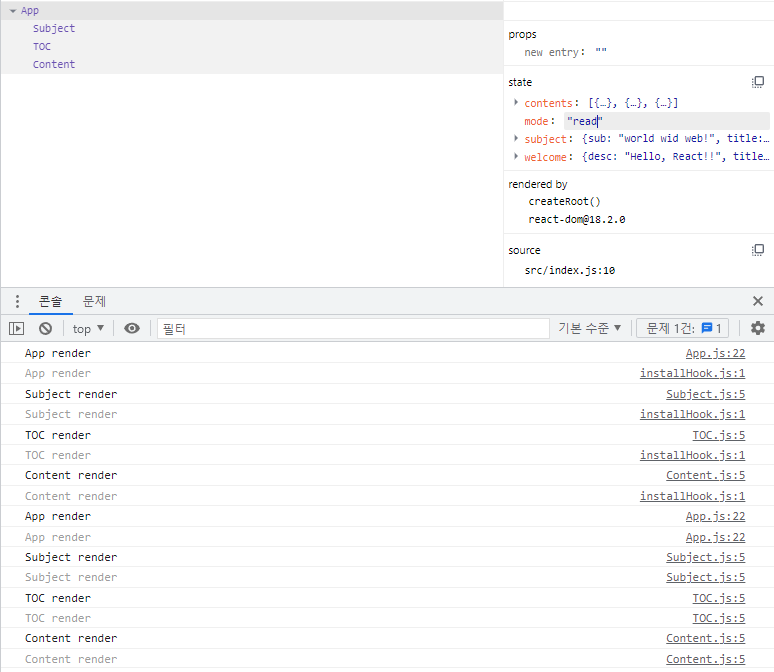
2) mode가 read 일 때 console.log
- 컴포넌트 다시 렌더링
❤클릭 이벤트
onClick={ } 의 형태
<a href='/' onClick={function(e){
            console.log(e);
  			e.preventDefault();
            // debugger;
}}>{this.state.subject.title}</a>
- debugger : 크롬 개발자도구에서 확인 가능
- e.preventDefault() : 예를 들어
<a>는 기본적으로 페이지 새로고침 기능이 있다
But 이 함수를 쓰게 되면 기본적으로 가진 기능 막아주는 역할 -> 페이지 새로고침 없어진다. - this.state.mode = 'welcome'; 코드 쓸 경우 에러 발생
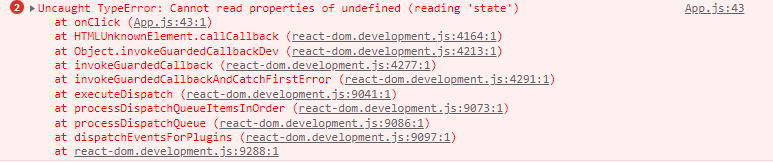 이유 :
이유 :
이벤트가 발생되는 함수 안에서this는 컴포넌트 자기자신을 가리키는 것이 아닌 아무것도 세팅되어 있지 않은 값. => undefinde 발생
해결: 함수 끝난 직후.bind(this)추가,setState()함수 추가
    <a href='/' onClick={function(e){
                console.log(e);
                e.preventDefault();
                // this.state.mode = 'welcome'; 값 바뀌지 않음
                this.setState({
                  mode:'welcome'
                });
              }.bind(this)}>{this.state.subject.title}</a>
⭐bind() 함수
기본적으로 리액트에서
render()함수 내에서this는 컴포넌트 자체, 함수에서는 아무 값도 가지지 않는다. 이때,bind()함수를 통해this를 주입시켜 주는 것이다.
❤이벤트 만들기 예제(전체 코드)
App.js
import React, { Component } from 'react';
import TOC from './components/TOC'
import Content from './components/Content'
import Subject from './components/Subject'
import './App.css';

class App extends Component {
  constructor(props) {
    super(props);
    this.state = {
      mode: 'read',
      selected_content_id: 2,
      subject: { title: 'WEB', sub: 'world wid web!' },
      welcome: { title: 'Welcome', desc: 'Hello, React!!' },
      contents: [
        { id: 1, title: 'HTML', desc: 'HTML is HyperText' },
        { id: 2, title: 'CSS', desc: 'CSS is design' },
        { id: 3, title: 'JavaScript', desc: 'JavaScript is interactive' },
      ]
    }
  }
  render() {
    var _title, _desc = null;

    // ⭐=== (같다): 리액트 문법
    if (this.state.mode === 'welcome') {
      _title = this.state.welcome.title;
      _desc = this.state.welcome.desc;
    } else if (this.state.mode === 'read') {
      var i = 0;

      while(i < this.state.contents.length) {
        var data = this.state.contents[i];
        if(data.id === this.state.selected_content_id) {

          _title = data.title;
          _desc = data.desc;
          break;
        }
        i = i + 1;
      }

    }
    return (
      <div className='App'>
        <Subject
          title={this.state.subject.title}
          sub={this.state.subject.sub}
          onChangePage={function() {
            this.setState({mode: 'welcome'});
          }.bind(this)}
        >
        </Subject>
        <TOC onChangePage={function (id) { // ⭐TOC.js에서 받아온 id값을 selected_content_id에 넘겨준다
          this.setState({
            mode: 'read',
            selected_content_id:Number(id)
          });
        }.bind(this)}
          data={this.state.contents}></TOC>
        <Content title={_title} desc={_desc}></Content>
      </div>
    );
  }
}

export default App;
Subject.js
import React, { Component } from 'react';

class Subject extends Component {
  render() {
    console.log('Subject render');
    return (
      <header>
        <h1><a href='/' onClick={function(e) {
            e.preventDefault();
            this.props.onChangePage();
        }.bind(this)}>{this.props.title}</a></h1>
        {this.props.sub}
      </header>
    );
  }
}

export default Subject;
TOC.js
- 속성을 이용하는 방법
import React, { Component } from "react";

class TOC extends Component {
    render() {
        var lists = [];
        var data = this.props.data;
        var i = 0;
        while (i < data.length) {
            lists.push(<li key={data[i].id}>
                <a href={"/content/" + data[i].id}
                    data-id={data[i].id}
                    onClick={function (e) {
                        e.preventDefault();
                        this.props.onChangePage(e.target.dataset.id);
                    }.bind(this)}>{data[i].title}</a></li>);
            i = i + 1;
        }
        return (
            <nav>
                <ul>{lists}</ul>
            </nav>
        );
    }
}
export default TOC;- bind 함수를 이용하는 방법
//TOC.js
while (i < data.length) {
	lists.push(<li key={data[i].id}>
		<a href={"/content/" + data[i].id}
			data-id={data[i].id}
            onClick={function (id, e) {
            	e.preventDefault();
                this.props.onChangePage(id);
            }.bind(this, data[i].id)}>{data[i].title}</a></li>);
        i = i + 1;
}