라우터 파라미터
// 라우트 코드 작성하기

// app.js
const express = require("express");
const app = express();

const port = 3000;

//인덱스(시작) 페이지 요청
app.get("/",(req,res)=> {
    res.status(200); //상태코드를 200으로 설정
    res.send("Hello Express~");
});

//연락처 요청하기
app.get("/contacts", (req,res)=>{
    res.status(200).send("Get Contacts");
});

//새 연락처 추가하기
app.post("/contacts", (req,res)=>{
    res.status(200).send("Create Contacts");
});

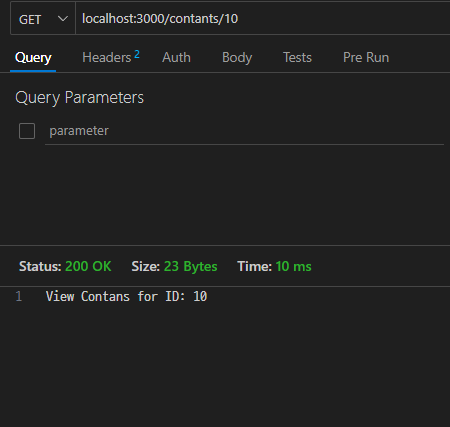
// 연락처 상세보기
// get url : localhost:3000/contants/10
app.get("/contants/:id", (req,res) => {
    res.status(200).send(`View Contans for ID: ${req.params.id}`);
});

// 연락처 수정하기
// put url : localhost:3000/contants/10
app.put("/contants/:id", (req,res) => {
    res.status(200).send(`Update Contans for ID: ${req.params.id}`);
});

// 연락처 삭제하기
// delete url : localhost:3000/contants/10
app.delete("/contants/:id", (req,res) => {
    res.status(200).send(`Delete Contans for ID: ${req.params.id}`);
});

app.listen(port, () => {
    console.log(`${port}번 포트에서 서버 실행 중...`);
});
app.js에도 동일하게 저장터미널
npm start입력 후Thunder client에서 노드 연결
익스프레스의 요청 객체와 응답객체
요청객체의 주요 속성
req.body: 서버로 POST 요청할 때 넘겨준 정보를 담고 있다. JSON, File(Bin)req.cookies: 클라이언트에 저장된 쿠키 정보를 HTTP에 담아서 보낼 때 쿠키정보를 담고 있음 - 클라이언트에 저장된 임시값(장바구니-비회원) 저장하는 용도req.heades: 서버로 요청을 보낼 때 같이 보낸 헤더 정보를 담고 있음req.params: URL 뒤에 파라미터가 포함되어 있는 경우에 파라미터 정보를 담고 있음req.query: 요청 URL의 포함된 질의 매개변수(query)를 담고 있음
응답객체의 주요 속성
res.download: 파일을 다운로드할 때 사용res.end: 응답 프로세스를 종료res.json: JSON 응답을 전송, Content-Type 헤더를 자동으로 생성res.jsonp: JSONP 지원을 통해 JSON 응답- JSONP란 CORS(크로스오리진) 문제를 피하기 위해 별도의 방식으로 JSON을 가져오는 방식
res.redirect: 요청 경로를 재지정하여 강제 이동 - 응답 헤더의 setLocation속성에 이동할 경로를 기술하면, 클라가 이 경로로 이동res.render: 뷰 템플릿을 화면에 렌더링(그린다.)한다.res.send: 어떤 유형이든 res.send() 괄호 안에 내용(변수,객체)을 전달res.sendFile: 지정한 경로의 파일을 읽어서 내용 전송res.sendStatus: 상태 메시지와 함께 HTTP 상태 코드 전송res.status: 응답의 상태 코드 설정// send() 함수와 json()함수 사용 const express = require("express"); const app = express(); const port = 3000; app.get("/", (req,res) => { res.status(200); res.send("Hello Node!"); // res.json({message : "Hello Node!"}); }); app.listen(port, () => { console.log(`${port}번 포트에서 서버 실행 중...`); });
html 파일 응답하기
- html
<!DOCTYPE html>
<html lang="en">
<head>
    <title>연락처 목록</title>
</head>
<style>
     h1 {
        color : green;
    }
</style>
<body>
    <h1>연락처 목록</h1>
</body>
</html>
- javascript
const express = require("express");
const app = express();

const port = 3000;

app.get("/", (req,res) => {
    res.status(200);
    console.log(__dirname);
    res.sendFile(__dirname + "/assets/contants.html");
});

app.listen(port, () => {
    console.log(`${port}번 포트에서 서버 실행 중...`);
});
연습문제
// 1번
const express = require("express");
const app = express();
const port = 3000;

app.get("/users/:name", (req,res) => {
    const name = req.params.name;
    res.send(`Hello, ${name}!`);
});

// 서버 실행
app.listen(3000, () => {
    console.log("Server is running on port 3000");
});

// 2번
// http://localhost:3000/users/about
app.get("/",(req,res) => {
    res.send("Welcome");
});

app.get("/about",(req,res) => {
    res.send("This is the about page");
});

// 3번
// http://localhost:3000/square
app.get("/square/:number",(req,res) => {
    const number = req.params.number;
    const square = number * number;
    const square2 = number ** 2;
    res.send(`Square is ${square}`);
});

미들웨어
- 요청과 응답 중간에 있으면서, 요청을 처리
- 원하는 형태로 응답을 수정 하는 함수
역할
요청 → req.body 파싱 → 인증(로그인) → 렌더링(뷰 템플릿) → 응답
라우터
// 라우터 객체를 사용하여 라우팅 코드를 수정하기
const express = require("express");
const app = express();
const router = express.Router();

const port = 3000;

app.get("/",(req,res)=>{
    res.status(200).send("Hello Node!");
});

// 모든 연락처 가져오기
router.get("/contacts",(req,res)=> {
    res.status(200).send("연락처 페이지");
});

// 새 연락처 추가하기
router.post("/contacts",(req,res)=> {
    res.status(201).send("연락처 추가하기");
});

// 연락처 상세보기
router.get("/contacts/:id",(req,res)=> {
    res.status(200).send(`연락처 상세보기: ID:${req.params.id}`);
});

// 연락처 수정하기
router.put("/contacts/:id",(req,res)=> {
    res.status(200).send(`연락처 수정하기: ID:${req.params.id}`);
});

// 연락처 삭제하기
router.delete("/contacts/:id",(req,res)=> {
    res.status(200).send(`연락처 삭제하기: ID:${req.params.id}`);
});

// 라우터 app에 등록하기
app.use(router);

app.listen(port,()=> {
    console.log("Server is running on port 3000");
});
Body Parser
- 요청 본문에 담긴 것을 파싱하는 미들웨어
- 파싱이란 전송된 자료를 프로젝트에서 사용할 수 있는 형식으로 변환하는 것
함수 설명 .jsonJSON 형식의 본문을 파싱한다. .urlencodedURL로 인코딩된 본문을 파싱한다. .urlURL 주소줄 문구(한글)가 깨지지 않도록 암호화하는 것을 url encode라 한다. .raw가공되지 않은 바이너리 자료를 파싱한다. .text텍스트 형식의 본문을 파싱한다.
- 익스프레스 4.13.0 버전부터는 바디파서 함수 중 일부를 익스프레스가 포함하고 있어서 바디파서 모듈을 따로 설치하지 않아도 된다.
app.use(express.json());app.use(express.urlencoded({ extended: true }));
라우터
route 함수
// 라우터 객체를 사용해 요청 경로별로 라우트하기
const express = require("express");
const app = express();
const router = express.Router();

const port = 3000;

app.get("/",(req,res)=>{
    res.status(200).send("Hello Node!");
});

// 모든 연락처 가져오기
// 새연락처 추가하기
router
    .route("/contacts")
    .get((req,res)=> {
        res.status(200).send("연락처 페이지");})
    .post((req,res)=> {
    res.status(201).send("연락처 추가하기");
});

router
    .route("/contacts/:id")
    // 연락처 상세보기
    .get((req,res)=> {
    res.status(200).send(`연락처 상세보기: ID:${req.params.id}`);
    })
    // 연락처 수정하기
    .put((req,res)=> {
    res.status(200).send(`연락처 수정하기: ID:${req.params.id}`);
    })
    // 연락처 삭제하기
    .delete((req,res)=> {
    res.status(200).send(`연락처 삭제하기: ID:${req.params.id}`);
    });

// 라우터 app에 등록하기
app.use(router);

app.listen(port,()=> {
    console.log("Server is running on port 3000");
});