Mongo DB
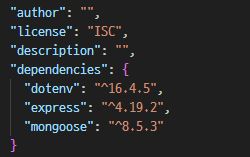
npm i dotenv,npm i mongoose터미널에서 다운 후package.json에서 다운 확인
Mongo DB 연결하기
//관련파일
// ./routes/contactRoutes-2.js
// ./config/dbConnect.js
// ./.env
// .gitignore파일에 .env파일을 포함시켜야 됨.

//.env에 DB_CONNECT 문자열(외부에 오픈되면 안되는 정보)을 저장하기
//dotenv 모듈을 설치하기
//npm i dotenv

const express = require("express");
const dbConnect = require("./config/dbConnect");
const app = express();
const port = 3000;

dbConnect();

app.use(express.json());
app.use(express.urlencoded({ extended: true }));

app.get("/", (req,res) => {
    res.send("Hello, Node!");
});

app.use("/contacts", require("./routes/contactRoutes"));

app.listen(port, ()=>{
    console.log("Server is running on port 3000");
});
파일 추가하기
- contactController-1파일
const asyncHandler = require("express-async-handler");

// @desc 코드설명
// @route 메소드와 경로
// @desc 전체 연락처 가져오기
// @route GET /contacts
const getAllContacts = asyncHandler(async (req,res)=>{
    // 전체 연락처 가져오기
    res.status(200).send("연락처 페이지");
});

// @desc 새 연락처 추가하기
// @route POST /contacts
const createContact = asyncHandler(async (req,res)=>{
    // 객체 구조분해할당, key와 value가 동일함
    const {name, email, phone} = req.body;
    if( !name || !email || !phone ){
        return res.status(400).send("필수값이 입력되지 않음");
    }
    res.status(200).send("새 연락처 추가");
});

// @desc 연락처 상세보기
// @route GET /contacts/:id
const getContact = asyncHandler(async(req,res)=>{
    res.status(200).send(`연락처 상세보기 ID: ${req.params.id}`);
});

// @desc 연락처 수정하기
// @route PUT /contacts/:id
const updateContact = asyncHandler(async(req,res)=>{
    res.status(200).send(`연락처 수정하기 ID:${req.params.id}`);
});

// @desc 연락처 삭제하기
// @route DELETE /contacts/:id
const deleteContact = asyncHandler(async(req,res)=>{
    res.status(200).send(`연락처 삭제하기 ID:${req.params.id}`);
});

module.exports = {
    getAllContacts,
    createContact,
    getContact,
    updateContact,
    deleteContact
};
- contactController-2파일
const asyncHandler = require("express-async-handler");
const Contact = require("../models/contactModel");
?
// @desc 코드설명
// @route 메소드와 경로

// @desc 전체 연락처 가져오기
// @route GET /contacts
const getAllContacts = asyncHandler(async (req,res)=>{
    // 전체 연락처 가져오기
    res.status(200).send("연락처 페이지");
});

// @desc 새 연락처 추가하기
// @route POST /contacts
const createContact = asyncHandler(async (req,res)=>{
    // 객체 구조분해할당, key와 value가 동일함
    const {name, email, phone} = req.body;
    if( !name || !email || !phone ){
        return res.status(400).send("필수값이 입력되지 않음");
    }
    const contact = await Contact.create({
        name,
        email,
        phone
    });
    res.status(200).send("새 연락처 추가");
});


// @desc 연락처 상세보기
// @route GET /contacts/:id
const getContact = asyncHandler(async(req,res)=>{
    res.status(200).send(`연락처 상세보기 ID: ${req.params.id}`);
});

// @desc 연락처 수정하기
// @route PUT /contacts/:id
const updateContact = asyncHandler(async(req,res)=>{
    res.status(200).send(`연락처 수정하기 ID:${req.params.id}`);
});

// @desc 연락처 삭제하기
// @route DELETE /contacts/:id
const deleteContact = asyncHandler(async(req,res)=>{
    res.status(200).send(`연락처 삭제하기 ID:${req.params.id}`);
});

module.exports = {
    getAllContacts,
    createContact,
    getContact,
    updateContact,
    deleteContact
};
contactController-1.js, contactController-2.js 저장 후 contactController.js에 저장
config 파일 생성
- dbConnect.js 생성
const mongoose = require("mongoose");
require("dotenv").config(); // .env파일에 수록된 정보를 가져옴

const dbConnect = async () => {
    try{
        const connect = await mongoose.connect(process.env.DB_CONNECT);
        console.log("DB Connected");
    } catch(err){
        console.log(err);
    }
};

module.exports = dbConnect;
routes 파일 생성
- contactRoutes-3 생성
const express = require("express");
const router = express.Router();
const {
    getAllContacts,
    createContact
}
= require("../controllers/contactController-1"); //컨트롤러 분리

// localhost:3000/contacts
router
    .route("/")
    //모든 연락처 가져오기
    .post(createContact);

module.exports = router;
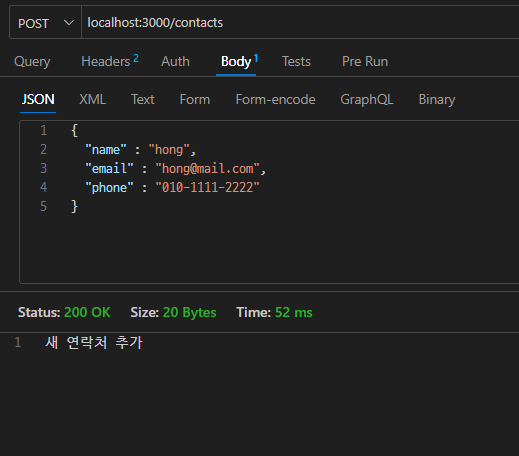
- 터미널에
npm start입력하여 포트 실행- Thunder Client에 내용입력
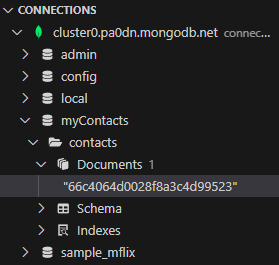
- 입력 내용 결과 확인
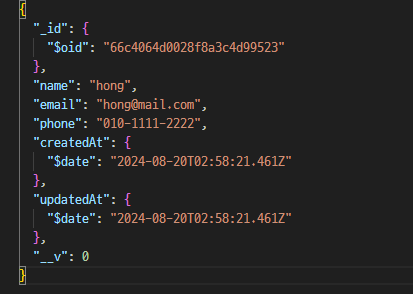
연락처찾기
- contactController-3.js 파일 추가
const asyncHandler = require("express-async-handler");
const Contact = require("../models/contactModel");

// @desc 코드설명
// @route 메소드와 경로

// @desc 전체 연락처 가져오기
// @route GET /contacts
const getAllContacts = asyncHandler(async (req,res)=>{
    const contact = await Contact.find(); // sql : select * from table;
    res.status(200).send(contact); // JS KV객체 => JSON문자열로 반환되어 전송됨.
});

// @desc 새 연락처 추가하기
// @route POST /contacts
const createContact = asyncHandler(async (req,res)=>{
    // 객체 구조분해할당, key와 value가 동일함
    const {name, email, phone} = req.body;
    if( !name || !email || !phone ){
        return res.status(400).send("필수값이 입력되지 않음");
    }
    const contact = await Contact.create({
        name,
        email,
        phone
    });
    res.status(200).send("새 연락처 추가");
});


// @desc 연락처 상세보기
// @route GET /contacts/:id
const getContact = asyncHandler(async(req,res)=>{
    const contact = await Contact.findById(req.params.id);
    //const contact = await Contact.findOne({name : name});
    res.status(200).send(`연락처 상세보기 ID: ${req.params.id}`);
});

// @desc 연락처 수정하기
// @route PUT /contacts/:id
const updateContact = asyncHandler(async(req,res)=>{
    res.status(200).send(`연락처 수정하기 ID:${req.params.id}`);
});


// @desc 연락처 삭제하기
// @route DELETE /contacts/:id
const deleteContact = asyncHandler(async(req,res)=>{
    res.status(200).send(`연락처 삭제하기 ID:${req.params.id}`);
});

module.exports = {
    getAllContacts,
    createContact,
    getContact,
    updateContact,
    deleteContact
};
contactController-3.js 저장 후 contactController.js에 저장
- 연락처찾기.js
// 몽고DB CRUD

// 관련 파일
// ./config/dbConnect.js
// ./routes/contactRoutes-3.js
// ./controllers/contactController-3.js


// @desc  연락처 찾기
// @route GET /contacts:id


const express = require("express");
const dbConnect = require("./config/dbConnect");
const app = express();
const port = 3000;

dbConnect();

app.use(express.json());
app.use(express.urlencoded({extended:true}));

app.use("/contacts", require("./routes/contactRoutes")); // contactRoutes-3.js

app.listen(port,()=>{
    console.log("3000번 포트에서 서버 실행중...");
});
http://localhost:3000/contacts검색시 입력된 정보 확인 가능

수정하기
- contactController-4.js 파일 생성
const asyncHandler = require("express-async-handler");
const Contact = require("../models/contactModel");

// @desc 전체 연락처 가져오기
// @route GET /contacts
const getAllContacts = asyncHandler(async (req,res)=>{
    const contact = await Contact.find(); // sql : select * from table;
    res.status(200).send(contact); // JS KV객체 => JSON문자열로 반환되어 전송됨.
});

// @desc 새 연락처 추가하기
  // @route POST /contacts
const createContact = asyncHandler(async (req,res)=>{
    // 객체 구조분해할당, key와 value가 동일함
    const {name, email, phone} = req.body;
    if( !name || !email || !phone ){
        return res.status(400).send("필수값이 입력되지 않음");
    }
    const contact = await Contact.create({
        name,
        email,
        phone
    });
    res.status(200).send("새 연락처 추가");
});

// @desc 연락처 상세보기
// @route GET /contacts/:id
const getContact = asyncHandler(async(req,res)=>{
    const contact = await Contact.findById(req.params.id);
    res.status(200).send(contact);
});

// @desc 연락처 수정하기
// @route PUT /contacts/:id
const updateContact = asyncHandler(async(req,res)=>{
    const id = req.params.id;
    const { name, email, phone } = req.body;
    const contact = await Contact.findById(id);
    if(!contact) {
        res.status(404);
        throw new Error("연락처를 찾지 못함.(ID에 맞는 데이터 없음)")
    }
    // 수정 데이터 설정(문서객체 업데이트)
    contact.name = name;
    contact.email = email;
    contact.phone = phone;
    // 저장
    contact.save();
    res.status(200).json(contact);
});


// @desc 연락처 삭제하기
// @route DELETE /contacts/:id
const deleteContact = asyncHandler(async(req,res)=>{
    res.status(200).send(`연락처 삭제하기 ID:${req.params.id}`);
});

module.exports = {
    getAllContacts,
    createContact,
    getContact,
    updateContact,
    deleteContact
};
contactController-3.js 저장 후 contactController.js에 저장
- thender client body에 수정하고 싶은 내용 추가 후 결과 확인 가능
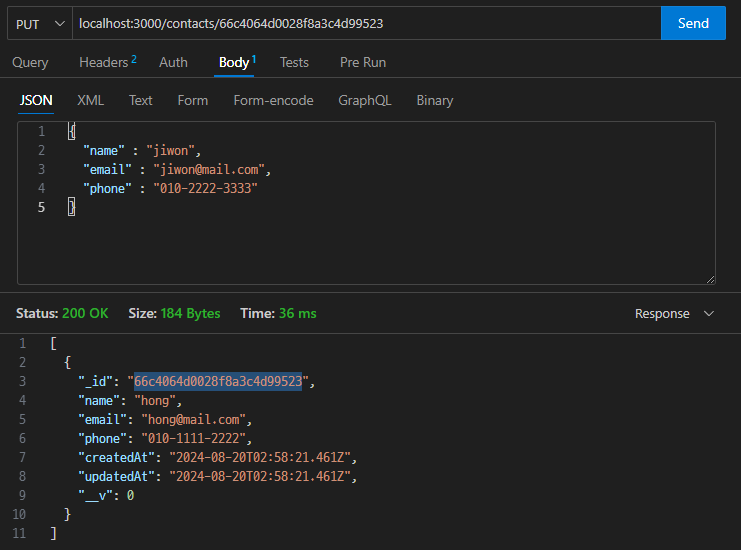
삭제하기
const asyncHandler = require("express-async-handler");
const Contact = require("../models/contactModel");

// @desc 코드설명
// @route 메소드와 경로

// @desc 전체 연락처 가져오기
// @route GET /contacts
const getAllContacts = asyncHandler(async (req,res)=>{
    const contact = await Contact.find(); // sql : select * from table;
    res.status(200).send(contact); // JS KV객체 => JSON문자열로 반환되어 전송됨.
});

// @desc 새 연락처 추가하기
// @route POST /contacts
const createContact = asyncHandler(async (req,res)=>{
    // 객체 구조분해할당, key와 value가 동일함
    const {name, email, phone} = req.body;
    if( !name || !email || !phone ){
        return res.status(400).send("필수값이 입력되지 않음");
    }
    const contact = await Contact.create({
        name,
        email,
        phone
    });
    res.status(200).send("새 연락처 추가");
});


// @desc 연락처 상세보기
// @route GET /contacts/:id
const getContact = asyncHandler(async(req,res)=>{
    const contact = await Contact.findById(req.params.id);
    //const contact = await Contact.findOne({name : name});
    //res.status(200).send(`연락처 상세보기 ID: ${req.params.id}`);
    res.status(200).send(contact);
});

// @desc 연락처 수정하기
// @route PUT /contacts/:id
const updateContact = asyncHandler(async(req,res)=>{
    // res.status(200).send(`연락처 수정하기 ID:${req.params.id}`);
    const id = req.params.id;
    const { name, email, phone } = req.body;
    const updateContact = await Contact.findByIdAndUpdate(
        id,
        {name, email, phone},
        {new : true} // 수정한 후의 도큐먼트로 반환해 주는 옵션
    );
    res.status(200).send(updateContact);
});


// @desc 연락처 삭제하기
// @route DELETE /contacts/:id
const deleteContact = asyncHandler(async(req,res)=>{
    const contact = await Contact.findById(req.params.id);
    if(!contact){
        res.status(404);
        throw new Error("연락처를 찾지 못함.(ID없음)");
    }
    await Contact.deleteOne();
    res.status(200).send("연락처 삭제됨.")
});

module.exports = {
    getAllContacts,
    createContact,
    getContact,
    updateContact,
    deleteContact
};
MongoDB에서Document의 파일이 2개에서 1개로 줄어든 것 확인 가능
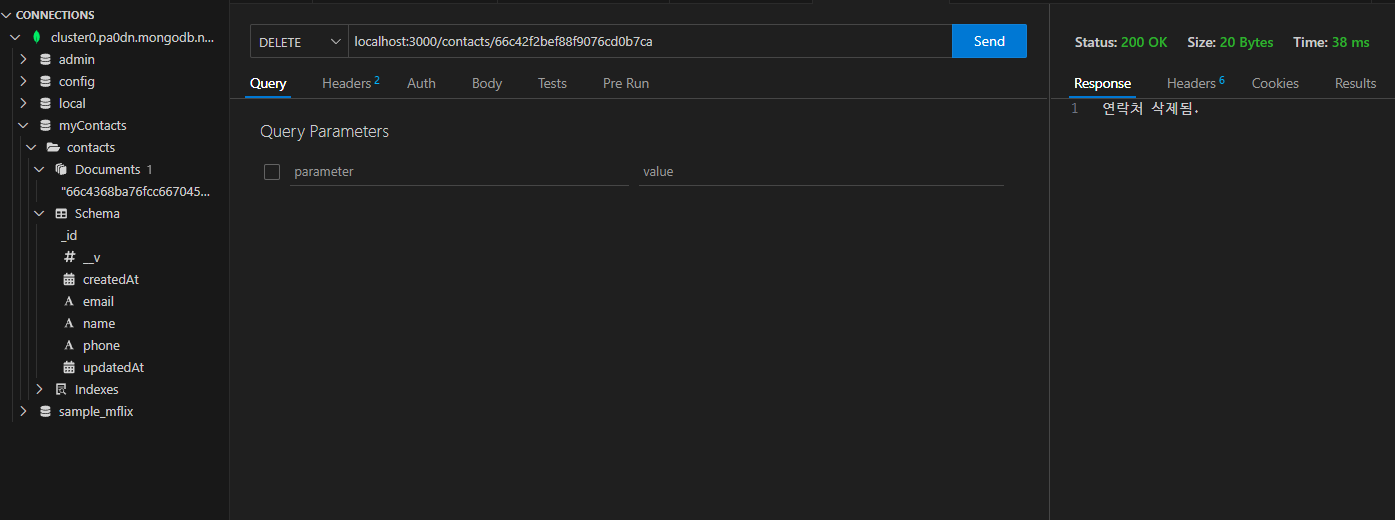
뷰템플릿 엔진 사용하기
템플릿 엔진이란?
- 대부분의 웹사이트나 앱은 사용자의 동작에 반응하여 서버로부터 자료를 가져와 바뀐 내용을 보여주는 SW
- 이렇게 내용이 동적으로 바뀌는 것을 처리할 때 사용하는 것이 템플릿 엔진
- 정적 HTML파일 + 동적인 데이터가 합쳐지는 것을 동적 바인딩
- 데이터 바인딩을 통해 동적인 웹페이지 제작 가능
프론트 사이드 템플릿 엔진
- 리액트(React.js JS번들) → Next.js(HTML 응답) - 검색엔진이 걸리도록
- 뷰(View.js)
서버 사이드 템플릿 엔진
- JS서버 : EJS, 퍼그, 핸들바
- JAVA 서버 : 타임리프, 머스테치, JSP
EJS 템플릿 모듈 설치하기
npm i ejsconst express = require("express"); const dbConnect = require("./config/dbConnect"); const app = express(); // 뷰 엔진 설정하기 app.set("view engine", "ejs"); app.set("views", "./views"); const port = 3000; dbConnect(); app.use(express.json()); app.use(express.urlencoded({extended:true})); app.use("/contacts", require("./routes/contactRoutes")); // contactRoutes-3.js app.listen(port,()=>{ console.log("3000번 포트에서 서버 실행중..."); });
- views 폴더 - getAll-1.ejs
<!DOCTYPE html>
<html lang="en">
<head>
  <meta charset="UTF-8">
  <meta http-equiv="X-UA-Compatible" content="IE=edge">
  <meta name="viewport" content="width=device-width, initial-scale=1.0">
  <title>Get All Contacts</title>
  <link rel="stylesheet" href="https://cdnjs.cloudflare.com/ajax/libs/font-awesome/6.4.0/css/all.min.css" integrity="sha512-iecdLmaskl7CVkqkXNQ/ZH/XLlvWZOJyj7Yy7tcenmpD1ypASozpmT/E0iPtmFIB46ZmdtAc9eNBvH0H/ZpiBw==" crossorigin="anonymous" referrerpolicy="no-referrer" />
  <style>
    * {
      margin:0;
      padding:0;
    }
    body {
      display: flex;
      flex-direction: column;
      justify-content: center;
      align-items: center;
      height: 100vh;
    }
    h1 {
      font-family: Arial, Helvetica, sans-serif;
      font-size: 3em;
      margin-bottom: 20px;
    }
    h1 i {
      margin-right: 0.8em;
    }
    h2 {
      margin-bottom: 15px;
    }
  </style>
</head>
<body>
  <h1><i class="fa-solid fa-address-card"></i>Contacts Page - ejs</h1>
</body>
</html>
- contactController-7.js 파일 생성
const asyncHandler = require("express-async-handler");
const Contact = require("../models/contactModel");

// @desc 코드설명
// @route 메소드와 경로

// @desc 전체 연락처 가져오기
// @route GET /contacts
const getAllContacts = asyncHandler(async (req,res)=>{
    const contact = await Contact.find();
    res.render("getAll-1"); // views/getAll-1.ejs 파일을 전송해 줌.
});

// @desc 새 연락처 추가하기
// @route POST /contacts
const createContact = asyncHandler(async (req,res)=>{
    // 객체 구조분해할당, key와 value가 동일함
    const {name, email, phone} = req.body;
    if( !name || !email || !phone ){
        return res.status(400).send("필수값이 입력되지 않음");
    }
    const contact = await Contact.create({
        name,
        email,
        phone
    });
    res.status(200).send("새 연락처 추가");
});

// @desc 연락처 상세보기
// @route GET /contacts/:id
const getContact = asyncHandler(async(req,res)=>{
    const contact = await Contact.findById(req.params.id);
    //const contact = await Contact.findOne({name : name});
    //res.status(200).send(`연락처 상세보기 ID: ${req.params.id}`);
    res.status(200).send(contact);
});

// @desc 연락처 수정하기
// @route PUT /contacts/:id
const updateContact = asyncHandler(async(req,res)=>{
    // res.status(200).send(`연락처 수정하기 ID:${req.params.id}`);
    const id = req.params.id;
    const { name, email, phone } = req.body;
    const updateContact = await Contact.findByIdAndUpdate(
        id,
        {name, email, phone},
        {new : true} // 수정한 후의 도큐먼트로 반환해 주는 옵션
    );
    res.status(200).send(updateContact);
});

// @desc 연락처 삭제하기
// @route DELETE /contacts/:id
const deleteContact = asyncHandler(async(req,res)=>{
    const contact = await Contact.findById(req.params.id);
    if(!contact){
        res.status(404);
        throw new Error("연락처를 찾지 못함.(ID없음)");
    }
    await Contact.deleteOne();
    res.status(200).send("연락처 삭제됨.")
});

module.exports = {
    getAllContacts,
    createContact,
    getContact,
    updateContact,
    deleteContact
};
`http://localhost:3000/contacts` 연결 시
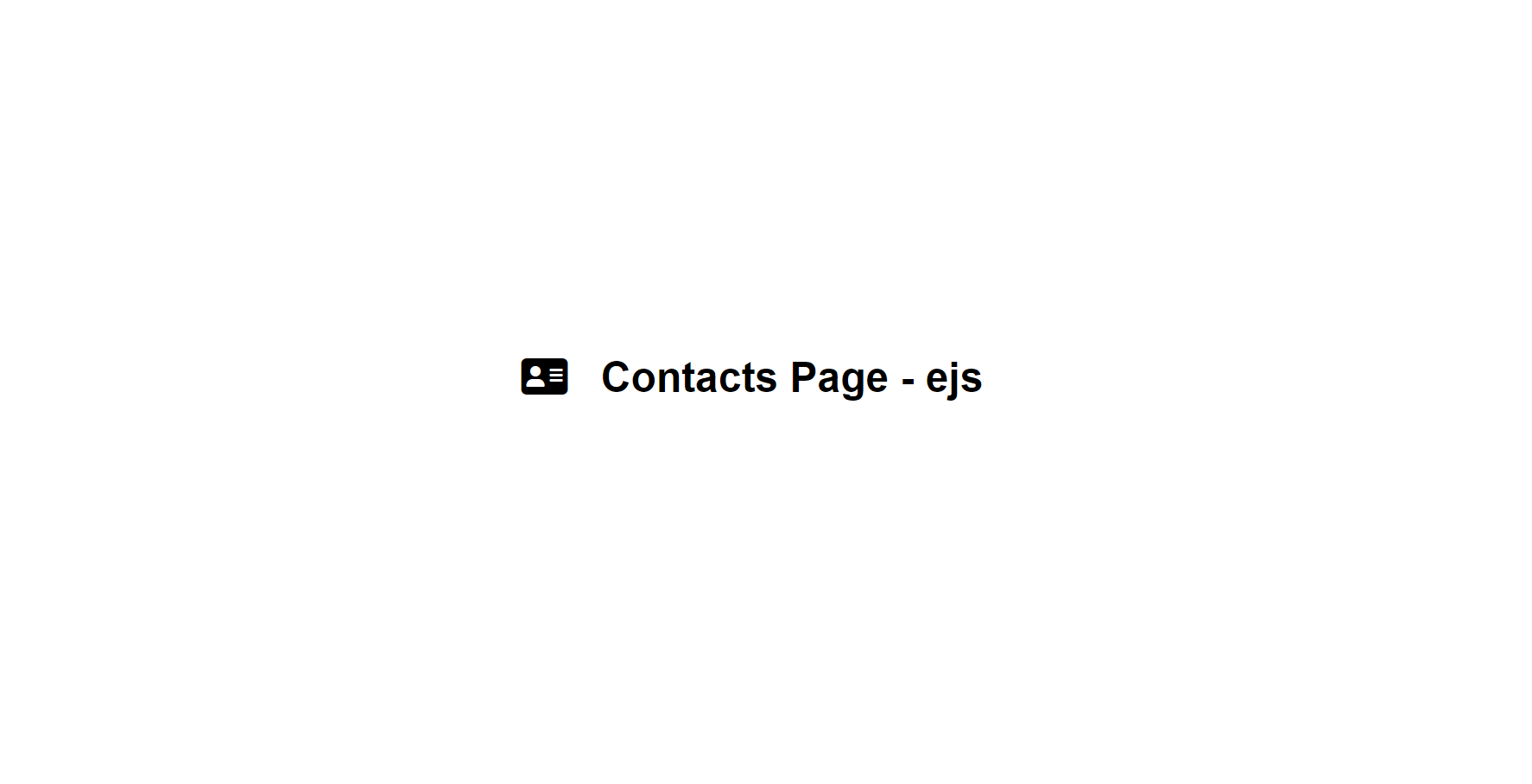
뷰템플릿엔진을 사용하여 동적인 콘텐츠 출력
컨트롤러에서 템플릿(ejs) 파일로 값 넘기기
res.render(ejs파일명,{변수이름 : 전송자료});- `res.render("getAll-2",{heading:"User List"});
템플릿 파일에서 동적인 콘텐츠 처리하기
<%= 변수 %><% 자바스크립트 코드 %><%- HTML 코드 %><%- include('include/header')%>헤더/푸터 중복되기 때문에 임포트한다.
// 관련파일
// ./routes/contactRoutes-3.js
// ./controllers/contactController-8.js
// ./views/getAll-2.ejs

const express = require("express");
const dbConnect = require("./config/dbConnect");

const app = express();

// 뷰 엔진 설정하기
app.set("view engine", "ejs");
app.set("views", "./views");

const port = 3000;

dbConnect();

app.use(express.json());
app.use(express.urlencoded({extended:true}));
app.use("/contacts", require("./routes/contactRoutes")); // contactRoutes-3.js

app.listen(port,()=>{
    console.log("3000번 포트에서 서버 실행중...");
});
- views 폴더 - getAll-2.ejs 파일
<!DOCTYPE html>
<html lang="en">
<head>
  <meta charset="UTF-8">
  <meta http-equiv="X-UA-Compatible" content="IE=edge">
  <meta name="viewport" content="width=device-width, initial-scale=1.0">
  <title>Get All Contacts</title>
  <link rel="stylesheet" href="https://cdnjs.cloudflare.com/ajax/libs/font-awesome/6.4.0/css/all.min.css" integrity="sha512-iecdLmaskl7CVkqkXNQ/ZH/XLlvWZOJyj7Yy7tcenmpD1ypASozpmT/E0iPtmFIB46ZmdtAc9eNBvH0H/ZpiBw==" crossorigin="anonymous" referrerpolicy="no-referrer" />
  <style>
    * {
      margin:0;
      padding:0;
    }
    body {
      display: flex;
      flex-direction: column;
      justify-content: center;
      align-items: center;
      height: 100vh;
    }
    h1 {
      font-family: Arial, Helvetica, sans-serif;
      font-size: 3em;
      margin-bottom: 20px;
    }
    h1 i {
      margin-right: 0.8em;
    }
    h2 {
      margin-bottom: 15px;
    }
  </style>
</head>
<body>
  <h1><i class="fa-solid fa-address-card"></i>Contacts Page - ejs</h1>
  <h2><%= heading %></h2>
  <ul>
    <% users.forEach( user => { %>
        <li>
            <strong>Name: </strong> <%= user.name %>
        </li>
        <li>
            <strong>Email: </strong> <%= user.email %>
        </li>
        <li>
            <strong>Phone: </strong> <%= user.phone %>
        </li>
    <% }); %>
  </ul>
</body>
</html>
- contactController-8.js 파일 생성
const asyncHandler = require("express-async-handler");
const Contact = require("../models/contactModel");

// @desc 코드설명
// @route 메소드와 경로

// @desc 전체 연락처 가져오기
// @route GET /contacts
const getAllContacts = asyncHandler(async (req,res)=>{
    const contact = await Contact.find();
    const users = [
        { name : "Hong", email : "hong@email.com", phone : "1234" },
        { name : "Kim", email : "kim@email.com", phone : "5678" }
    ];
    res.render("getAll-2", { heading : "User List", users : users });
});

// @desc 새 연락처 추가하기
// @route POST /contacts
const createContact = asyncHandler(async (req,res)=>{
    // 객체 구조분해할당, key와 value가 동일함
    const {name, email, phone} = req.body;
    if( !name || !email || !phone ){
        return res.status(400).send("필수값이 입력되지 않음");
    }
    const contact = await Contact.create({
        name,
        email,
        phone
    });
    res.status(200).send("새 연락처 추가");
});

// @desc 연락처 상세보기
// @route GET /contacts/:id
const getContact = asyncHandler(async(req,res)=>{
    const contact = await Contact.findById(req.params.id);
    //const contact = await Contact.findOne({name : name});
    //res.status(200).send(`연락처 상세보기 ID: ${req.params.id}`);
    res.status(200).send(contact);
});

// @desc 연락처 수정하기
// @route PUT /contacts/:id
const updateContact = asyncHandler(async(req,res)=>{
    // res.status(200).send(`연락처 수정하기 ID:${req.params.id}`);
    const id = req.params.id;
    const { name, email, phone } = req.body;
    const updateContact = await Contact.findByIdAndUpdate(
        id,
        {name, email, phone},
        {new : true} // 수정한 후의 도큐먼트로 반환해 주는 옵션
    );
    res.status(200).send(updateContact);
});

// @desc 연락처 삭제하기
// @route DELETE /contacts/:id
const deleteContact = asyncHandler(async(req,res)=>{
    const contact = await Contact.findById(req.params.id);
    if(!contact){
        res.status(404);
        throw new Error("연락처를 찾지 못함.(ID없음)");
    }
    await Contact.deleteOne();
    res.status(200).send("연락처 삭제됨.")
});

module.exports = {
    getAllContacts,
    createContact,
    getContact,
    updateContact,
    deleteContact
};
`http://localhost:3000/contacts` 연결 시
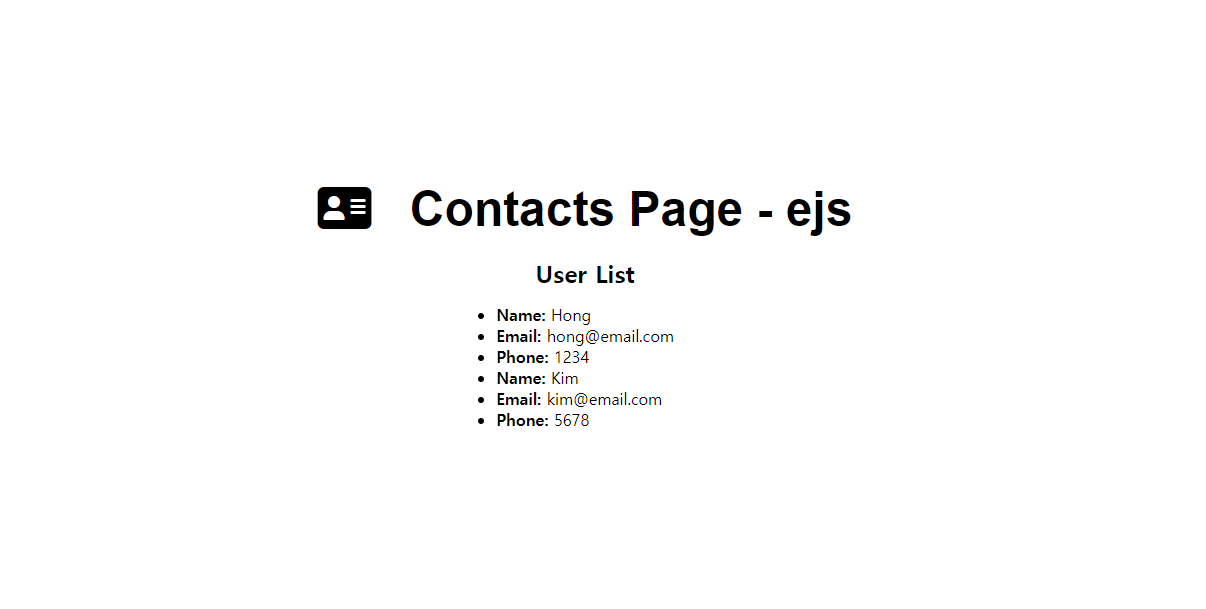
전체 연락처 화면 표시
// 관련파일
// ./routes/contactRoutes-3.js
// ./controllers/contactController-8.js
// ./views/getAll-2.ejs

const express = require("express");
const dbConnect = require("./config/dbConnect");

const app = express();

// 뷰 엔진 설정하기
app.set("view engine", "ejs");
app.set("views", "./views");

const port = 3000;

// static폴더(정적폴더 - css,js,img 정적 자원이 있는 폴더)
// public이라는 이름으로 폴더 지정 - ejs views폴더에서 마치 현재 폴더처럼 사용할 수 있다.
app.use(express.static("./public"))

dbConnect();

app.use(express.json());
app.use(express.urlencoded({extended:true}));

app.use("/contacts", require("./routes/contactRoutes")); // contactRoutes-3.js

app.listen(port,()=>{
    console.log("3000번 포트에서 서버 실행중...");
});
app.js에 저장
- views 폴더 - index-1.js파일 생성
<!DOCTYPE html> <html lang="ko"> <head> <meta charset="UTF-8"> <meta name="viewport" content="width=device-width, initial-scale=1.0"> <title>연락처 관리하기</title> <link rel="stylesheet" href="https://cdn.jsdelivr.net/npm/bootstrap@5.2.3/dist/css/bootstrap.min.css"> <link rel="stylesheet" href="/css/style.css"> <link rel="stylesheet" href="https://cdnjs.cloudflare.com/ajax/libs/font-awesome/6.4.0/css/all.min.css" integrity="sha512-iecdLmaskl7CVkqkXNQ/ZH/XLlvWZOJyj7Yy7tcenmpD1ypASozpmT/E0iPtmFIB46ZmdtAc9eNBvH0H/ZpiBw==" crossorigin="anonymous" referrerpolicy="no-referrer" /> </head> <body> <!-- Header --> <header class="border-shadow"> <div class="container "> <nav> <a href="/"><i class="fa-solid fa-address-book"></i> My Contacts</a> </nav> </div> </header> <!-- /Header --> <!-- Main --> <main id="site=main"> <div class="button-box"> <a href="#" class="btn btn-light"><i class="fa-solid fa-user-plus"></i>연락처 추가</a> </div> <table class="table"> <thead> <tr> <th>이름</th> <th>메일주소</th> <th>전화번호</th> <th> </th> </tr> </thead> <tbody> <% contacts.forEach(contact => { %> <tr> <td><%= contact.name %></td> <td><%= contact.email %></td> <td><%= contact.phone %></td> <td> <a href="#" class="btn update" title="수정"> <i class="fas fa-pencil-alt"></i> </a> <a href="#" class="btn delete" title="삭제"> <i class="fas fa-times"></i> </a> </td> </tr> <% }); %> </tbody> </table> </main> </body> </html>
- contactController-9.js 파일
const asyncHandler = require("express-async-handler");
const Contact = require("../models/contactModel");

// @desc 코드설명
// @route 메소드와 경로

// @desc 전체 연락처 가져오기
// @route GET /contacts
const getAllContacts = asyncHandler(async (req,res)=>{
    const contacts = await Contact.find();
    res.render("index-1",{contacts : contacts});
});

// @desc 새 연락처 추가하기
// @route POST /contacts
const createContact = asyncHandler(async (req,res)=>{
    // 객체 구조분해할당, key와 value가 동일함
    const {name, email, phone} = req.body;
    if( !name || !email || !phone ){
        return res.status(400).send("필수값이 입력되지 않음");
    }
    const contact = await Contact.create({
        name,
        email,
        phone
    });
    res.status(200).send("새 연락처 추가");
});

// @desc 연락처 상세보기
// @route GET /contacts/:id
const getContact = asyncHandler(async(req,res)=>{
    const contact = await Contact.findById(req.params.id);
    //const contact = await Contact.findOne({name : name});
    //res.status(200).send(`연락처 상세보기 ID: ${req.params.id}`);
    res.status(200).send(contact);
});

// @desc 연락처 수정하기
// @route PUT /contacts/:id
const updateContact = asyncHandler(async(req,res)=>{
    // res.status(200).send(`연락처 수정하기 ID:${req.params.id}`);
    const id = req.params.id;
    const { name, email, phone } = req.body;
    const updateContact = await Contact.findByIdAndUpdate(
        id,
        {name, email, phone},
        {new : true} // 수정한 후의 도큐먼트로 반환해 주는 옵션
    );
    res.status(200).send(updateContact);
});

// @desc 연락처 삭제하기
// @route DELETE /contacts/:id
const deleteContact = asyncHandler(async(req,res)=>{
    const contact = await Contact.findById(req.params.id);
    if(!contact){
        res.status(404);
        throw new Error("연락처를 찾지 못함.(ID없음)");
    }
    await Contact.deleteOne();
    res.status(200).send("연락처 삭제됨.")
});

module.exports = {
    getAllContacts,
    createContact,
    getContact,
    updateContact,
    deleteContact
};
contactController.js에 저장
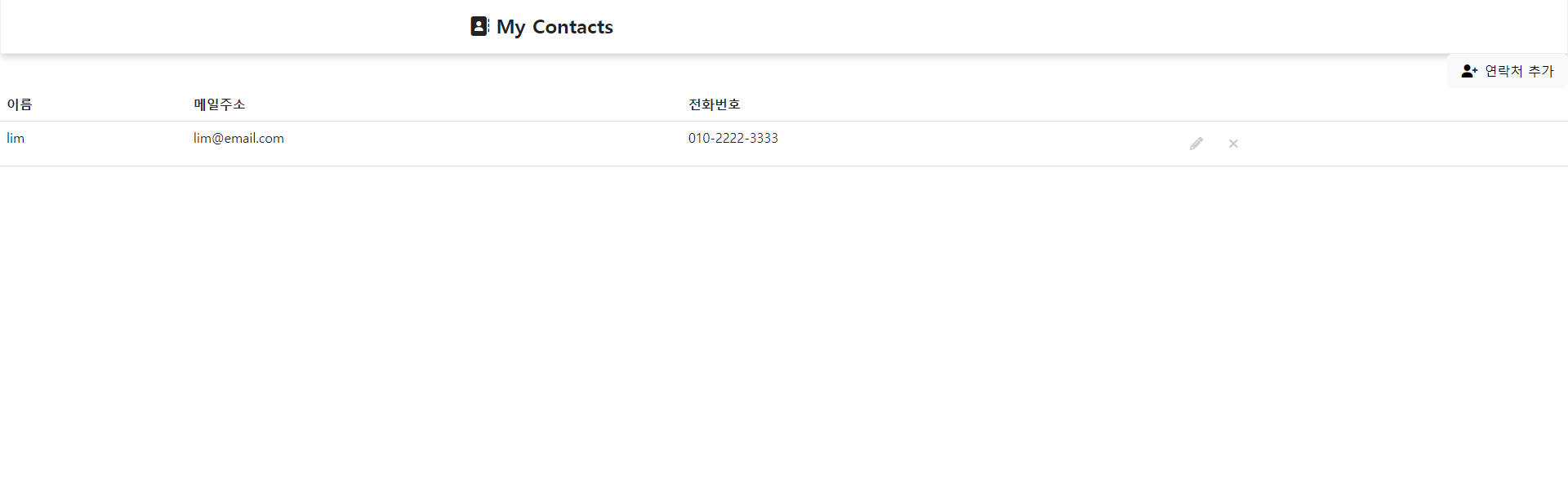
http://localhost:3000/contacts연결 시
저장되어있는 정보 확인 가능