연락처 추가하기
- 메인 js
// 관련파일
// ./routes/contactRoutes-4.js
// ./controllers/contactController-12.js
// ./views/index-2.ejs
// ./views/add-2.ejs

const express = require("express");
const dbConnect = require("./config/dbConnect");

const app = express();

// 뷰 엔진 설정하기
app.set("view engine", "ejs");
app.set("views", "./views");

const port = 3000;

// static폴더(정적폴더 - css,js,img 정적 자원이 있는 폴더)
// public이라는 이름으로 폴더 지정 - ejs views폴더에서 마치 현재 폴더처럼 사용할 수 있다.
app.use(express.static("./public"))

dbConnect();

app.use(express.json());
app.use(express.urlencoded({extended:true}));

app.use("/contacts", require("./routes/contactRoutes")); // contactRoutes-3.js

app.listen(port,()=>{
    console.log("3000번 포트에서 서버 실행중...");
});
- index2.ejs 파일
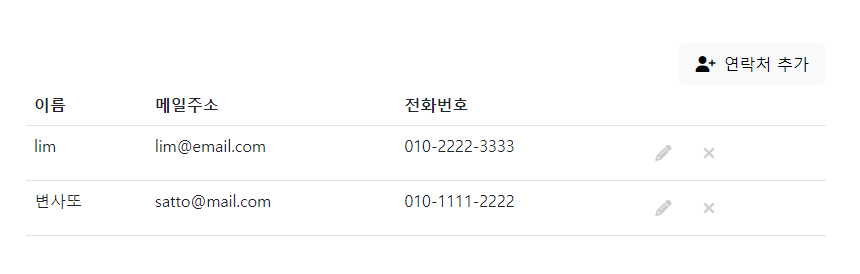
<!-- include header --> <%- include('./include/_header-1') %> <!-- /include header --> <!-- Main --> <main id="site-main"> <div class="button-box"> <a href="#" class="btn btn-light"><i class="fa-solid fa-user-plus"></i>연락처 추가</a> </div> <table class="table"> <head> <tr> <th>이름</th> <th>메일주소</th> <th>전화번호</th> <th> </th> </tr> </head> <tbody> <% contacts.forEach(contact => { %> <tr> <td><%= contact.name %></td> <td><%= contact.email %></td> <td><%= contact.phone %></td> <td> <a href="#" class="btn update" title="수정"> <i class="fas fa-pencil-alt"></i> </a> <a href="#" class="btn delete" title="삭제"> <i class="fas fa-times"></i> </a> </td> </tr> <% }); %> </tbody> </table> </main> <!-- /Main --> <!-- include footer--> <%- include('./include/_footer') %> <!-- /include footer -->
- contactRoutes-5.j 파일
const express = require("express");
const router = express.Router();
const {
    getAllContacts,
    createContact,
    getContact,
    updateContact,
    deleteContact,
    addContactForm // 연락처 추가 폼
}
= require("../controllers/contactController"); // contactController-11.js

// localhost:3000/contacts/
router.route("/").get(getAllContacts);
// localhost:3000/contacts/add
router.route("/add").get(addContactForm).post(createContact);
// localhost:3000/contacts/:id
router.route("/:id").get(getContact).put(updateContact).delete(deleteContact);

module.exports = router;
- contactController-12.js 파일
const asyncHandler = require("express-async-handler");
const Contact = require("../models/contactModel");

// @desc 전체 연락처 가져오기
// @route GET /contacts
const getAllContacts = asyncHandler(async (req,res)=>{
    const contacts = await Contact.find();
    // 헤더와 푸터를 나눈 index-2.ejs
    res.render("index-2",{contacts : contacts});
});

// @desc 연락처 추가 폼
// @route GET /add
const addContactForm = (req,res) => {
    res.render("add-2");
};

// @desc 새 연락처 추가하기
// @route POST /contacts
const createContact = asyncHandler(async (req,res)=>{
    // 객체 구조분해할당, key와 value가 동일함
    const {name, email, phone} = req.body;
    if( !name || !email || !phone ){
        return res.status(400).send("필수값이 입력되지 않음");
    }
    const contact = await Contact.create({
        name,
        email,
        phone
    });
    res.status(200).send("새 연락처 추가");
});

// @desc 연락처 상세보기
// @route GET /contacts/:id
const getContact = asyncHandler(async(req,res)=>{
    const contact = await Contact.findById(req.params.id);
    //const contact = await Contact.findOne({name : name});
    //res.status(200).send(`연락처 상세보기 ID: ${req.params.id}`);
    res.status(200).send(contact);
});

// @desc 연락처 수정하기
// @route PUT /contacts/:id
const updateContact = asyncHandler(async(req,res)=>{
    // res.status(200).send(`연락처 수정하기 ID:${req.params.id}`);
    const id = req.params.id;
    const { name, email, phone } = req.body;
    const updateContact = await Contact.findByIdAndUpdate(
        id,
        {name, email, phone},
        {new : true} // 수정한 후의 도큐먼트로 반환해 주는 옵션
    );
    res.status(200).send(updateContact);
});

// @desc 연락처 삭제하기
// @route DELETE /contacts/:id
const deleteContact = asyncHandler(async(req,res)=>{
    const contact = await Contact.findById(req.params.id);
    if(!contact){
        res.status(404);
        throw new Error("연락처를 찾지 못함.(ID없음)");
    }
    await Contact.deleteOne();
    res.status(200).send("연락처 삭제됨.")
});

module.exports = {
    getAllContacts,
    createContact,
    getContact,
    updateContact,
    deleteContact,
    addContactForm
};
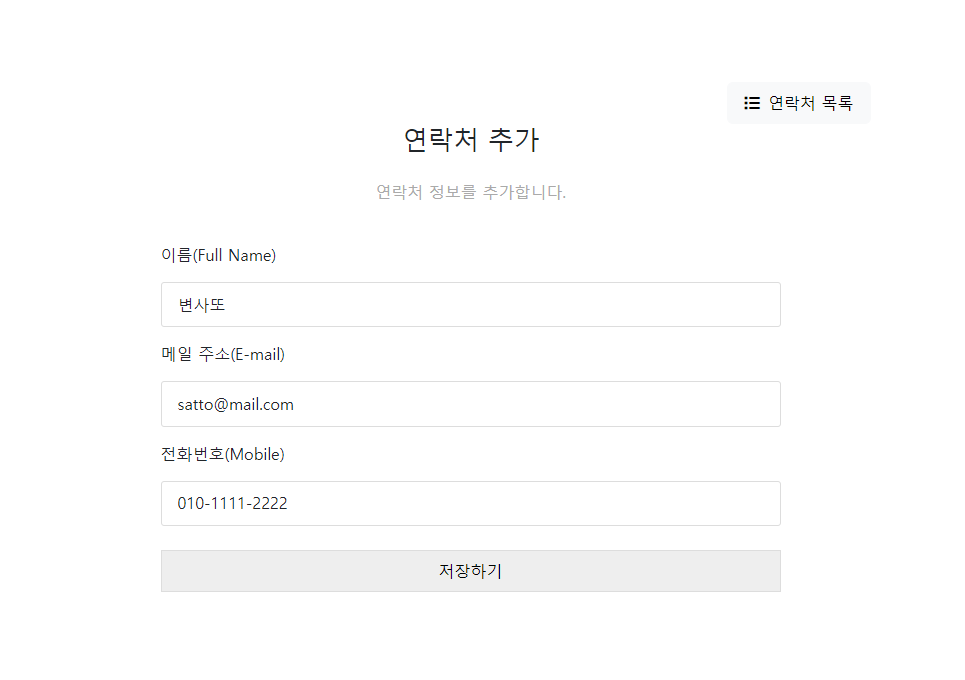
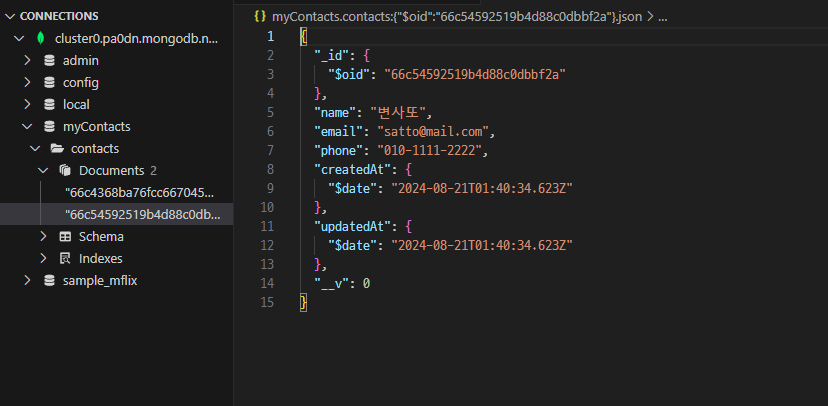
http://localhost:3000/contacts/add검색 후 데이터 입력하기
입력된 데이터 mongo DB에서 확인 가능
연락처 수정하기
리스트 화면의 수정아이콘 클릭하면 id값을 넘겨주기
- 메인 js
// 관련파일
// ./routes/contactRoutes-5.js
// ./controllers/contactController-13.js
// ./views/index-3.ejs
// ./views/add-2.ejs
// ./views/update-1.ejs

const express = require("express");
const dbConnect = require("./config/dbConnect");

const app = express();

// 뷰 엔진 설정하기
app.set("view engine", "ejs");
app.set("views", "./views");

const port = 3000;

// static폴더(정적폴더 - css,js,img 정적 자원이 있는 폴더)
// public이라는 이름으로 폴더 지정 - ejs views폴더에서 마치 현재 폴더처럼 사용할 수 있다.
app.use(express.static("./public"))

dbConnect();

app.use(express.json());
app.use(express.urlencoded({extended:true}));

app.use("/contacts", require("./routes/contactRoutes")); // contactRoutes-3.js

app.listen(port,()=>{
    console.log("3000번 포트에서 서버 실행중...");
});
- update-1.ejs
<!-- include header -->
<%- include('./include/_header-1') %>
    <!-- /include header -->
  <!-- Main -->
  <main id="site-main">
    <div class="button-box">
      <a href="#" class="btn btn-light"><i class="fa-solid fa-list"></i>연락처 목록</a>
    </div>
    <h2>연락처 수정</h2>
    <p>연락처 정보를 수정합니다.</p>
    <form method="POST" id="add-user">
      <div class="user-info">
        <div class="col-12">
          <label for="name" class="col-form-label">이름(Full Name)</label>
          <div>
            <input type="text" class="form-control" name="name" id="name" value="도레미">
          </div>
        </div>
        <div class="col-12">
          <label for="email" class="col-form-label">메일 주소(E-mail)</label>
          <div>
            <input type="text" class="form-control" name="email" id="email" value="doremi@abc.def">
          </div>
        </div>
        <div class="col-12">
          <label for="phone" class="col-form-label">전화번호(Mobile)</label>
          <div>
            <input type="text" class="form-control" name="phone" id="phone" value="456-7890-1234">
          </div>
        </div>
        <button type="submit">수정하기</button>
      </div>
    </form>
  </main>
<!-- /Main -->

<!-- include footer-->
<%- include('./include/_footer') %>
<!-- /include footer -->
- contactRoutes-5.j 파일
- contactController-13.js 파일
const asyncHandler = require("express-async-handler");
const Contact = require("../models/contactModel");

// @desc 전체 연락처 가져오기
// @route GET /contacts
const getAllContacts = asyncHandler(async (req,res)=>{
    const contacts = await Contact.find();
    // 헤더와 푸터를 나눈 index-3.ejs
    res.render("index-3",{contacts : contacts});
});

// @desc 연락처 추가 폼
// @route GET /add
const addContactForm = (req,res) => {
    res.render("add-2");
};

// @desc 새 연락처 추가하기
// @route POST /contacts
const createContact = asyncHandler(async (req,res)=>{
    // 객체 구조분해할당, key와 value가 동일함
    const {name, email, phone} = req.body;
    if( !name || !email || !phone ){
        return res.status(400).send("필수값이 입력되지 않음");
    }
    const contact = await Contact.create({
        name,
        email,
        phone
    });
    // 새 연락처 추가 후에 리스트 화면으로 이동
    res.redirect("/contacts");
});

// @desc 연락처 상세보기 => 업데이트 화면으로 상세보기
// @route GET /contacts/:id
const getContact = asyncHandler(async(req,res)=>{
    const contact = await Contact.findById(req.params.id);
    res.render("update-1",{contact:contact});
});

// @desc 연락처 수정하기
// @route PUT /contacts/:id
const updateContact = asyncHandler(async(req,res)=>{
    const id = req.params.id;
    const { name, email, phone } = req.body;
    const updateContact = await Contact.findByIdAndUpdate(
        id,
        {name, email, phone},
        {new : true} // 수정한 후의 도큐먼트로 반환해 주는 옵션
    );
    res.status(200).send(updateContact);
});

// @desc 연락처 삭제하기
// @route DELETE /contacts/:id
const deleteContact = asyncHandler(async(req,res)=>{
    const contact = await Contact.findById(req.params.id);
    if(!contact){
        res.status(404);
        throw new Error("연락처를 찾지 못함.(ID없음)");
    }
    await Contact.deleteOne();
    res.status(200).send("연락처 삭제됨.")
});

module.exports = {
    getAllContacts,
    createContact,
    getContact,
    updateContact,
    deleteContact,
    addContactForm
};
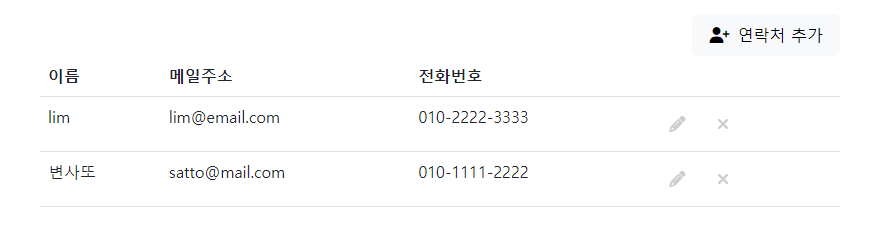
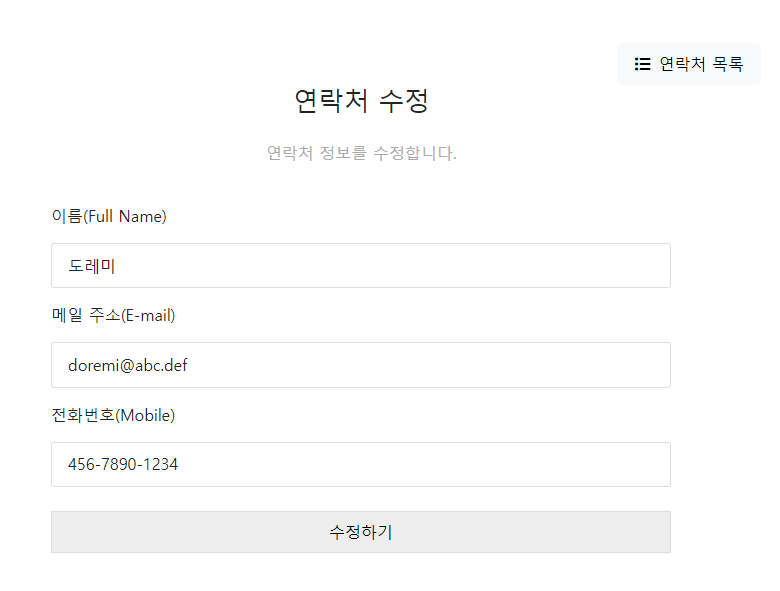
http://localhost:3000/contacts검색 후 수정 연필 모양 클릭
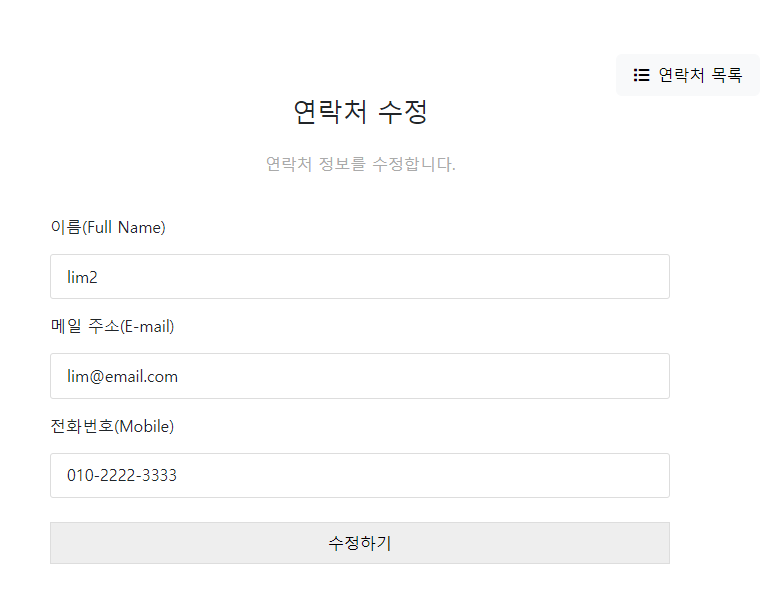
수정 화면 확인 가능
연락처 추가하기
폼에서 PUT 요청방식 사용하기 → method-override미들웨어
npm i method-override미들웨어 설치
- 메인 js
// 관련파일
// ./routes/contactRoutes-5.js
// ./controllers/contactController-14.js
// ./views/index-3.ejs
// ./views/add-2.ejs
// ./views/update-3.ejs PUT요청하기

const express = require("express");
const dbConnect = require("./config/dbConnect");
const methodOverride = require("method-override");

const app = express();

// 뷰 엔진 설정하기
app.set("view engine", "ejs");
app.set("views", "./views");

const port = 3000;

// public파일
app.use(express.static("./public"))
// method-override 미들웨어 등록
app.use(methodOverride("_method"))

dbConnect();

app.use(express.json());
app.use(express.urlencoded({extended:true}));

app.use("/contacts", require("./routes/contactRoutes")); // contactRoutes-3.js

app.listen(port,()=>{
    console.log("3000번 포트에서 서버 실행중...");
});
- contactController-14.js 파일
const asyncHandler = require("express-async-handler");
const Contact = require("../models/contactModel");

// @desc 전체 연락처 가져오기
// @route GET /contacts
const getAllContacts = asyncHandler(async (req,res)=>{
    const contacts = await Contact.find();
    // 헤더와 푸터를 나눈 index-3.ejs
    res.render("index-3",{contacts : contacts});
});

// @desc 연락처 추가 폼
// @route GET /add
const addContactForm = (req,res) => {
    res.render("add-2");
};

// @desc 새 연락처 추가하기
// @route POST /contacts
const createContact = asyncHandler(async (req,res)=>{
    // 객체 구조분해할당, key와 value가 동일함
    const {name, email, phone} = req.body;
    if( !name || !email || !phone ){
        return res.status(400).send("필수값이 입력되지 않음");
    }
    const contact = await Contact.create({
        name,
        email,
        phone
    });
    // 새 연락처 추가 후에 리스트 화면으로 이동
    res.redirect("/contacts");
});

// @desc 연락처 상세보기 => 업데이트 화면으로 상세보기
// @route GET /contacts/:id
const getContact = asyncHandler(async(req,res)=>{
    const contact = await Contact.findById(req.params.id);
    res.render("update-3",{contact:contact}); // PUT방식 요청하기
});

// @desc 연락처 수정하기
// @route PUT /contacts/:id
const updateContact = asyncHandler(async(req,res)=>{
    const id = req.params.id;
    const { name, email, phone } = req.body;
    const updateContact = await Contact.findByIdAndUpdate(
        id,
        {name, email, phone},
        {new : true} // 수정한 후의 도큐먼트로 반환해 주는 옵션
    );
    res.redirect("/contacts");
});

// @desc 연락처 삭제하기
// @route DELETE /contacts/:id
const deleteContact = asyncHandler(async(req,res)=>{
    const contact = await Contact.findById(req.params.id);
    if(!contact){
        res.status(404);
        throw new Error("연락처를 찾지 못함.(ID없음)");
    }
    await Contact.deleteOne();
    res.status(200).send("연락처 삭제됨.")
});

module.exports = {
    getAllContacts,
    createContact,
    getContact,
    updateContact,
    deleteContact,
    addContactForm
};
- update-3.ejs 파일
<!-- include header -->
<%- include('./include/_header-1') %>
    <!-- /include header -->
  <!-- Main -->
  <main id="site-main">
    <div class="button-box">
      <a href="#" class="btn btn-light"><i class="fa-solid fa-list"></i>연락처 목록</a>
    </div>
    <h2>연락처 수정</h2>
    <p>연락처 정보를 수정합니다.</p>
    <!-- method-overrid 미들웨어가 ?_method=PUT 분석해서 PUT 요청으로 처리한다. -->
    <form action = "/contacts/<%= contact._id %>?_method=PUT" method = "POST" id = "add-user">
      <div class="user-info">
        <div class="col-12">
          <label for="name" class="col-form-label">이름(Full Name)</label>
          <div>
            <input type="text" class="form-control" name="name" id="name" value="<%= contact.name %>">
          </div>
        </div>
        <div class="col-12">
          <label for="email" class="col-form-label">메일 주소(E-mail)</label>
          <div>
            <input type="text" class="form-control" name="email" id="email" value="<%= contact.email %>">
          </div>
        </div>
        <div class="col-12">
          <label for="phone" class="col-form-label">전화번호(Mobile)</label>
          <div>
            <input type="text" class="form-control" name="phone" id="phone" value= "<%= contact.phone %>">
          </div>
        </div>
        <button type="submit">수정하기</button>
      </div>
    </form>
  </main>
<!-- /Main -->

<!-- include footer-->
<%- include('./include/_footer') %>
<!-- /include footer -->
기존 데이터 확인
수정
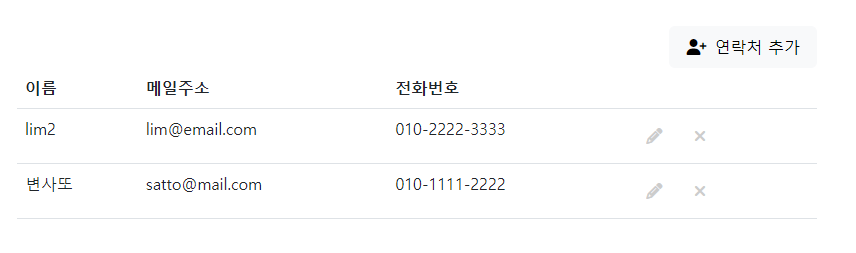
수정 확인 결과