01.TypeScript 설치 준비
typescript를 실행하기 위해서는nodejs가 설치되어 있어야 합니다.
02.폴더 생성
- 새 폴더를 생성 합니다.
- 저는 tes-project이름으로 폴더를 생성 했습니다.
03.프로젝트 폴더 생성
$ npm initpackage.json파일이 생성됩니다.
04.typescript 설치
$ npm i typescript -g- 컴퓨터 전역으로 설치를 원할 경우:
-g옵션을 붙여줍니다. - 해당 프로젝트에서만 사용할 경우:
-g옵션은 안해줘도 됩니다.
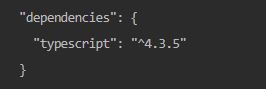
package.json에typescript버전 내용이 등록됩니다.node_modules폴더가 생성되면서 설치됩니다.
05.ts-node 설치
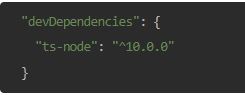
typescript를node에서 실행시킬 수 있는 런타임을 설치합니다.ts-node가ts를js로 컴파일 하고 실행시켜주도록 해줍니다.$ npm i ts-node --save dev
- 이처럼
package.json에 추가됩니다.
06.tsconfig.json 생성
$ npx tsc --init
07.test 파일 작성
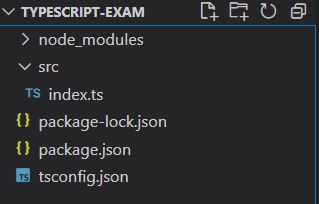
scr폴더를 생성하고 그 밑에index.ts파일 생성합니다.
index.ts파일에 작성:console.log("Hello TypeScript!!");
08.실행
8-1.컴파일 후 node로 실행
- 컴파일:
$ npx tsc(index.ts파일이index.js로 생성됨) - 실행:
$ node dist/index.js
8-2.ts-node로 바로 실행
$ npx ts-node src/index.ts
09.자동화
package.json의scripts을 이용하여 컴파일과 실행을 한번에 진행할 수 있습니다.
package.json파일
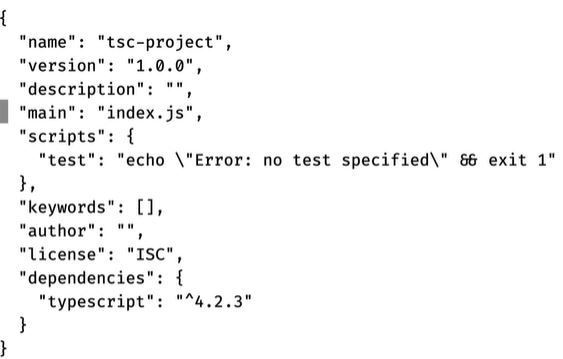
scripts속성을 아래 코드로 변경 해줍니다."scripts": { build: "tsc" }
npm run build명령어를 입력하면 컴파일 후 바로node로 실행합니다.
10.CLI명령어로 설치하는 방법
- 타입스크립트 컴파일러를 글로벌로 설치
// 1.npm으로 설치
$ npm i typescript -g
$ node_modules/.bin/tsc
$ tsc source.ts

// 2.Visual Studio plugin 설치
// Visual Studio 2017 / 2015 Update 3 이후로는 디폴트로 설치되어 있음, 아니면 설치.
- CLI 명령어로 파일 컴파일
// TypeScript 사용하는 명령어(TS -> JS) 컴파일
$ tsc [파일명]

// 예시
// 1.간단하게 파일 생성
$ nano test.ts

// 2.컴파일, 문제없으면 아무것도 안뜸.
$ tsc test.ts

// 3.코드 확인
$ cat test.js
$ cat test.ts

// 4.폴더 생성
$ mkdir tsc-project

// 5.폴더 이동
$ cd tsc-project

// 6.간단하게 파일 생성
$ nano test.ts

// 7.자동으로 설정파일 생성 => tsconfig.json(프로젝트 루트)
$ tsc --init

// 8.JS로 변환(tsconfig.json의 설정에 맞게) => test.js가 생김.
$ tsc

// 9.ts 파일이 변경되면 즉시 js가 변경되도록 설정
$ tsc -w
- 프로젝트에 있는 타입스크립트 설정에 맞춰 npm 스크립트로 컴파일 후 실행
// 1.글로벌로 설치된 TS 삭제
$ npm uninstall typescript -g

// 2.프로젝트에 npm 설치
$ npm init -y

// 3.json 파일 확인 => dependencies : typescript : ^4.2.3
$ cat package.json

// 4.node_modules => typescript
$ npx tsc

// 5.tsconfig.json file 설치
$ npx tsc --init

// 6.watch 모드
$ npx tsc -w

// 7.npx tsc 로 실행할 스크립트 등록 : "scripts"
$ npx tsc

// 8."build": "tsc" => tsc tlfgod
$ npm run build

// 9.build에 watch 기능 추가.
$ npm run build:watch

일취월장(日就月將) - 「날마다 달마다 성장하고 발전한다.」