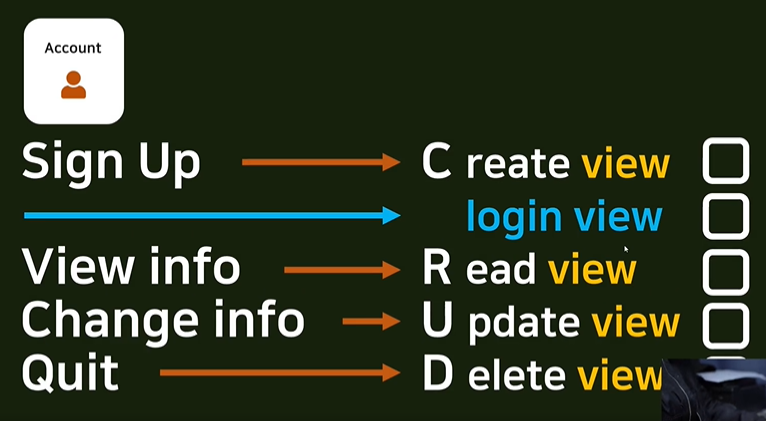
1. CreateView(회원가입)
class base view.py
class AccountCreateView(CreateView):
    model = User
    form_class = UserCreationForm
    success_url = reverse_lazy('accountapp:hello_world')
template_name = 'accountapp/create.html'- CreateView를 상속받음
- model: User(장고에서 기본 제공 모델- AbstractUser를 상속)
- form_class: UserCreationForm(장고 기본 제공 모델)
- success_url: reverse_lazy('accountapp:hello_world')(계정 만들기에 성공했을 때 연결할 주소)
reverse_lazy는 함수의 reverse와 같지만 불러오는 방식의 차이가 있어 class에서는 reverse_lazy 사용 - template_name: 'accountapp/create.html'(form을 볼 html)
create할 경로 지정(urls.py)
app_name = "accountapp"

urlpatterns = [
    path('hello_world/', hello_world, name='hello_world'),
    path('create/', AccountCreateView.as_view(), name='create'),
]- create/: 경로
- AccountCreateView.as_view(): class 기반 view이름(함수로 작성한 view는 이름을 적으면 되지만 class로 작성한 view는 이름.as_view()라고 작성)
- name: app_name과 함께 사용될 이름
create.html 작성
{% extends 'base.html' %}

{% block content %}

  <div style="text-align: center">
    <form action="{% url 'accountapp:create' %}" method="post">
      {% csrf_token %}
      {{ form }}
      <input type="submit" class="btn btn-primary">

    </form>
  </div>

{% endblock %}- extends, block
- form 태그
action: 요청을 보내는 url(/사용하지 않고, {% 구문을 사용하여 view에서 라우팅한 것처럼 {% url '앱:(urls에서 명시한)name' %} 형식으로 작성)
method: post or get 등등 - post요청을 사용할 때 {% csrf_token %} 작성 필수
- {{ form }}을 통해 view에서 지정한 form_class 불러오기
header.html에서 create로의 이동
<div class="pragmatic_header">
    <div>
        <h1 class="pragmatic_logo">Pragmatic</h1>
    </div>
    <div>
        <span>nav1</span>
        <span>nav2</span>
        <span>nav3</span>
        {% if not user.is_authenticated %}
        <a href="{% url 'accountapp:login' %}?next={{ request.path }}">
            <span>login</span>
        </a>
        <a href="{% url 'accountapp:create' %}">
            <span>SignUp</span>
        </a>
        {% else %}
        <a href="{% url 'accountapp:detail' pk=user.pk %}">
            <span>MyPage</span>
        </a>
        <a href="{% url 'accountapp:logout' %}">
            <span>logout</span>
        </a>
        {% endif %}
    </div>
</div>
2. Login, Logout
url.py에서 login, logout 구현
urlpatterns = [
    path('hello_world/', hello_world, name='hello_world'),
    path('create/', AccountCreateView.as_view(), name='create'),
    path('login/', LoginView.as_view(template_name='accountapp/login.html'), name='login'),
    path('login/', LogoutView.as_view(), name='logout'),
]
django에서 제공하는 User를 사용하면 view를 만들지 않고 간단하게 urls.py에서 작성하여 login, logout 구현 가능
(template는 따로 만들어야하기 때문에 login에서 template_name을 지정)
(view를 작성하지 않았기 때문에 login 성공 후 자동으로 account/profile로 이동)
login.html 작성
{% extends 'base.html' %}

{% block content %}

  <div style="text-align: center">
    <div>
      <h4>Login</h4>
    </div>
    <div>
      <form action="" method="post">
        {% csrf_token %}
        {{ form }}
        <input type="submit" class="btn btn-primary">
      </form>
    </div>
  </div>

{% endblock %}
login, logout Redirect Mechanism
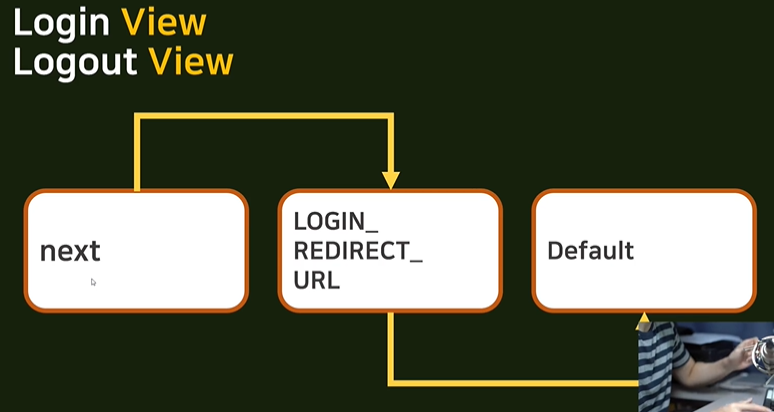
1. post와 get 파라미터 중 next value가 존재한다면 next로 이동
2. next가 없다면 settings.py에 있는 login, logout 경로로 이동
3. setting.py에 경로가 없다면 default경로로 이동(-> accounts/profile)
1. next
header.html에 login, logout으로의 이동
<div class="pragmatic_header">
    <div>
        <h1 class="pragmatic_logo">Pragmatic</h1>
    </div>
    <div>
        <span>nav1</span>
        <span>nav2</span>
        <span>nav3</span>
        {% if not user.is_authenticated %}
        <a href="{% url 'accountapp:login' %}?next={{ request.path }}">
            <span>login</span>
        </a>
        {% else %}
        <a href="{% url 'accountapp:logout' %}">
            <span>logout</span>
        </a>
        {% endif %}
    </div>
</div>
로그인이 되어있지 않다면 login으로 span 태그를 만들어서 누르면 a태그로 accountapp:login url로 이동
next를 사용하여 전에 있었던 페이지를 기억하고 login하면 next에 저장된 주소로 돌아감-> ?next={{ request.path }}(: get 방식)
(전의 페이지 없이 그냥 login주소에 접속했다면 next에 value가 없으므로 default 주소로 이동)
로그인이 되어있다면 logout으로 span 태그를 만들어 누르면 로그아웃되도록 url지정
2. REDIRECT_URL
settings.py
LOGIN_REDIRECT_URL = reverse_lazy('accountapp:hello_world')
LOGOUT_REDIRECT_URL = reverse_lazy('accountapp:login')
login, logout 성공시 이동할 url 지정
3. Bootstrap for Form
bootstrap 설치
djnago-bootstrap4
페이지 안내에 따라 bootstrap4 설치
html의 form에서 bootstrap 사용
(페이지 Quickstrat)
{% extends 'base.html' %}
{% load bootstrap4 %}

{% block content %}

  <div style="text-align: center; max-width: 500px; margin: 4rem auto">
    <div>
      <h4>Login</h4>
    </div>
    <div>
      <form action="" method="post">
        {% csrf_token %}
        {% bootstrap_form form %}
        <input type="submit" class="btn btn-dark rounded-pill col-6 mt-3">
      </form>
    </div>
  </div>

{% endblock %}
bootstrap4를 로드하고 "{% bootstrap_form form %}"으로 form을 넣는다.
<input type="submit" class="btn btn-dark rounded-pill col-6 mt-3">
: bootstrap으로 input 버튼 꾸미기
font 적용
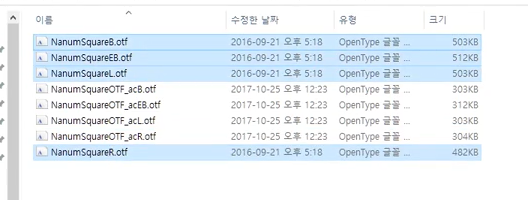
- 서치해서 찾은 폰트를 다운받아 복사하여 최상위 폴더에 있는 static에 font 폴더를 만들어서 넣어준다.
- head.html에 불러오기
{% load static %}

<head>
    <meta charset="UTF-8">
    <title>Pragmatic</title>

    <!-- BOOTSTRAP LINK -->
    <link href="https://cdn.jsdelivr.net/npm/bootstrap@5.2.0/dist/css/bootstrap.min.css" rel="stylesheet" integrity="sha384-gH2yIJqKdNHPEq0n4Mqa/HGKIhSkIHeL5AyhkYV8i59U5AR6csBvApHHNl/vI1Bx" crossorigin="anonymous">
	<script src="https://cdn.jsdelivr.net/npm/bootstrap@5.2.0/dist/js/bootstrap.bundle.min.js" integrity="sha384-A3rJD856KowSb7dwlZdYEkO39Gagi7vIsF0jrRAoQmDKKtQBHUuLZ9AsSv4jD4Xa" crossorigin="anonymous"></script>

     <!-- GOOGLE FONTS LINKS -->
    <link rel="preconnect" href="https://fonts.googleapis.com">
    <link rel="preconnect" href="https://fonts.gstatic.com" crossorigin>
    <link href="https://fonts.googleapis.com/css2?family=Caveat&family=Noto+Sans+KR:wght@100&display=swap" rel="stylesheet">

    <!--    DEFAULT CSS LINK  -->
    <link rel="stylesheet" type="text/css" href="{% static 'base.css' %}">

    <style>
        @font-face{
            font-family: 'NanumSquareRoundR';
            src: local('NanumSquareRoundR'),
            url("{% static 'fonts/NanumSquareRoundR.ttf' %}") format("opentype");
        }
        @font-face{
            font-family: 'NanumSquareRoundEB';
            src: local('NanumSquareRoundEB'),
            url("{% static 'fonts/NanumSquareRoundEB.ttf' %}") format("opentype");
        }
        @font-face{
            font-family: 'NanumSquareRoundB';
            src: local('NanumSquareRoundB'),
            url("{% static 'fonts/NanumSquareRoundB.ttf' %}") format("opentype");
        }
        @font-face{
            font-family: 'NanumSquareRoundL';
            src: local('NanumSquareRoundL'),
            url("{% static 'fonts/NanumSquareRoundL.ttf' %}") format("opentype");
        }
    </style>

</head>- 전체 적용을 위해 base.html에 적용
<!DOCTYPE html>
<html lang="ko">

{% include 'head.html' %}

<body style="font-family: 'NanumSquareRoundR">

    {% include 'header.html' %}

    <hr>

    {% block content %}
    {% endblock %}

    <hr>

    {% include 'footer.html' %}

</body>
</html>
4. Read View-> Detail View
class base view
class AccountDetailView(DetailView):
    model = User
    template_name = 'accountapp/detail.html'
account의 view에서 DetailView를 만든다.
-> User 모델의 정보를 시각화하는 것만 구현하면 되기 때문에 model과 templat_name(정보를 볼 수 있는 html)만 정해주면 된다.
deatil.html 작성
{% extends 'base.html' %}

{% block content %}

  <div>
    <div style="text-align: center; max-width: 500px; margin: 4rem auto;">
      <p>
        {{ user.data_joined }}
      </p>
      <h2>
        {{ user.username }}
      </h2>
    </div>
  </div>

{% endblock %}
detail.html 경로 지정(urls.py)
path('deatil/<int:pk>', AccountDetailView.as_view(), name='deatil'),
deatil/<int:pk>': int인 pk라는 이름의 정보를 /뒤에 받아옴(몇번 유저인지 확인하기 위해)
header.html에 detail로의 이동
<div class="pragmatic_header">
    <div>
        <h1 class="pragmatic_logo">Pragmatic</h1>
    </div>
    <div>
        <span>nav1</span>
        <span>nav2</span>
        <span>nav3</span>
        {% if not user.is_authenticated %}
        <a href="{% url 'accountapp:login' %}?next={{ request.path }}">
            <span>login</span>
        </a>
        {% else %}
        <a href="{% url 'accountapp:detail' pk=user.pk %}">
            <span>MyPage</span>
        </a>
        <a href="{% url 'accountapp:logout' %}">
            <span>logout</span>
        </a>
        {% endif %}
    </div>
</div>
login 되어있는 상태에서만 myPage로 넘어갈 수 있는 span태그 생성
-> login된 User의 pk값을 받아서 pk에 저장하여 accountapp:detail에서 사용
(pk는 urls.py에서 path 지정할 때 필요하면 html에서 그 주소로 넘어갈 때 붙여줘야함)
class view에 context_object_name
-> 다른 계정의 myPage를 접속하였을 때 로그인한 유저의 Page가 아닌 선택한 계정의 Page가 보일 수 있도록하는 파라미터
view.py
class AccountDetailView(DetailView):
    model = User
    context_object_name = 'target_user'
    template_name = 'accountapp/detail.html'
detail.html
{% extends 'base.html' %}

{% block content %}

  <div>
    <div style="text-align: center; max-width: 500px; margin: 4rem auto;">
      <p>
        {{ target_user.date_joined }}
      </p>
      <h2 style="font-family: 'NanumSquareRoundB'">
        {{ target_user.username }}
      </h2>
    </div>
  </div>

{% endblock %}
5. UpdateView
class base view
class AccountUpdateView(CreateView):
    model = User
    context_object_name = 'target_user'
    form_class = UserCreationForm
    success_url = reverse_lazy('accountapp:hello_world')
    template_name = 'accountapp/update.html'
CreateView와 유사
update.html 작성
{% extends 'base.html' %}
{% load bootstrap4 %}

{% block content %}

  <div style="text-align: center; max-width: 500px; margin: 4rem auto">
    <div class="mb-4">
      <h4>Change Info</h4>
    </div>
    <form action="{% url 'accountapp:update' pk=user.pk %}" method="post">
      {% csrf_token %}
      {% bootstrap_form form %}
      <input type="submit" class="btn btn-dark rounded-pill col-6 mt-3">
    </form>
  </div>

{% endblock %}
마찬가지로 CreateView와 유사
update.html 경로 지정(urls.py)
path('update/<int:pk>', AccountUpdateView.as_view(), name='update'),deatil/<int:pk>': int인 pk라는 이름의 정보를 /뒤에 받아옴(몇번 유저인지 확인하기 위해)
detail.html에서 update로 이동
{% extends 'base.html' %}

{% block content %}

  <div>
    <div style="text-align: center; max-width: 500px; margin: 4rem auto;">
      <p>
        {{ target_user.date_joined }}
      </p>
      <h2 style="font-family: 'NanumSquareRoundB'">
        {{ target_user.username }}
      </h2>

      {% if target_user == user %}
      <a href="{% url 'accountapp:update' pk=user.pk %}">
        <p>
          Change Info
        </p>
      </a>
      {% endif %}
    </div>
  </div>

{% endblock %}
username을 바꾸지 못하는 비활성 상태로 만들기
- Account에 forms.py를 만들어 UserCreateForm을 상속받는 AccountUpdateForm을 새로 만든다.
class AccountUpdateForm(UserCreationForm):
    def __init__(self, *args, **kwargs):
        super().__init__(*args, **kwargs)

self.fields['username'].disabled = True- AccountUpdateView의 form_class를 새로 만든 AccountUpdatForm으로 바꾼다.
class AccountUpdateView(CreateView):
    model = User
    form_class = AccountUpdateForm
    success_url = reverse_lazy('accountapp:hello_world')
    template_name = 'accountapp/update.html'
6. DeleteView
class base view
class AccountDeleteView(DeleteView):
    model = User
    context_object_name = 'target_user'
    success_url = reverse_lazy('accountapp:login')
    template_name = 'accountapp/delete.html'
delete.html 작성
{% extends 'base.html' %}

{% block content %}

  <div style="text-align: center; max-width: 500px; margin: 4rem auto">
    <div class="mb-4">
      <h4>Quit</h4>
    </div>
    <form action="{% url 'accountapp:delete' pk=target_user.pk %}" method="post">
      {% csrf_token %}
      <input type="submit" class="btn btn-dark rounded-pill col-6 mt-3">

    </form>
  </div>

{% endblock %}
form이 필요없다.
delete.html 경로 지정(urls.py)
path('delete/<int:pk>', AccountDeleteView.as_view(), name='delete'),detail.html에서 delete로 이동
{% extends 'base.html' %}

{% block content %}

  <div>
    <div style="text-align: center; max-width: 500px; margin: 4rem auto;">
      <p>
        {{ target_user.date_joined }}
      </p>
      <h2 style="font-family: 'NanumSquareRoundB'">
        {{ target_user.username }}
      </h2>

      {% if target_user == user %}
      <a href="{% url 'accountapp:update' pk=user.pk %}">
        <p>
          Change Info
        </p>
      </a>
       <a href="{% url 'accountapp:delete' pk=user.pk %}">
        <p>
          Quit
        </p>
      </a>
      {% endif %}
    </div>
  </div>

{% endblock %}
7. Authentication 인증
Authentication
-> 인증 시스템 사용(ex 로그인했을 때만 글 작성이 가능하도록)
hello_world view에서 로그인 확인
def hello_world(request):

    if request.user.is_authenticated:
        if request.method == "POST":

            temp = request.POST.get('hello_world_input')

            new_hello_world = HelloWorld()
            new_hello_world.text = temp
            new_hello_world.save()

            return HttpResponseRedirect(reverse('accountapp:hello_world'))
        else:
            hello_world_list = HelloWorld.objects.all()
            return render(request, 'accountapp/hello_world.html', context={'hello_world_list': hello_world_list})
    else:
        return HttpResponseRedirect(reverse('accountapp:login'))
UpdateView와 DeleteView에서도 인증 시스템을 구현과 주소의 pk접근으로 자신의 계정이 아님에도 계정 수정이나 탈퇴가 가능하므로 이를 막아야한다.
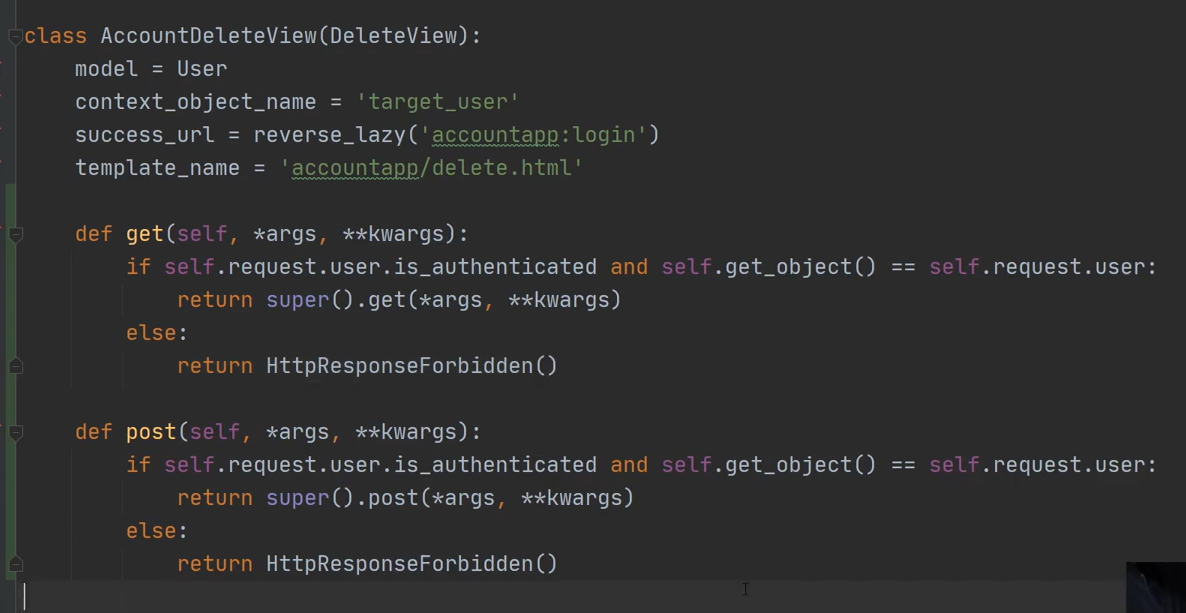
이러한 방법은 적당한 방법이 아니다. 정확한 방법은 추후에 하기로 하자.
8. Decorator
decorator 예시
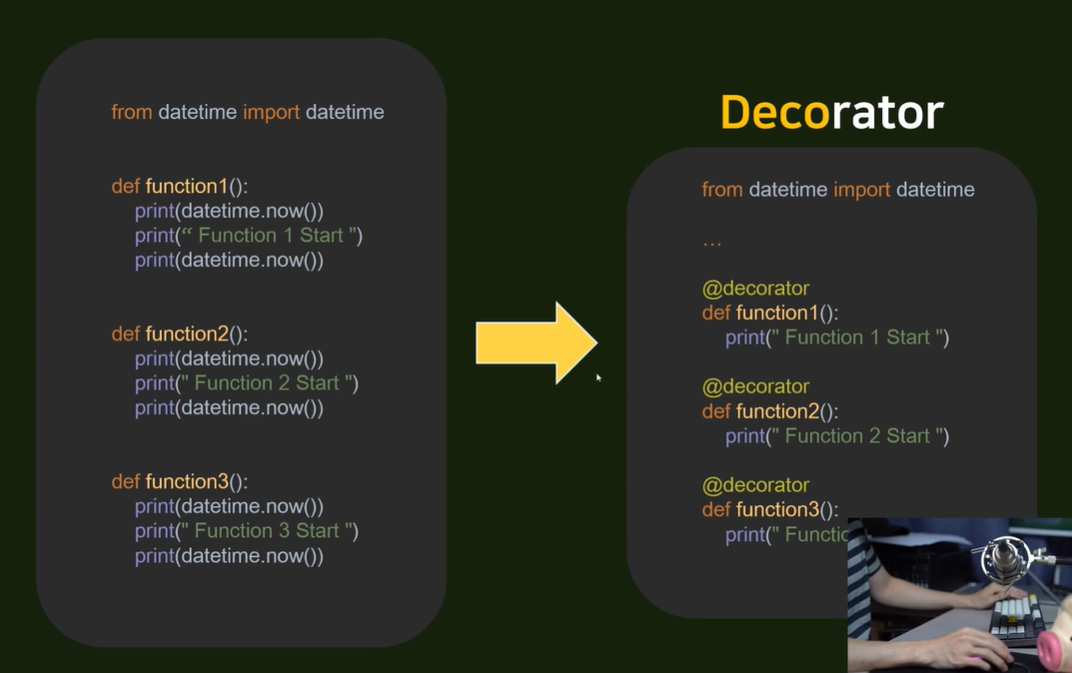
hello_world view에서 decorator 사용 (함수에서의 사용)
def hello_world(request):

    if request.user.is_authenticated:
        if request.method == "POST":

            temp = request.POST.get('hello_world_input')

            new_hello_world = HelloWorld()
            new_hello_world.text = temp
            new_hello_world.save()

            return HttpResponseRedirect(reverse('accountapp:hello_world'))
        else:
            hello_world_list = HelloWorld.objects.all()
            return render(request, 'accountapp/hello_world.html', context={'hello_world_list': hello_world_list})
    else:
        return HttpResponseRedirect(reverse('accountapp:login'))
-> -> -> ->
@login_required
def hello_world(request):

    if request.method == "POST":
        temp = request.POST.get('hello_world_input')

        new_hello_world = HelloWorld()
        new_hello_world.text = temp
        new_hello_world.save()

        return HttpResponseRedirect(reverse('accountapp:hello_world'))
    else:
        hello_world_list = HelloWorld.objects.all()
        return render(request, 'accountapp/hello_world.html', context={'hello_world_list': hello_world_list})
-> 위의 login되어있는지 확인과 로그아웃이라면 로그인.html로 리턴하는 것을 @login_required를 통해 할 수 있음(코드의 가독성 증가)
class view에서의 decorator 사용
@method_decorator(login_required, 'get')
@method_decorator(login_required, 'post')
class AccountUpdateView(CreateView):
    model = User
    context_object_name = 'target_user'
    form_class = AccountUpdateForm
    success_url = reverse_lazy('accountapp:hello_world')
    template_name = 'accountapp/update.html'
@method_decorator(login_required, 'get') : 일반 함수에서 사용하는 decorator(login_required)를 class method(method의 방식이 get또는 post)에서 사용할 수 있도록하는 decorator
Custom Decorator
- accountapp에 decorators.py를 만들어 작성
def account_ownership_required(func):
    def decorated(request, *args, **kwargs):
        user = User.objects.get(pk=kwargs['pk'])
        if not user == request.user:
            return HttpResponseForbidden()
        return func(request, *args, **kwargs)
    return decorated
해당 decorator를 사용하여 접속한 pk로 user를 get하여 현재 login된 user와 같은지 확인 후 리턴한다.
- view에서 custom한 decorator 사용
has_ownership = [account_ownership_required, login_required]

@method_decorator(has_ownership, 'get')
@method_decorator(has_ownership, 'post')
class AccountDeleteView(DeleteView):
    model = User
    context_object_name = 'target_user'
    success_url = reverse_lazy('accountapp:login')
    template_name = 'accountapp/delete.html'
has_ownership = [account_ownership_required, login_required] -> 배열로 모든 decorator를 모두 확인하도록
9. Superuser, Media
1. superuser 계정 만들기
python manage.py createsuperuser
username과 password 입력
path('admin/', admin.site.urls),
주소에 admin/에 접속하여 데이터 수정가능
2. media
settings.py에 작성
MEDIA_URL = '/media/'

MEDIA_ROOT = os.path.join(BASE_DIR, "media")- MEDIA_URL: 주소 창에 /media/이하로 접근해야 미디어 파일에 접근 가능
- MEDIA_ROOT: 미디어 파일을 서버에 올렸을 때 지정되는 루트(미디어를 올렸을 때 media라는 파일이 생기고 그 파일에 저장)
- ex)127.0.0.1:8000/media/test.jpg
이미지 사용에 필요한 package: pillow
pip install pillow
