enterprise applications을 개발을 진행하게 되었는데 이 때 aggrid가 고성능, 다양한 기능, 친절한 문서와 예제 등의 장점으로 상용 라인선스를 구매하여 개발을 하게 되었습니다.
📌 문제 상황
Aggrid에서 셀을 수정할 때 CellEditor라는 컴포넌트를 통해서 Cell의 값을 수정할 수 있는 기능을 제공해줍니다.
그런데 년/월/일을 수정할 수 있는 CellEditor는 Aggrid에서 기본적으로 제공되지만 년/월/일/시/분까지 수정할 수 있는 CellEditor는 지원하지 않는 것으로 파악이되어(못찾은걸 수도...) Custom Cell Editor Compoent를 개발해야했습니다.
📌 HTML5 input type="datetime-local"
HTML5부터 input type중에 datetime-local이 있는데 이를 통해 날짜와 시간을 쉽게 선택할 수 있도록 UI를 제공해주어 이를 사용해서 CellEditor를 개발하였습니다.
MDN input type="datetime-local" 설명
<input
  type="datetime-local"
  id="meeting-time"
  name="meeting-time"
  value="2018-06-12T19:30"
  min="2018-06-07T00:00"
  max="2018-06-14T00:00" />
📌 Custom Cell Editor Compoent
- CLocalDatetime.vue 코드
<template>
    <input ref="input" v-model="value" type="datetime-local" class="custom-datetime-local" @input="changeValue" />
</template>

<script>
import { nextTick } from 'vue';

export default {
    setup() {
        return {
            value: null
        };
    },

    created() {
        this.value = this.getInitialValue();
    },

    mounted() {
        nextTick(() => {
            this.$refs.input.focus();
        });
    },

    methods: {

        getValue() {
            return this.value;
        },

        // 초기 값 설정
        getInitialValue() {
            let startValue = this.params.value;

            if (startValue === '' || startValue === undefined) {
                return '';
            }

            if (startValue.split(':').length > 2) {
                startValue = startValue.split('T')[0] + 'T' + startValue.split('T')[1].split(':').slice(0, -1).join(':');
            }

            return startValue;
        },

        setValue(params) {
            const value = params.value
            this.value = value;
        },

        changeValue(newValue) {
            this.setValue(newValue?.target)
        }
    }
};

</script>

<style scoped>
.custom-datetime-local {
    width: 180px;
    height: 100%;
    border: 0;
    background: none;
    outline: none;
    padding: 0 12px;
}
</style>
Back-End의 Api서버를 Spring, JPA를 사용해서 개발하였는데 이 때 LocalDatetime 객체를 사용해서 타임스탬프를 저장하였는데 이를 핸들링 할 수 있도록 getInitialValue() 함수를 개발하였습니다.
📌 valueFormatter(ISO -> 한글)
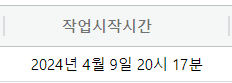
ISO 8601 형식의 날짜 값이 그대로 보여지게 되면 가독성이 떨어지기 때문에 한글로 변환하여 보여질 수 있도록 포맷팅하는 함수를 개발하였습니다.
- convertISOToKorean함수
/**
 * type === second 일 경우 초까지 표현
 * type === minute 일 경우 분까지 표현
 *
 * @param {String} dateString(ISO 8601 형식)
 * @returns YYYY년 MM월 DD일 HH시 MM분 SS초(초는 옵션)
 * @author onetaekoh
 */
function convertISOToKorean(dateString, type = 'minute') {
  if (dateString === undefined || dateString === '') {
    return '';
  }

  if (dateString.split(':').length > 2 && type === 'minute') {
    dateString = dateString.split(':').slice(0, -1).join(':');
  }

  const date = new Date(dateString);

  const year = date.getFullYear();
  const month = date.getMonth() + 1; // 월은 0부터 시작하므로 1을 더해줌
  const day = date.getDate();
  const hour = date.getHours();
  const minute = date.getMinutes();

  return `${year}년 ${month}월 ${day}일 ${hour}시 ${minute}분${type === 'second' ? ' ' + date.getSeconds() + '초' : ''}`;
}
📌 사용방법 및 이미지
- columnDefs
{
	field: 'startDateTime',
	headerName: '작업시작시간',
	cellStyle: { textAlign: 'center' },
	cellEditor: "CLocalDateTimeEditor",
	editable: true,
	width: 180,
	valueFormatter: param => {
	  return convertISOToKorean(param.value)
	},
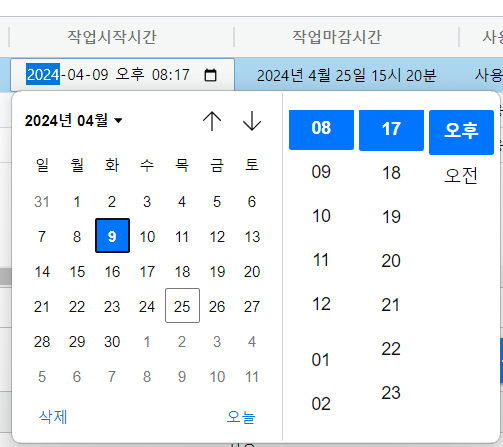
},- CellEditor를 통해 Cell을 수정하는 이미지
- ISO -> 한글로 변환된 이미지
✨ 마무리
ag-Grid와 같은 라이브러리를 사용하면 화면을 빠르고 쉽게 개발할 수 있지만, 다른 라이브러리와 마찬가지로 커스터마이징하는 것은 어려운 것을 느꼈습니다.