리얼센스 RGB-D 카메라로 실시간 ORB SLAM 구동하기
ORB_SLAM2/Examples에 있는 예제를 사용해서 realsense 카메라로 실시간 ORB SLAM을 돌려보자- 우리가 해야 할 일은 크게 네 가지
- librealsense 설치
- 카메라의 intrinsic 정보가 담긴 yaml 파일 수정
- 코드 수정
- CMake 파일 수정
컨테이너 올리기
- nvidia cuda 이미지 받아서 디펜던시 설치하고 셋업하는 걸 차근차근 쓰려고 했다
- 근데 디펜던시 빌드도 문제없이 했고, 환경변수도 잡아줬는데 orb slam 셋업 스크립트만 돌리면 opencv를 못 찾았다
- 찾아보니 도커 이미지가 있었고, 디펜던시 설치고 나발이고 셋업 스크립트만 돌리면 한방에 셋업된다
- 이거 하려고 나는 어제 하루를 갈아넣었는데... 이래서 사람은 검색을 잘 해야한다
xhost +local:docker

sudo docker run -it --name orb_slam --gpus all -it --privileged --env=NVIDIA_DRIVER_CAPABILITIES=all -v ~/docker:/data -v /tmp/.X11-unix:/tmp/.X11-unix:rw -v /tmp/.docker.xauth:/tmp/.docker.xauth:rw -e DISPLAY=$DISPLAY --env QT_X11_NO_MITSHM=1e --ipc=host youyu/orb_slam2:ubuntu18-
-v옵션은 공유 볼륨 설정으로, <호스트 쪽 디렉토리>:<컨테이너 내 디렉토리> 형태로 사용. 위의 스크립트에서~/docker:/data대신 사용하는 디렉토리에 맞게 수정해서 사용하면 된다. -
컨테이너 내에서,
apt update

cd ORB_SLAM2
chmod +x build.sh
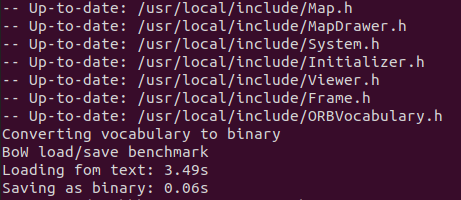
./build.sh- 그럼 이렇게 쉽고 빠르게 끝난다...
librealsense 설치
# /ORB_SLAM2/
cd Thirdparty

# 설치 과정에서 필요한 패키지 설치
apt-get install libssl-dev xorg-dev libglu1-mesa-dev
apt-get update && apt-get install -y gnupg2
apt-get install software-properties-common
apt-get install libusb-1.0-0-dev

# librealsense 설치
git clone https://github.com/IntelRealSense/librealsense.git
cd librealsense/
mkdir build
cd build
cmake ..
make
make install
rgbd_realsense.cc 코드
ORB_SLAM2/Examples/RGB-D/rgbd_realsense.cc를 생성
#include <iostream>
#include <algorithm>
#include <fstream>
#include <chrono>
#include <atomic>
#include <thread>
#include <opencv2/core/core.hpp>
#include <librealsense2/rs.hpp>
#include <System.h>

void stop_falg_detection();

// A flag to indicate whether a key had been pressed.
std::atomic_bool stop_flag(false);

int main(int argc, char **argv) try {

    if(argc != 3){
        cerr << endl << "Usage: ./rgbd_realsense path_to_vocabulary path_to_settings" << endl;
        return EXIT_SUCCESS;
    }

    std::cout << "Querying Realsense device info..." << std::endl;

    // Create librealsense context for managing devices
    rs2::context ctx;
    auto devs = ctx.query_devices();  // Get device list
    int device_num = devs.size();
    std::cout << "Device number: " << device_num << std::endl; // Device amount

    // Query the info of first device
    rs2::device dev = devs[0];  // If no device conneted, a rs2::error exception will be raised
    // Device serial number (different for each device, can be used for searching device when having mutiple devices)
    std::cout << "Serial number: " << dev.get_info(RS2_CAMERA_INFO_SERIAL_NUMBER) << std::endl;

    rs2::config cfg;
    // Default it will config all the devices,you can specify the device index you want to config (query by serial number)
    // Config color stream: 640*480, frame format: BGR, FPS: 30
    cfg.enable_stream(RS2_STREAM_COLOR,640, 480, RS2_FORMAT_RGB8, 30);  // BGR8 correspond to CV_8UC3 in OpenCV
    // Config depth stream: 640*480, frame format: Z16, FPS: 30
    cfg.enable_stream(RS2_STREAM_DEPTH, 640, 480, RS2_FORMAT_Z16, 30); // Z16 corresponds to CV_16U in OpenCV

    std::cout << "Config RGB frame format to 8-channal RGB" << std::endl;
    std::cout << "Config RGB and depth FPS to 30" << std::endl;

    rs2::pipeline pipe;
    pipe.start(cfg);

    // Block program until frames arrive
    rs2::frameset data = pipe.wait_for_frames();

    rs2::depth_frame depth = data.get_depth_frame();
    rs2::video_frame color = data.get_color_frame();

    rs2::stream_profile depth_profile = depth.get_profile();
    rs2::stream_profile color_profile = color.get_profile();

    // Get RGB camera intrinsics
    // Note that the change of config will cause the change of intrinsics
    rs2::video_stream_profile cvsprofile(color_profile);
    rs2::video_stream_profile dvsprofile(depth_profile);
    rs2_intrinsics color_intrinsics = cvsprofile.get_intrinsics();
    rs2_intrinsics depth_intrinsics = dvsprofile.get_intrinsics();

    const int color_width = color_intrinsics.width;
    const int color_height = color_intrinsics.height;
    const int depth_width = depth_intrinsics.width;
    const int depth_height = depth_intrinsics.height;

    std::cout << "RGB Frame width: " << color_width << std::endl;
    std::cout << "RGB Frame height: " << color_height << std::endl;
    std::cout << "Depth Frame width: " << depth_width << std::endl;
    std::cout << "Depth Frame height: " << depth_height << std::endl;
    std::cout << "RGB camera intrinsics:" << std::endl;
    std::cout << "fx: " << color_intrinsics.fx << std::endl;
    std::cout << "fy: " << color_intrinsics.fy << std::endl;
    std::cout << "cx: " << color_intrinsics.ppx << std::endl;
    std::cout << "cy: " << color_intrinsics.ppy << std::endl;
    std::cout << "RGB camera distortion coeffs:" << std::endl;
    std::cout << "k1: " << color_intrinsics.coeffs[0] << std::endl;
    std::cout << "k2: " << color_intrinsics.coeffs[1] << std::endl;
    std::cout << "p1: " << color_intrinsics.coeffs[2] << std::endl;
    std::cout << "p2: " << color_intrinsics.coeffs[3] << std::endl;
    std::cout << "k3: " << color_intrinsics.coeffs[4] << std::endl;
    //std::cout << "RGB camera distortion model: " << color_intrinsics.model << std::endl;

    std::cout << "* Please adjust the parameters in config file accordingly *" << std::endl;

    // Create SLAM system. It initializes all system threads and gets ready to process frames.
    ORB_SLAM2::System SLAM(argv[1],argv[2],ORB_SLAM2::System::RGBD,true);
    std::cout << std::endl << "Start SLAM thread" << std::endl;

    // Vector for tracking time statistics
    vector<float> vtimes_track;

    std::thread stop_detect_thread = std::thread(stop_falg_detection);

    std::cout << std::endl << "-------" << std::endl;
    std::cout << "Start processing realsense stream ..." << std::endl;
    std::cout << "Use 'e + enter' to end the system" << std::endl;

    while (!stop_flag){
        data = pipe.wait_for_frames();

        depth = data.get_depth_frame();
        color = data.get_color_frame();
        double time_stamp = data.get_timestamp();

        cv::Mat im_D(cv::Size(depth_width, depth_height), CV_16U, (void*)depth.get_data(), cv::Mat::AUTO_STEP);
        cv::Mat im_RGB(cv::Size(color_width, color_height), CV_8UC3, (void*)color.get_data(), cv::Mat::AUTO_STEP);

        std::chrono::steady_clock::time_point t1 = std::chrono::steady_clock::now();

        // Pass the image to the SLAM system
        SLAM.TrackRGBD(im_RGB,im_D,time_stamp);

        std::chrono::steady_clock::time_point t2 = std::chrono::steady_clock::now();
        double ttrack= std::chrono::duration_cast<std::chrono::duration<double>>(t2 - t1).count();
        vtimes_track.push_back(ttrack);
    }

    stop_detect_thread.join();

    // Stop all threads
    SLAM.Shutdown();

    // Tracking time statistics
    sort(vtimes_track.begin(),vtimes_track.end());
    float time_total = 0;
    for(size_t i = 0; i < vtimes_track.size(); i++){
        time_total += vtimes_track[i];
    }

    std::cout << "-------" << std::endl << std::endl;
    std::cout << "median tracking time: " << vtimes_track[vtimes_track.size() / 2] << std::endl;
    std::cout << "mean tracking time: " << time_total / vtimes_track.size() << std::endl;

    // Save camera trajectory
    SLAM.SaveTrajectoryTUM("CameraTrajectory.txt");
    SLAM.SaveKeyFrameTrajectoryTUM("KeyFrameTrajectory.txt");

    return EXIT_SUCCESS;

}catch(const rs2::error &e){
    // Capture device exception
    std::cerr << "RealSense error calling " << e.get_failed_function() << "(" << e.get_failed_args() << "):\n    " << e.what() << std::endl;
    return EXIT_FAILURE;
}catch(const std::exception &e){
    std::cerr<<"Other error : " << e.what() << std::endl;
    return EXIT_FAILURE;
}

void stop_falg_detection(){
    char c;
    while (!stop_flag) {
        c = std::getchar();
        if(c == 'e'){
            stop_flag = true;;
        }
    }
}yaml 파일 생성 및 카메라 Intrinsic parameter 내용 수정
- 실행 시 Intrinsic parameter가 포함된 yaml 파일을 arg로 주는데,
- 우리가 사용할 카메라의 intrinsic parameter에 맞게 수정해줘야한다.
Examples/RGB-D/에 있는TUM1.yaml파일을 복제 후, 파일 이름을d415.yaml로 변경- 파일을 살펴보면
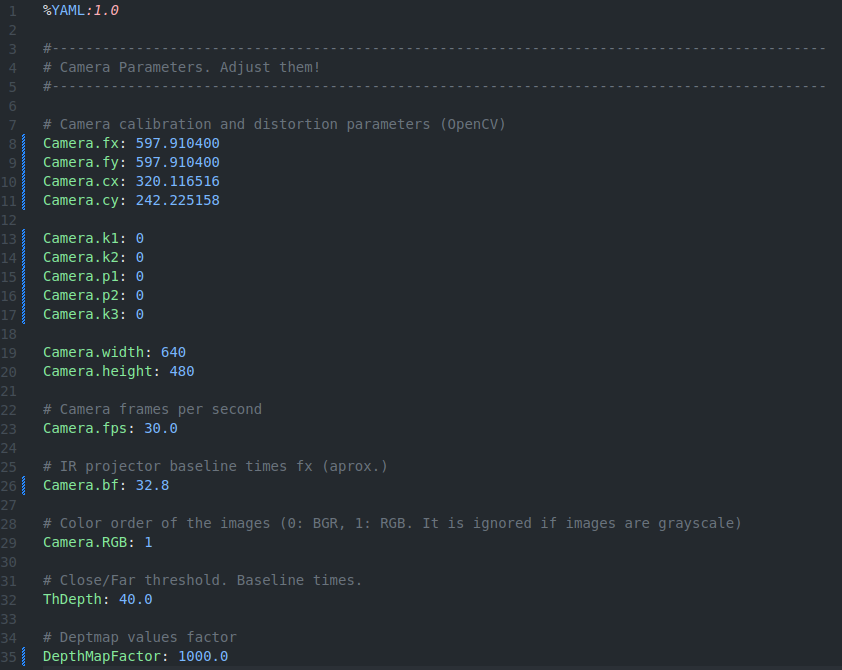
여기까지가 카메라 파라미터에 관한 부분이다.
나는 d415를 사용했기 때문에 위처럼 설정했다.
- 파라미터 중
Camera.bf는 baseline (m 단위) * Camera.fx를 곱해주면 된다.- 베이스라인 참고
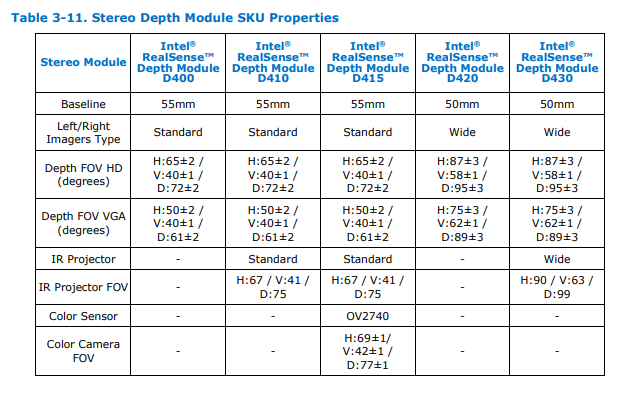
- 베이스라인 참고
- fx, fy (초점거리), cx, cy (주점), k1, k2, p1, p2, k3 (왜곡계수) 확인 방법
# in terminal,
pip install pyrealsense
설치가 완료되면 아래 파이썬 스크립트를 실행한다.
import pyrealsense2 as rs

def print_intrinsic_parameters():
    # Create a context object. This object manages the RealSense devices.
    pipeline = rs.pipeline()
    config = rs.config()

    # Enable the desired streams and set the resolution to 640x480.
    config.enable_stream(rs.stream.depth, 640, 480, rs.format.z16, 30)
    config.enable_stream(rs.stream.color, 640, 480, rs.format.rgb8, 30)

    # Start the pipeline with the given configuration.
    profile = pipeline.start(config)

    # Get the intrinsic parameters of the color stream.
    depth_stream = profile.get_stream(rs.stream.depth)
    intrinsics = depth_stream.as_video_stream_profile().get_intrinsics()

    # Print the intrinsic parameters.
    print("Intrinsic Parameters:")
    print("Width:", intrinsics.width)
    print("Height:", intrinsics.height)
    print("Fx:", intrinsics.fx)
    print("Fy:", intrinsics.fy)
    print("Cx:", intrinsics.ppx)
    print("Cy:", intrinsics.ppy)
    print("Model:", intrinsics.model)
    print("Coeffs:", intrinsics.coeffs)

    # Stop the pipeline and release resources.
    pipeline.stop()

if __name__ == "__main__":
    print_intrinsic_parameters()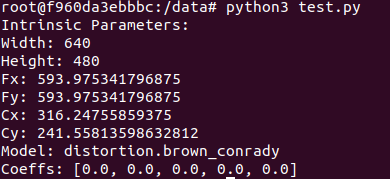
이 값을 확인해서 사용하면 된다.
CMakeList.txt 수정
- 아래 내용을 파일에 추가
find_package(realsense2 REQUIRED)

add_executable(rgbd_realsense
Examples/RGB-D/rgbd_realsense.cc)
target_link_libraries(rgbd_realsense ${PROJECT_NAME} ${realsense2_LIBRARY})
빌드
# 작업 디렉토리 : ORB_SLAM2/

./build.sh
실행
Examples/RGB-D/rgbd_realsense Vocabulary/ORBvoc.txt Examples/RGB-D/d415.yaml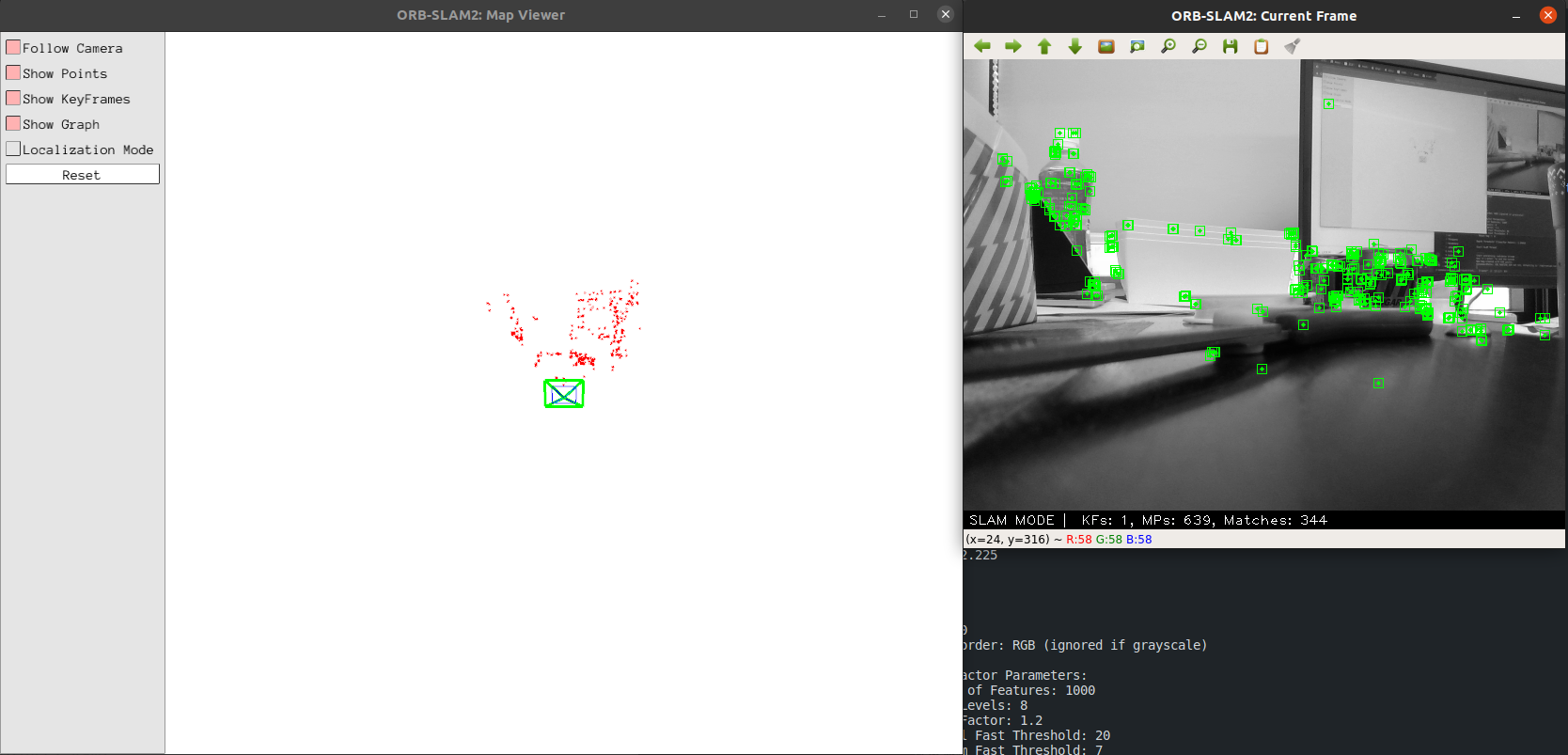
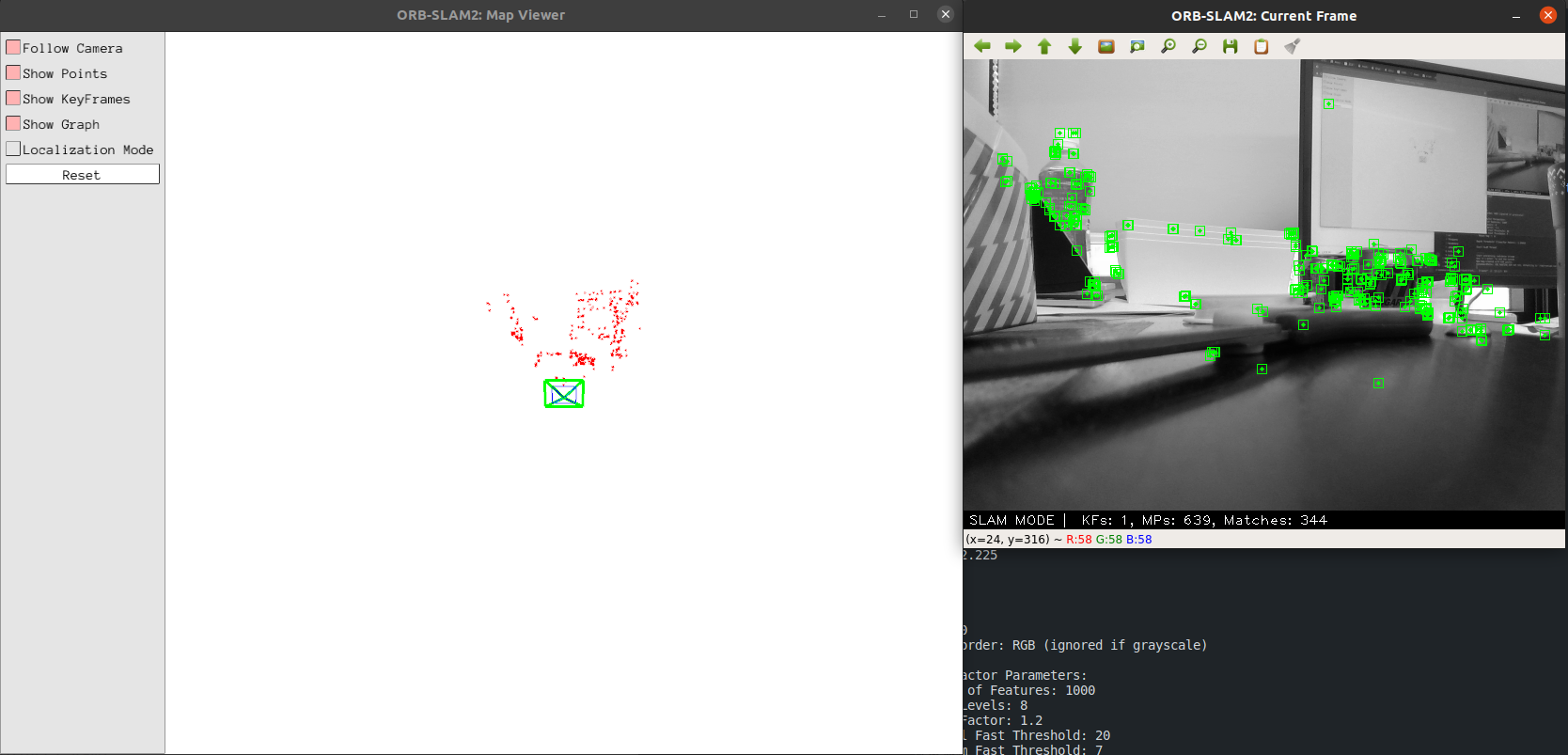
- 그럼 이렇게 돈다
이 도비는 이제 공짜가 아닙니다
글 잘 봤습니다.