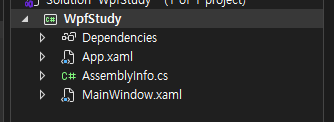
처음 프로젝트 열면 보이는 것들
App.xaml - 프로그램 시작점
<Application x:Class="WpfStudy.App"
             xmlns="http://schemas.microsoft.com/winfx/2006/xaml/presentation"
             xmlns:x="http://schemas.microsoft.com/winfx/2006/xaml"
             xmlns:local="clr-namespace:WpfStudy"
             StartupUri="MainWindow.xaml">
    <Application.Resources>

    </Application.Resources>
</Application>
프로그램 전체 설정
전역 스타일, 리소스 저장소
=> 프로그램 공통 설정
MainWindow.xaml - 화면 모양
<Window x:Class="WpfStudy.MainWindow"
        xmlns="http://schemas.microsoft.com/winfx/2006/xaml/presentation"
        Title="MainWindow" Height="300" Width="400">
    <Grid>
        <Button Content="Hello WPF" />
    </Grid>
</Window>
winodw - 창
grid - 기본 레이아웃
Button - 컨트롤
MainWindow.xaml.cs - 동작코드
public partial class MainWindow : Window
{
    public MainWindow()
    {
        InitializeComponent();
    }
}
InitializeComponent(); - xaml화면을 만들어주는 코드
        <Button
            Content="Click me"
            Width="120"
            Height="40"
            Click="Button_Click"></Button>
버튼추가, Click = "Button_Click" 함수 연결
private void Button_Click(object sender, RoutedEventArgs e)
{
    MessageBox.Show("WPF 시작!");
}
실행 -> 버튼클릭 -> 메시지 박스 : 가장 기초적인 WPF 동작

0부터 시작하는 백엔드