
각 마이크로서비스에 카프카로 비동기 이벤트까지 구현했겠다, 실질적인 성능테스트로 수치화된 결과가 필요했다. 이 관련으로 정리해본다.
nGrinder 설치는 스킵.
nGrinder 실행
ngrinder-controller-{version}.war 파일과 ngrinder-agent 폴더를 받았다면 두 개의 커맨드창을 띄워 다음과 같이 명령어를 입력해준다. 우선 컨트롤러는 다음과 같이 입력한다.
java -jar ngrinder-controller-{version}.war --port=8300다음으로 ngrinder-agent 폴더에 들어가면 여러 파일들이 있는데, 나는 윈도우 환경이므로 다음 파일을 실행시켰다.
run_agent.bat참고로 컨트롤러는 에이전트 관리와 테스트 프로세스 조정 및 실행, 테스트 결과 수집 및 보고하는 기능을 수행하고, 에이전트는 컨트롤러로부터 전달받은 테스트 스크립트를 실행하여 목표 시스템에 대해 부하를 생성하며, 테스트 중에는 요청에 대한 응답 시간, 성공률, 에러 발생률 등의 성능 데이터를 수집하여 컨트롤러로 전송한다.
실행되었으면 브라우저로 localhost:8300으로 접속한 후에 위의 [ Script ] 탭에서 스크립트를 작성하고서 [ Performance Test ] 탭에서 테스트를 해주면 된다.
Script
스크립트 생성 시 스크립트 이름과 요청 메서드, URL을 입력해주면 기본적으로 작성된 코드들이 나온다. 그렇지만 나는 테스트에서 입력값들을 주입받아야 할 필요가 있었다. 그래서 입력에 들어갈 값들은 userUuids.json 파일 안에 JSON 형식으로 작성해주었고, 스크립트에서 해당 파일의 값들을 읽도록 하면 되었다.
import static net.grinder.script.Grinder.grinder
import static org.junit.Assert.*
import static org.hamcrest.Matchers.*
import net.grinder.script.GTest
import net.grinder.script.Grinder
import net.grinder.scriptengine.groovy.junit.GrinderRunner
import net.grinder.scriptengine.groovy.junit.annotation.BeforeProcess
import net.grinder.scriptengine.groovy.junit.annotation.BeforeThread
// import static net.grinder.util.GrinderUtils.* // You can use this if you're using nGrinder after 3.2.3
import org.junit.Before
import org.junit.BeforeClass
import org.junit.Test
import org.junit.runner.RunWith

import org.ngrinder.http.HTTPRequest
import org.ngrinder.http.HTTPRequestControl
import org.ngrinder.http.HTTPResponse
import org.ngrinder.http.cookie.Cookie
import org.ngrinder.http.cookie.CookieManager

import com.fasterxml.jackson.databind.ObjectMapper
import java.util.Random
import java.io.File

/**
* A simple example using the HTTP plugin that shows the retrieval of a single page via HTTP.
*
* This script is automatically generated by ngrinder.
*
* @author admin
*/
@RunWith(GrinderRunner)
class TestRunner {

	public static GTest test
	public static HTTPRequest request
	public static Map<String, String> headers = [:]
	public static Map<String, Object> params = [:]
	public static List<Cookie> cookies = []
	public static List<String> headerValues = []
    public static Random random = new Random()

	@BeforeProcess
	public static void beforeProcess() {
		HTTPRequestControl.setConnectionTimeout(300000)
		test = new GTest(1, "127.0.0.1")
		request = new HTTPRequest()
		grinder.logger.info("before process.")

		// JSON 파일에서 헤더값 로드
		loadHeaderValuesFromJson()
	}

	@BeforeThread
	public void beforeThread() {
		test.record(this, "test")
		grinder.statistics.delayReports = true
		grinder.logger.info("before thread.")
	}

	@Before
	public void before() {
		request.setHeaders(headers)
		CookieManager.addCookies(cookies)
		grinder.logger.info("before. init headers and cookies")
	}

	@Test
	public void test() {
		// 헤더값 랜덤추출
		String userUuid = headerValues[random.nextInt(headerValues.size())]
		headers.put("userUuid", userUuid)
		request.setHeaders(headers)

		HTTPResponse response = request.GET("http://127.0.0.1:8000/member-service/basket/list", params)

		if (response.statusCode == 301 || response.statusCode == 302) {
			grinder.logger.warn("Warning. The response may not be correct. The response code was {}.", response.statusCode)
		} else {
			assertThat(response.statusCode, is(200))
		}
	}

	private static void loadHeaderValuesFromJson() {
		try {
			File file = new File("./resources/userUuids.json")
			if (file.exists()) {
				ObjectMapper objectMapper = new ObjectMapper()
				List<Map<String, String>> values = objectMapper.readValue(file, List)
				values.each { headerValues.add(it.get("userUuid")) }
				grinder.logger.info("Loaded ${headerValues.size()} header values from JSON file.")
			} else {
				grinder.logger.error("userUuids.json 파일을 찾을 수 없습니다.")
			}
		} catch (Exception e) {
			grinder.logger.error("Failed to load header values from JSON file.", e)
		}
	}
}
위 스크립트는 itemUuid라는 헤더값을 랜덤으로 입력 받아서 http://127.0.0.1:8000/member-service/basket/list URL로 GET 요청을 날리는 작업에 대한 테스트를 하도록 한 것이다. userUuids.json 파일로부터 ObjectMapper를 통해 값들을 읽어 headerValues 리스트에 담아두는 loadHeaderValuesFromJson() 메서드를 beforeProcess()에서 실행해주고, test() 메서드의 앞부분에서는 headerValues에서 값을 랜덤추출하여 헤더에 넣어준다.
여기서 나는 특정 라이브러리들을 아래와 같이 추가하도록 했는데,
import com.fasterxml.jackson.databind.ObjectMapper
import java.util.Random
import java.io.File
이대로 바로 검증을 하도록 하면 다음과 같은 에러 메시지를 받게 된다.
Caused by: org.codehaus.groovy.control.MultipleCompilationErrorsException: startup failed:
${NGRINDER_HOME}\script\admin\getBasketItemList.groovy: 28: unable to resolve class com.fasterxml.jackson.databind.ObjectMapper
해당 테스트 스크립트를 생성할 때 'Create Lib and Resource folders' 체크 박스를 눌러서 Lib과 Resource 폴더를 생성하고, Lib 폴더에 필요한 라이브러리들을 추가하도록 한다. 나는 다음과 같은 라이브러리들을 업로드했다.
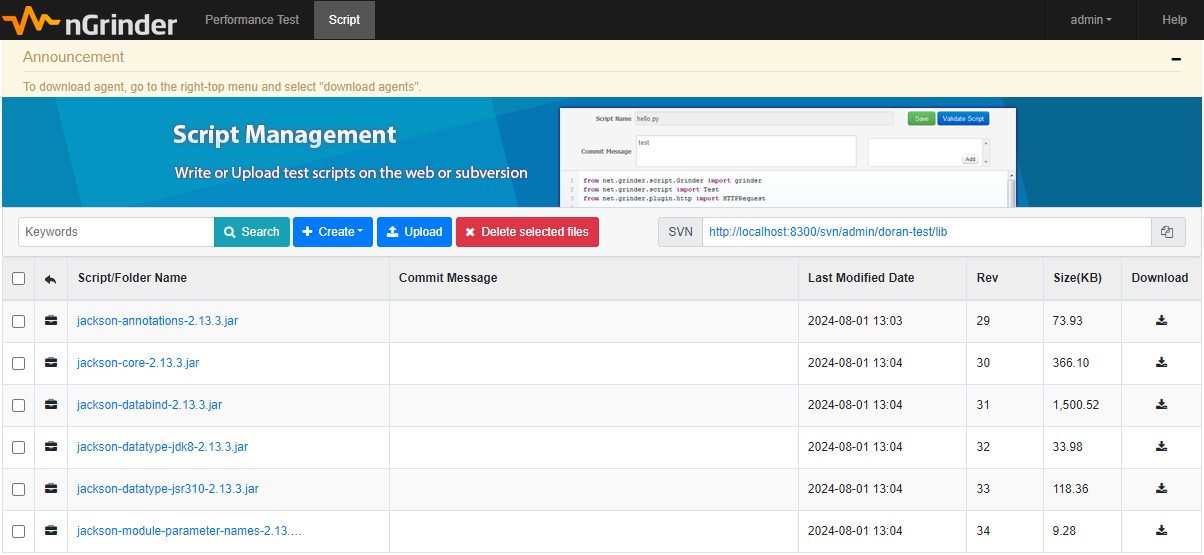
그리고 Resource 폴더에는 입력값으로 읽어들일 파일인 userUuids.json 파일을 업로드한다.
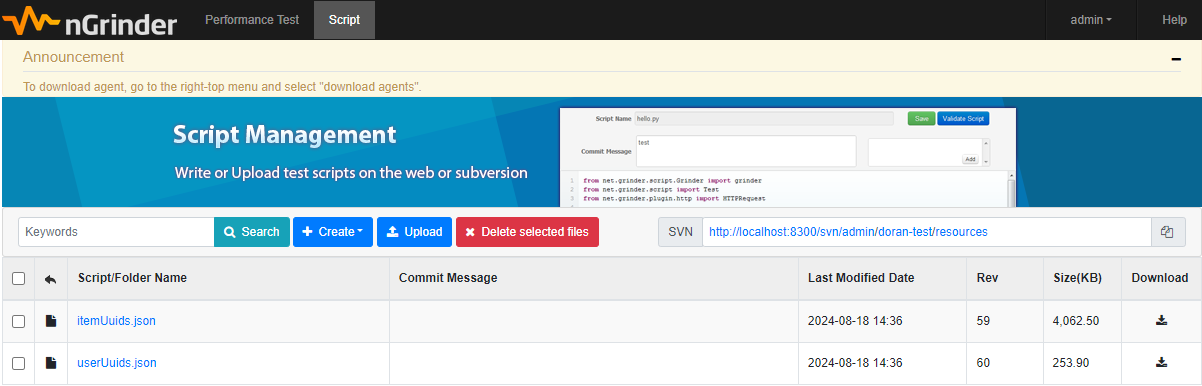
그리고 다시 스크립트 검증을 시도하면 에러 없이 성공적인 결과를 얻을 수 있다.
2024-08-21 21:16:53,378 INFO  Setting of nGrinder local DNS successfully
2024-08-21 21:16:53,382 INFO  The Grinder version 3.9.1
2024-08-21 21:16:53,383 INFO  OpenJDK Runtime Environment 11.0.0.1+3-5: OpenJDK 64-Bit Server VM (11.0.0.1+3-5, mixed mode) on Windows 10 amd64 10.0
2024-08-21 21:16:53,391 INFO  time zone is KST (+0900)
2024-08-21 21:16:53,447 INFO  worker process 0 of agent number 0
2024-08-21 21:16:53,463 INFO  Instrumentation agents: byte code transforming instrumenter for Java
2024-08-21 21:16:54,485 INFO  registered plug-in net.grinder.plugin.http.HTTPPlugin
2024-08-21 21:16:54,542 INFO  before process.
2024-08-21 21:16:54,863 INFO  Loaded 5000 header values from JSON file.
2024-08-21 21:16:54,864 INFO  Running "basketlist-test.groovy" using GroovyScriptEngine running with groovy version: 3.0.5
2024-08-21 21:16:54,936 INFO  before thread.
2024-08-21 21:16:54,936 INFO  starting, will do 1 run
2024-08-21 21:16:54,937 INFO  Start time is 1724242614937 ms since Epoch
2024-08-21 21:16:54,946 INFO  before. init headers and cookies
2024-08-21 21:16:55,211 INFO  http://127.0.0.1:8000/member-service/basket/list -> 200 OK, 2 bytes
2024-08-21 21:16:55,221 INFO  finished 1 run
2024-08-21 21:16:55,223 INFO  elapsed time is 286 ms
2024-08-21 21:16:55,223 INFO  Final statistics for this process:
2024-08-21 21:16:55,227 INFO
             Tests        Errors       Mean Test    Test Time    TPS          Mean         Response     Response     Mean time to Mean time to Mean time to
                                       Time (ms)    Standard                  response     bytes per    errors       resolve host establish    first byte
                                                    Deviation                 length       second                                 connection
                                                    (ms)

Test 1       1            0            273.00       0.00         3.50         2.00         6.99         0            0.00         10.00        246.00        "127.0.0.1"

Totals       1            0            273.00       0.00         3.50         2.00         6.99         0            0.00         10.00        246.00

  Tests resulting in error only contribute to the Errors column.
  Statistics for individual tests can be found in the data file, including
  (possibly incomplete) statistics for erroneous tests. Composite tests
  are marked with () and not included in the totals.


2024-08-21 21:16:54,867 INFO  validation-0: Starting threads
2024-08-21 21:16:55,227 INFO  validation-0: Finished
Test
[ Performance Test ] 탭에서 테스트를 생성해서 다음과 같이 설정해주고
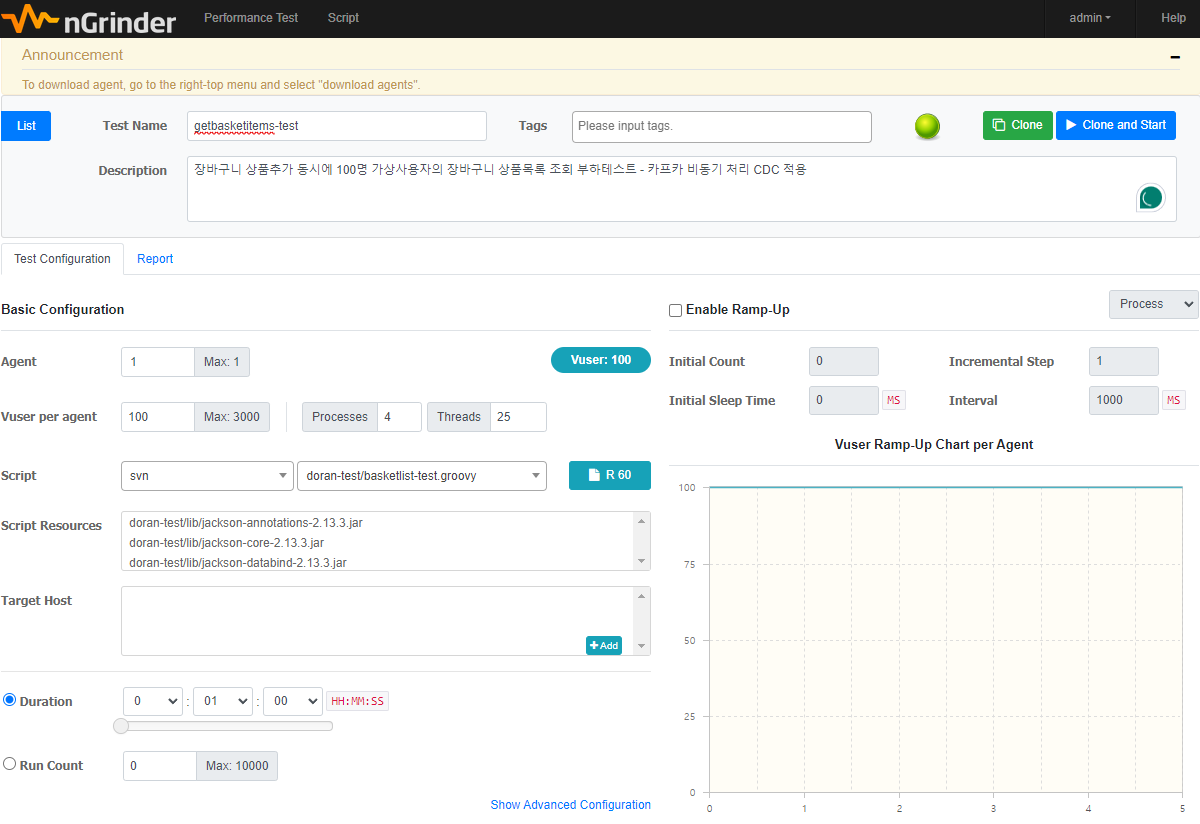
여기서 나는 100명의 가상 사용자에 대해 Script를 위에서 작성했던 스크립트를 선택해주고, Duration을 1분으로 설정했다. 그리고 Clone and Start를 통해 테스트를 시작 후 1분 뒤에 다음과 같은 결과를 얻게 된다.
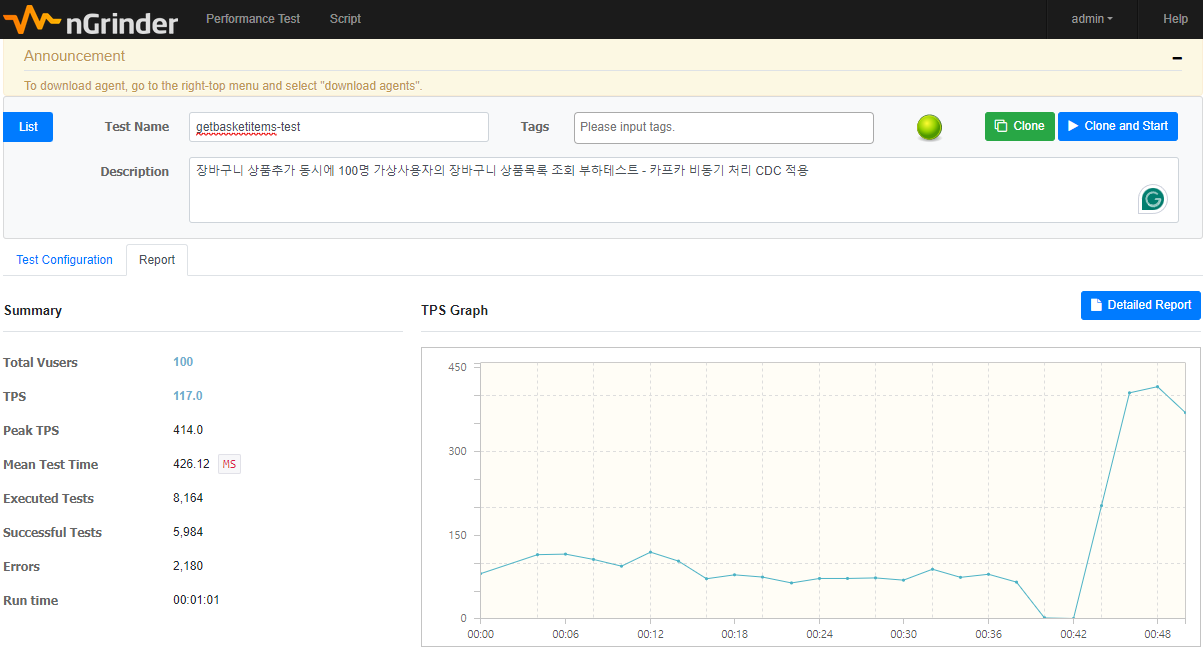
테스트 결과 TPS 117, Peak TPS 414, MTT 426.12ms를 확인할 수 있다.