3 샌드위치 맛집 좌표 구글맵에 찍기
3-1 인터넷의 top50 샌드위치 DF로 만들기
#url 저장
url_base = 'http://www.chicagomag.com'
url_sub = '/Chicago-Magazine/November-2012/Best-Sandwiches-Chicago/'

#모듈 호출
from bs4 import BeautifulSoup
from urllib.request import Request, urlopen

#클라이언트 요청 거부 뚫기
url = Request(url_base + url_sub,headers={'User-Agent': 'Mozilla/5.0'})

#파싱
html = urlopen(url)
soup = BeautifulSoup(html, "html.parser")- Request로 Request 객체 만들고(이때 user 설정해서 우회) -> urlopen으로 HTTP respnse객체로 -> BeautifulSoup 객체로 파싱
#가게 이름 리스트 뽑기
a = soup.select('.sammyListing')
for i in a:
    print(i.text)


#저장할 리스트 변수 선언
foodList = []
placeList = []
numList = [i for i in range(1, 51)]
urlList = []

#나머지도 뽑기
for i in a:
    text = i.text.split('\n')
    foodList.append(text[0])
    placeList.append(text[1])
    if i.attrs['href'].startswith('http'):
        urlList.append(i.attrs['href'])
    else:
        url = 'https://www.chicagomag.com' + i.attrs['href']
        urlList.append(url)

#DF 만들기
import pandas as pd
df = pd.DataFrame(data={
    'Rank': numList,
    'Menu': foodList,
    'Cafe': placeList,
    'URL': urlList})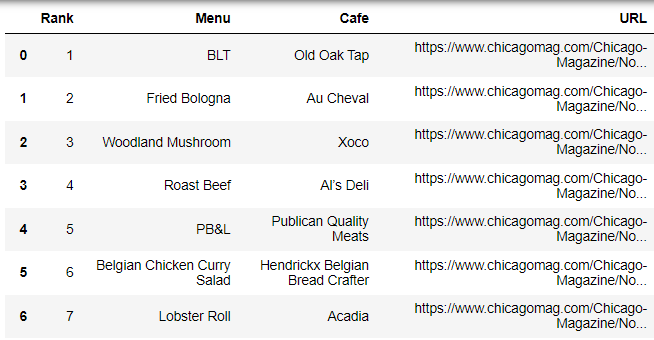
3-2 다수의 개별 페이지 접근해서 원하는 정보 들고오기
#모듈 호출
from bs4 import BeautifulSoup
from urllib.request import Request, urlopen
import pandas as pd

#위에 파일 이렇게 저장
df = pd.read_csv('../data/best_sandwiches_chicago11.csv', encoding='utf-8', index_col=0)

#원하는 링크 접근
print(df.index) #인덱스 번호
df['URL'][0] #url 열의 인덱스 0 확인- 모듈 호출 부분에서 urllib의 request는 requests와 다른 모듈.
전자는 파이썬 표준이고, 후자는 외부 모듈이다.
전자는 상대적으로 낮은 수준의 HTTP 요청 작업 수행, 후자는 사용자 친화적인 API 제공해서 HTTP 요청 보내는 과정을 더 단순화하고 다양한 기능 지원.
#url을 Request 객체로
url = Request(df['URL'][0], headers={'User-Agent':'Mozilla/5.0'})

#URL 또는 Request 객체 받아서, 해당 리소스 열고 읽어서 => HTTP 응답을 나타내는 객체로, HTTP respnse객체.
html = urlopen(url)

#파싱해서, BeautifulSoup 객체로
soup_tmp = BeautifulSoup(html, 'html.parser')- 여기서
Request는 url을 받아서 Request 객체를 만드는 것. header={'User-Agent':'Mozilla/5.0'}부분은 헤더에 User-Agent 추가하는 것으로, 자신을 일반 웹브라우저 사용자로 가장해서 접근 제한 우회하는 방법. 이걸 빼면 웹사이트에서 요청 막힌다.
https://m.blog.naver.com/kiddwannabe/221185808375urlopen은 URL 또는 Request 객체 받아서, 해당 리소스 열고 읽어서 => HTTP 응답을 나타내는 객체 (HTTP respnse객체)로BeautifulSoup로 HTTP respnse 객체 받아서 BeautifulSoup 객체로 파싱. requests모듈을 썼으면 Response 객체. => 이게 html 문자열이다.
#1개 확인
#개발자도구로 확인해보니 class addy에 있음
soup_tmp.select_one('.addy')

#원하는 정보 추출
price_tmp = soup_tmp.select_one('.addy').text
temp = price_tmp.split()

#1개 확인
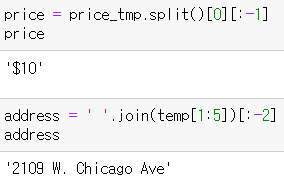
price = price_tmp.split()[0][:-1]
address = ' '.join(temp[1:5])[:-2]
phone_number = temp[5][:-1]- 정보 1개만 추출
#일단 3개만 추출

price = []
address = []

for n in df.index[:3]:
    url = Request(df['URL'][n], headers = {'User-Agent':'Mozilla/5.0'})
    html = urlopen(url)
    soup_tmp = BeautifulSoup(html, 'lxml') # lxml은 더 빠른 파서
    gettings = soup_tmp.select_one('.addy').text

    price.append(gettings.split()[0][:-1])
address.append(' '.join(gettings.split()[1:-2][:-1]))- 'lxml'은 그냥 내장된 html.parser보다 더 빠른 파서
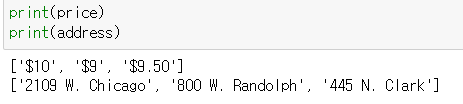
- 3개 for문으로 돌려보기 => 이상 없음 => 이제 50개 돌려보기
from tqdm import tqdm_notebook

price = []
address = []

for n in tqdm_notebook(df.index):
    url = Request(df['URL'][n], headers = {'User-Agent':'Mozilla/5.0'})
    html = urlopen(url)
    soup_tmp = BeautifulSoup(html, 'lxml') # lxml은 더 빠른 파서
    gettings = soup_tmp.select_one('.addy').text

    price.append(gettings.split()[0][:-1])
    address.append(' '.join(gettings.split()[1:-2]))

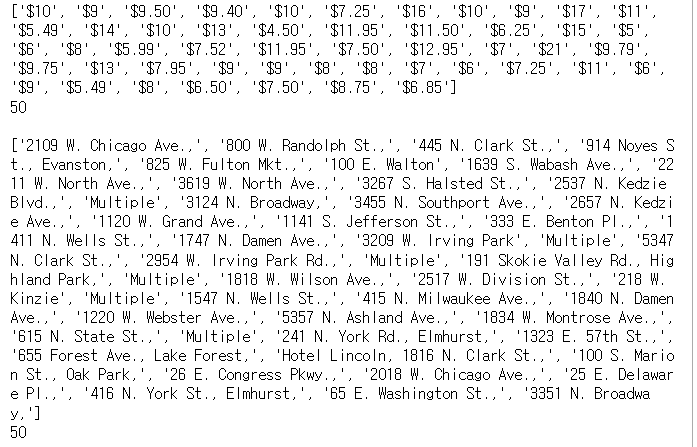
#결과값 확인
print(price)
print(len(price))

print()

print(address)
print(len(address))- 50개 추출, 결과값 확인
#기존 데이터프레임에 결과 통합 => 시각화 준비
df['Price'] = price
df['Address'] = address
df = df.loc[:, ['Rank', 'Cafe', 'Menu', 'Price', 'Address']]
df.set_index('Rank', inplace=True)

df.to_csv('../data/best_sandwiches_chicago22.csv', sep=',', encoding='UTF-8')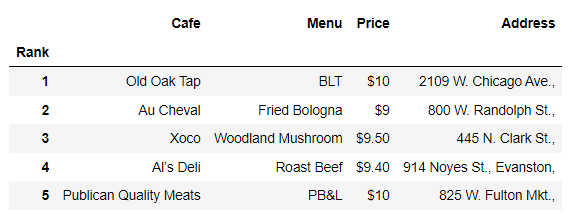
3-3 googlemaps에서 위도경도 뽑아와서 전처리
import folium
import pandas as pd
import googlemaps
import numpy as np

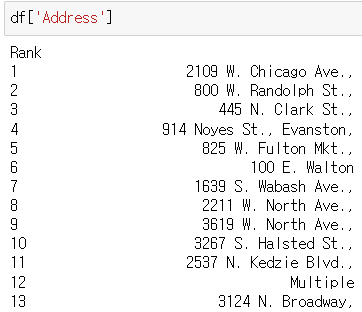
df['Address']- 이상값 확인 => 'Multiple'이 주소에 있음
gmaps_key = "구글키"
gmaps = googlemaps.Client(key=gmaps_key)

#1개만 뽑아보기
gmaps_output = gmaps.geocode('2109 W. Chicago')
location_output = gmaps_output[0].get('geometry')
#위도, 경도 출력
print(location_output['location']['lat'])
print(location_output['location']['lng'])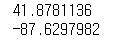
lat = []
lng = []

for n in tqdm_notebook(df.index):
    if df['Address'][n] != 'Multiple' :
        target_name = df['Address'][n] + '. ' + 'Chicago'
        gmaps_output = gmaps.geocode(target_name)
        location_output = gmaps_output[0].get('geometry')
        lat.append(location_output['location']['lat'])
        lng.append(location_output['location']['lng'])
    else:
        lat.append(np.nan)
        lng.append(np.nan)
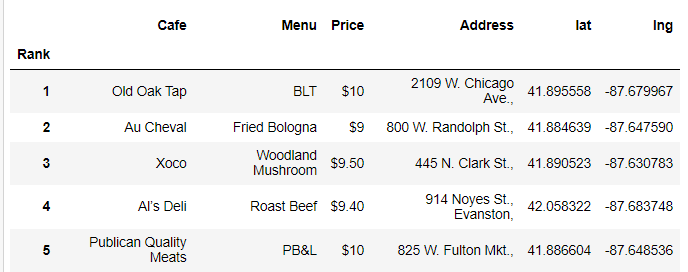
df['lat'] = lat; df['lng'] = lng
df.head()- Multiple에 대해 예외처리를 해서, for문으로 모든 위도 경도 리스트로 만들기
- 그리고 결과를 DF에 집어넣기
3-4 folium으로 시각화
#위, 경도의 평균 지점을 중심으로 지도 깐다
 mapping = folium.Map(location=[df['lat'].mean(),
                              df['lng'].mean()],
                    zoom_start=11)

#마커 찍기
for n in df.index:
    if df['Address'][n] != 'Multiple':
        folium.Marker([df['lat'][n], df['lng'][n]],
popup = df['Cafe'][n]).add_to(mapping) - 먼저 mapping할 때 평균을 쓰는 이유는, 그래야 대략적인 지도 위치가 잡히기 때문.
무작위로 하면 세계 지도가 잡히거나 전혀 중심이 안잡힐 수 있다. => 마커를 찍어도 안된다.

일본에서 일하는 게임 기획자. 시시해서 죽어버리지 않게, 재밌고 의미 있는 컨텐츠에 관심 있습니다. 그 도구로 데이터, AI도 찝적댑니다.