import Button from "./Button";
import styles from "./App.module.css";
import { useState } from "react";

function App() {
  const [counter, setValue] = useState(0);
  const onClick = () => setValue((prev) => prev + 1);
  console.log("call an api");
  return (
    <div>
      <h1 className={styles.title}>Welcome back!!!</h1>
      <Button text={"Continue"} />
      <h1>{counter}</h1>
      <button onClick={onClick}>click me</button>
    </div>
  );
}
react앱으로 하는 것이기 때문에 앞에 React를 붙이지 않아도 된다.
상태가 변화할 때 다시 데이터를 가지고 오지 않아도 된다.
import { useState } from "react";
import { useState, useEffect } from "react";

function App() {
  const [counter, setValue] = useState(0);
  const onClick = () => setValue((prev) => prev + 1);
  console.log("call an api");
  console.log("i run all the time");
  useEffect(() => {
    console.log("CALL THE API....");
  }, []);
  return (
    <div>
      <h1>{counter}</h1>
useEffect 코드 실행은 컴포넌트가 랜더링 된 후에 된다.
한번만 호출하고 그 뒤로 호출하지 않을 때 사용한다.
첫번째 인자로 콜백 두번째 인자로 state가 들어가있는 배열을 넣어준다.
두번째 인자를 비워두면 초기화 할 때 한번만 한다.
function App() {
  const [counter, setValue] = useState(0);
  const [keyword, setKeyword] = useState("");
  const onClick = () => setValue((prev) => prev + 1);
  console.log("i run all the time");
  const onChange = (event) => setKeyword(event.target.value);
  useEffect(() => {
    console.log("CALL THE API....");
    console.log("I run only once.");
  }, []);
  useEffect(() => {
    console.log("I run when 'keyword' changes.");
  }, [keyword]);
  useEffect(() => {
    console.log("I run when 'counter' changes.");
  }, [counter]);
  useEffect(() => {
    console.log("I run when keyword & counter change");
  }, [keyword, counter]);
  return (
    <div>
      <input
        value={keyword}
        onChange={onChange}
        type="text"
        placeholder="Search here..."
      />
      <h1>{counter}</h1>
      <button onClick={onClick}>click me</button>
    </div>
dep파라미터에 지정된 state가 변경될때 실행된다.
import { useState, useEffect } from "react";

function App() {
  const [counter, setValue] = useState(0);
  const [keyword, setKeyword] = useState("");
  const onClick = () => setValue((prev) => prev + 1);
  const onChange = (event) => setKeyword(event.target.value);
  useEffect(() => {
    console.log("I run only once.");
function Hello() {
  useEffect(function () {
    console.log("hi :)");
    return function () {
      console.log("bye :(");
    };
  }, []);
  useEffect(() => {
    console.log("I run when 'keyword' changes.");
  }, [keyword]);
  useEffect(() => {
    console.log("I run when 'counter' changes.");
  }, [counter]);
  useEffect(() => {
    console.log("I run when keyword & counter change");
  }, [keyword, counter]);
    console.log("hi :)");
    return () => console.log("bye :(");
  }, []);
  return <h1>Hello</h1>;
}

function App() {
  const [showing, setShowing] = useState(false);
  const onClick = () => setShowing((prev) => !prev);
  return (
    <div>
      <input
        value={keyword}
        onChange={onChange}
        type="text"
        placeholder="Search here..."
      />
      <h1>{counter}</h1>
      <button onClick={onClick}>click me</button>
      {showing ? <Hello /> : null}
      <button onClick={onClick}>{showing ? "Hide" : "Show"}</button>
    </div>
  );
}
정리해야하는 effect가 있다. 외부 데이터에 구독을 설정하는 경우 메모리 누수가 나지 않도록 하는 것이 중요하다.
effect에서 정리를 위해 함수를 반환한다.
react는 마운트가 해제될 때 정리한다. effect는 렌더링이 될 때마다 실행된다. 이전에 파생된 effect를 정리해야 다음 차례의 effect를 실행하기 좋다.
import { useState, useEffect } from "react";

function Hello() {
  useEffect(function () {
    console.log("hi :)");
    return function () {
      console.log("bye :(");
    };
  }, []);
  useEffect(() => {
    console.log("hi :)");
    return () => console.log("bye :(");
  }, []);
  return <h1>Hello</h1>;
}
import { useState } from "react";

function App() {
  const [showing, setShowing] = useState(false);
  const onClick = () => setShowing((prev) => !prev);
  const [toDo, setToDo] = useState("");
  const [toDos, setToDos] = useState([]);
  const onChange = (event) => setToDo(event.target.value);
  const onSubmit = (event) => {
    event.preventDefault();
    if (toDo === "") {
      return;
    }
    setToDos((currentArray) => [toDo, ...currentArray]);
    setToDo("");
  };
  return (
    <div>
      {showing ? <Hello /> : null}
      <button onClick={onClick}>{showing ? "Hide" : "Show"}</button>
      <h1>My To Dos ({toDos.length})</h1>
      <form onSubmit={onSubmit}>
        <input
          onChange={onChange}
          value={toDo}
          type="text"
          placeholder="Write your to do..."
        />
        <button>Add To Do</button>
      </form>
    </div>
  );
}
todo를 저장할 array를 만들고 직접적으로 state를 수정하는게 아니라 element를 추가한다.
6.0 introduction
먼저 ReactJS가 어떻게 작동했는지 살펴보자.
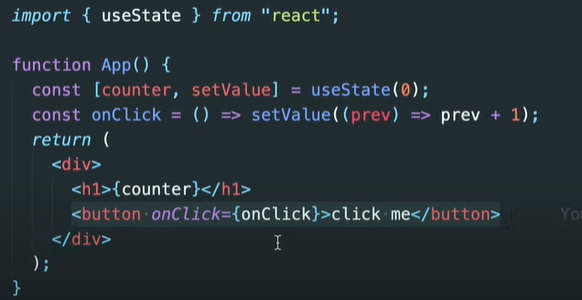
create-react-app을 사용하기 때문에 react라고 적어줄 필요가 없다. 그냥 useState만 써주면 된다.
value를 받아오고 value를 수정하기 위해 function을 받아온다.
이전 state를 받아서 +1한 값을 return하는 function을 만들어서 그 값을 h1을 통해 보여줬다.
지금은 state가 변할 때마다 계속 새롭게 랜더링되고있다.
컴포넌트가 처음 render될때만 코드가 실행되고 다른 state변화에는 실행되지않도록 할 수 있다. 예를 들어 API를 통해 데이터 가져올 때 첫번째 component render에서 API를 call한다. state가 변할 때마다 다시 데이터를 굳이 가지고 오고 싶지 않을 때 이용할 수 있다. 이게 우리가 useEffect로 배울것이다.
useEffect를 이용하면 언제 코드를 실행할지 정할 수 있다.
6.1 useEffect
코드를 시작할 때 딱 한번 실행하고 다시 실행하지 않도록 하는 방법을 알아볼 것이다.
useEffect는 두개의 argument를 가지는 function이다.
useEffect( , [dependency])
첫번째 argument는 우리가 딱 한번만 실행하고 싶은 코드.
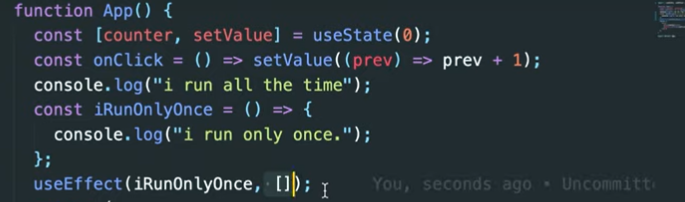
useEffect에는 처음에만 실행되고 다시는 실행되지 않을 function을 넣어준다. 두번째 argument로 빈 array를 준다.
이렇게 해주면 i run all the time은 state가 변할 때마다 매번 실행되는데 i run only once는 한번만 실행된다.
이런 이유로 우리는 useEffect를 사용하게 된다. (우리 코드가 딱 한번만 실행될 수 있도록 보호해준다.)
6.2 Deps
두번째 argument에 대해 배울것이다.
두번째는 dependenc라고 부르고 react.js가 지켜봐야할 것이다. dependency가 변화하면 react.js가 코드를 실행시킨다.
코드의 특정한 부분만이 변화했을 때 원하는 코드들을 실행할 수 있는 방법
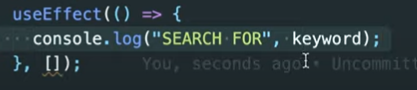
이 방법은 딱 한번만 실행된다. 내가 원하는 바는 keyword가 변화할 때만 코드를 실행하는것. (array가 비어있음-> react가 지켜볼 게 없으니까 처음 한번만 실행되는 것)
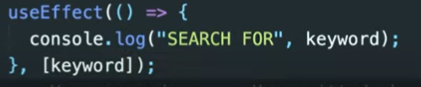
이렇게 하면 keyword가 변화할 때 코드를 실행할거라고 react.js에게 알려주는 것이다. 이제 counter가 변화할 때는 실행되지 않을 수 있게 된다.
그런데 이 코드도완벽하지는 않다. component가 시작될 때도 검색이 되고있기 때문이다.
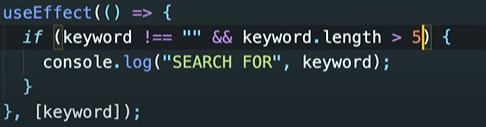
코드 해설: keyword가 빈값이 아니고 keyword.length가 5보가 길 때 keyword를 검색하자.
정리
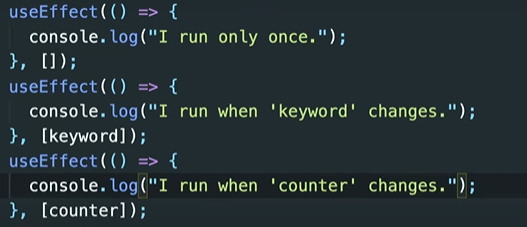
콘솔 결과
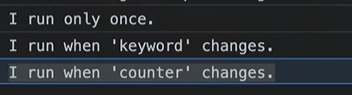 처음실행 비워두면 처음 실행에만 코드를 실행한다.
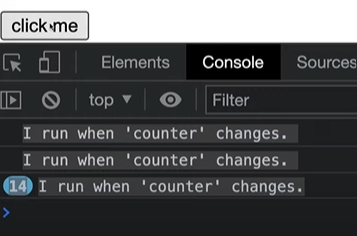 버튼을 누를 때마다 counter changes
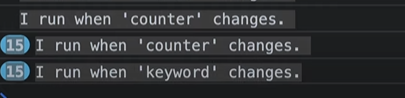 키워드를 적으면 keyword changes

이렇게 여러개를 같이 작성해줄 수도 있다.
6.4 Cleanup
Cleanup function -> 많이 쓰이진 않는다.
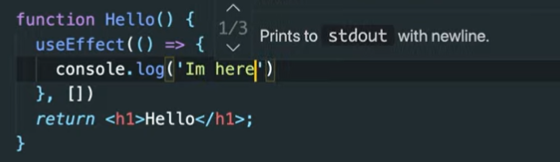
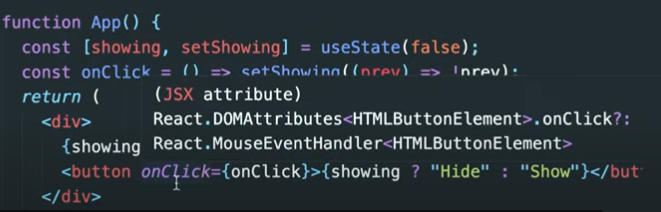
버튼을 클릭할 때 component를 만든다. 그리고 다시 클릭할 때 destroy한다. 코드를 남기지 않고 없앤다.
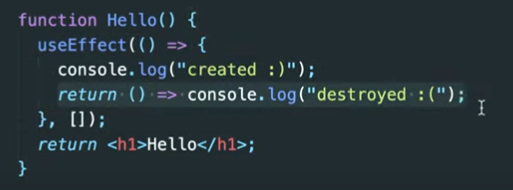
cleanup function으로 component가 destroy될 때 destroyed :(라고 콘솔에 나오게 한다. (언제 create이고 destroy인지 알 수 있다.)
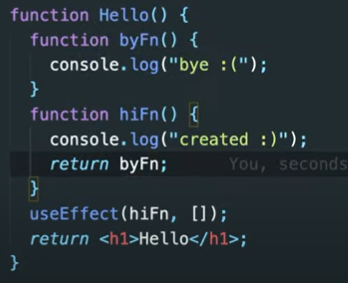
component가 생성될 때 hiFn이 실행된다. 이 component가 언제 파괴될지 알고 싶으면 hiFn이 byFn을 return해줘야 한다.(컴포넌트가 파괴될 때도 function을 실행하고 싶으면)
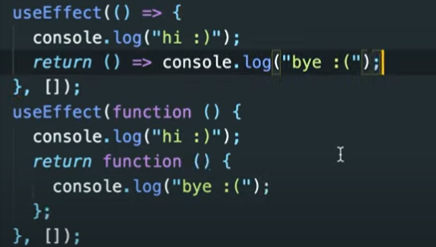
같은 내용을 다른 방법으로 작성. 밑에게 더 내용이 많다. 그렇기 때문에 사람들은 보통 짧은 방법을 더 많이 사용한다.
