[final project] day_5
사원 목록 조회
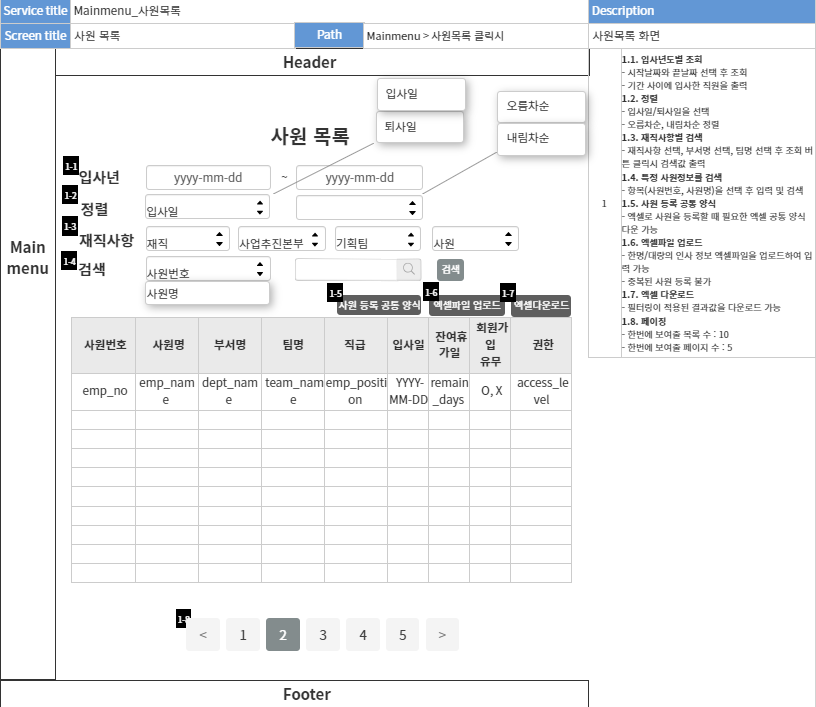
empService
package com.fit.service;

import java.util.HashMap;

import java.util.List;
import java.util.Map;

import org.springframework.beans.factory.annotation.Autowired;
import org.springframework.stereotype.Service;
import org.springframework.transaction.annotation.Transactional;

import com.fit.CC;
import com.fit.mapper.EmpMapper;
import com.fit.mapper.MemberMapper;
import com.fit.vo.Department;
import com.fit.vo.EmpInfo;
import com.fit.vo.MemberFile;
import com.fit.vo.Team;

import lombok.extern.slf4j.Slf4j;

@Slf4j
@Service
@Transactional
public class EmpService {
	@Autowired
	private EmpMapper empMapper;

	@Autowired
	private MemberMapper memberMapper;

	// 인사정보 조회 (emp_info)
	public EmpInfo selectEmp(int empNo) {
		log.debug(CC.HE + "EmpService.selectEmp() empNo param : " + empNo + CC.RESET);

		EmpInfo empInfo = empMapper.selectEmp(empNo);

		// 날짜만 추출
		String createdate = empInfo.getCreatedate().substring(0, 10);
		String udpatedate = empInfo.getUpdatedate().substring(0, 10);
		empInfo.setCreatedate(createdate);
		empInfo.setUpdatedate(udpatedate);

		log.debug(CC.HE + "EmpService.selectEmp() empInfo : " + empInfo + CC.RESET);

		return empInfo;
	}

	// 부서, 팀 테이블 조회 (department, team)
	public Map<String, Object> getDeptAndTeamList() {
		Map<String, Object> result = new HashMap<>();

		List<Department> deptList = empMapper.selectDepartment();
		List<Team> teamList = empMapper.selectTeam();

		result.put("deptList", deptList);
		result.put("teamList", teamList);

		return result;
	}

	// 인사정보 수정
	public int modifyEmp(EmpInfo empInfo) {
		log.debug(CC.HE + "EmpService.modifyEmp() empNo param : " + empInfo.getEmpNo() + CC.RESET);

		int row = empMapper.modifyEmp(empInfo);
		log.debug(CC.HE + "EmpService.modifyEmp() row : " + row + CC.RESET);

		return row;
	}

	// 개인정보 조회 (관리자)
	public Map<String, Object> selectMember(int empNo) {
		Map<String, Object> result = new HashMap<>();

		log.debug(CC.HE + "EmpService.selectMember() empNo param : " + empNo + CC.RESET);

		// 1. 개인정보 조회 // emp_name을 추출하기 위해 emp_info 테이블과 join하므로 반환타입은 Map
		Map<String, Object> memberInfo = memberMapper.selectMemberInfo(empNo);

		// 1-1. 성별 추출
		if ( memberInfo.get("gender").equals("M") ) {
			memberInfo.put("gender", "남자");
		} else {
			memberInfo.put("gender", "여자");
		}

		// 1-2. 날짜 추출
		// log.debug(CC.HE + memberInfo.get("createdate").getClass() + CC.RESET);
		// -> class java.sql.Timestamp
		String createdate = memberInfo.get("createdate").toString(); // Timestamp 객체를 String타입으로 형변환
		String udpatedate = memberInfo.get("updatedate").toString();
		memberInfo.put("createdate", createdate.substring(0, 10));
		memberInfo.put("updatedate", udpatedate.substring(0, 10));

		log.debug(CC.HE + "EmpService.selectMember() memberInfo : " + memberInfo + CC.RESET);

		// 2. fileCategory를 Image로 지정하여 사진 조회
		MemberFile memberImage = memberMapper.selectMemberFile(empNo, "Image");
		log.debug(CC.HE + "EmpService.selectMember() memberImage : " + memberImage + CC.RESET);

		// 3. fileCategory를 Sign으로 지정하여 서명 조회
		MemberFile memberSign = memberMapper.selectMemberFile(empNo, "Sign");
		log.debug(CC.HE + "EmpService.selectMember() memberSign : " + memberSign + CC.RESET);

		// map에 담기
		result.put("memberInfo", memberInfo);
		result.put("memberImage", memberImage);
		result.put("memberSign", memberSign);

		return result;
	}

	// 비밀번호 수정 (관리자)
	public int modifyPw(int empNo, String tempPw) {
		int row = empMapper.modifyPw(empNo, tempPw);

		return row;
	}

	// 인사 정보 등록
	public int addEmp(EmpInfo empInfo) {
		// 사원번호 등록
	    int addEmpNoRow = empMapper.addEmpNo(empInfo.getEmpNo());
	    log.debug(CC.YE + "EmpService.addEmpNoRow() row : " + addEmpNoRow + CC.RESET);

	    // 사원번호 등록 후 인사 정보 등록
	    int addEmpRow = empMapper.addEmp(empInfo);
	    log.debug(CC.YE + "EmpService.addEmp() row : " + addEmpRow + CC.RESET);

	    return addEmpRow; // 사원 정보 등록 결과를 반환
	}

	// 사원 전체 목록 조회
	public List<EmpInfo> selectEmpList() {
		// 사원 목록을 List 형식으로 담기
		List<EmpInfo> selectEmpList = empMapper.selectEmpList();
		log.debug(CC.YE + "EmpService.selectListEmp() selectListEmp : " + selectEmpList + CC.RESET);

		return selectEmpList;
	}

    // 사원 등록 엑셀 업로드
	@Transactional
    public void excelProcess(List<Map<String, Object>> jsonDataList) {
        log.debug(CC.YE + "EmpService.excelProcess() 실행" + CC.RESET);
        log.debug(CC.YE + "EmpService.excelProcess() jsonData.size(): " + jsonDataList.size() + CC.RESET);
        // 엑셀 파일 파싱
        for (Map<String, Object> jsonData : jsonDataList) { // jsonData를 가지고 필요한 처리를 수행하고 데이터베이스에 저장
            EmpInfo empInfo = new EmpInfo();
            empInfo.setEmployDate((String) jsonData.get("입사일"));
            empInfo.setEmpPosition((String) jsonData.get("직급"));
            empInfo.setEmpNo((int) jsonData.get("사원번호"));
            empInfo.setAccessLevel((String) jsonData.get("권한"));
            empInfo.setDeptName((String) jsonData.get("부서명"));
            empInfo.setEmpState((String) jsonData.get("재직사항"));
            empInfo.setEmpName((String) jsonData.get("사원명"));
            empInfo.setTeamName((String) jsonData.get("팀명"));
            log.debug(CC.YE + "EmpService.excelProcess() empInfo: "+ empInfo + CC.RESET);

            // 2. 사원번호 등록
		    int addEmpNoRow = empMapper.addEmpNo(empInfo.getEmpNo());
		    log.debug(CC.YE + "EmpService.addEmpNoRow() row : " + addEmpNoRow + CC.RESET);

		    // 3. 사원번호 등록 후 인사 정보 등록
		    int addEmpRow = empMapper.addEmp(empInfo);
		    log.debug(CC.YE + "EmpService.addEmp() row : " + addEmpRow + CC.RESET);
        }
    }

	// 선택된 사원 정보 리스트
	public List<EmpInfo> getSelectedEmpList(List<Integer> empNos) {
		// empMapper의 getSelectedEmpList 선택된 사원 정보 리스트 조회
		List<EmpInfo> selectedEmpList = empMapper.getSelectedEmpList(empNos);
		log.debug(CC.YE + "EmpService.addEmpNoRow() selectedEmpList : " + selectedEmpList + CC.RESET);

		// 선택된 사원 정보 리스트를 반환
        return selectedEmpList;
    }

}
controller
view에서 받은 parameter 값을 post로 보내 처리하지 않았다.
DB에 직접 접근하는 처리가 아닌 경우에는 대부분 Get 방식을 사용하기 때문이다.
작업 과정에서 이를 깨달았고, Post와 Get 방식의 차이점을 명확히 알게 되었다.
// 사원 목록 조회 폼
 	@GetMapping("/emp/empList")
 	public String empList(Model model
			 			  , HttpSession session
			              , @RequestParam(required = false, name = "ascDesc", defaultValue = "") String ascDesc // 오름차순, 내림차순
			              , @RequestParam(required = false, name = "empState", defaultValue = "재직") String empState // 재직(기본값), 퇴직
			              , @RequestParam(required = false, name = "empDate", defaultValue = "") String empDate // 입사일, 퇴사일
			              , @RequestParam(required = false, name = "deptName", defaultValue = "") String deptName // 부서명
			              , @RequestParam(required = false, name = "teamName", defaultValue = "") String teamName // 팀명
			              , @RequestParam(required = false, name = "empPosition", defaultValue = "") String empPosition // 직급
			              , @RequestParam(required = false, name = "searchCol", defaultValue = "") String searchCol // 검색항목
			              , @RequestParam(required = false, name = "searchWord", defaultValue = "") String searchWord // 검색어
			              , @RequestParam(required = false, name = "startDate", defaultValue = "") String startDate // 입사년도 검색 - 시작일
			              , @RequestParam(required = false, name = "endDate", defaultValue = "") String endDate // 입사년도 검색 - 마지막일
			              , @RequestParam(name = "currentPage", required = false, defaultValue = "1") int currentPage // 현재 페이지
			              , @RequestParam(name = "rowPerPage", required = false, defaultValue = "10") int rowPerPage) { // 한 페이지에 출력될 행의 수

 		// 1. accessLevel (세션 accessLevel값으로 권한에 따라 비밀번호 초기화 버튼 공개)
 	    String accessLevel = (String)session.getAttribute("accessLevel");

 	    // 페이지 시작 행
 	    int beginRow = (currentPage-1) * rowPerPage;

 	    // 2. param Map (parameter값을 Map으로 묶음 -> enrichedEmpList의 매개값으로 전달)
	    Map<String, Object> param = new HashMap<>();
	    param.put("ascDesc", ascDesc); // 오름차순, 내림차순
	    log.debug(CC.YE + "EmpController.empList() ascDesc: " + ascDesc + CC.RESET);
	    param.put("empDate", empDate); // 입사일, 퇴사일
	    log.debug(CC.YE + "EmpController.empList() empDate: " + empDate + CC.RESET);
	    param.put("empState", empState); // 재직, 퇴직
	    log.debug(CC.YE + "EmpController.empList() empState: " + empState + CC.RESET);
	    param.put("deptName", deptName); // 부서명
	    log.debug(CC.YE + "EmpController.empList() deptName: " + deptName + CC.RESET);
	    param.put("teamName", teamName); // 팀명
	    log.debug(CC.YE + "EmpController.empList() teamName: " + teamName + CC.RESET);
	    param.put("empPosition", empPosition); // 직급
	    log.debug(CC.YE + "EmpController.empList() empPosition: " + empPosition + CC.RESET);
	    param.put("searchCol", searchCol); // 검색항목
	    log.debug(CC.YE + "EmpController.empList() searchCol: " + searchCol + CC.RESET);
	    param.put("searchWord", searchWord); // 검색어
	    log.debug(CC.YE + "EmpController.empList() searchWord: " + searchWord + CC.RESET);
	    param.put("startDate", startDate); // 입사년도 검색 - 시작일
	    log.debug(CC.YE + "EmpController.empList() startDate: " + startDate + CC.RESET);
	    param.put("endDate", endDate); // 입사년도 검색 - 마지막일
	    log.debug(CC.YE + "EmpController.empList() endDate: " + endDate + CC.RESET);
	    param.put("beginRow", beginRow); // 시작 행
	    log.debug(CC.YE + "EmpController.empList() beginRow: " + beginRow + CC.RESET);
	    param.put("rowPerPage", rowPerPage); // 한 페이지에 출력될 행의 수
	    log.debug(CC.YE + "EmpController.empList() rowPerPage: " + rowPerPage + CC.RESET);

    	// 3. 사원 목록 (휴가일수, 회원가입 여부 추가)
		List<Map<String, Object>> enrichedEmpList = empService.enrichedEmpList(param);
		log.debug(CC.YE + "EmpController.empList() enrichedEmpList: " + enrichedEmpList + CC.RESET);

	    // 4. 페이징
    	// 4-1. 검색어가 적용된 리스트의 전체 행 개수를 구해주는 메서드 실행
		int totalCount = empService.getEmpListCount(param);
		log.debug(CC.YE + "EmpController.empList() totalCount: " + totalCount + CC.RESET);
		// 4.2. 마지막 페이지 계산
		int lastPage = commonPagingService.getLastPage(totalCount, rowPerPage);
		log.debug(CC.YE + "EmpController.empList() lastPage: " + lastPage + CC.RESET);
		// 4.3. 페이지네이션에 표기될 쪽 개수
		int pagePerPage = 5;
		// 4.4. 페이지네이션에서 사용될 가장 작은 페이지 범위
		int minPage = commonPagingService.getMinPage(currentPage, pagePerPage);
		log.debug(CC.YE + "EmpController.empList() minPage: " + minPage + CC.RESET);
		// 4.5. 페이지네이션에서 사용될 가장 큰 페이지 범위
		int maxPage = commonPagingService.getMaxPage(minPage, pagePerPage, lastPage);
		log.debug(CC.YE + "EmpController.empList() maxPage: " + maxPage + CC.RESET);

	    // 5. 모델값 view에 전달
	    model.addAttribute("enrichedEmpList", enrichedEmpList); // 사원 목록 리스트
	    model.addAttribute("accessLevel", accessLevel); // 권한
	    model.addAttribute("totalCount", totalCount); // 전체 행 개수
	    model.addAttribute("lastPage", lastPage); // 마지막 페이지
	    model.addAttribute("minPage", minPage); // 페이지네이션에서 사용될 가장 작은 페이지 범위
	    model.addAttribute("maxPage", maxPage); // 페이지네이션에서 사용될 가장 큰 페이지 범위
	    model.addAttribute("param", param); // 파라미터 값

	    return "/emp/empList"; // 사원 목록 페이지로 이동
    }
사원 목록 체크박스 선택 시 엑셀 다운로드
라이브러리 : 이전 업로드때와 동일하게, POI라이브러리를 사용했다.
코드리뷰를 하며, Excel과 관련된 메서드는 따로 클래스를 만들면 좋겠다는 피드백을 받아 함께 수정하였다.
ExcelController
// 엑셀 다운로드 (정렬/검색된 결과값을 페이징 없이 출력)
  	@GetMapping("/emp/excelDownload")
  	public void excelDownload(HttpServletResponse response // 엑셀 다운로드
	 			              , @RequestParam(required = false, name = "ascDesc", defaultValue = "") String ascDesc // 오름차순, 내림차순
	 			              , @RequestParam(required = false, name = "empState", defaultValue = "재직") String empState // 재직(기본값), 퇴직
	 			              , @RequestParam(required = false, name = "empDate", defaultValue = "") String empDate // 입사일, 퇴사일
	 			              , @RequestParam(required = false, name = "deptName", defaultValue = "") String deptName // 부서명
	 			              , @RequestParam(required = false, name = "teamName", defaultValue = "") String teamName // 팀명
	 			              , @RequestParam(required = false, name = "empPosition", defaultValue = "") String empPosition // 직급
	 			              , @RequestParam(required = false, name = "searchCol", defaultValue = "") String searchCol // 검색항목
	 			              , @RequestParam(required = false, name = "searchWord", defaultValue = "") String searchWord // 검색어
	 			              , @RequestParam(required = false, name = "startDate", defaultValue = "") String startDate // 입사년도 검색 - 시작일
	 			              , @RequestParam(required = false, name = "endDate", defaultValue = "") String endDate) throws IOException { // 입사년도 검색 - 마지막일

  	    // 1. param Map (parameter값들 Map으로 묶기 -> enrichedEmpList의 매개값으로 전달)
 	    Map<String, Object> param = new HashMap<>();
 	    param.put("ascDesc", ascDesc); // 오름차순, 내림차순
 	    log.debug(CC.YE + "ExcelController.excelDownload() ascDesc: " + ascDesc + CC.RESET);
 	    param.put("empDate", empDate); // 입사일, 퇴사일
 	    log.debug(CC.YE + "ExcelController.excelDownload() empDate: " + empDate + CC.RESET);
 	    param.put("empState", empState); // 재직, 퇴직
 	    log.debug(CC.YE + "ExcelController.excelDownload() empState: " + empState + CC.RESET);
 	    param.put("deptName", deptName); // 부서명
 	    log.debug(CC.YE + "ExcelController.excelDownload() deptName: " + deptName + CC.RESET);
 	    param.put("teamName", teamName); // 팀명
 	    log.debug(CC.YE + "ExcelController.excelDownload() teamName: " + teamName + CC.RESET);
 	    param.put("empPosition", empPosition); // 직급
 	    log.debug(CC.YE + "ExcelController.excelDownload() empPosition: " + empPosition + CC.RESET);
 	    param.put("searchCol", searchCol); // 검색항목
 	    log.debug(CC.YE + "ExcelController.excelDownload() searchCol: " + searchCol + CC.RESET);
 	    param.put("searchWord", searchWord); // 검색어
 	    log.debug(CC.YE + "ExcelController.excelDownload() searchWord: " + searchWord + CC.RESET);
 	    param.put("startDate", startDate); // 입사년도 검색 - 시작일
 	    log.debug(CC.YE + "ExcelController.excelDownload() startDate: " + startDate + CC.RESET);
 	    param.put("endDate", endDate); // 입사년도 검색 - 마지막일
 	    log.debug(CC.YE + "ExcelController.excelDownload() endDate: " + endDate + CC.RESET);
 	    param.put("beginRow", 0); // 페이지 시작 행
 	    param.put("rowPerPage", Integer.MAX_VALUE); // 모든 데이터를 받아야 하므로 Integer 형의 MAX 값으로 지정

    	// 2. 사원 목록 (휴가일수, 회원가입 여부 추가)
		List<Map<String, Object>> enrichedEmpList = empService.enrichedEmpList(param);
		log.debug(CC.YE + "ExcelController.excelDownload() enrichedEmpList: " + enrichedEmpList + CC.RESET);

		// 3. 엑셀 파일 생성 및 데이터 삽입
	    byte[] excelData = excelService.getExcel(enrichedEmpList);
	    log.debug(CC.YE + "ExcelController.excelDownload() excelData: " + excelData + CC.RESET);

	    // 4. 엑셀 다운로드 처리 설정
	    response.setContentType("application/vnd.openxmlformats-officedocument.spreadsheetml.sheet"); // HTTP 응답(response)의 설정을 구성. 브라우저가 이 데이터가 엑셀 파일임을 인식할 수 있도록

		/* Content-Disposition : 헤더를 설정하여 브라우저가 엑셀 파일을 어떻게 처리해야 하는지 지정
		   attachment : 파일을 첨부 파일로 다운로드하도록 지시하는 것
		   filename=employee_list.xlsx : 다운로드될 파일의 이름을 설정
		*/
	    response.setHeader("Content-Disposition", "attachment; filename=employee_list.xlsx"); // 브라우저가 이 헤더를 통해 다운로드될 파일의 이름을 표시하고, 사용자에게 저장 위치를 묻게됨

	    // 5. 엑셀 데이터를 출력 스트림에 작성
	    try (OutputStream outputStream = response.getOutputStream()) {
	    	log.debug(CC.YE + "ExcelController.excelDownload() 출력스트림에 엑셀 데이터 작성" + CC.RESET);

	    	outputStream.write(excelData); // 생성한 엑셀 데이터를 출력 스트림에 작성
	        outputStream.flush(); // 출력 스트림을 강제로 비우고 데이터를 전송
	    } catch (IOException e) {
            e.printStackTrace();
        }
 	}
ExcelService
이 부분에서 오류가 많이 났었다.
parameter값을 매칭시켜야하는데 매칭이 잘 안됐고, 잔여휴가일, 회원가입 유무 데이터가 함께 들어가지지 않아서 공백으로 출력되었었다.
나는 parameter값이 넘어가지 않았음을 깨달았다.
view에서 a 태그를 사용해 파라미터값을 함께 넘겨보았더니 잘 받아졌다..!
// [목록 다운로드] 엑셀 파일 생성을 위한 메서드
    public byte[] getExcel(List<Map<String, Object>> dataList) throws IOException {
        try (Workbook workbook = new XSSFWorkbook()) {
            // 1. 시트 생성 및 이름 설정
            Sheet sheet = workbook.createSheet("사원 목록");

            // 2. 헤더 행 생성
            Row headerRow = sheet.createRow(0);
            int colIdx = 0; // 열 인덱스를 초기화

            // 3. 열 이름과 키 값을 매칭하는 맵 생성
            Map<String, String> columnMapping = new HashMap<>();
            columnMapping.put("사원번호", "empNo");
            columnMapping.put("사원명", "empName");
            columnMapping.put("부서명", "deptName");
            columnMapping.put("팀명", "teamName");
            columnMapping.put("직급", "empPosition");
            columnMapping.put("입사일", "employDate");
            columnMapping.put("잔여휴가일", "remainDays");
            columnMapping.put("회원가입유무", "isMember");
            columnMapping.put("권한", "accessLevel");

            // 4. 헤더 셀 생성
            for (String columnName : columnMapping.keySet()) {
                Cell cell = headerRow.createCell(colIdx++);
                cell.setCellValue(columnName); // 헤더 셀에 열 이름을 채우기
            }

            // 5. 데이터 행 채우기
            int rowIdx = 1; // 데이터 행의 시작 인덱스 설정

            for (Map<String, Object> data : dataList) {
                Row dataRow = sheet.createRow(rowIdx++);
                colIdx = 0; // 열 인덱스를 초기화
                for (String columnName : columnMapping.values()) {
                	// 데이터 셀 생성
                    Cell cell = dataRow.createCell(colIdx++);
                    Object value = data.get(columnName); // 맵 데이터에서 해당 열 이름에 해당하는 값을 가져오는 코드

                    // 값이 문자열일 경우, 셀에 문자열 값을 채웁
                    if (value instanceof String) {
                        cell.setCellValue((String) value);
                    // 값이 숫자일 경우, 셀에 숫자 값을 채움
                    } else if (value instanceof Number) {
                        cell.setCellValue(((Number) value).doubleValue());
                    }

                }
            }

            // ByteArrayOutputStream에 워크북을 작성하여 엑셀 파일 생성
            ByteArrayOutputStream outputStream = new ByteArrayOutputStream();
            workbook.write(outputStream);
            return outputStream.toByteArray(); // 생성된 엑셀 파일의 바이트 배열을 반환
        }
    }
empList.jsp
<%@ page language="java" contentType="text/html; charset=UTF-8" pageEncoding="UTF-8"%>
<%@ taglib prefix="c" uri="http://java.sun.com/jsp/jstl/core" %>
<!DOCTYPE html>
<html>
<head>
<meta charset="UTF-8">
<title>empList</title>
<!-- jquery -->
<script src="https://ajax.googleapis.com/ajax/libs/jquery/3.7.0/jquery.min.js"></script>
<!-- excel download api : sheetjs -->
<script src="https://cdnjs.cloudflare.com/ajax/libs/xlsx/0.15.5/xlsx.full.min.js"></script>
<!-- file download api : FileServer saveAs-->
<script src="https://cdnjs.cloudflare.com/ajax/libs/FileSaver.js/1.3.8/FileSaver.min.js"></script>
<!-- 모달을 띄우기 위한 부트스트랩 라이브러리 추가 -->
<link href="https://cdn.jsdelivr.net/npm/bootstrap@5.3.1/dist/css/bootstrap.min.css" rel="stylesheet">
<script src="https://cdn.jsdelivr.net/npm/bootstrap@5.3.1/dist/js/bootstrap.bundle.min.js"></script>
<script>
//랜덤 비밀번호 생성 규칙을 정할 상수 선언
const UPPERCASE = 'ABCDEFGHIJKLMNOPQRSTUVWXYZ'; // 영대문자
const NUMBERS = '0123456789'; // 숫자
const SPECIAL_CHARS = '!@#%'; // 특수문자
const ALL_CHARACTERS = UPPERCASE + NUMBERS + SPECIAL_CHARS; // 영대문자, 숫자, 특수문자를 보유한 문자 집합 상수 선언
const PW_LENGTH = 12; // 생성할 비밀번호의 길이 선언
// 함수 선언 시작
// 랜덤 비밀번호 생성 함수
let tempPw = ''; // 임시 비밀번호 변수 선언
function getRandomPw() {
tempPw = ''; // 임시 비밀번호를 빈 문자열로 초기화
while (tempPw.length < PW_LENGTH) { // 비밀번호 길이만큼 반복
// ALL_CHARACTERS의 길이 내에서 랜덤한 인덱스 선택
let index = Math.floor(Math.random() * ALL_CHARACTERS.length);
// Math.random() -> 0과 1 사이의 무작위한 실수를 반환
// ALL_CHARACTERS.length 를 곱하면 결과적으로 0이상 ALL_CHARACTERS.length 미만의 랜덤값을 가짐
// Math.floor() -> 소숫점을 버려 정수화
tempPw += ALL_CHARACTERS[index];
// 랜덤한 인덱스 위치의 문자를 임시 비밀번호에 추가
}
return tempPw;
}
$(document).ready(function() {
// 1. 비밀번호 초기화
$('#getPwBtn').click(function() { // 비밀번호 생성 버튼 클릭시 이벤트 발생
tempPw = getRandomPw(); // 랜덤 비밀번호 생성 함수 호출
console.log('랜덤 비밀번호 생성 : ' + tempPw);
$('#tempPw').text(tempPw); // view에 출력
});
let empNoTest = '';
$('.getEmpNo').click(function() { // empNo가 전달되지 않아 모달창 열리지 X -> foreach문 안에 있는 empNo에 class 이름을 부여하여 값을 받아옴으로써 해결
empNoTest = $(this).data("empno");
console.log('번호 가져오기1 : ' + empNoTest);
});
// 모달창의 비밀번호 초기화 버튼 클릭시 이벤트 발생 // 비동기
$('#updatePwBtn').click(function() {
if (tempPw == '') { // 비밀번호를 생성하지 않았을시
alert('비밀번호를 생성해주세요.');
} else { // 비밀번호를 생성했다면
let result = confirm('생성한 임시 비밀번호로 초기화할까요?');
// 사용자 선택 값에 따라 true or false 반환
if (result) { // 확인 선택 시 true 반환
console.log('디버깅');
console.log('번호 가져오기2 : ' + empNoTest);
$.ajax({ // 비밀번호 초기화 비동기 방식으로 실행
url : '/adminUpdatePw',
type : 'post',
data : {tempPw : tempPw,
empNo : empNoTest },
success : function(response) {
if (response == 1) { // row 값이 1로 반환되면 성공
console.log('비밀번호 초기화 완료');
$('#updateResult').text('비밀번호 초기화 완료').css('color', 'green');
} else {
console.log('비밀번호 초기화 실패');
$('#updateResult').text('비밀번호 초기화 실패').css('color', 'red');
}
},
error : function(error) {
console.error('비밀번호 초기화 실패 : ' + error);
$('#updateResult').text('비밀번호 초기화 실패').css('color', 'red');
}
});
}
}
});
// 취소 버튼 클릭 시
$('#cancelBtn').click(function() {
let result = confirm('사원목록으로 이동할까요?'); // 사용자 선택 값에 따라 true or false 반환
if (result) {
window.location.href = '/emp/empList'; // empList로 이동
}
});
// 2. 엑셀 업로드 버튼 클릭 시
$('#uploadBtn').click(function(event) {
const fileInput = $('#fileInput');
if (fileInput.get(0).files.length === 0) {
event.preventDefault(); // 기본 동작 중단
alert('파일을 선택해주세요.');
return false;
}
const file = fileInput.get(0).files[0]; // 선택된 파일 가져오기
const fileName = file.name;
const fileExtension = fileName.split('.').pop().toLowerCase();
// 엑셀 파일이 아닌 경우 업로드 막기
if (fileExtension !== 'xlsx' && fileExtension !== 'xls') {
event.preventDefault(); // 기본 동작 중단
alert('엑셀 파일(xlsx 또는 xls)만 선택해주세요.');
return false;
}
});
// 3. 파라미터 값에 따라 알림 메세지
const urlParams = new URLSearchParams(window.location.search); // 서버에서 전송한 결과 값 처리
const resultParam = urlParams.get('result'); // '?' 제외한 파라미터 이름만 사용
const errorParam = urlParams.get('error'); // error 파라미터 값을 가져옴
if (resultParam === 'fail') { // fail 파라미터 값이 있고
if (errorParam === 'duplicate') { // 그 값이 duplicate 일 때
alert('중복된 사원번호가 있습니다. 엑셀 파일을 수정해주세요.'); // 중복된 사원번호라는 것을 알림
} else {
alert('엑셀 파일 업로드에 실패했습니다. 엑셀 파일을 확인해주세요.'); // 이외 오류에 대해 엑셀 파일 재확인 알림
}
} else if (resultParam === 'success') { // success 파라미터 값이 있을 경우에만 알림 표시
alert('엑셀 파일 업로드에 성공했습니다.');
}
});
</script>
<style>
.hover { /* 모달창이 열리는 것을 직관적으로 알리기 위해 커서 포인터를 추가 */
cursor: pointer;
}
.hover:hover { /* 호버 시 약간의 그림자와 배경색 변경 효과 추가 */
box-shadow: 0 0 5px rgba(0, 0, 0, 0.3);
background-color: #f5f5f5;
}
</style>
</head>
<body>
<h1>사원 목록</h1>
<!-- [시작] 검색 ------->
<form action="/emp/empList" method="GET" id="employee-form">
<!-- 1. 입사년도별 조회 -->
<div class="search-by-year-area">
<label class="search-by-year-label">입사년도</label>
<input type="date" name="startDate" class="search-by-year-input" value="${param.startDate}">
~
<input type="date" name="endDate" class="search-by-year-input" value="${param.endDate}">
</div>
<!-- 2. 재직/퇴직에 따른 정렬 -->
<div class="sort-area">
<label class="sort-label">정렬</label>
<select name="empDate" class="sort-input">
<option value="employ_date" <c:if test="${param.empDate.equals('employ_date')}">selected</c:if>>입사일</option>
<option value="retirement_date" <c:if test="${param.empDate.equals('retirement_date')}">selected</c:if>>퇴사일</option>
</select>
<select name="ascDesc" class="sort-select">
<option value="ASC" <c:if test="${param.ascDesc.equals('ASC')}">selected</c:if>>오름차순</option>
<option value="DESC" <c:if test="${param.ascDesc.equals('DESC')}">selected</c:if>>내림차순</option>
</select>
</div>
<!-- 3. 재직사항별 조회 -->
<div class="sort-personnel-area">
<label class="sort-label">재직사항</label>
<select name="empState" class="sort-input">
<option value="" <c:if test="${param.empState.equals('')}">selected</c:if>>전체</option>
<option value="재직" <c:if test="${param.empState.equals('재직')}">selected</c:if>>재직</option>
<option value="퇴직" <c:if test="${param.empState.equals('퇴직')}">selected</c:if>>퇴직</option>
</select>
<label class="sort-label">부서명</label>
<select name="deptName" class="sort-input">
<option value="" <c:if test="${param.deptName.equals('')}">selected</c:if>>전체</option>
<option value="사업추진본부" <c:if test="${param.deptName.equals('사업추진본부')}">selected</c:if>>사업추진본부</option>
<option value="경영지원본부" <c:if test="${param.deptName.equals('경영지원본부')}">selected</c:if>>경영지원본부</option>
<option value="영업지원본부" <c:if test="${param.deptName.equals('영업지원본부')}">selected</c:if>>영업지원본부</option>
</select>
<label class="sort-label">팀명</label>
<select name="teamName" class="sort-input">
<option value="" <c:if test="${param.teamName.equals('')}">selected</c:if>>전체</option>
<option value="기획팀" <c:if test="${param.teamName.equals('기획팀')}">selected</c:if>>기획팀</option>
<option value="경영팀" <c:if test="${param.teamName.equals('경영팀')}">selected</c:if>>경영팀</option>
<option value="영업팀" <c:if test="${param.teamName.equals('영업팀')}">selected</c:if>>영업팀</option>
</select>
<label class="sort-label">직급</label>
<select name="empPosition" class="sort-input">
<option value="" <c:if test="${param.empPosition.equals('')}">selected</c:if>>전체</option>
<option value="CEO" <c:if test="${param.empPosition.equals('CEO')}">selected</c:if>>CEO</option>
<option value="부서장" <c:if test="${param.empPosition.equals('부서장')}">selected</c:if>>부서장</option>
<option value="팀장" <c:if test="${param.empPosition.equals('팀장')}">selected</c:if>>팀장</option>
<option value="부팀장" <c:if test="${param.empPosition.equals('부팀장')}">selected</c:if>>부팀장</option>
<option value="사원" <c:if test="${param.empPosition.equals('사원')}">selected</c:if>>사원</option>
</select>
</div>
<!-- 4. 특정 사원의 정보 검색 -->
<div class="search-area">
<label class="search-label">검색</label>
<select name="searchCol" class="search-input">
<option value="empNo" <c:if test="${param.searchCol.equals('empNo')}">selected</c:if>>사원번호</option>
<option value="empName" <c:if test="${param.searchCol.equals('empName')}">selected</c:if>>사원명</option>
</select>
<input type="text" name="searchWord" class="search-input">
</div>
<button type="submit" id="search-button">검색</button>
</form>
<!-- [끝] 검색 ------->
<hr><!-- 구분선 -->
<!-- 엑셀 공통 양식 다운로드 -->
<a href="/file/defaultTemplate.xlsx" download="defaultTemplate.xlsx">기존 사원 등록 공통 양식</a>
<!-- [시작] 파일 업로드 ------->
<form id="uploadForm" action="/excelUpload" method="post" enctype="multipart/form-data">
<input type="file" name="file" id="fileInput">
<button type="submit" id="uploadBtn">저장</button>
<span id="msg"></span>
</form>
<!-- [끝] 파일 업로드 ------->
<a href="/emp/excelDownload?ascDesc=${param.ascDesc}&empState=${param.empState}&empDate=${param.empDate}&deptName=${param.deptName}&teamName=${param.teamName}&empPosition=${param.empPosition}&searchCol=${param.searchCol}&searchWord=${param.searchWord}&startDate=${param.startDate}&endDate=${param.endDate}" class="generateListBtn">엑셀 다운로드</a>
<!-- [시작] 관리자 리스트 출력 ------->
<table border="1">
<!-- 관리자의 경우, 비밀번호 초기화 가능 -->
<tr>
<c:if test="${accessLevel >= 3}">
<th>비밀번호 초기화</th>
</c:if>
<th>사원번호</th>
<th>사원명</th>
<th>부서명</th>
<th>팀명</th>
<th>직급</th>
<th>입사일</th>
<th>잔여휴가일</th>
<th>회원가입유무</th>
<th>권한</th>
</tr>
<c:forEach var="e" items="${enrichedEmpList}">
<tr>
<c:if test="${accessLevel >= 3}">
<td>
<button type="button" class="getEmpNo" data-empno="${e.empNo}" data-bs-toggle="modal" data-bs-target="#pwModal">
초기화
</button>
</td>
</c:if>
<td>${e.empNo}</td>
<td onclick="window.location='/emp/modifyEmp?empNo=${e.empNo}';">${e.empName}</td>
<td>${e.deptName}</td>
<td>${e.teamName}</td>
<td>${e.empPosition}</td>
<td>${e.employDate}</td><!-- YYYY-MM-DD -->
<th>${e.remainDays}</th>
<td>${e.isMember}</td>
<td>${e.accessLevel}</td>
</tr>
</c:forEach>
</table>
<!-- 비밀번호 초기화 모달 -->
<div class="modal" id="pwModal">
<div class="modal-dialog">
<div class="modal-content">
<!-- 모달 헤더 -->
<div class="modal-header">
<h4 class="modal-title">비밀번호 초기화</h4>
<button type="button" class="btn-close" data-bs-dismiss="modal"></button> <!-- x버튼 -->
</div>
<!-- 모달 본문 -->
<div class="modal-body">
<div>
랜덤한 임시 비밀번호를 생성하여 초기화합니다.
</div>
<div>
<button type="button" id="getPwBtn">비밀번호 생성</button>
임시 비밀번호 : <span id="tempPw"></span> <!-- 비밀번호 생성시 출력 -->
</div> <br>
<div>
<p style="color:red;">
비밀번호 초기화 후 다시 되돌릴 수 없습니다. <br>
생성한 임시 비밀번호를 사용자에게 반드시 전달하세요.
</p>
<button type="button" id="updatePwBtn">비밀번호 초기화</button>
<span id="updateResult"></span> <!-- 비밀번호 초기화 결과 출력 -->
</div>
</div>
<!-- 모달 푸터 -->
<div class="modal-footer">
<button type="button" class="btn btn-secondary" data-bs-dismiss="modal">닫기</button>
</div>
</div>
</div>
</div>
<!-- 비밀번호 초기화 모달 끝 -->
<!-- [끝] 관리자 리스트 출력 ------->
<!-- [시작] 페이징 ------->
<nav aria-label="Page navigation">
<ul class="pagination">
<c:if test="${minPage > 1}">
<li class="page-item">
<a class="page-link" href="${pageContext.request.contextPath}/emp/empList?currentPage=${currentPage - 1}" aria-label="Previous">
<span aria-hidden="true">«</span>
<span class="sr-only">Previous</span>
</a>
</li>
</c:if>
<c:forEach var="i" begin="${minPage}" end="${maxPage}" step="1">
<li class="page-item">
<c:choose>
<c:when test="${i == currentPage}">
<span class="page-link current-page">${i}</span>
</c:when>
<c:otherwise>
<a class="page-link" href="${pageContext.request.contextPath}/emp/empList?currentPage=${i}">${i}</a>
</c:otherwise>
</c:choose>
</li>
</c:forEach>
<c:if test="${lastPage > currentPage}">
<li class="page-item">
<a class="page-link" href="${pageContext.request.contextPath}/emp/empList?currentPage=${currentPage + 1}" aria-label="Next">
<span aria-hidden="true">»</span>
<span class="sr-only">Next</span>
</a>
</li>
</c:if>
</ul>
</nav>
<!-- [끝] 페이징 ------->
</body>
</html>리스트를 출력하며 정렬과 검색 기능을 추가하기는 생각보다 어려웠다.
쿼리가 제일 복잡했는데, 어떤 Parameter값이 들어올지 모르기 때문에 공백처리를 해주어야했고, 때문에 조건절을 동적으로 만들었던 게 기억에 남는다.
EmpMapper.xml (myBatis)
selectEmpListCount는 페이징을 위해 정렬/검색이 적용된 리스트의 총 수를 반환해주는 쿼리이고
selectEmpList는 정렬/검색/페이징이 적용된 리스트를 반환하는 쿼리이다.
이 두가지 쿼리는 정렬/검색값인 param Map을 parameter로 받는다는 특징이 있다.
<!-- 사원 목록 조건에 따른 행의 수(페이징 조건이 적용된 map 리스트를 파라미터 값으로 받음) -->
	<select id="selectEmpListCount" parameterType="java.util.Map" resultType="int">
	    SELECT COUNT(*) totalCount
	    FROM emp_info
	    <where>
	    	<if test="startDate != '' and endDate != ''">
	            AND employ_date BETWEEN #{startDate} AND #{endDate}
	        </if>
	        <if test="empState != ''">
	            AND emp_state = #{empState}
	        </if>
	        <if test="deptName != ''">
	            AND dept_name = #{deptName}
	        </if>
	        <if test="teamName != ''">
	            AND team_name = #{teamName}
	        </if>
	        <if test="empPosition != ''">
	            AND emp_position = #{empPosition}
	        </if>
	        <!-- emp_no로 검색하는 경우 -->
	        <if test="searchCol == 'empNo' and searchWord != ''">
			    AND emp_no LIKE CONCAT('%', #{searchWord}, '%')
			</if>
			<!-- emp_name으로 검색하는 경우 -->
	        <if test="searchCol == 'empName' and searchWord != ''">
	            AND emp_name LIKE CONCAT('%', #{searchWord}, '%')
	        </if>
	    </where>
	</select>

	<!-- 사원 목록 조회 -->
	<select id="selectEmpList" parameterType="java.util.Map" resultType="com.fit.vo.EmpInfo">
	    SELECT
	        emp_no empNo
	        , emp_name empName
	        , dept_name deptName
	        , team_name teamName
	        , emp_position empPosition
	        , access_level accessLevel
	        , emp_state empState
	        , employ_date employDate
	        , createdate
	        , updatedate
	    FROM
	        emp_info
	    <!-- 정렬, 검색 조건에 따라 동적으로 조회 -->
	    <where>
	        <!-- 날짜 검색 -->
	        <if test="startDate != '' and endDate != ''">
	            AND employ_date BETWEEN #{startDate} AND #{endDate}
	        </if>
	        <!-- 재직/퇴직 -->
	        <if test="empState != ''">
	            AND emp_state = #{empState}
	        </if>
	        <!-- 부서명 -->
	        <if test="deptName != ''">
	            AND dept_name = #{deptName}
	        </if>
	        <!-- 팀명 -->
	        <if test="teamName != ''">
	            AND team_name = #{teamName}
	        </if>
	        <!-- 직급 -->
	        <if test="empPosition != ''">
	            AND emp_position = #{empPosition}
	        </if>
	        <!-- 검색어 -->
	        <!-- emp_no로 검색하는 경우 -->
			<if test="searchCol == 'empNo' and searchWord != ''">
			    AND emp_no LIKE CONCAT('%', #{searchWord}, '%')
			</if>
			<!-- emp_name으로 검색하는 경우 -->
	        <if test="searchCol == 'empName' and searchWord != ''">
	            AND emp_name LIKE CONCAT('%', #{searchWord}, '%')
	        </if>
	    </where>
	    <!-- 입사일과 퇴직일에 따라 오름차순/내림차순 -->
	    <choose>
	        <when test="ascDesc == 'ASC'">
	           <![CDATA[ORDER BY ${empDate} ASC]]><!-- MyBatis의 동적 SQL에 변수를 삽입하기 위한 표기법 -->
	        </when>
	        <when test="ascDesc == 'DESC'">
	           <![CDATA[ORDER BY ${empDate} DESC]]>
	        </when>
	        <!-- 기본 정렬 조건 -->
	        <otherwise>
	            ORDER BY employ_date DESC
	        </otherwise>
	    </choose>
	    <!-- 페이징 -->
		    LIMIT #{beginRow}, #{rowPerPage}
	</select>
concat = 2개 이상의 문자열을 연결해준다.
예를 들어, LIKE CONCAT('pattern', '%'); 라면 'pattern으로 시작하는 모든 문자'를 의미한다.
CDATA 같은 문법은 MyBatis의 동적 쿼리라고 한다. ascDesc라는 카테고리가 들어올 때만 실행된다.