
Map
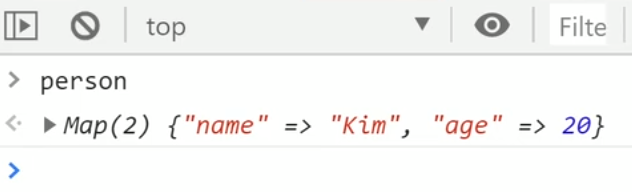
Object자료형과 같이 key, value 형태로 자료를 저장할 수 있는 자료형이다.
var person = new Map();
person.set('name', 'Kim');
person.set('age', '30');
Object자료형과는 다르게 자료의 연관성을 표현해 준다.
특징
key, value의 값에 모든 자료형을 쓸 수 있다.
var person = new Map();
person.set([1,2,3], 'Kim');
person.set('age', 20);
methods
var person = new Map();
person.set('age', 20);

person.get('age'); //자료 꺼내는 법
person.delete('age'); //자료 삭제하는 법
person.size; //자료 몇갠지 알려줌

//Map자료 반복문 돌리기
for (var key of person.keys() ){
  console.log(key)
}

//자료를 직접 집어넣고 싶으면

var person = new Map([
  ['age', 20],
  ['name', 'Kim']
]);
Set
Array 자료형과 형태가 비슷하다.
var 출석부2 = new Set([ 'john' , 'tom', 'andy', 'tom' ]);

console.log(출석부2);
특징
중복자료를 허용하지 않는다.
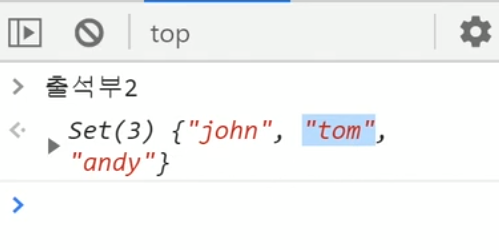
var 출석부 = [ 'john' , 'tom', 'andy', 'tom' ];

var 출석부2 = new Set(출석부); //Array를 Set으로 바꾸기

출석부 = [...출석부2]  //Set을 Array로 바꾸기
흔히 배열 자료를 Set으로 바꿔 중복을 제거 하고 다시 배열로 바꾸는 패턴으로 자주 쓰인다.
methods
var 출석부2 = new Set([ 'john' , 'tom', 'andy', 'tom' ]);

출석부2.add('sally'); //자료더하기
출석부2.has('tom'); //자료있는지 확인
출석부2.size;  //자료 몇갠지 세기