Elastic Stack(ELK Stack) 구조
| 구성요소 | 역할 요약 |
|---|---|
| Elasticsearch | 분산형 검색 및 분석 엔진, 데이터 저장/검색/분석 |
| Logstash | 데이터 수집·가공·전송 파이프라인 |
| Kibana | 시각화 및 대시보드, 검색·분석 결과 UI 제공 |
| Beats | 경량 데이터 수집 에이전트(옵션, Filebeat 등) |
- ELK Stack = Elasticsearch + Logstash + Kibana
- Elastic Stack = ELK + Beats 등 확장 구성
Elasticsearch
- NoSQL 기반의 분산 검색/분석 엔진
- 인덱스 단위로 데이터를 저장하며, 샤드(Shard)로 분선
- JSON 기반 문서 저장 및 검색
- 실시간 검색, 집계, 필터링, 대용량 데이터 처리
- 클러스터, 노드, 인덱스, 샤드, 에플리카 등 분산 구조 이해가 필요함
- 데이터 백업(Snapshot & Restore), 인덱스 관리(롤오버, 삭제, 보존 정책)
Elastic Stack(ELK Stack) 설치 순서
각 구성요소 간에 의존성이 있기 때문에 공식 문서에서 권장하는 순서대로 하려고 한다.
- Elasticsearch
- Kibana
- Logstash
- Beats 또는 Elastic Agent
위의 순서대로 진행해보려고 한다.
Elasticsearch
Elasticsearch의 역할은 데이터 저장, 검색, 분석의 핵심 엔진이다.
가장 먼저 설치해야 하고, 모든 데이터가 여기에 저장된다.
Elasticsearch 는 Java 런타임이 필요하기 때문에 java 설치를 해주어야 한다.
나는 Kali 에서 진행했다.
설치 전 메모리는 최소 4GB, 8GB 이상을 권장한다고 한다.
나는 4GB라서 일단 진행했는데 애가 힘들어한다.
Intro.
- 시작하기 전 apt update 진행해주기
- java 설치
- java 설치 후 버전 확인
┌──(kali㉿kali)-[~]
└─$ sudo apt update

┌──(kali㉿kali)-[~]
└─$ sudo apt install openjdk-11-jdk -y
Installing:
  openjdk-11-jdk
  [생략]
┌──(kali㉿kali)-[~]
└─$ java -version
Picked up _JAVA_OPTIONS: -Dawt.useSystemAAFontSettings=on -Dswing.aatext=true
openjdk version "23-ea" 2024-09-17
OpenJDK Runtime Environment (build 23-ea+34-Debian-1)
OpenJDK 64-Bit Server VM (build 23-ea+34-Debian-1, mixed mode, sharing)
Elasticsarch 다운로드 및 설치
- GPG 키 등록과
apt-transport-https설치 - Elastic 저장소 등록
- 패키지 목록 업데이트를 위해 패키지 목록 갱신
- Elasticsearch 설치
┌──(kali㉿kali)-[~]
└─$ wget -qO - https://artifacts.elastic.co/GPG-KEY-elasticsearch | sudo tee /etc/apt/keyrings/elasticsearch.gpg
-----BEGIN PGP PUBLIC KEY BLOCK-----
[중략]
GIHikRcYWeXTYW7veewK5Ss=
=ftS0
-----END PGP PUBLIC KEY BLOCK-----
┌──(kali㉿kali)-[~]
└─$ sudo apt install apt-transport-https
Upgrading:
  apt  apt-utils

Installing:
  apt-transport-https

Installing dependencies:
  libapt-pkg7.0  sqv

┌──(kali㉿kali)-[~]
└─$ echo "deb [signed-by=/etc/apt/keyrings/elasticsearch.gpg] https://artifacts.elastic.co/packages/8.x/apt stable main" | sudo tee /etc/apt/sources.list.d/elastic-8.x.list
deb [signed-by=/etc/apt/keyrings/elasticsearch.gpg] https://artifacts.elastic.co/packages/8.x/apt stable main

┌──(kali㉿kali)-[~]
└─$ sudo apt update
[sudo] password for kali:
Get:1 https://artifacts.elastic.co/packages/8.x/apt stable InRelease [3248 B]
Hit:2 http://http.kali.org/kali kali-rolling InRelease
Hit:3 https://dl.google.com/linux/chrome/deb stable InRelease
Get:4 https://artifacts.elastic.co/packages/8.x/apt stable/main i386 Packages [3396 B]
Get:5 https://artifacts.elastic.co/packages/8.x/apt stable/main amd64 Packages [78.7 kB]
Fetched 85.4 kB in 2s (37.1 kB/s)
2192 packages can be upgraded. Run 'apt list --upgradable' to see them.
┌──(kali㉿kali)-[~]
└─$ sudo apt install elasticsearch -y
Installing:
  elasticsearch

Summary:
  Upgrading: 0, Installing: 1, Removing: 0, Not Upgrading: 2192
  Download size: 648 MB
  Space needed: 1239 MB / 425 MB available

Warning: More space needed than available: 1239 MB > 425 MB, installation may fail
Error: You don't have enough free space in /var/cache/apt/archives/.
설치에 필요한 용량이 부족해서 불필요한 패키지랑 캐시 정리를 해주었다
┌──(kali㉿kali)-[~]
└─$ sudo apt clean

┌──(kali㉿kali)-[~]
└─$ sudo apt autoremove
Summary:
  Upgrading: 0, Installing: 0, Removing: 0, Not Upgrading: 2192

┌──(kali㉿kali)-[~]
└─$ sudo rm -rf /tmp/*

┌──(kali㉿kali)-[~]
└─$ sudo rm -rf /var/tmp/*

┌──(kali㉿kali)-[~]
└─$ sudo rm -rf /var/log/*.gz /var/log/*.1
난 여기에 추가로 volatility 도 삭제해줬다.
다시 설치 시도를 하니 성공했다.
──(kali㉿kali)-[~/Downloads]
└─$ sudo apt install elasticsearch -y
Installing:
  elasticsearch

Summary:
  Upgrading: 0, Installing: 1, Removing: 0, Not Upgrading: 2192
  Download size: 648 MB
Space needed: 1239 MB / 1657 MB available┌──(kali㉿kali)-[~/Downloads]
└─$ sudo systemctl enable elasticsearch
Created symlink '/etc/systemd/system/multi-user.target.wants/elasticsearch.service' → '/usr/lib/systemd/system/elasticsearch.service'.
┌──(kali㉿kali)-[~/Downloads]
└─$ sudo systemctl start elasticsearch
┌──(kali㉿kali)-[~/Downloads]
└─$ sudo systemctl status elasticsearch
● elasticsearch.service - Elasticsearch
Loaded: loaded (/usr/lib/systemd/system/elasticsearch.service; enabled; preset: disabled)
Active: active (running) since Mon 2025-07-07 08:38:50 EDT; 2min 29s ago
Invocation: 330046cbd3d249d2b685f475ecdf9977
Docs: https://www.elastic.co
Main PID: 40937 (java)
Tasks: 89 (limit: 4562)
Memory: 2.3G (peak: 2.3G swap: 16.7M swap peak: 16.7M)
CPU: 2min 38.607s
CGroup: /system.slice/elasticsearch.service
├─40937 /usr/share/elasticsearch/jdk/bin/java -Xms4m -Xmx64m -XX:+UseSerialGC -Dcli.name=serve>
├─41128 /usr/share/elasticsearch/jdk/bin/java -Des.networkaddress.cache.ttl=60 -Des.networkadd>
└─41228 /usr/share/elasticsearch/modules/x-pack-ml/platform/linux-x86_64/bin/controller
Jul 07 08:35:30 kali systemd[1]: Starting elasticsearch.service - Elasticsearch...
Jul 07 08:38:50 kali systemd[1]: Started elasticsearch.service - Elasticsearch.
한 3~5분 정도 걸려서 서비스가 정상적으로 작동했다.
running 상태인 것을 보면 된다.
localhost:9200에 접속해서 확인을 해보려고 하니 정말정말 느려져서 .. curl 명령어를 써보았다.
┌──(kali㉿kali)-[~]
└─$ sudo systemctl status elasticsearch
● elasticsearch.service - Elasticsearch
     Loaded: loaded (/usr/lib/systemd/system/elasticsearch.service; enabled; preset: disabled)
     Active: active (running) since Mon 2025-07-07 10:13:10 EDT; 14s ago
 Invocation: d9dad9b2223a4122adc2d1b6969104e0
       Docs: https://www.elastic.co
   Main PID: 89012 (java)
      Tasks: 69 (limit: 4562)
     Memory: 2.4G (peak: 2.4G)
        CPU: 2min 10.993s
     CGroup: /system.slice/elasticsearch.service
             ├─89012 /usr/share/elasticsearch/jdk/bin/java -Xms4m -Xmx64m -XX:+UseSerialGC -Dcli.name=serve>
             ├─89222 /usr/share/elasticsearch/jdk/bin/java -Des.networkaddress.cache.ttl=60 -Des.networkadd>
             └─89345 /usr/share/elasticsearch/modules/x-pack-ml/platform/linux-x86_64/bin/controller

Jul 07 10:10:28 kali systemd[1]: Starting elasticsearch.service - Elasticsearch...
Jul 07 10:13:10 kali systemd[1]: Started elasticsearch.service - Elasticsearch.
lines 1-16/16 (END)

┌──(kali㉿kali)-[~]
└─$ sudo /usr/share/elasticsearch/bin/elasticsearch-reset-password -u elastic -i

Failed to determine the health of the cluster. Cluster health is currently RED.
This means that some cluster data is unavailable and your cluster is not fully functional.
The cluster logs (https://www.elastic.co/guide/en/elasticsearch/reference/8.18/logging.html) might contain information/indications for the underlying cause
It is recommended that you resolve the issues with your cluster before continuing
It is very likely that the command will fail when run against an unhealthy cluster.

If you still want to attempt to execute this command against an unhealthy cluster, you can pass the `-f` parameter.

ERROR: Failed to determine the health of the cluster. Cluster health is currently RED., with exit code 69
지금 일단 계속 이 오류가 나서 진행을 못하는 중..
비밀번호를 바꿔줘야 하는데 용량 부족인듯 하다.
그냥 kali 환경을 하나 더 만들어서 이번에는 메모리를 8기가로 설정해주었다.
그리고 다시 설치부터 시작했다.
처음에 localhost:9200으로 입력하니 The connection was reset 이런 문구가 떠서 뭔가 하구 9200 포트가 리슨되어 있는지 확인해보았다
──(kali㉿kali)-[~]
└─$ sudo netstat -tnlp | grep 9200
tcp6       0      0 :::9200                 :::*                    LISTEN      4006/java
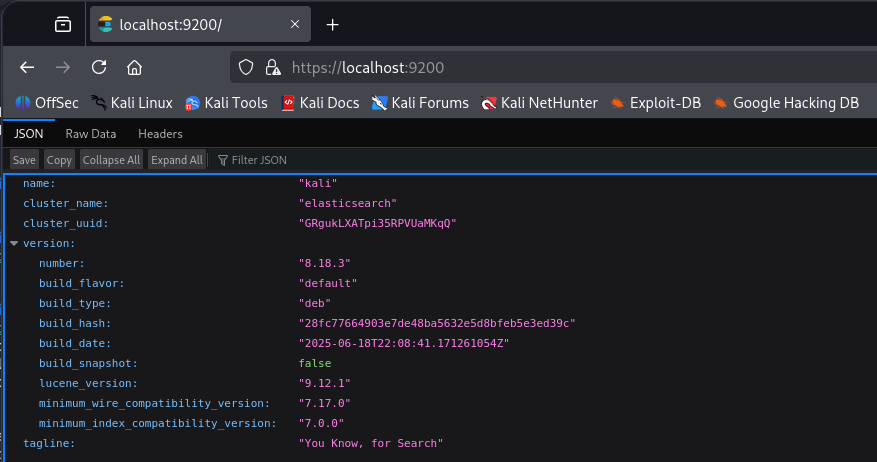
잘 리슨되어 있었고 https://localhost:9200 으로 접속해야 하는 것이었다.
다시 접속해보니 계정에 로그인하도록 되어 있어서 비밀번호 재설정을 해주어야 했다.
비밀번호 설정은 아래와 같이 할 수 있다.
┌──(kali㉿kali)-[~]
└─$ sudo /usr/share/elasticsearch/bin/elasticsearch-reset-password -u elastic -i
This tool will reset the password of the [elastic] user.
You will be prompted to enter the password.
Please confirm that you would like to continue [y/N]y


Enter password for [elastic]:
Re-enter password for [elastic]:
Password for the [elastic] user successfully reset.
마지막에 successfully reset.이라고 뜨면 성공적으로 변경된 것이다.
잘 로그인을 하면 이제 아래와 같은 화면을 볼 수 있다.