2024.02.05
시스템 입력 ( 키보드 입력 )
- 키보드는 하드웨어에 연결되어 있음.
- 키보드에서 입력된 키의 정보를 저장하는 Keyboard Buffer가 존재한다.
- Enter키를 누르면 Keyboard Buffer에 저장되어있던 키의 정보들은 OS로 전달된 후 Keyboard Buffer는 비워진다.
- Java Test 로 자바를 실행하면 System클래스의 Stream이 OS와 연결된 상태로 실행된다.
- in , out , err 3가지를 연결시킴 ( OS와 JVM 사이 )
- instance에 있는 System.in.read()는 OS에 키보드 입력값이 들어올 때 까지 기다린다.
- 값이 입력되면 입력된 값을 java에서 가로챈다.
입력의 근원이 시스템( 키보드 ) 일 때 값 받기
try{
	int readData = System.in.read();
    //read() : 키보드의 입력 값 중에 가장 처음 입력값에 대한 코드 값을 반환.
    //         엔터가 눌러져야 다음 코드로 진행된다.

}catch(IOException ie){

}
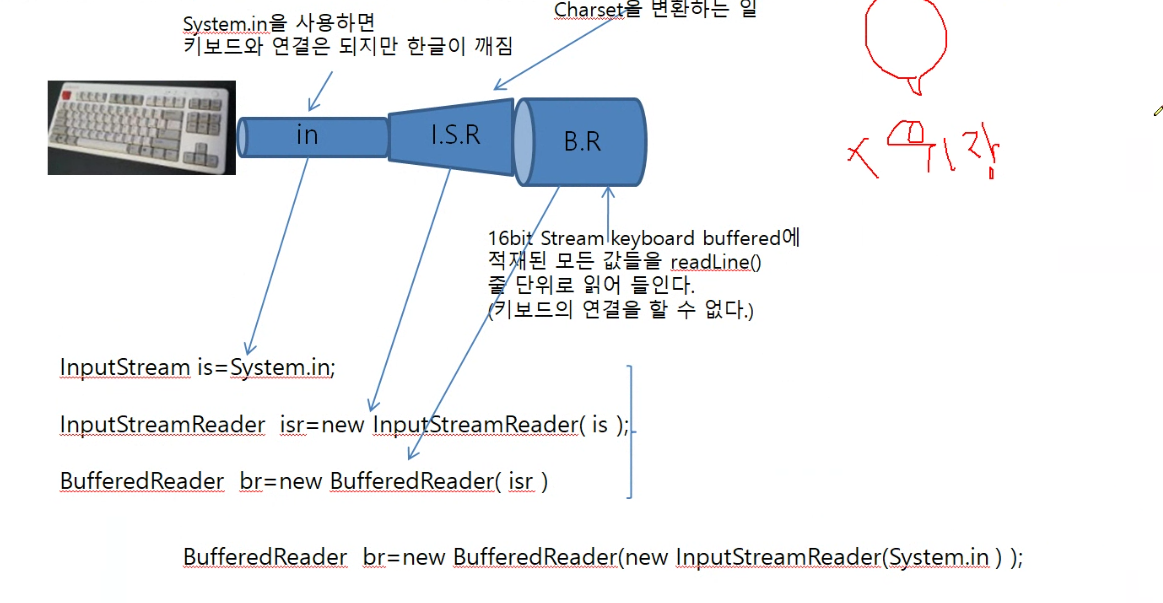
8bit stream인 InputStream 은 한글이 깨진다.
- Stream 1byte, 한글은 2byte
- stream을 결합하여 해결.
- 8bit stream과 16비트 stream을 조합하여 사용.
입력의 근원이 파일 일 때 값 받기
- 8bit stream사용 : 연결된 파일의 종류와 상관 없이 모두 읽어 들일 수 있다.
- 파일을 복사할 때 사용
- 16bit stream사용 :
- 파일에 스트림을 연결
FileInputStream fls = new FileInputStream( File객체 ); //File객체 : String 경로 + 파일명- File
- 파일에 대한 정보를 얻거나, 디렉토리를 생성하거나, 파일명 변경, 파일을 삭제할 때 사용하는 클래스.
- java.io패키지 에서 제공
- 사용법 )
- 생성 )
File file = new File("파일의 경로");
- 파일이 존재하는지?
boolean b = file.exists(); - 파일인지?
boolean b = file.isFile(); - 디렉토리인지?
boolean b = file.isDirectory(); - 읽기가능한지?
boolean b = file.canRead(); - 쓸 수 있는지?
boolean b = file.canWrite(); - 숨김파일인지?
boolean b = file.isHidden(); - 파일의 길이는
long l = file.length(); - 파일의 절대경로는
String str = file.getAbsolutePath(); - 파일의 규범경로
- OS에서 파일에 접근하기 위해 사용하는 단 하나의 경로
- 드라이브 경로 대문자로만 사용.(ex C:, D:,,,)
String str = file.getCanonicalPath(); - 파일의 실행가능여부
boolean b = file.canExecute(); - 파일이 존재하는 디렉토리 얻기
String path = file.getParent(); - 파일명 얻기
String path = file.getName(); - 파일이 마지막으로 수정
long l = file.lastModified(); //xxxx년 xx월 xx일 처럼 원하는 형식으로 표현하기 위해서는 //SimpleDateFormat을 활용한다. //SimpleDateFormat sdf = new SimpleDateFormat("yyyy:MM:dd HH:mm:ss"); //System.out.println(sdf.format(new Date(file.lastModified()))); - 디렉토리 생성
- OS에서 제공하는 명령어
"mkdir 디렉토리명"
"mkdir c:\상위디렉토리명\하위디렉토리명..."
- 디렉토리명을 가진 File을 생성
File file = new File("디렉토리명"); - 생성
mkdir() // 부모디렉토리가 존재하지 않으면 하위 디렉토리를 생성하지 않는다.
mkdirs() // 부모디렉토리가 존재하지 않으면, 부모디렉토리부터 생성한다.
- OS에서 제공하는 명령어
- 파일 삭제
- 삭제할 파일과 같은 이름의 파일객체를 생성
File file = new File("파일명");
file.delete();
- 삭제할 파일과 같은 이름의 파일객체를 생성
- 파일명 변경
- 이전 파일명을 저장한 객체
File file = new File("변경전 이름"); - 변경할 파일명을 저장한 객체
File renameFile = new File("변경후 이름"); - 변경
이전이름.renameTo(새이름객체)
- 이전 파일명을 저장한 객체
- 생성 )
파일의 내용 읽기
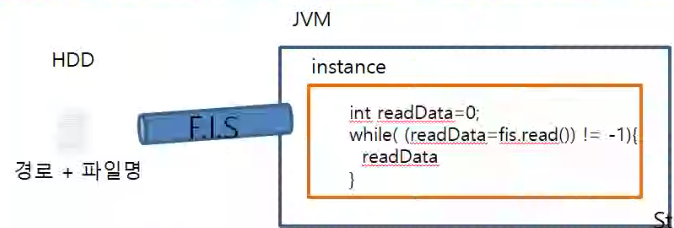
- 스트림에서 1byte읽어들인 (read())값이 존재한다면
-
파일에 스트림을 연결
FileInputStream fis = new FileInputStream( File객체 ) -
파일에서 내용을 읽어 들인다. (읽어 들인 내용이 없다면 -1이 나온다.)
int readData = 0; while((readData = fis.read())=-1){ //읽어들인 데이터를 사용 } -
스트림 사용을 종료하면 연결을 끊는다.
fis.close();