빌보드
- 오브젝트가 배치 되어 있을 때 카메라가 어느 방향에서 보아도 항상 오브젝트가 카메라의 정면을 향하고 있는 것
Billboard(한개의 물체)
만약에 물체가 하나만 있다면, rotation을 수정해주는 방식으로 하면 된다.
그러면 먼저 물체가 한개만 있을때를 해보면
메인코드 (Demo)
테스트용으로 MonoBehavior를 상속받는 BillBoardTest클래스를 생성해주고 Update()에서 rotation을 수정해주는 코드를 추가
BillBoardDemo.h
#include "IExecute.h"

class BillBoardDemo : public IExecute
{

public:
	void Init() override;
	void Update() override;
	void Render() override;


private:
	shared_ptr<Shader> _shader;
};

#include "MonoBehaviour.h"

class BillBoardTest : public MonoBehaviour
{
public:
	virtual void Update();

};
BillBoardDemo.cpp
- UI작업해준거는 지워주고, mesh에다가 billboardTest를 붙여주자
- BillboardTest::Update() : 물체에서 카메라의 방향 벡터와, Up벡터, 물체의 위치를 가지고 새로운
lookMatrix를 생성
->lookMatrix.Decompose()를 통해서 Quaternion R을 추출해주고,Transform::ToEulerAngles()를 통해 rotation을 구해주고 적용
	// Mesh
	{
		auto obj = make_shared<GameObject>();
		obj->GetOrAddTransform()->SetLocalPosition(Vec3(0.f));
		obj->GetOrAddTransform()->SetScale(Vec3(2.f));
		obj->AddComponent(make_shared<MeshRenderer>());
		obj->AddComponent(make_shared<BillBoardTest>());
		{
			obj->GetMeshRenderer()->SetMaterial(RESOURCES->Get<Material>(L"Veigar"));
		}
		{
			auto mesh = RESOURCES->Get<Mesh>(L"Quad");
			obj->GetMeshRenderer()->SetMesh(mesh);
			obj->GetMeshRenderer()->SetPass(0);
		}
		CUR_SCENE->Add(obj);
	}


void BillBoardTest::Update()
{
	auto go = GetGameObject();

	Vec3 up = Vec3(0, 1, 0);
	Vec3 cameraPos = CUR_SCENE->GetMainCamera()->GetTransform()->GetPosition();
	Vec3 myPos = GetTransform()->GetPosition();

	Vec3 forward = cameraPos - myPos;
	forward.Normalize();

	Matrix lookMatrix = Matrix::CreateWorld(myPos, forward, up);

	Vec3 S, T;
	Quaternion R;
	lookMatrix.Decompose(S, R, T);

	Vec3 rot = Transform::ToEulerAngles(R);

	GetTransform()->SetRotation(rot);
}
Billboard(여러개 물체)
물체를 여러개에 Billboard를 적용시키기 위해서는 쉐이더에서 작업을 해주어야 한다.
BillboardDemo.fx
#include "00.Global.fx"
#include "00.Light.fx"
#include "00.Render.fx"

struct VertexInput
{
    float4 position : POSITION;
    float2 uv : TEXCOORD;
    float2 scale : SCALE;
};

struct V_OUT
{
    float4 position : SV_POSITION;
    float2 uv : TEXCOORD;
};

V_OUT VS(VertexInput input)
{
    V_OUT output;

    float4 position = mul(input.position, W);

    float3 up = float3(0, 1, 0);
    //float3 forward = float3(0, 0, 1); // 나중에 카메라 방향으로 변경
    float3 right = normalize(cross(up, forward));

    // 직접적으로 좌표 변환
    position.xyz += (input.uv.x - 0.5f) * right * input.scale.x;
    position.xyz += (1.0f - input.uv.y - 0.5f) * up * input.scale.y;
    position.w = 1.0f;

    output.position = mul(mul(position, V), P);

    output.uv = input.uv;

    return output;
}

float4 PS(V_OUT input) :SV_Target
{
    float4 diffuse = DiffuseMap.Sample(LinearSampler, input.uv);

    return diffuse;
}

technique11 T0
{
    pass P0
    {
        //SetRasterizerState(FillModeWireFrame);
        SetVertexShader(CompileShader(vs_5_0, VS()));
        SetPixelShader(CompileShader(ps_5_0, PS()));
    }
};
메인함수(Demo)
- billboard를 적용시킬 Object 생성
	// Billboard
	{
		auto obj = make_shared<GameObject>();
		obj->GetOrAddTransform()->SetLocalPosition(Vec3(0.f));
		obj->AddComponent(make_shared<Billboard>());
		{
			// Material
			{
				shared_ptr<Material> material = make_shared<Material>();
				material->SetShader(_shader);
				auto texture = RESOURCES->Load<Texture>(L"Veigar", L"..\\Resources\\Textures\\veigar.jpg");
				material->SetDiffuseMap(texture);
				MaterialDesc& desc = material->GetMaterialDesc();
				desc.ambient = Vec4(1.f);
				desc.diffuse = Vec4(1.f);
				desc.specular = Vec4(1.f);
				RESOURCES->Add(L"Veigar", material);

				obj->GetBillboard()->SetMaterial(material);
			}
		}

		for (int32 i = 0; i < 500; i++)
		{
			Vec2 scale = Vec2(1 + rand() % 3, 1 + rand() % 3);
			Vec2 position = Vec2(-100 + rand() % 200, -100 + rand() % 200);

			obj->GetBillboard()->Add(Vec3(position.x, scale.y * 0.5f, position.y), scale);
		}

		CUR_SCENE->Add(obj);
	}
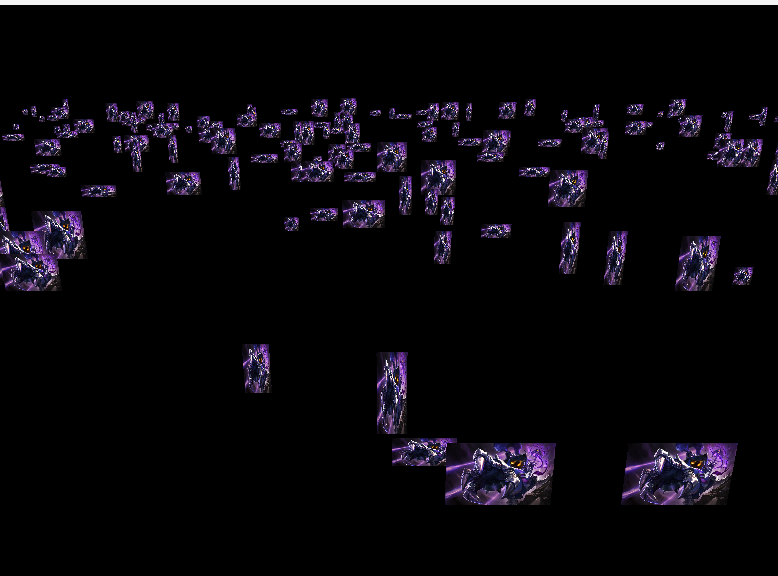
결과
- 모든 물체가 앞방향을 바라봤을때
BillboardDemo.fx
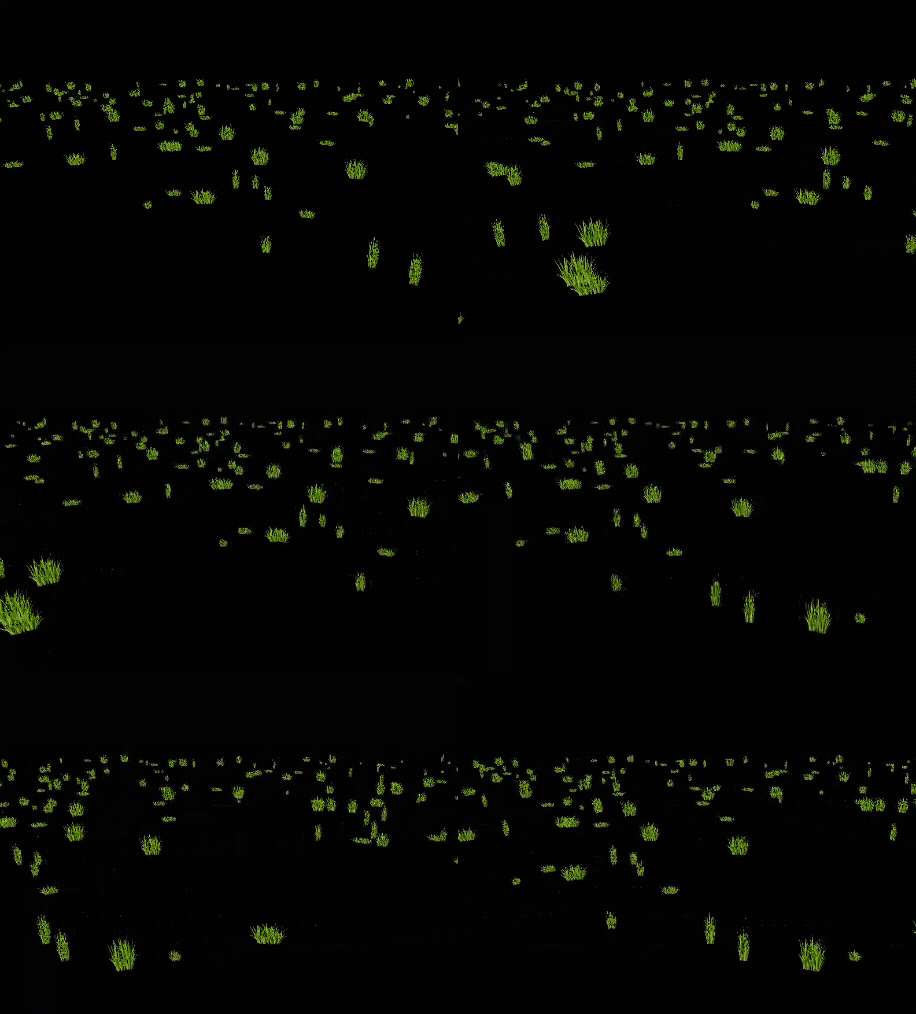
이제는 모든 물체가 카메라를 바라보도록 하고, 이미지를 풀로 변경해주고, 풀의 알파값을 조절해서 배경을 지우고 실제 풀처럼 만들어주자
#include "00.Global.fx"
#include "00.Light.fx"
#include "00.Render.fx"

struct VertexInput
{
    float4 position : POSITION;
    float2 uv : TEXCOORD;
    float2 scale : SCALE;
};

struct V_OUT
{
    float4 position : SV_POSITION;
    float2 uv : TEXCOORD;
};

V_OUT VS(VertexInput input)
{
    V_OUT output;

    float4 position = mul(input.position, W);

    float3 up = float3(0, 1, 0);
    float3 forward = position.xyz - CameraPosition(); // BillBoard
    float3 right = normalize(cross(up, forward));

    // 직접적으로 좌표 변환
    position.xyz += (input.uv.x - 0.5f) * right * input.scale.x;
    position.xyz += (1.0f - input.uv.y - 0.5f) * up * input.scale.y;
    position.w = 1.0f;

    output.position = mul(mul(position, V), P);

    output.uv = input.uv;

    return output;
}

float4 PS(V_OUT input) :SV_Target
{
    float4 diffuse = DiffuseMap.Sample(LinearSampler, input.uv);

    //clip(diffuse.a - 0.3f);
    if (diffuse.a < 0.3f) // 알파값이 0.3이하면 그리지 않도록
        discard;

    return diffuse;
}

technique11 T0
{
    pass P0
    {
        //SetRasterizerState(FillModeWireFrame);
        SetVertexShader(CompileShader(vs_5_0, VS()));
        SetPixelShader(CompileShader(ps_5_0, PS()));
    }
};
결과
- 모든 물체가 카메라를 바라봤을 때
Billboard(Snow 작업)
이번에는 눈을 깔고, 눈 내려보는 방식을 진행해보자
눈을 만들때는 풀처럼 인위적으로 몇개 만들고 위치 지정하고 하는게 아닌 구역을 정해주면 그 구역에 지정해준 카운트만큼 눈송이를 뿌려주는 방식이다.
또한 눈 효과를 위해 시간 경과에 대한 정보를 상수버퍼로 넣어야한다.
그렇기에 상수버퍼를 넣어줄 구조체를 정의해주고, shader에서 push함수를 생성해줘야한다.
BindShaderDesc.h
- SnowBillboardDesc 구조체 추가
struct SnowBillboardDesc
{	// 눈을 뿌리고 싶을때 어떻게 뿌릴지에 대한 정보를 넣어주자
	Color color = Color(1, 1, 1, 1);	// 색상

	Vec3 velocity = Vec3(0, -5, 0);		// 속도
	float drawDistance = 0;

	Vec3 origin = Vec3(0, 0, 0);		// 구역 원점
	float turbulence = 5;				// 흔들리는 강도

	Vec3 extent = Vec3(0, 0, 0);		// 구역
	float time;							// 시간
};
Shader
- 만들어둔
SnowBillboardDesc구조체에 대한 버퍼와 이펙트퍼버 생성하고, Push함수 추가하기
// Shader.h

class Shader
{
public:
	void PushSnowData(const SnowBillboardDesc& desc);

private:
	SnowBillboardDesc _snowDesc;
	shared_ptr<ConstantBuffer<SnowBillboardDesc>> _snowBuffer;
	ComPtr<ID3DX11EffectConstantBuffer> _snowEffectBuffer;
}

// Shader.cpp
void Shader::PushSnowData(const SnowBillboardDesc& desc)
{
	if (_snowEffectBuffer == nullptr)
	{
		_snowBuffer = make_shared<ConstantBuffer<SnowBillboardDesc>>();
		_snowBuffer->Create();
		_snowEffectBuffer = GetConstantBuffer("SnowBuffer");
	}

	_snowDesc = desc;
	_snowBuffer->CopyData(_snowDesc);
	_snowEffectBuffer->SetConstantBuffer(_snowBuffer->GetComPtr().Get());
}
SnowBillboard
- 헤더에서 VertexSnow 구조체 추가 및, Desc과 타임 변수 추가
Billboard에서의Add()함수를 지우고 생성자에서 눈을 만들어주는 코드 추가Update()에서 필요한 부분(타임, 구역중점, Shader->Push) 추가
SnowBillboard.h
struct VertexSnow
{
	Vec3 position;
	Vec2 uv;
	Vec2 scale;
	Vec2 random;
};

#define MAX_BILLBOARD_COUNT 500

class SnowBillboard : public Component
{
	using Super = Component;

public:
	SnowBillboard(Vec3 extent, int32 drawCount = 100); // 구역과 카운트
	virtual ~SnowBillboard();

	void Update();

	void SetMaterial(shared_ptr<Material> material) { _material = material; }
	void SetPass(uint8 pass) { _pass = pass; }

private:
	vector<VertexSnow> _vertices;
	vector<uint32> _indices;
	shared_ptr<VertexBuffer> _vertexBuffer;
	shared_ptr<IndexBuffer> _indexBuffer;

	int32 _drawCount = 0;
	int32 _prevCount = 0;

	shared_ptr<Material> _material;
	uint8 _pass = 0;

	SnowBillboardDesc _desc;
	float _elpasedTime = 0.f;
};
SnowBillboard.cpp
SnowBillboard::SnowBillboard(Vec3 extent, int32 drawCount /*= 100*/)
	:Super(ComponentType::Billboard)
{
	_desc.extent = extent;
	_desc.drawDistance = _desc.extent.z * 2.0f;
	_drawCount = drawCount;


	const int32 vertexCount = _drawCount * 4;
	_vertices.resize(vertexCount);

	// 범위 내 랜덤하게 생성
	for (int32 i = 0; i < _drawCount * 4; i += 4)
	{
		Vec2 scale = MathUtils::RandomVec2(0.1f, 0.5f);

		Vec3 position;
		position.x = MathUtils::Random(-_desc.extent.x, _desc.extent.x);
		position.y = MathUtils::Random(-_desc.extent.y, _desc.extent.y);
		position.z = MathUtils::Random(-_desc.extent.z, _desc.extent.z);

		Vec2 random = MathUtils::RandomVec2(0.0f, 1.0f);

		_vertices[i + 0].position = position;
		_vertices[i + 1].position = position;
		_vertices[i + 2].position = position;
		_vertices[i + 3].position = position;

		_vertices[i + 0].uv = Vec2(0, 1);
		_vertices[i + 1].uv = Vec2(0, 0);
		_vertices[i + 2].uv = Vec2(1, 1);
		_vertices[i + 3].uv = Vec2(1, 0);

		_vertices[i + 0].scale = scale;
		_vertices[i + 1].scale = scale;
		_vertices[i + 2].scale = scale;
		_vertices[i + 3].scale = scale;

		_vertices[i + 0].random = random;
		_vertices[i + 1].random = random;
		_vertices[i + 2].random = random;
		_vertices[i + 3].random = random;
	}

	_vertexBuffer = make_shared<VertexBuffer>();
	_vertexBuffer->Create(_vertices, 0);

	const int32 indexCount = _drawCount * 6;
	_indices.resize(indexCount);

	for (int32 i = 0; i < _drawCount; i++)
	{
		_indices[i * 6 + 0] = i * 4 + 0;
		_indices[i * 6 + 1] = i * 4 + 1;
		_indices[i * 6 + 2] = i * 4 + 2;
		_indices[i * 6 + 3] = i * 4 + 2;
		_indices[i * 6 + 4] = i * 4 + 1;
		_indices[i * 6 + 5] = i * 4 + 3;
	}

	_indexBuffer = make_shared<IndexBuffer>();
	_indexBuffer->Create(_indices);
}

void SnowBillboard::Update()
{
	_desc.origin = CUR_SCENE->GetMainCamera()->GetTransform()->GetPosition();
	_desc.time = _elpasedTime;
	_elpasedTime += DT;

	auto shader = _material->GetShader();

	// Transform
	auto world = GetTransform()->GetWorldMatrix();
	shader->PushTransformData(TransformDesc{ world });

	// GlobalData
	shader->PushGlobalData(Camera::S_MatView, Camera::S_MatProjection);

	// SnowData
	shader->PushSnowData(_desc);

	// Light
	_material->Update();

	// IA
	_vertexBuffer->PushData();
	_indexBuffer->PushData();

	shader->DrawIndexed(0, _pass, _drawCount * 6);
}
쉐이더(.fx)
SnowDemo.fx
- 만들어둔 Desc과 대응하는 상수버퍼 생성
- VertexInput도 VertexSnow와 동일하게 추가
- V_Out에서는 알파블랜딩을 위한 알파값 추가
#include "00.Global.fx"
#include "00.Light.fx"
#include "00.Render.fx"

cbuffer SnowBuffer
{
    float4 Color;
    float3 Velocity;
    float DrawDistance;

    float3 Origin;
    float Turbulence;

    float3 Extent;
    float Time;
};


struct VertexInput
{
    float4 position : POSITION;
    float2 uv : TEXCOORD;
    float2 scale : SCALE;
    float2 random : RANDOM;
};

struct V_OUT
{
    float4 position : SV_POSITION;
    float2 uv : TEXCOORD;
    float alpha : ALPHA;
};

V_OUT VS(VertexInput input)
{
    V_OUT output;

    float3 displace = Velocity * Time * 100;

    // 눈 이동
    // input.position.y += displace;
    input.position.y = Origin.y + Extent.y - (input.position.y - displace) % Extent.y;
    input.position.x += cos(Time - input.random.x) * Turbulence;
    input.position.z += cos(Time - input.random.y) * Turbulence;
    //input.position.xyz = Origin + (Extent + (input.position.xyz + displace) % Extent) % Extent - (Extent * 0.5f);

    float4 position = mul(input.position, W);

    float3 up = float3(0, 1, 0);
    //float3 forward = float3(0, 0, 1);
    float3 forward = position.xyz - CameraPosition(); // BillBoard
    float3 right = normalize(cross(up, forward));

    position.xyz += (input.uv.x - 0.5f) * right * input.scale.x;
    position.xyz += (1.0f - input.uv.y - 0.5f) * up * input.scale.y;
    position.w = 1.0f;

    output.position = mul(mul(position, V), P);
    output.uv = input.uv;

    output.alpha = 1.0f;

    // Alpha Blending
    //float4 view = mul(position, V);
    //output.alpha = saturate(1 - view.z / DrawDistance) * 0.8f;

    return output;
}

float4 PS(V_OUT input) :SV_Target
{
    float4 diffuse = DiffuseMap.Sample(LinearSampler, input.uv);

    diffuse.rgb = Color.rgb * input.alpha * 2.0f;
    diffuse.a = diffuse.a * input.alpha * 1.5f;

    return diffuse;
}

technique11 T0
{
    PASS_BS_VP(P0, AlphaBlend, VS, PS)
};
00.Global.fs
- 알파블랜딩을 위한 AlphaBlend를 추가하고 매크로 추가하기
////////////////
// BlendState //
////////////////

BlendState AlphaBlend
{
    AlphaToCoverageEnable = false;

    BlendEnable[0] = true;
    SrcBlend[0] = SRC_ALPHA;
    DestBlend[0] = INV_SRC_ALPHA;
    BlendOp[0] = ADD;

    SrcBlendAlpha[0] = One;
    DestBlendAlpha[0] = Zero;
    BlendOpAlpha[0] = Add;

    RenderTargetWriteMask[0] = 15;
};

///////////
// Macro //
///////////

#define PASS_VP(name, vs, ps)                               \
pass name                                                   \
    {                                                       \
        SetVertexShader( CompileShader( vs_5_0, vs() ) );   \
        SetPixelShader( CompileShader( ps_5_0, ps() ) );    \
    }
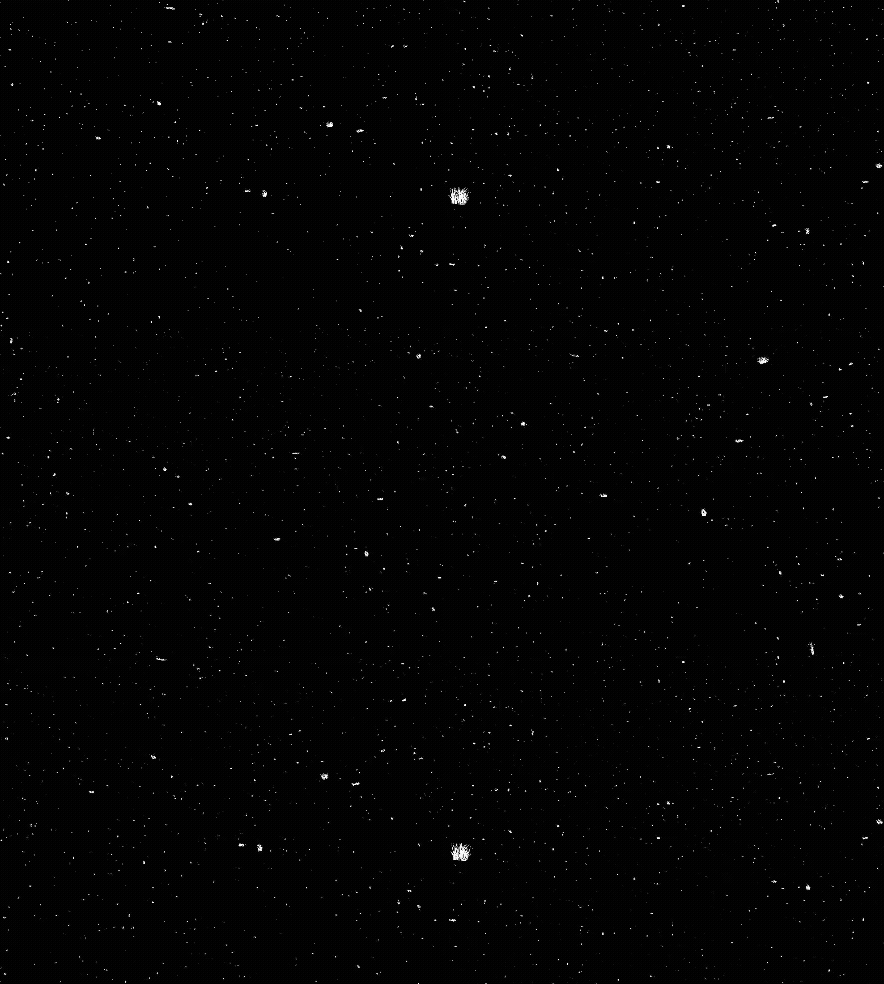
결과
참고 자료
https://www.inflearn.com/courses/lecture?courseId=329791&tab=curriculum&type=LECTURE&unitId=161180&subtitleLanguage=ko
https://www.inflearn.com/courses/lecture?courseId=329791&tab=curriculum&type=LECTURE&unitId=161181&subtitleLanguage=ko

게임 클라이언트 프로그래머 준비중 (공부 및 기록용)