애니메이션
- 그동안 해왔던 방식은 스프라이트를 보여주는 방식으로 구현
- 하지만 3D에서는 각 노드, 뼈를 움직이는 것으로 애니메이션을 구현
- 뼈를 움직이면, 다른 뼈를 어떻게 처리할지 중요
- 정점을 사용하게 되면 모든 정점을 움직이기에는 용량이 너무크기 때문에 정점을 뼈대에 따라 움직이게 해준다.
- 한 정점이 여러 뼈대에 영향을 받을 경우에는 비율을 정해두고 영향을 받도록 설정
-> 스키닝
스키닝
- 어떠한 뼈에 영향을 받아서 우직일 것인지에 대해 정보
- 스킨에 대한 정보를 추불 해주기 위해 메쉬를 순회하면서 뼈대가 있다면 본을 순회하고, 연관된 정점과 가중치 정보를 전달해주는 방식
- 현재 정점이 아닌 뼈대에 정보가 있기에 정보를 추출해서 정점에 파싱 작업이 필요
AsTypes.h
- 정점마다 뼈번호와 가중치를 저장할 구조체를 선언과이를 파싱해줄 구조체 생성
// Animation

struct asBlendWeight
{
	// index : 0 ~ 3 중 어느 슬롯에 넣을지
	// boneIndex : 본 인덱스
	// weight : 가중치
	void Set(uint32 index, uint32 boneIndex, float weight)
	{
		float i = (float)boneIndex;
		float w = weight;

		switch (index)
		{
		case 0: indices.x = i; weights.x = w; break;
		case 1: indices.y = i; weights.y = w; break;
		case 2: indices.z = i; weights.z = w; break;
		case 3: indices.w = i; weights.w = w; break;
		}
	}

	Vec4 indices = Vec4(0, 0, 0, 0);
	Vec4 weights = Vec4(0, 0, 0, 0);
};

// 정점마다 -> (뼈번호, 가중치)
struct asBoneWeights
{
	// 특정 본의 가중치를 리스트에 추가
	void AddWeights(uint32 boneIndex, float weight)
	{
		if (weight <= 0.0f)
			return;

		// 현재 리스트 중에서, 가중치가 더 큰 위치를 찾아 내림차순 정렬 상태를 유지하도록 삽입
		auto findit = std::find_if(boneWeights.begin(), boneWeights.end(),
			[weight](const Pair& p) {return weight > p.second; });

		boneWeights.insert(findit, Pair(boneIndex, weight));
	}

	// boneWeights 리스트에서 최대 4래를 뽑아서 asBlendWeight로 변환
	asBlendWeight GetBlendWeights()
	{
		asBlendWeight blendWeights;

		for (uint32 i = 0; i < boneWeights.size(); i++)
		{
			if (i >= 4)
				break;

			blendWeights.Set(i, boneWeights[i].first, boneWeights[i].second);
		}

		return blendWeights;
	}

	// (1, 0.3) (2, 0.2) -> 합이 0.5
    // 스키닝에서는 각 정점의 총 합이 1이 되도록 정규화
	void Normalize()
	{
    	// 4개 이상이면 4개까지만 남김 (GPU에서 대부분 4본 제한)
		if (boneWeights.size() >= 4)
			boneWeights.resize(4);

		float totalWeight = 0.f;
		for (const auto& item : boneWeights)
			totalWeight += item.second;

		// 가중치의 합을 1로 만들어주는
		for (auto& item : boneWeights)
			item.second /= totalWeight;
	}

	using Pair = pair<int32, float>;
	vector<Pair> boneWeights;
};
Converter.cpp
- 본의 정보를 정점 기준으로 다시 모아서 정규화한 뒤, 각 정점의
blendIndices/blendWeights에 스키닝 데이터를 채워 넣는 함수
void Converter::ReadSkinData()
{
	for (uint32 i = 0; i < _scene->mNumMeshes; i++)
	{
		aiMesh* srcMesh = _scene->mMeshes[i];
		if (srcMesh->HasBones() == false)
			continue;

		shared_ptr<asMesh> mesh = _meshes[i];

		vector<asBoneWeights> tempVertexBoneWeights;
		tempVertexBoneWeights.resize(mesh->vertices.size());

		// Bone을 순회하면서 연관된 VertexId, Weight를 구해서 기록한다.
		for (uint32 b = 0; b < srcMesh->mNumBones; b++)
		{
			aiBone* srcMeshBone = srcMesh->mBones[b];
			uint32 boneIndex = GetBoneIndex(srcMeshBone->mName.C_Str());

			for (uint32 w = 0; w < srcMeshBone->mNumWeights; w++)
			{
				uint32 index = srcMeshBone->mWeights[w].mVertexId;
				float weight = srcMeshBone->mWeights[w].mWeight;
				tempVertexBoneWeights[index].AddWeights(boneIndex, weight);
			}
		}

		// 최종결과 계산
		for (uint32 v = 0; v < tempVertexBoneWeights.size(); v++)
		{
			tempVertexBoneWeights[v].Normalize();

			asBlendWeight blendWeight = tempVertexBoneWeights[v].GetBlendWeights();
			mesh->vertices[v].blendIndices = blendWeight.indices;
			mesh->vertices[v].blendWeights = blendWeight.weights;
		}
	}
}
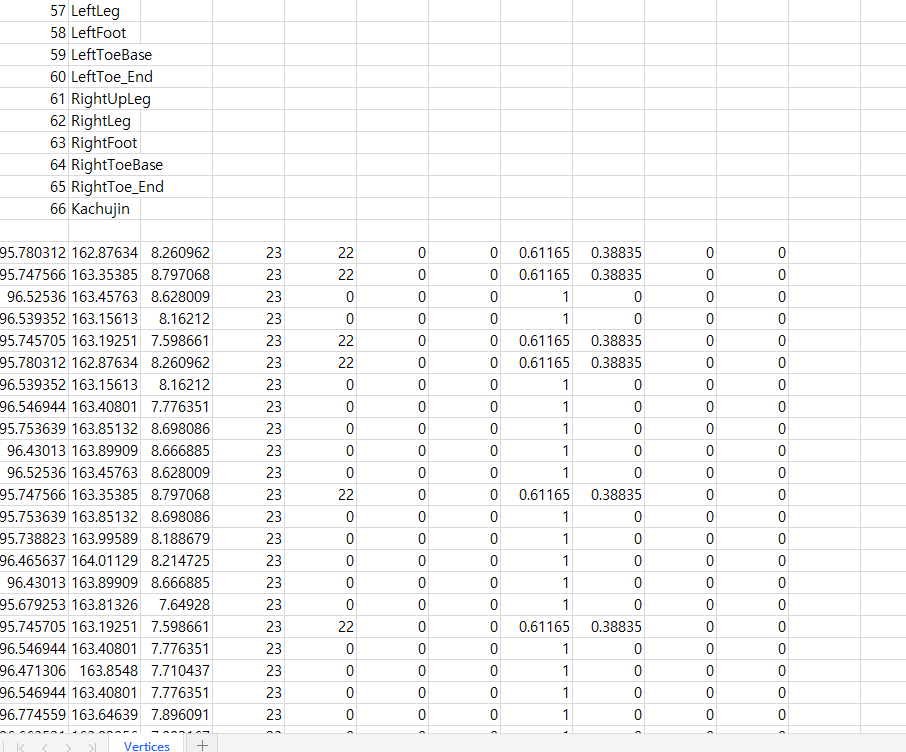
csv파일 생성
- 저장된 정보를 확인하기 위해 엑셀파일로 저장
Converter.cpp
void Converter::ExportModelData(wstring savePath)
{ // 모델 데이터를 추출해서 그 정보를 가지고 와서 별도의 파일을 만드는
	wstring finalPath = _modelPath + savePath + L".mesh";

	ReadModelData(_scene->mRootNode, -1, -1); // 모델의 모든 노드를 재귀를 통해서 로드하는
	ReadSkinData();

	//Write CSV File
	{
		FILE* file;
		::fopen_s(&file, "../Vertices.csv", "w");

		for (shared_ptr<asBone>& bone : _bones)
		{
			string name = bone->name;
			::fprintf(file, "%d,%s\n", bone->index, bone->name.c_str());
		}

		::fprintf(file, "\n");

		//::fprintf(file, "position.x,position.y,position.z,indices.x,indices.y,indices.z,indices.w,weights.x,weights.y,weights.z,weights.w\n");

		for (shared_ptr<asMesh>& mesh : _meshes)
		{
			string name = mesh->name;
			::printf("%s\n", name.c_str());

			for (UINT i = 0; i < mesh->vertices.size(); i++)
			{
				Vec3 p = mesh->vertices[i].position;
				Vec4 indices = mesh->vertices[i].blendIndices;
				Vec4 weights = mesh->vertices[i].blendWeights;

				::fprintf(file, "%f,%f,%f,", p.x, p.y, p.z);
				::fprintf(file, "%f,%f,%f,%f,", indices.x, indices.y, indices.z, indices.w);
				::fprintf(file, "%f,%f,%f,%f\n", weights.x, weights.y, weights.z, weights.w);
			}
		}

		::fclose(file);
	}

	WriteModelFile(finalPath); // 메모리에 들고 있던 것들을 최종 타일 형태로 만드는
}
결과

참고 강의

게임 클라이언트 프로그래머 준비중 (공부 및 기록용)