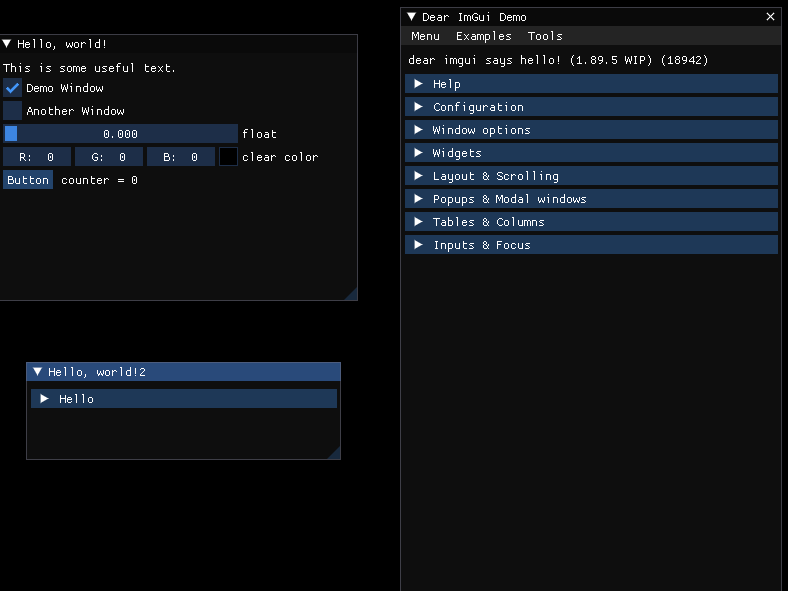
IMGUI라이브러리를 사용하기 위한 소스코드를 가져오기
ImGuiGithub에서 소스코드 다운받기Imgui-master폴더와Imgui-master/backends폴더에서 해당 소스코드 가져오기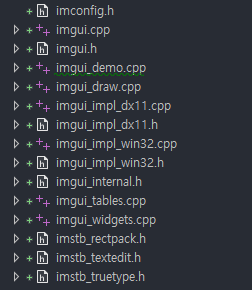
ImGui 마우스입력 처리
Game::WndProc()에서ImGui_ImplWin32_WndProcHandler()함수 추가
Game.cpp
LRESULT CALLBACK Game::WndProc(HWND handle, UINT message, WPARAM wParam, LPARAM lParam)
{
	if (ImGui_ImplWin32_WndProcHandler(handle, message, wParam, lParam))
		return true;

	switch (message)
	{
	case WM_SIZE:
		break;
	case WM_CLOSE:
	case WM_DESTROY:
		PostQuitMessage(0);
		break;
	default:
		return ::DefWindowProc(handle, message, wParam, lParam);
	}
}
ImGui를 자유롭게 사용하도록 Manager 생성
- 매번 ImGui를 사용할때마다
Init과,Update,Render를 사용할 클래스에다가 적용해주기는 힘들어서Singleton으로 생성해서 만들기
ImGuiManager.h
#pragma once

class ImGuiManager
{
	DECLARE_SINGLE(ImGuiManager);

public:
	void Init();
	void Update();
	void Render();

};
ImGuiManager.cpp
#include "pch.h"
#include "ImGuiManager.h"


void ImGuiManager::Init()
{
	IMGUI_CHECKVERSION();
	ImGui::CreateContext();
	ImGuiIO& io = ImGui::GetIO(); (void)io;
	io.ConfigFlags |= ImGuiConfigFlags_NavEnableKeyboard;     // Enable Keyboard Controls
	io.ConfigFlags |= ImGuiConfigFlags_NavEnableGamepad;      // Enable Gamepad Controls

	// Setup Dear ImGui style
	ImGui::StyleColorsDark();
	//ImGui::StyleColorsLight();

	// Setup Platform/Renderer backends
	ImGui_ImplWin32_Init(GAME->GetGameDesc().hWnd);
	ImGui_ImplDX11_Init(DEVICE.Get(), DC.Get());
}

void ImGuiManager::Update()
{
	ImGui_ImplDX11_NewFrame();
	ImGui_ImplWin32_NewFrame();
	ImGui::NewFrame();
}

void ImGuiManager::Render()
{
	// Rendering
	ImGui::Render();
	ImGui_ImplDX11_RenderDrawData(ImGui::GetDrawData());
}
Game.cpp
WPARAM Game::Run(GameDesc& desc)
{
	_desc = desc;
	assert(_desc.app != nullptr);

	// 1) 윈도우 창 정보 등록
	MyRegisterClass();

	// 2) 윈도우 창 생성
	if (!InitInstance(SW_SHOWNORMAL))
		return FALSE;

	GRAPHICS->Init(_desc.hWnd);
	TIME->Init();
	INPUT->Init(_desc.hWnd);
	GUI->Init();					// <- ImGui를 사용하기 위해 추가

	_desc.app->Init();

	MSG msg = { 0 };

	while (msg.message != WM_QUIT)
	{
		if (::PeekMessage(&msg, NULL, 0, 0, PM_REMOVE))
		{
			::TranslateMessage(&msg);
			::DispatchMessage(&msg);
		}
		else
		{
			Update();
		}
	}

	return msg.wParam;
}


void Game::Update()
{
	TIME->Update();
	INPUT->Update();

	GRAPHICS->RenderBegin();

	GUI->Update(); 				// <- ImGui를 사용하기 위해 추가

	_desc.app->Update();
	_desc.app->Render();

	GUI->Render();				// <- ImGui를 사용하기 위해 추가

	GRAPHICS->RenderEnd();
}
ImGuiDemo.cpp
#include "pch.h"
#include "ImGuiDemo.h"


void ImGuiDemo::Init() { }
void ImGuiDemo::Update()
{
    // UI
    Test();
}
void ImGuiDemo::Render() { }

void ImGuiDemo::Test()
{
    // 1. Show the big demo window (Most of the sample code is in ImGui::ShowDemoWindow()! You can browse its code to learn more about Dear ImGui!).
    if (show_demo_window)
        ImGui::ShowDemoWindow(&show_demo_window);

    // 2. Show a simple window that we create ourselves. We use a Begin/End pair to create a named window.
    {
        static float f = 0.0f;
        static int counter = 0;

        ImGui::Begin("Hello, world!");                          // Create a window called "Hello, world!" and append into it.

        ImGui::Text("This is some useful text.");               // Display some text (you can use a format strings too)
        ImGui::Checkbox("Demo Window", &show_demo_window);      // Edit bools storing our window open/close state
        ImGui::Checkbox("Another Window", &show_another_window);

        ImGui::SliderFloat("float", &f, 0.0f, 1.0f);            // Edit 1 float using a slider from 0.0f to 1.0f
        ImGui::ColorEdit3("clear color", (float*)&clear_color); // Edit 3 floats representing a color

        if (ImGui::Button("Button"))                            // Buttons return true when clicked (most widgets return true when edited/activated)
            counter++;
        ImGui::SameLine();
        ImGui::Text("counter = %d", counter);

        //ImGui::Text("Application average %.3f ms/frame (%.1f FPS)", 1000.0f / io.Framerate, io.Framerate);
        ImGui::End();
    }

    {
        static float f = 0.0f;
        static int counter = 0;

        ImGui::Begin("Hello, world!2");                          // Create a window called "Hello, world!" and append into it.
        if (ImGui::CollapsingHeader("Hello"))
        {
            ImGui::Text("Hi");
        }


        //ImGui::Text("Application average %.3f ms/frame (%.1f FPS)", 1000.0f / io.Framerate, io.Framerate);
        ImGui::End();
    }

    // 3. Show another simple window.
    if (show_another_window)
    {
        ImGui::Begin("Another Window", &show_another_window);   // Pass a pointer to our bool variable (the window will have a closing button that will clear the bool when clicked)
        ImGui::Text("Hello from another window!");
        if (ImGui::Button("Close Me"))
            show_another_window = false;
        ImGui::End();
    }
}
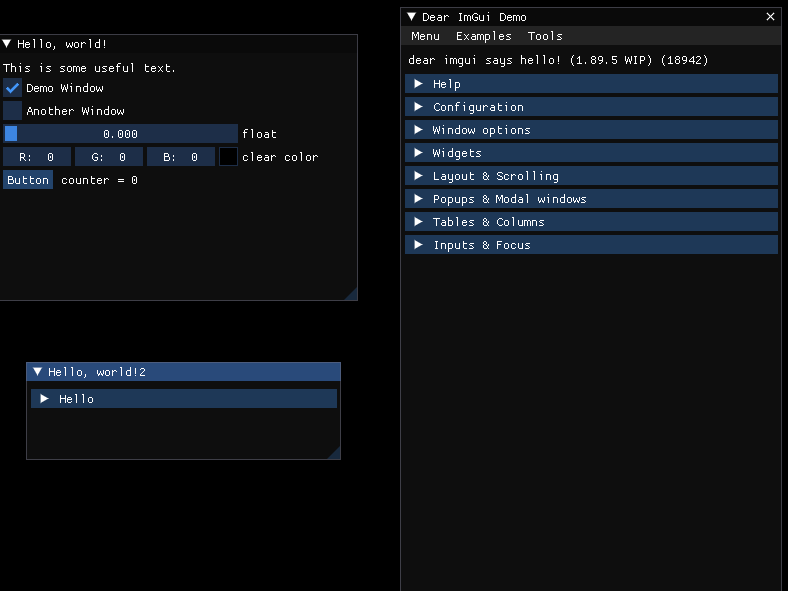
결과
참고 강의

게임 클라이언트 프로그래머 준비중 (공부 및 기록용)