오늘은 C# 강의를 마저 수강하고, TRPG 필수 구현 기능과 추가 구현 기능까지 구현해볼 예정이다. 시간 상 TRPG의 필수 기능을 먼저 구현해보고 C# 강의를 수강할 계획이다.
TRPG 필수 기능 구현
- 어제 상점창을 구현하는 것을 마지막으로 실습을 마쳤었는데, 이어서 상점의 기능을 구현해보겠다. 구현하기 전 구현해야 하는 기능이 무엇이 있는지를 알아보겠다.
상점 기능 구현
- 상점 창에서 상품의 구매가격과 판매가격을 표시한다.
- 구매한 아이템은 "구매완료" 텍스트를 출력한다.
- 아이템 구매 창에서 아이템 목록 앞에 숫자가 표시된다.
- 구매할 때,
- 이미 구매한 아이템이라면 "이미 구매한 아이템입니다" 출력
- 구매한 아이템이 아니라면
- 보유 금액이 충분하다면
"구매를 완료했습니다." 출력
재화 감소/ 인벤토리에 아이템 추가/ 상점에 구매완료 표시 - 보유 금액이 부족하다면
"Gold가 부족합니다." 출력
구현해야 할 기능을 어떻게 구현할지 구상해보고, 구현해보겠다.
-
상점 창에서 상품의 구매가격과 판매가격 표시하기
- 이미 Item 클래스에서 item.Price를 정의했으므로 불러오기만 하면 된다.
-
아이템 구매 창에서 아이템 목록 앞에 숫자 표시하기
- 두 기능을 한번에 표시하자면
for (int i = 0; i < StoreItems.Count; i++) { Console.WriteLine($"- {i + 1}. {StoreItems[i].Name} | + {StoreItems[i].Atk} | + {StoreItems[i].Def} | {StoreItems[i].Description} | 구매가격 {StoreItems[i].Price}G"); }- 코드를 이렇게 작성할 수 있겠다.
-
다음은 구매할 때에 따라 출력되는 텍스트와 상태가 바뀌는 기능을 구현하겠다.
- 먼저 Item 클래스에서
IsOccupied불리언 변수를 추가하여 이를 통해 내가 얻은 장비인지 아닌지 판별하도록 하겠다.추가 사항
기존에는 시작점인Program.cs에서 기본 아이템을 획득한 상태로 시작했는데,
isOccupied불리언을 이용하여IsOccupied == true인 아이템을 Inventory에 넣을 수 있도록 하겠다. - Item 클래스의 속성에
IsOccupied불리언을 추가했다. Item.cs에서 모든 아이템을 모아 놓은 리스트를 생성한다.
public static List<Item> AllItems = new List<Item> { TraineeArmor, IronArmor, SpartanArmor, OldSword, BronzeAxe, SpartanSpear };Inventory.cs에서 아이템을 갱신하는 스크립트를 작성했다.AllItems에서IsOccupied가true인 아이템을Inventory.Items에 추가해준다.
public static void renew() { foreach (var item in Item.AllItems) { if (item.IsOccupied) { Items.Add(item); } } }- 이제 상점에서
isOccupied불리언을 바꿀 수 있도록 해준다. 다른 조건들이면 다른 텍스트들을 출력한다.
//Shop.Buy() 메서드 string input = Console.ReadLine(); if (input == "0") { Console.Clear(); Shop.Show(); } else if (int.TryParse(input, out int selection)) { int index = selection - 1; if (index >= 0 && index < StoreItems.Count) { Console.Clear(); var item = StoreItems[index]; if (item.IsOccupied == false && Player.Gold >= item.Price) { Player.Gold -= item.Price; item.IsOccupied = true; Inventory.renew(); Console.WriteLine($"{item.Name} 구매 완료!"); } else if (item.IsOccupied == false && Player.Gold < item.Price) { Console.WriteLine($"{item.Name}을 구매하기에는 골드가 부족합니다."); } else if (item.IsOccupied == true) { Console.WriteLine("이미 보유 중인 아이템입니다."); } else { Console.WriteLine("잘못된 입력입니다. 다시 시도해주세요."); } Console.WriteLine("아무 키나 눌러서 계속."); Console.ReadKey(); {Shop.Buy(); } } else { Console.WriteLine("잘못된 입력입니다. 다시 시도해주세요."); } } else { Console.WriteLine("잘못된 입력입니다. 숫자를 입력해주세요."); } } - 먼저 Item 클래스에서
-
여기까지 필수 기능들을 전부 구현해보았다.
-
하지만 실행해보니 몇가지 문제가 발견되었다.
Shop.Buy()메서드를 만들면서Shop.Sell()메서드도 같이 만들었는데, 물건을 팔아도 목록에서 사라지지 않았다.
Inventory.renew()메서드에서IsOccupied가false인 아이템에 대해 리스트에서 빼도록 처리를 해줘야 했는데 이를 놓쳤다.
해당 메서드에Items.Clear();를 추가하여renew()메서드가 호출될 때마다IsOccupied여부를 재검사하게끔 만들었다.- 다음으로, 장착한 장비를 상점에서 팔면 장비를 팔 수 있는데, 이 장비를 착용했을 때 얻은 능력치는 지속되는 오류가 발생했다.
IsEquipped가true인 아이템을 팔지 못하도록 처리하였다. - 창을 이동함에 있어서 약간의 오류가 있었는데, 오류를 바로 수정할 수 있었다.
- 이후 약간의 UI 수정을 추가하였다.
추가 기능 구현
아이템 추가
- 도전 기능 중 하나인 아이템 정보를 클래스로 활용하고 있고 아이템 정보를 배열로 관리하고 있기 때문에 바로 아이템 추가를 해보겠다.
.
.
.
public static Item SpecialItem = new Item("특별한 아이템", 15, 15, "특별한 아이템입니다.", 150);
.
.
.
    public static List<Item> AllItems = new List<Item>
.
.
.
    SpecialItem
하지만 여기서 추가한 아이템이 상점에 반영되지 않았다.
이전에 StoreItems 리스트를 생성할 때, 수동으로 아이템을 추가했는데, 이를 static List<Item> StoreItems = Item.AllItems; 를 통해 자동으로 받아오게끔 만들었다.
판매하기 기능
- 판매하기 기능은 구매하기와 함께 추가했다.
- 이 과정에서 신경써야 했던 점은 다음과 같다.
구매하기에서는StoreItems리스트를 가져왔었는데, 판매하기는InventoryItems리스트를 가져와야 한다.
판매가격은 구매가격의 0.85배이므로item.Price * 0.85f만큼Player.Gold를 더하는데,Convert.ToInt32를 이용하여 float을 Int로 변환해주어야 했다.
- 이 과정에서 신경써야 했던 점은 다음과 같다.
장착 기능 개선
- 장착 기능의 개선 방향은 다음과 같다.
- 각 타입(무기/방어구)별로 하나의 아이템만 장착가능
- 방어구를 장착할 때 기존 방어구가 있다면 해제하고 장착
- 무기를 장착할 때 기존 무기가 있다면 해제하고 장착
- 이를 구현할 방법을 구상하고, 구현해보겠다.
- 먼저
type이라는 새로운 string 값을 아이템에 부여한다.
public Item(string name, string type, int atk, int def, string description, int price, bool isEquipped = false, bool isOccupied = false) - 다음으로
Inventory.Items리스트 중IsEquipped == true이고~.Type == item.Type인 아이템이 있는지 검사한다.Find 메서드란?
Find 메서드는 리스트를 순회하면서 조건을 만족하는 첫 번째 요소를 찾고, 해당 요소를 반환한다. 만약 조건을 만족하는 요소가 없으면 null을 반환한다.
- 그 아이템을
IsEquipped = false로 장착해제 하고 새로 장착한 아이템을IsEquipped = true로 설정하여 장착한다.
- 먼저
                if (index >= 0 && index < Items.Count)
                {
                    Console.Clear();

                    var item = Items[index];
                    if (item.IsEquipped == false)
                    {
                        var oldItem = Items.Find(i => i.IsEquipped && i.Type == item.Type);
                        if (oldItem != null)
                        {
                            oldItem.IsEquipped = false;
                            Console.WriteLine($"{oldItem.Name}의 장착을 해제했습니다.");
                        }
                        item.IsEquipped = true;
                        Console.WriteLine($"{item.Name}을 장착했습니다.");
                    }
                    else
                    {
                        item.IsEquipped = false;
                        Console.WriteLine($"{item.Name}의 장착을 해제했습니다.");
                    }
휴식하기 기능
- 체력을 회복시키는 휴식하기 기능을 구현해보겠다.
- 먼저 MainScene에서 휴식하기로 이동하는 조건을 추가해준다.
Player.cs에서Recovery()메서드를 생성해준다.- 만약
Hp == MaxHp이면, "체력이 가득 차 있습니다." 라는 텍스트를 출력한다. - 만약 아닌 경우라면
- Gold가 500 미만이면 "골드가 부족합니다." 라는 텍스트를 출력한다.
- Gold가 500 이상이면 소지 골드에서 500골드를 차감하고 HP를 MaxHP까지 올린다.
    public static void Recovery()
    {
        while (true)
        {
            Console.Clear();
            Console.WriteLine("휴식하기");
            Console.WriteLine("500 G를 내면 체력을 회복할 수 있습니다."); Console.WriteLine("보유골드 :" + Gold + "G");
            Console.WriteLine("현재 체력 :" + Hp + " / " + MaxHp + "\n");
            Console.WriteLine("1. 휴식하기");
            Console.WriteLine("0. 나가기");
            Console.WriteLine("\n원하시는 행동을 입력해주세요.");
            Console.Write(">> ");
            string input = Console.ReadLine();
            if (input == "0")
            {
                Console.Clear();
                break;
            }
            else if (input == "1")
            {
                Console.Clear();
                if (Hp == MaxHp)
                {
                    Console.WriteLine("체력이 가득 차 있습니다.");
                    Console.WriteLine("계속하려면 아무 키나 누르세요.");
                    Console.ReadKey();
                }
                else
                {
                    if (Gold < 500)
                    {
                        Console.WriteLine("골드가 부족합니다.");
                        Console.WriteLine("계속하려면 아무 키나 누르세요.");
                        Console.ReadKey();
                    }
                    else
                    {
                        Console.WriteLine("500G를 지불하고 체력을 회복합니다.");
                        Gold -= 500;
                        Hp = MaxHp;
                        Console.WriteLine("체력이 회복되었습니다.");
                        Console.WriteLine("계속하려면 아무 키나 누르세요.");
                        Console.ReadKey();
                    }
                }
            }
            else
            {
                Console.WriteLine("\n잘못된 입력입니다. 다시 시도해주세요.");
                Console.ReadKey();
            }
        }
    }
}
레벨업 및 던전 기능 추가
- 먼저 레벨 기능을 추가해보겠다.
Player에게 level 필드를 추가했다.
임시로levelup()메서드 또한 생성해주었다. - 다음으로 Dungeon 스크립트를 추가했다. 이 스크립트에서 던전 관련 이벤트를 관리할 생각이다.
- 간단하게 던전 화면을 생성하는 스크립트를 추가했다.
public static void Show() { while (true) { Console.Clear(); int inputNumber = 0; Console.WriteLine($"던전 탐험"); Console.WriteLine($"이곳에서 던전을 선택할 수 있습니다.\n"); Console.WriteLine("1. 쉬운 던전 | 방어력 5 이상 권장"); Console.WriteLine("2. 일반 던전 | 방어력 11 이상 권장"); Console.WriteLine("3. 어려운 던전 | 방어력 17 이상 권장"); Console.WriteLine("0. 나가기\n"); Console.WriteLine("원하시는 던전을 선택해주세요."); Console.Write(">> "); string input = Console.ReadLine(); if (int.TryParse(input, out inputNumber)) { switch (inputNumber) { case 0: break; case 1: break; case 2: break; case 3: break; default: Console.WriteLine("1~3 사이의 숫자를 입력해주세요."); break; } } else { Console.WriteLine("잘못된 입력입니다. 숫자를 입력해주세요."); } } }- 던전 클리어 메서드도 임시로 추가해주었다.
   public static void Clear()
   {
        while (true)
        {


            Console.Clear();
            Console.WriteLine("던전 클리어");
            Console.WriteLine("축하합니다!");
            Console.WriteLine("던전을 클리어했습니다.");

            Console.WriteLine("[탐험 결과");
            Console.WriteLine($"체력 {Player.Hp} -> {Player.Hp - 30}");
            Console.WriteLine($"골드 {Player.Gold} -> {Player.Gold + 1000}");

            Console.WriteLine("0. 나가기");
            Console.WriteLine("\n원하시는 행동을 입력해주세요.");
            Console.Write(">> ");
            string input = Console.ReadLine();
            if (input == "0")
                break;
        }
    }
이후 구체적인 기능을 추가해주었다.
먼저, 레벨업 기능이다.
-
던전을 여러번 클리어할 수록 레벨이 증가한다.
-
레벨업 시 기본 공격력이 0.5 방어력이 1 증가한다.
- 던전을 클리어 한 횟수(Exp)를 센다.
- 레벨업 메서드를 추가한다.
public static void LevelUp() { // 다음 레벨에 필요한 클리어 수 int requiredClears = Level; // 1→2는 1, 2→3은 2... if (Exp >= requiredClears) { Exp = 0; // 초기화 Level++; Atk += 0.5f; Def += 1f; Console.WriteLine($"레벨이 {Level}로 상승했습니다!"); Console.WriteLine("공격력 +0.5, 방어력 +1 증가!"); Console.WriteLine("아무 키나 눌러서 계속..."); Console.ReadKey(); } }- 던전 클리어 시 Exp를 1씩 올리고 레벨업 했는지 판별한다.
    public static void Clear()
  {
      while (true)
      {
          Console.Clear();
          Player.Exp++;
          Player.LevelUp();
 .
 .
 .
던전 클리어 판별 기능
-
던전은 3가지 난이도가 있다.
-
방어력으로 던전을 수행할 수 있는지 판단한다.
- 권장 방어력과 내 방어력을 비교해서 확률로 실패를 판별한다.
-
공격력으로 던전 클리어 시 보상의 양을 계산한다.
-
각 던전별 기본 클리어 보상 {1+공격력~공격력 2%}
Dungeon.Explore()의 기능을 확장하겠다.
public static void Explore(int recommendedDef, int baseReward) { . . . float playerDef = Player.totalDef(); float playerAtk = Player.totalAtk(); Random random = new Random(); if (playerDef<recommendedDef) { if (random.Next(0,100) < 40) { failure(); return; } } else Clear(); }Dungeon.Clear()의 기능도 확장하겠다.public static void Clear(int hpLoss, int baseReward, int bonusPercent) { while (true) { Console.Clear(); int totalGold = baseReward + baseReward * bonusPercent / 100; int prevHp = Player.Hp; int prevGold = Player.Gold; // 적용 Player.Hp -= hpLoss; Player.Gold += totalGold; Player.Exp++; Player.LevelUp(); . . . Console.WriteLine($"체력 {prevHp} -> {Player.Hp}"); Console.WriteLine($"골드 {prevGold} -> {Player.Gold}"); . . . } }수정된 Clear 메서드에 따라 Explore 메서드에서 hpLoss와 bonusPercent 값을 넘겨준다.
        int diff = (int)(recommendedDef - playerDef);
      int minLoss = 20 + diff;
      int maxLoss = 35 + diff;

      int hpLoss = random.Next(minLoss, maxLoss);
      int bonusPercent = random.Next((int)playerAtk, (int)playerAtk * 2);

      Clear(hpLoss, baseReward, bonusPercent);
마지막으로 Show에서 Explore 메서드를 호출한다.
            string input = Console.ReadLine();
          if (input == "0")
          {
              Console.Clear();
              break;
          }
          if (int.TryParse(input, out inputNumber))
          {
              switch (inputNumber)
              {
                  case 1:
                      Explore(5, 1000);
                      break;
                  case 2:
                      Explore(11, 1700);
                      break;
                  case 3:
                      Explore(17, 2500);
                      break;
이로써 던전 탐험 기능은 마무리하도록 하겠다.
-
사망 메서드 추가
-
실행해서 기능을 확인해보던 중, 체력이 음수가 되어도 계속 플레이가 되었다.
-
체력이 0이하가 되면 즉시 사망하고 캐릭터를 초기화 하도록 하겠다.
-
처음 생각한 방식은 Player 스크립트 안에 Die 메서드를 추가해서 hpLoss가 일어나는 이벤트마다 이를 Die를 판별하도록 만드는 방식이었다. 이를 구현해보았다.
-
먼저
Die()메서드이다.public static void Die() { Console.Clear(); Console.WriteLine("당신은 사망했습니다."); Console.WriteLine("게임을 다시 시작해주세요."); Console.WriteLine("아무 키나 눌러 종료합니다..."); Console.ReadKey(); Environment.Exit(0); // 프로그램 강제 종료 }이 메서드를 체력이 감소하는 이벤트에 넣어준다.
//Dungeon.Clear()예시 Player.Hp -= hpLoss; if (Player.Hp <= 0) { Player.Die(); } Player.Gold += totalGold; Player.Exp++; Player.LevelUp(); -
하지만 이런 식으로 체력이 감소하는 모든 메서드에 이를 판별하도록 하는 것은 확장성과 가독성이 굉장히 떨어지는 방식이라고 생각했다.
-
따라서 나는
Takedamage()라는 메서드를 따로 만들어서 관리하기로 했다.Player 스크립트 안에
Takedamage()메서드 생성public static void TakeDamage(int damage) { Hp -= damage; if (Hp <= 0) { Die(); } }체력을 정수가 아닌 퍼센트로 깎는 경우도 따로 처리했다.
public static void TakePercentageDamage(float percent) { Hp = (int)(Hp * percent); if (Hp <= 0) { Die(); } }Die()메서드도 초기화 후 재시작하는 것으로 수정했다.public static void Die() { Console.Clear(); Console.WriteLine("당신은 사망했습니다."); Console.WriteLine("게임이 초기화됩니다..."); Thread.Sleep(1500); Reset(); PlayerSetup.Start(); // 이름 재입력 MainScene.Start(); // 메인 씬 진입 } public static void Reset() { Name = "Chad"; Job = "전사"; Level = 1; Hp = 20; MaxHp = 100; Atk = 10; Def = 5; Gold = 3000; level = 1; Exp = 0; foreach (var item in Item.AllItems) { item.IsEquipped = false; item.IsOccupied = false; } Inventory.Items.Clear(); Inventory.renew(); }사망 시 초기화 기능도 구현완료했다.
이후 출력 텍스트나 UI를 약간 수정하였다.
-
C# 수강
TRPG 프로젝트는 여기까지 하고 오늘 남은시간은 C# 강의를 수강하겠다.
인터페이스
- 다중 상속을 사용하지 않는 이유
- 다이아몬드 문제
한 클래스가 두 개 이상의 부모 클래스로부터 동일한 멤버를 상속받고, 그 부모 클래스가 서로 같은 이름의 멤버를 가지고 있다면,
어떤 부모 클래스의 멤버를 사용해야 하는지 모호해진다. - 설계의 일관성과 단순성 유지
클래스 간의 관계를 명확하게 만들고 코드의 가독성과 이해도를 높일 수 있다.
또한 인터페이스를 사용하여 유사한 기능을 구현할 수 있다.
- 다이아몬드 문제
- 인터페이스를 사용하는 이유
- 코드의 재사용성
다른 클래스에서 해당 인터페이스를 구현하여 동일한 기능을 공유할 수 있다. - 다중 상속 제공
C#에서 클래스는 단일 상속만을 지원하지만, 인터페이스는 다중상속을 지원한다.
한 클래스에서 여러 인터페이스를 구현함으로써 여러 개의 기능을 조합할 수 있다. - 유연한 설계
클래스와 인터페이스 간에 느슨한 결합을 형성할 수 있다.
- 코드의 재사용성
인터페이스
- 인터페이스란?
- 클래스가 구현해야 하는 멤버들을 정의하는 것
- 클래스에 대한 제약 조건을 명시하는 것
- 인터페이스를 구현할 경우, 모든 인터페이스의 멤버를 구현해야 함
- 다중 상속을 지원함
- 사용 예시
public interface IAnimal
{
    void Speak();
    void Eat();
}

public class Dog : IAnimal
{
    public void Speak()
    {
        Console.WriteLine("Woof!");
    }
    public void Eat()
    {
        Console.WriteLine("Dog is eating.");
    }
}
public class Cat : IAnimal
{
    public void Speak()
    {
        Console.WriteLine("Meow!");
    }
}//인터페이스를 구현하지 않아서 오류 발생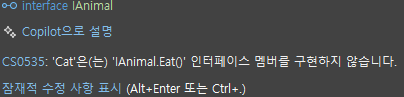
- 인터페이스와 추상 클래스 비교
| 구분 | 인터페이스 (interface) | 추상 클래스 (abstract class) |
|---|---|---|
| 정의 | 구현되지 않은 메서드 시그니처만 선언 C# 8.0+: default 구현 메서드 가능 | 일부 구현(메서드)과 추상 메서드를 함께 가질 수 있는 클래스 |
| 상속/구현 | 다중 구현 가능 (다중 상속) | 단일 상속만 가능 |
| 멤버 | 메서드 시그니처, 속성, 이벤트 선언만 가능 (필드, 생성자 없음) | 필드, 생성자, 속성, 일반 메서드 및 추상 메서드 모두 선언 가능 |
| 생성자 | 정의할 수 없음 | 정의할 수 있음 |
| 접근 지정자 | 모든 멤버가 암시적으로 public | 멤버별로 public, protected, private 등 접근 지정자 설정 가능 |
| 용도 | 클래스 간 계약(Contract) 정의 및 구현 강제 | 공통 기능 제공 + 구현 강제 병행 (코드 재사용과 기본 로직 제공) |
| 사용 시기 | 완전 추상화만 필요하고 상태 관리가 불필요할 때 | 공통 상태(필드)나 기본 구현이 필요할 때 |
열거형 (Enums)
- 관련된 상수 값들을 한 그룹으로 묶어, 코드 가독성과 안전성을 높여주는 사용자 정의 값 타입이다.
- 사용 이유
- Enum 미사용 시
숫자나 문자열 상수를 직접 사용하게 되어, 무슨 값인지 명확한 파악이 어렵다.
잘못된 값을 대입해도 컴파일 오류가 발생하지 않는다.
- Enum 미사용 시
public class Player
{
    public int state;  // 0: Idle, 1: Running, 2: Jumping

    public void Update()
    {
        if (state == 0)
            Console.WriteLine("대기 상태");
        else if (state == 1)
            Console.WriteLine("달리는 중");
        else if (state == 2)
            Console.WriteLine("점프 중");
        else
            Console.WriteLine("알 수 없는 상태");  // 잘못된 state 값도 들어올 수 있음
    }
}

var p = new Player();
p.state = 3;  // 컴파일 오류 없음―런타임에 엉뚱한 동작이 발생할 수 있음
p.Update(); // "알 수 없는 상태" 출력- Enum 사용 시
명명된 값으로 상태를 표현하여 가독성이 높아진다.
컴파일러가 올바른 값 범위를 체크해주므로, 잘못된 값 할당을 막아준다.
// 1) Enum 선언
public enum PlayerState
{
    Idle = 0,
    Running = 1,
    Jumping = 2
}

public class Player
{
    // 2) 상태를 enum 타입으로 선언
    public PlayerState state;

    public void Update()
    {
        switch (state)
        {
            case PlayerState.Idle:
                Console.WriteLine("대기 상태");
                break;
            case PlayerState.Running:
                Console.WriteLine("달리는 중");
                break;
            case PlayerState.Jumping:
                Console.WriteLine("점프 중");
                break;
            default:
                // 컴파일러가 범위를 체크하므로, 이 블록은 거의 불필요
                Console.WriteLine("알 수 없는 상태");
                break;
        }
    }
}

var p = new Player();
p.state = PlayerState.Running;  // 명확하고 안전
// p.state = (PlayerState)5;    // 컴파일 경고/오류 혹은 명시적 캐스트 필요
p.Update(); // "달리는 중" 출력- Enum을 사용하여 상태나 카테고리처럼 한정된 값 집합을 명확하고 안전하게 다룰 수 있다.
- 코드의 가독성,안정성,유지보수성을 크게 향상시킬 수 있다.
예외 처리
- 예외란?
- 프로그램 실행 중 발생하는 예기치 않은 오류 상황
- 정상 흐름을 방해하고 프로그램을 중단시킬 수 있다.
- 예외 처리를 하는 이유
- 오류가 나도 프로그램을 강제 종료하지 않고 적절히 처리하여 안정성을 높임
- 디버깅 시 어떤 문제가 생겼는지 정보를 얻기 편함
- 기본 구조
try
{
    // 문제가 발생할 수 있는 코드
}
catch (SpecificException ex)
{
    // 해당 예외 처리
}
catch (Exception ex)
{
    // 그 외 모든 예외 처리
}
finally
{
    // 예외 발생 여부 관계없이 무조건 실행
}- catch 블록 우선순위
- 위에서부터 내려오며, 타입이 맞으면 그 자리에서 처리 후 나머지 건너뜀
- 상위(부모) 예외 타입보다 구체적(자식) 타입을 먼저 배치해야 함
- 다중 catch
- 서로 다른 예외별로 분기 처리 가능
- 각 catch에 맞는 로직을 작성
- 예외 객체 활용
ex.Message,ex.StackTrace등으로 상세 정보 확인
finally 블록
- 역할: 리소스 해제, 로그 기록 등 반드시 실행해야 할 마무리 작업
- 실행 시점
- 예외 발생:catch 처리 후
- 예외 미발생:try 블록 종료 후
- 생략 가능하지만, 꼭 정리 작업이 필요할 때는 항상 추가
예외 처리 예시
//0으로 나누기
try
{
    int r = 10 / 0;
}
catch (DivideByZeroException)
{
    Console.WriteLine("0으로 나눌 수 없습니다.");
}
catch (Exception ex)
{
    Console.WriteLine("다른 예외: " + ex.Message);
}
finally
{
    Console.WriteLine("정리 작업 실행");
}
회고 및 느낀점
- 오늘은 상점 기능을 비롯한 TRPG의 필수 기능과 추가 기능까지 꽤 막히지 않고 부드럽게 잘 구현해나갔다.
- 특히 이전에 배운 것들을 자연스럽게 사용할 수 있었다는 점이 만족스럽다. 기본적인 클래스의 구조를 잘 알지 못하고 사용했던 적이 많은데, 메서드들을 잘 생성하고 적절하게 호출하는 법을 좀 알아가는 것 같다.
- 전체적인 구조를 짜는 데에 조금 익숙해졌으니 이제 구체적인 문법과 키워드들을 배워서 그 구조를 조금 더 단순하고 명확하게 만드는 데에 집중해야겠다.
- 다른 조원들은 이미 많이 진행하고 있는 걸 보니 자극을 받아, 오늘은 출석을 1시간 정도 일찍 했는데 생각보다 집중이 잘 유지되었다. 이제 막 공부를 시작한 만큼, 매일 조금씩 일찍 출석하는 것도 좋은 방법인 듯 하다.
- 반면, 프로젝트에 몰두하느라 C# 강의 남은 부분을 소홀히 했다. 내일은 프로젝트 제출 전까지 Json 저장/불러오기 기능까지 마무리하고, 남은 강의들을 마무리 해볼 계획이다.
- 그리고 최근에 배우는 C# 강의 내용들을 프로젝트에 적용하는 것이 아직 힘든데, 프로젝트가 끝나고 개인적으로 복습해보며 필요한 곳에 적절하게 사용할 수 있도록 준비해야겠다.