[C# 유니티] 커맨드 패턴 (Command pattern)
커맨드 패턴이란??
- 실행될 기능을 캡슐화를 함으로 주어진 여러 기능들을 실행할 수 있는 재사용성을 높게 하는 클래스를 설계 하나는 패턴이다!
- 실행될 기능을 캡슐화를 함으로써 기능의 실행을 요구하는 호출자 클래스와 실제 기능을 실행하는 수신자 클래스의 의존성을 제거한다.
- 이벤트가 발생 했을때 이벤트를 발생 시키는 클래스를 변경 하지 않고 재사용성이 유용하다.
😀 버튼을 이용한 램프와 알람을 관리하는 커맨드 패턴
- 먼저 인터페이스를 정의 한다.
using UnityEngine;

public interface ICommand
{
    public abstract void execute();
}
- Button 클래스를 만들어 생성자에서 버튼을 눌렀을 때 필요한 기능을 인자로 받고,
버튼이 눌리면 주어진 Command의 execute 메서드를 호출하는 코드를 만든다.
public class Button
{
    private ICommand theCommand;

    public Button(ICommand theCommand)
    {
         this.theCommand = theCommand;
    }

    public void pressed()
    {
        theCommand.execute();
    }
}
- lamp를 켜는 클래스와 , Alarm을 울리는 클래스를 만들어준다.
public class Lamp
{
    public void turnOn()
    {
        Debug.Log("램프 켜짐");
    }
}

/* 램프를 켜는 LampOnCommand 클래스 */
public class LampOnCommand : ICommand
{
    private Lamp theLamp;
    public LampOnCommand(Lamp theLamp)
    {
        this.theLamp = theLamp;
    }
// Command 인터페이스의 execute 메서드
    public void execute()
    {
        theLamp.turnOn();
    }
}


public class Alarm
{
    public void start() { Debug.Log("알람 울림"); }
}

/* 알람을 울리는 AlarmStartCommand 클래스 */
public class AlarmStartCommand : ICommand
{
    private Alarm theAlarm;
    public AlarmStartCommand(Alarm theAlarm)
    {
        this.theAlarm = theAlarm;
    }
    // Command 인터페이스의 execute 메서드
    public void execute()
    {
        theAlarm.start();
    }
}
public class CommandPattern : MonoBehaviour
{
private void Update()
{
ICommand lampOnCommand = new LampOnCommand(new Lamp());
ICommand alarmStartCommand = new AlarmStartCommand(new Alarm());
Button button = new Button(lampOnCommand); // 램프 켜는 Command 설정
if (Input.GetKeyDown(KeyCode.L))
{
button = new Button(lampOnCommand); // 램프 켜는 Command 설정
button.pressed(); // 램프 켜는 기능 수행
}
if (Input.GetKeyDown(KeyCode.A))
{
button = new Button(alarmStartCommand);
button.pressed(); // 알람 울리는 기능 수행
}
}
}
- L 버튼을 입력시 버튼의 lamp를 넣고 틀고, A 버튼을 입력시 버튼의 알람이 들어가 알람을 울리는 기능을 수행한다.
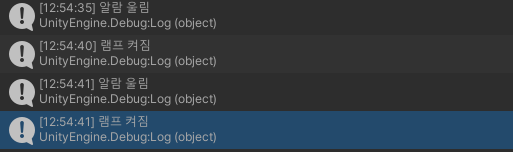
- Button 클래스의 pressed 메서드에서 구체적인 기능을 직접구현하는 대신 버튼을 눌렀을 때 실행될 기능을 Button 클래스 외부에서 제공받아 캡슐화해 pressed 메서드에서 호출한다.
- 전략 패턴과 비슷하지만 다른점은
커맨드 패턴 - '무엇'을 하는가? EX) 불켜지는 기능/ 알람 울리는 기능
전략 패턴 - '어떻게' 하는가 EX) 친절한 수업스타일로 / 엄격한 수업스타일로

노력하자 즐겁게 개발할수 있는 환경을 위해