System level: below standard level
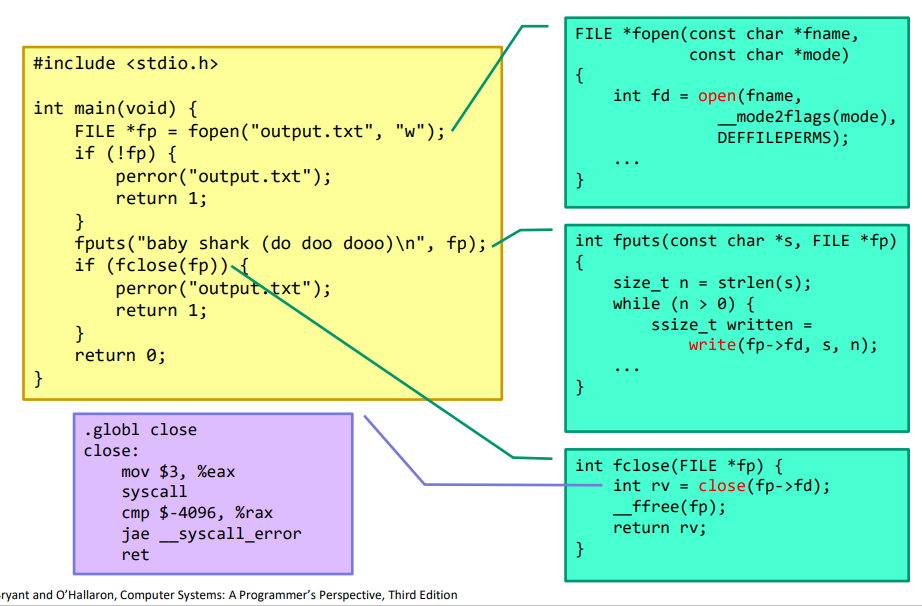
Why do we have two sets?
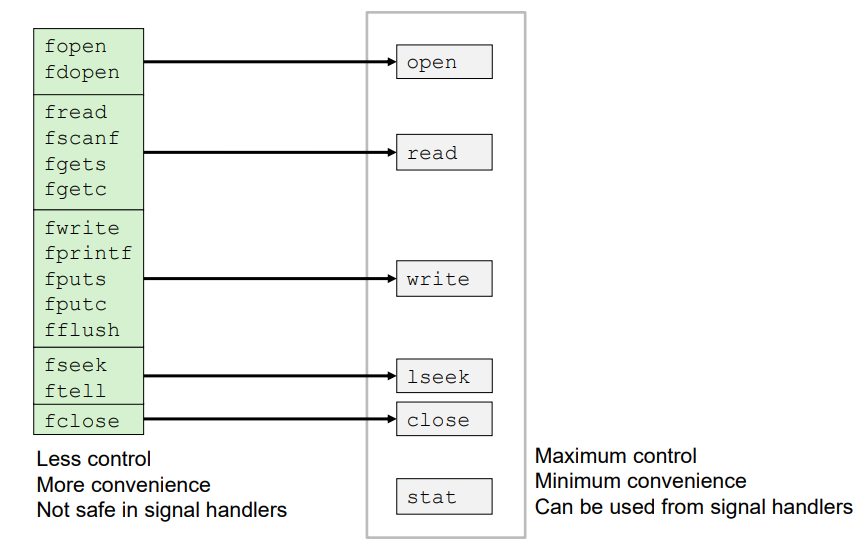
fopen도 open이라는 시스템콜로 redirect된다.
fopen은 c library에서 제공하는 api 함수이고 open은 unix 계열의 로우 레벨 시스템콜로 구현된다.
이런 시스템콜은 함수를 호출하는 것처럼 부를 수 있다. 커널과 직접적으로 맞닿아있는 함수라고 보면 된다.
커널에게 어떤 인자를 가지고 시스템콜을 발생시킬지를 더 세밀하게 control할 수 있다. 그런 의미에서 maximum control. 그러나 복잡한 매뉴얼을 따라야 한다.
Unix I/O Overview
A Linux file is a sequence of bytes.
All I/O devices are represented as files
- /dev/sda2 (disk partition)
- /dev/tty2 (terminal)
Mapping of devices to files allows kernel to export simple interface called Unix I/O
Unix의 중요한 철학은 많은 것을 파일로 환원하는 것이다.
일반적인 파일 (regular file)의 경우 파일을 open하고 파일에 쓰고 파일 포인터를 닫는 작업을 한다.
Unix 운영체제의 입출력 장치 터미널도 일종의 파일로 모델링한다. 커널에서 /dev/tty라는 파일을 open하고 write 시스템콜을 호출해서 데이터를 쓴다. 진짜 하드디스크에 파일이 존재하는 게 아니라 마치 파일인 것처럼 다룬다. open, read, wrtie 함수를 사용해서 다루는 것처럼 인터페이스를 제공한다. 내부적으로는 갖가지 redirection을 동원해서 터미널을 represent하는 파일에 쓰는 것이다.
Kernel offers a set of basic operations for all files
- Opening and closing files
-open() and close() - Reading and writing a file
-read() and write() - Changing the current file position (seek)
-indicates next offset into file to read or write
-lseek()
File Types
Each file has a type indicating its role in the system
- Regular file: Contains arbitrary data
- Directory: Index for a related group of files
- Socket: For communication with a process on another machine
Regular Files
- A regular file contains arbitrary data
- Applications often distinguish between text files and binary files
-Text files are regular files with only ASCII or Unicode characters
-Binary files are everything else (object files, JPEG images) - End of line indicators in other systems
-Unix: Single byte 0xa (Line feed)
-Windows: Two bytes 0xd 0xa (carriage return followed by line feed)
Directories
- Directory consists of an array of entries (also called links)
-Each link maps a filename to a file - Each directory contains at least two entries
-. maps to the directory itself
-.. maps to the parent directory in the directory hierarchy
디렉토리는 여러 개의 파일을 담고 있는 공간. 내용물을 entry, link라고 한다. 하나하나가 파일을 나타낸다고 생각하면 된다. 파일이 디렉토리를 나타내는 것일 수도 있다. 그래야 디렉토리 안에 디렉토리를 넣는 구조를 지원할 수 있다.
Directory Hierarhy
All files are organized as a hierarchy anchored by root directory named / (slash)
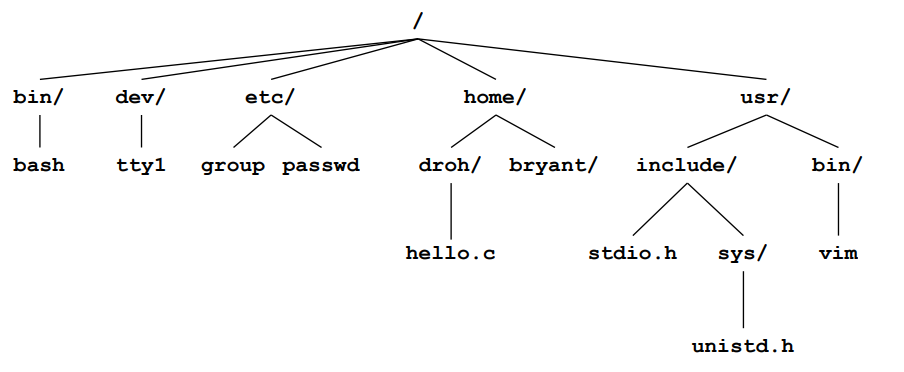
Kernel maintains current working directory for each process
- Modified using the cd command
Pathnames
Locations of files in the hierarchy denoted by pathnames
- Absolute pathname starts with '/' and denotes path from root
- /home/droh/hello.c - Relative pathname denotes path from current working directory
- ../homedroh/hello.c (cwd: /home/bryant)
Opening files
Opening a file informs the kernel that you are getting ready to access that file
int fd; /*file descriptor*/

if((fd = open("/etc/hosts", O_RDONLY)) < 0) {
	perror("open");
    exit(1);
}
Returns a small identifying integer file descriptor
- fd == -1 indicates that an error occured
Each process created by a Linux shell begins life with three open files associated with a terminal: - STDIN_FILENO = 0: standard input (stdin)
- STDOUT_FILENO = 1: standard output (stdout)
- STDERR_FILENO = 2: standard error (stderr)
Closing Files
Closing a file informs the kernel that you are finished accesing that file
if (close(fd) < 0) {
	perror("close");
    exit(1);
}
Closing an already closed file can cause a bug
- Similar to calling free() twice on the same pointer
Also, you should always check return codes, even for seemingly benign functions like close() - Not exactly fail, but OS cna take this as an opportunity to report a delayed error from a previous write operation
- You may silently lose data if you don't check!
Reading Files
Reading a file copies bytes from the current file position to memory, and then updates file position
char buf[512];
int fd;
int nbytes;	/* number of bytes read */

/* Open file fd... */
/* Then read up to 512 bytes from file fd */
if ((nbytes = read(fd, buf, sizeof(buf))) < 0) {
	perror("read");
    exit(1);
}
Returns the number of bytes read from file fd into buf
- Return type ssize_t is signed integer
- nbytes < 0 indicates that an error occurred
- Short counts nbytes < sizeof(buf) are possible (not errors)
Writing Files
Writing a file copies bytes from memory to the current file position, and then updates current file position
char buf[512];
int fd;
int nbytes;	/* number of bytes read */

/* Open file fd... */
/* Then write up to 512 bytes from file fd */
if ((nbytes = write(fd, buf, sizeof(buf))) < 0) {
	perror("read");
    exit(1);
}
Returns number of bytes written from buf to file fd
- nbytes < 0 indicates that an error occurred
- As with reads, short counts are possible and are not errors!
On Short Counts
Short counts can occur in these situations:
- Encountering end-of-file (EOF) on reads
- Reading and writing network sockets
Short counts never occur in these situations:
- Reading from disk files (except for EOF)
- Writing to disk files
How the Unix Kernel Represents Open Files
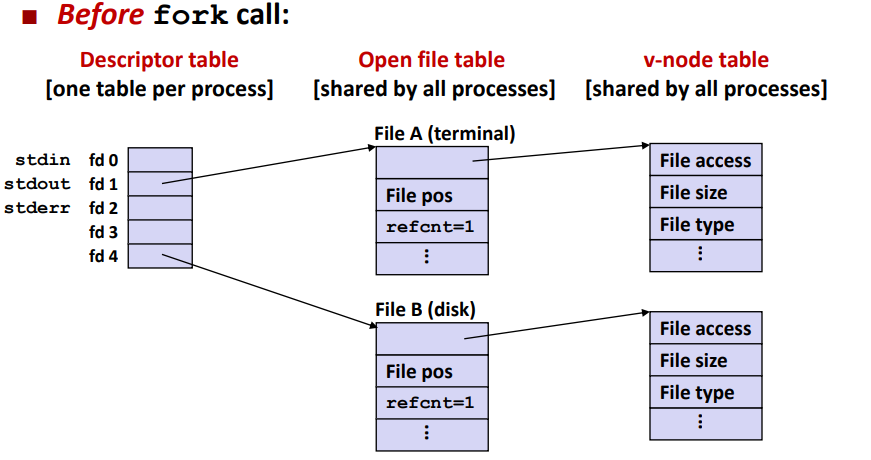
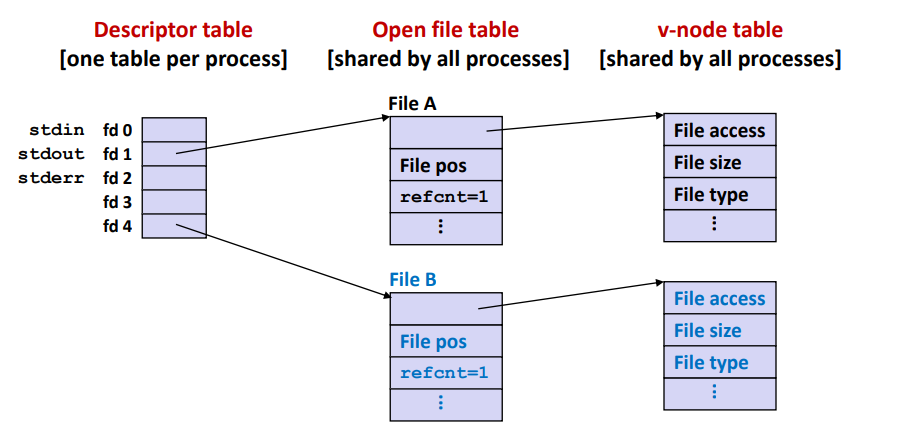
Two descriptors referencing two distinct open files:
Descriptor 1 (stdout) points to terminal and descriptor 4 points to open disk file (regular file on hard disk)
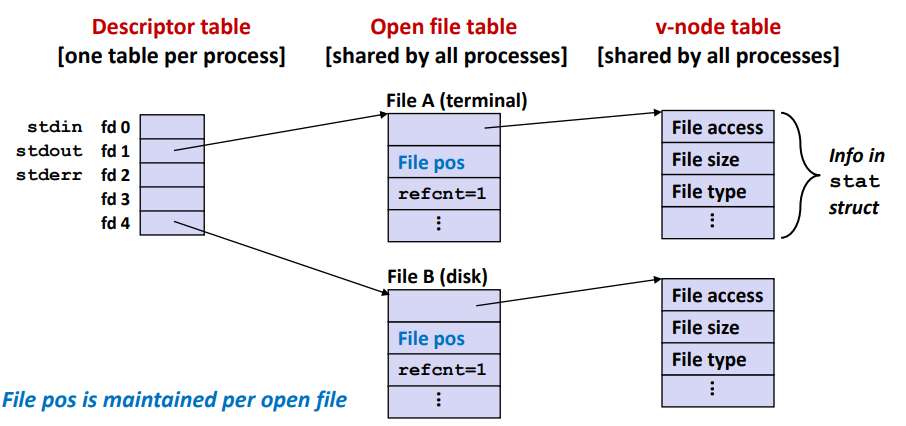
file을 open한다는 건 fd를 return한다는 것이다. fd의 값이 열려있는 파일을 나타낸다.
어떤 프로그램이 실행되면 각각의 fd를 갖고 있다. File B는 regular file이다. 파일의 크기, 종류, 엑세스 모드 등 파일에 대한 정보들이 v-node table에 정리되어 있다. Open file table에는 current file position이 들어간다. 읽거나 쓴 값이 업데이트된다. v-node table은 파일이 열려있는 동안 유지되다가 닫을 때 업데이트된다.
File Sharing
Two distinct descriptors sharing the same disk file through two distinct open file table entries
- E.g., Calling open twice with the same filename argument
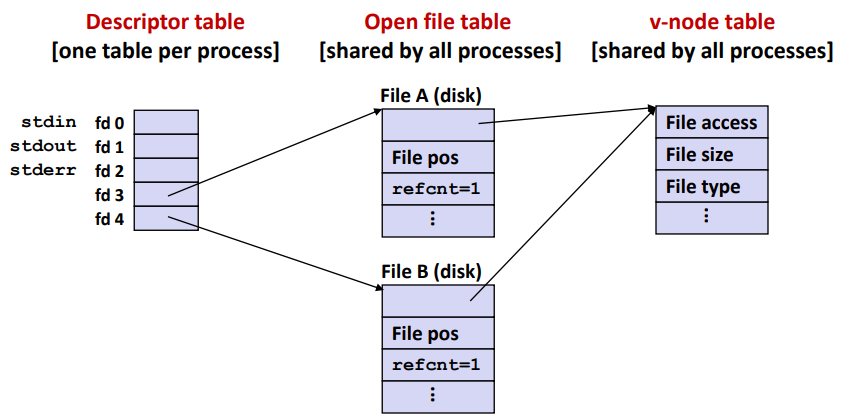
descriptor table은 각 프로세스마다 가지고 있고 open file table은 글로벌하게 관리되고 있다. 여러 개의 프로세스가 있어도 open file table, v-node table은 하나만 있고 커널이 업데이트하며 관리한다.
How Processes Share Files: fork
A child process inherits its parent's open files
- Note: situation unchanged by exec function
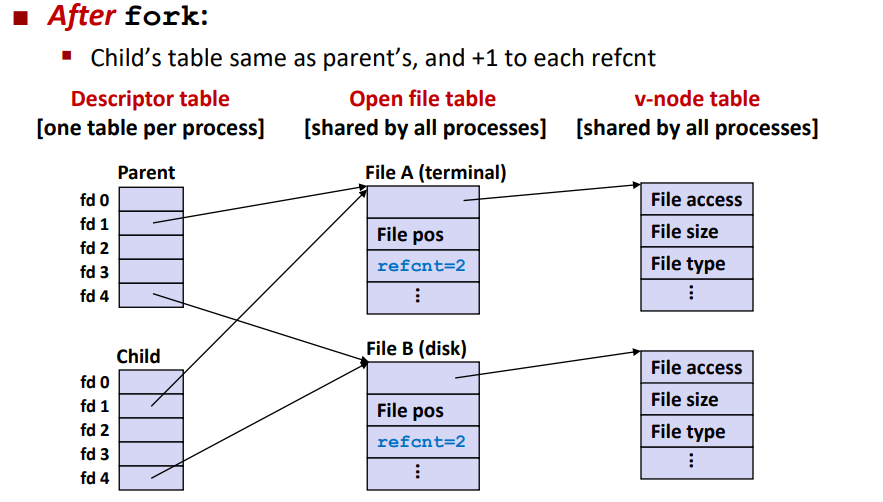
reference count는 현재 이 파일을 열고 있는 프로세스의 개수를 나타낸다. refcnt가 0이면 이 파일을 열고 있는 프로세스가 아무것도 없다는 뜻. 그럼 open file table에서 이 파일을 지울 수 있다. refcnt가 1 이상이라면 open file table에 유지하고 있어야 한다.
I/O Redirection
How does a shell implement I/O redirection?
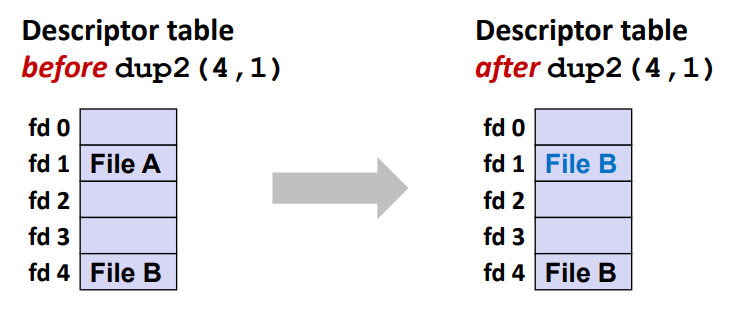
By calling the dup2(oldfd, newfd) function
- Update(per-process) descriptor table by copying entry oldfd to entry newfd
I/O Redirection Example
Step #1: open file to which stdout should be redirected
- Happens in the child process code, before calling exec
Stem #2: call dup2(4, 1) - cause fd=1 (stdout) to refer to disk file pointed at by fd=4
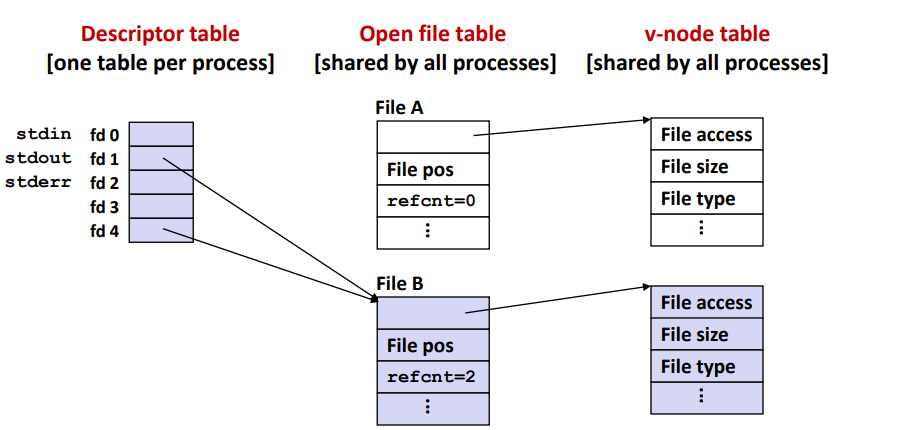
- 파일로 모델링하는 것의 장점
터미널로 출력하는 간단한 프로그램이 있다고 하자. 터미널을 나타내는 fd를 사용해서 write 시스템콜을 내부적으로 사용하고 있을 것이다.
fd를 알맞게 redirection하기만 해도 하던 일을 그대로 하면서 다른 파일 혹은 네트워크를 통해 다른 컴퓨터에 출력할 수 있다.
Standard I/O Functions
The C standard library(libc.so) contains a collection of higher-level standard I/O functions
Examples of standard I/O functions:
- Opening and closing files (fopen and fclose)
- Reading and writing bytes (fread and fwrite)
- Reading and writing text lines (fgets and fputs)
- Formatted reading and writing (fscanf and fprintf)
Standard I/O Streams
Standard I/O models open files as streams
- Abstraction for a file descriptor and a buffer in memory
C programs begin life with three open streams (defined in stdio.h)
- stdin
- stdout
- stderr
Buffered I/O: Motivation
Applications often read/write one character at a time
- getc, putc, ungetc
- gets, fgets
- Read line of text one character at a time, stopping at newline
Implementing as Unix I/O calls expensive
- read and write require Unix kernel calls
- >10,000 clock cycles
Solution: Buffered read - Use Unix read to grab block of bytes
- User input functions take one byte at a time from buffer
- Refill buffer when empty

Buffering in Standard I/O
Standard I/O functions uses buffered I/O
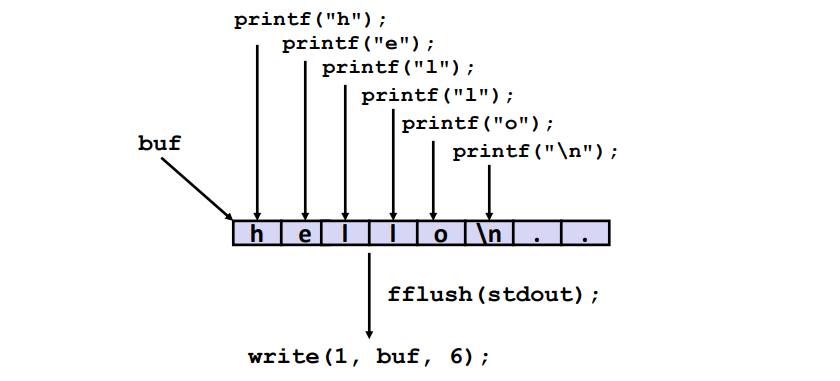
Buffer flushed to output fd on "\n", or call to fflush or exit, or return from main
read, write 시스템콜 횟수를 최대한 줄이는 것이 좋다.
read 함수를 호출하여 최대한 많은 양을 버퍼에 읽어오고 나서 standard i/o가 호출되면 필요한 만큼만 읽어온다.
버퍼에 일단 저장해두고 특정한 순간이 되면 flush한다.
Pros and Cons of Unix I/O
Pros
- Unix I/O is the most general and lowest overhead form of I/O
- All other I/O packages are implemented using Unix I/O functions - Unix I/O functions are async-signal-safe and can be used safely in signal handlers
Cons
- Dealing with short counts is tricky and error prone
- Efficient reading of text lines requires some form of buffering, which is also tricky and error prone
Pros and Cons of Standard I/O
Pros
- Buffering increases efficiently by decreasing the number of read and write system calls
Cons
- Standard I/O functions are not async-signal-safe, and not appropriate for signal handlers
- Standard I/O is not appropriate for input and output on network sockets