중재자 패턴
객체 간의 직접 통신을 제한하고 중재자 객체를 통해서만 협력하도록 하는 패턴
구조
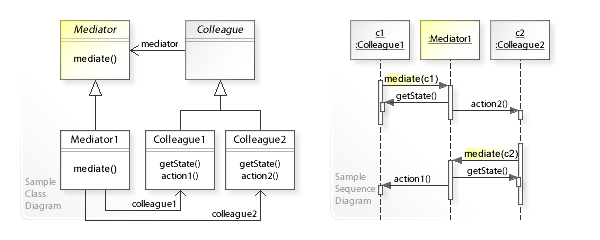
- 컴포넌트: 비즈니스 로직을 포함한 다양한 클래스들. 각 컴포넌트는 중재자에 대한 참조가 있고 컴포넌트는 중재자의 실제 클래스를 알지 못한다.
- 중재자: 일반적으로 단일 알림 메서드만을 포함하는 컴포넌트들과의 통신 메서드들을 선언한다.
- 구상 중재자: 자신이 관리하는 모든 컴포넌트에 대한 참조를 유지하고 때로는 수명 주기를 관리한다.
- 컴포넌트들은 다른 컴포넌트를 서로 인식하지 않아야 한다.
예시 코드
// MediatorPatternDemo.java

// 미디에이터 인터페이스
interface Mediator {
    void notify(Component sender, String event);
}

// 모든 컴포넌트의 기본 클래스
abstract class Component {
    protected Mediator mediator;

    public Component(Mediator mediator) {
        this.mediator = mediator;
    }

    public void click() {
        mediator.notify(this, "click");
    }

    public void keypress() {
        mediator.notify(this, "keypress");
    }
}

// Button 컴포넌트
class Button extends Component {
    private String name;

    public Button(Mediator mediator, String name) {
        super(mediator);
        this.name = name;
    }

    public String getName() {
        return name;
    }
}

// Textbox 컴포넌트
class Textbox extends Component {
    private String name;
    private String text;

    public Textbox(Mediator mediator, String name) {
        super(mediator);
        this.name = name;
        this.text = "";
    }

    public String getName() {
        return name;
    }

    public String getText() {
        return text;
    }

    public void setText(String text) {
        this.text = text;
    }
}

// Checkbox 컴포넌트
class Checkbox extends Component {
    private String name;
    private boolean checked;

    public Checkbox(Mediator mediator, String name) {
        super(mediator);
        this.name = name;
        this.checked = false;
    }

    public String getName() {
        return name;
    }

    public boolean isChecked() {
        return checked;
    }

    // 상태 변경 시 미디에이터에게 알립니다.
    public void setChecked(boolean checked) {
        this.checked = checked;
        mediator.notify(this, "check");
    }

    // 토글 방식도 구현할 수 있습니다.
    public void toggle() {
        this.checked = !this.checked;
        mediator.notify(this, "check");
    }
}

// 구상 미디에이터 클래스: AuthenticationDialog
class AuthenticationDialog implements Mediator {
    private String title;

    // 컴포넌트들
    private Checkbox loginOrRegisterChkBx;
    private Textbox loginUsername, loginPassword;
    private Textbox registrationUsername, registrationPassword, registrationEmail;
    private Button okBtn, cancelBtn;

    public AuthenticationDialog() {
        // 모든 컴포넌트들을 생성할 때, 현재 미디에이터(this)를 전달합니다.
        loginOrRegisterChkBx = new Checkbox(this, "Login/Register Checkbox");
        loginUsername = new Textbox(this, "Login Username");
        loginPassword = new Textbox(this, "Login Password");
        registrationUsername = new Textbox(this, "Registration Username");
        registrationPassword = new Textbox(this, "Registration Password");
        registrationEmail = new Textbox(this, "Registration Email");
        okBtn = new Button(this, "OK Button");
        cancelBtn = new Button(this, "Cancel Button");

        // 초기 모드를 로그인 모드로 설정 (체크박스 true: 로그인, false: 등록)
        loginOrRegisterChkBx.setChecked(true);
    }

    // 컴포넌트에서 이벤트가 발생하면 notify 메서드를 호출합니다.
    @Override
    public void notify(Component sender, String event) {
        if (sender == loginOrRegisterChkBx && event.equals("check")) {
            if (loginOrRegisterChkBx.isChecked()) {
                title = "Log in";
                System.out.println("Mediator: Switching to Login mode.");
                showLoginComponents();
                hideRegistrationComponents();
            } else {
                title = "Register";
                System.out.println("Mediator: Switching to Registration mode.");
                showRegistrationComponents();
                hideLoginComponents();
            }
        }

        if (sender == okBtn && event.equals("click")) {
            if (loginOrRegisterChkBx.isChecked()) {
                System.out.println("Mediator: OK button clicked in Login mode.");
                System.out.println("Attempting to log in with credentials:");
                System.out.println("Username: " + loginUsername.getText());
                System.out.println("Password: " + loginPassword.getText());
                // 예시로, username이 "user"이고 password가 "pass"일 경우 로그인 성공 처리
                if (loginUsername.getText().equals("user") && loginPassword.getText().equals("pass")) {
                    System.out.println("Login successful!");
                } else {
                    System.out.println("Login failed: Incorrect username or password.");
                }
            } else {
                System.out.println("Mediator: OK button clicked in Registration mode.");
                System.out.println("Attempting to register with details:");
                System.out.println("Username: " + registrationUsername.getText());
                System.out.println("Password: " + registrationPassword.getText());
                System.out.println("Email: " + registrationEmail.getText());
                // 등록 성공 후, 자동 로그인 등의 처리
                System.out.println("Registration successful! Logging in...");
            }
        }
    }

    // UI에서 로그인 관련 컴포넌트를 표시하는 메서드 (시뮬레이션)
    private void showLoginComponents() {
        System.out.println("Displaying login components.");
        // 실제 UI에서는 로그인 폼을 보이게 하는 로직을 추가합니다.
    }

    // UI에서 로그인 관련 컴포넌트를 숨기는 메서드 (시뮬레이션)
    private void hideLoginComponents() {
        System.out.println("Hiding login components.");
        // 실제 UI에서는 로그인 폼을 숨기는 로직을 추가합니다.
    }

    // UI에서 등록 관련 컴포넌트를 표시하는 메서드 (시뮬레이션)
    private void showRegistrationComponents() {
        System.out.println("Displaying registration components.");
        // 실제 UI에서는 등록 폼을 보이게 하는 로직을 추가합니다.
    }

    // UI에서 등록 관련 컴포넌트를 숨기는 메서드 (시뮬레이션)
    private void hideRegistrationComponents() {
        System.out.println("Hiding registration components.");
        // 실제 UI에서는 등록 폼을 숨기는 로직을 추가합니다.
    }

    // 테스트 및 시뮬레이션을 위한 각 컴포넌트에 대한 Getter들

    public Checkbox getLoginOrRegisterChkBx() {
        return loginOrRegisterChkBx;
    }

    public Textbox getLoginUsername() {
        return loginUsername;
    }

    public Textbox getLoginPassword() {
        return loginPassword;
    }

    public Textbox getRegistrationUsername() {
        return registrationUsername;
    }

    public Textbox getRegistrationPassword() {
        return registrationPassword;
    }

    public Textbox getRegistrationEmail() {
        return registrationEmail;
    }

    public Button getOkBtn() {
        return okBtn;
    }

    public Button getCancelBtn() {
        return cancelBtn;
    }
}

// 애플리케이션 실행 클래스
public class MediatorPatternDemo {
    public static void main(String[] args) {
        // AuthenticationDialog 미디에이터 생성
        AuthenticationDialog dialog = new AuthenticationDialog();

        // ----- 로그인 시나리오 -----
        System.out.println("=== Simulating Login Scenario ===");

        // 로그인 모드 선택: 체크박스가 true이면 로그인 모드입니다.
        dialog.getLoginOrRegisterChkBx().setChecked(true);  // notify() 호출됨

        // 로그인 정보를 입력 (예: 올바른 정보: user / pass)
        dialog.getLoginUsername().setText("user");
        dialog.getLoginPassword().setText("pass");

        // OK 버튼 클릭 (로그인 시도)
        dialog.getOkBtn().click();

        System.out.println();

        // ----- 등록 시나리오 -----
        System.out.println("=== Simulating Registration Scenario ===");

        // 등록 모드 선택: 체크박스 false이면 등록 모드입니다.
        dialog.getLoginOrRegisterChkBx().setChecked(false);  // notify() 호출됨

        // 등록 정보를 입력
        dialog.getRegistrationUsername().setText("newUser");
        dialog.getRegistrationPassword().setText("newPass");
        dialog.getRegistrationEmail().setText("newUser@example.com");

        // OK 버튼 클릭 (등록 시도)
        dialog.getOkBtn().click();
    }
}- 독립적으로 만들었을 때 유지관리나 재사용이 쉬워지는 클래스들을 식별한다.
- 중재자 인터페이스를 선언하고 중재자와 컴포넌트 간의 원하는 통신 프로토콜을 설명한다.
- 구상 중재자 클래스를 구현한다. 모든 컴포넌트에 대한 참조를 중재자 내부에 저장하면 중재자의 메서드에서 어떤 컴포넌트라도 호출할 수 있다.
- 중재자가 컴포넌트 객체의 생성 및 파괴를 담당할 수도 있으며 이 경우 중재자는 팩토리 또는 퍼사드와 유사할 수 있다.
- 컴포넌트들은 중재자 객체에 대한 참조를 저장한다.
- 중재자의 알림 메서드를 호출하도록 클라이언트 코드를 변경한다.
장단점
장점
- 단일 책임 원칙: 다양한 컴포넌트 간의 통신을 한 곳으로 추출
- 개방/폐쇄 원칙: 실제 컴포넌트를 변경하지 않고 새로운 중재자를 도입 가능
- 프로그램의 다양한 컴포넌트 간의 결합도를 줄일 수 있음
- 개별 컴포넌트들을 더 쉽게 재사용 가능
단점
- 중재자는 전지전능한 객체로 발전할 수도 있음
