[유니티 C#] 문자열 - 1
📌 문자열 서식 string Text.Format()
- 문자열을 원하는 형태로 가공하는 문자열 서식 메소드
- 첫 번째 매게변수에 서식 항목의 개수와 각 문자열의 서식을 지정
- 두 번째 매게변수부터 문자열 정보 입력
- 즉, 첫 번째 매개변수인 서식 항목의 개수에 따라 병합 가능한 문자열 개수가 바뀐다
ex) string.Format("{0}{1}{2}{3}, .."); 과 같을 경우 4개의 문자열을 매개변수에 등록해야 하기 때문에 서식 항목을 포함해 5개의 매개변수 사용
string str = string.Format("{0}{1}","Hello,","World");
// {0}{1}로 두개의 서식 항목을 사용하기 때문에
// "Hello,"와 "World" 두 개의 문자열을 매개변수에 작성
string str = string.Format("{0}{1}{2}",1,":",30);
{0}{1}{2}로 세개의 서식 항목을 사용하기 때문에
1과 ":", 30 세 개의 문자열(정수/실수 가능)을 매개변수에 작성✏️ 서식 항목에 입력되는 정보
- 맞춤(왼쪽, 오른쪽)
- 왼쪽 또는 오른쪽 맞춤으로 해당 문자열의 앞 또는 뒤에 공백을 추가


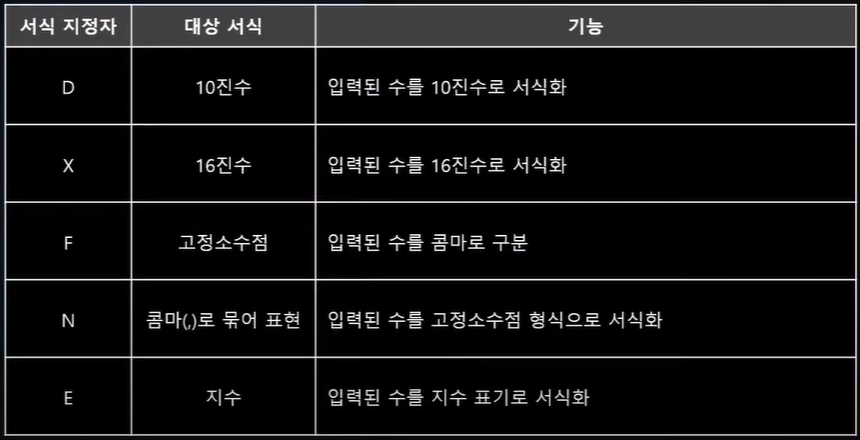
- 서식 문자열 설정 (숫자)
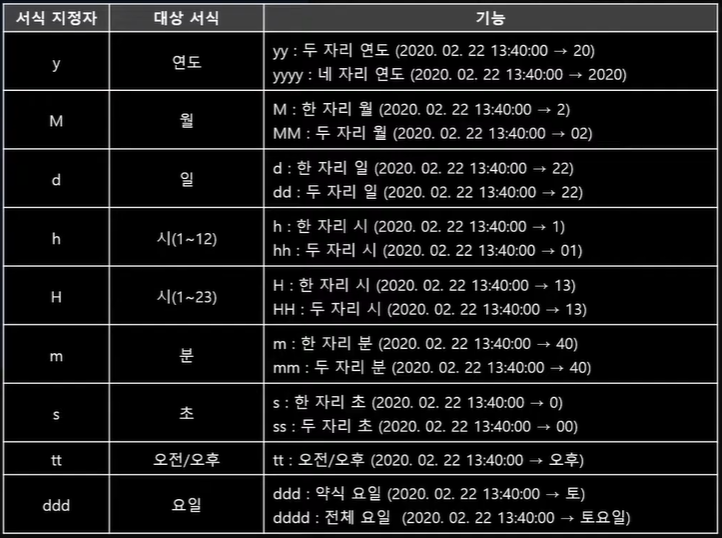
- 서식 문자열 설정 (날짜)
- 맞춤(왼쪽, 오른쪽)
✏️ 문자열 보간
- C# 6.0 이상에서 사용 가능한 기능
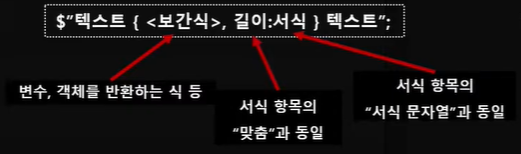
- string.Format()과 비슷하지만 서식 항목에 첨자 대신 식이 들어간다
- 식에 변수나 객체의 이름을 그대로 사용 가능
- 상수 입력 가능
- 조건에 따라 다른 값을 출력하는 코드 사용 가능
//string.Format()
using System.Collections;
using System.Collections.Generic;
using UnityEngine;

public class Test : MonoBehaviour
{
    int minutes = 1;
    int seconds = 30;

    private void Update()
    {
        Debug.Log(string.Format("{0}{1}{2}", minutes, " : ", seconds));
        Debug.Log(string.Format("{0, -10:D5}", minutes));
    }
}
// 문자열 보간
using System.Collections;
using System.Collections.Generic;
using UnityEngine;
public class Test : MonoBehaviour
{
int minutes = 1;
int seconds = 30;
private void Update()
{
Debug.Log($"{minutes}:{seconds}");
Debug.Log($"{minutes,-10:D5}");
}
}👆 두 코드 실행시 동일한 결과 값을 출력해낸다