[Unity C#] 조건문
📌 조건문 개요
- 조건문은 설정한 조건이 참(true) 또는 거짓(false)일 때 코드를 실행하거나 실행하지 않고 넘어가서 프로그램의 흐름을 여러 갈로 나누는 제어문이다.
- 조건문에는 if와 switch-case 가 있으며, if의 경우 if, else if, else로 나눌 수 있다
✏️ if
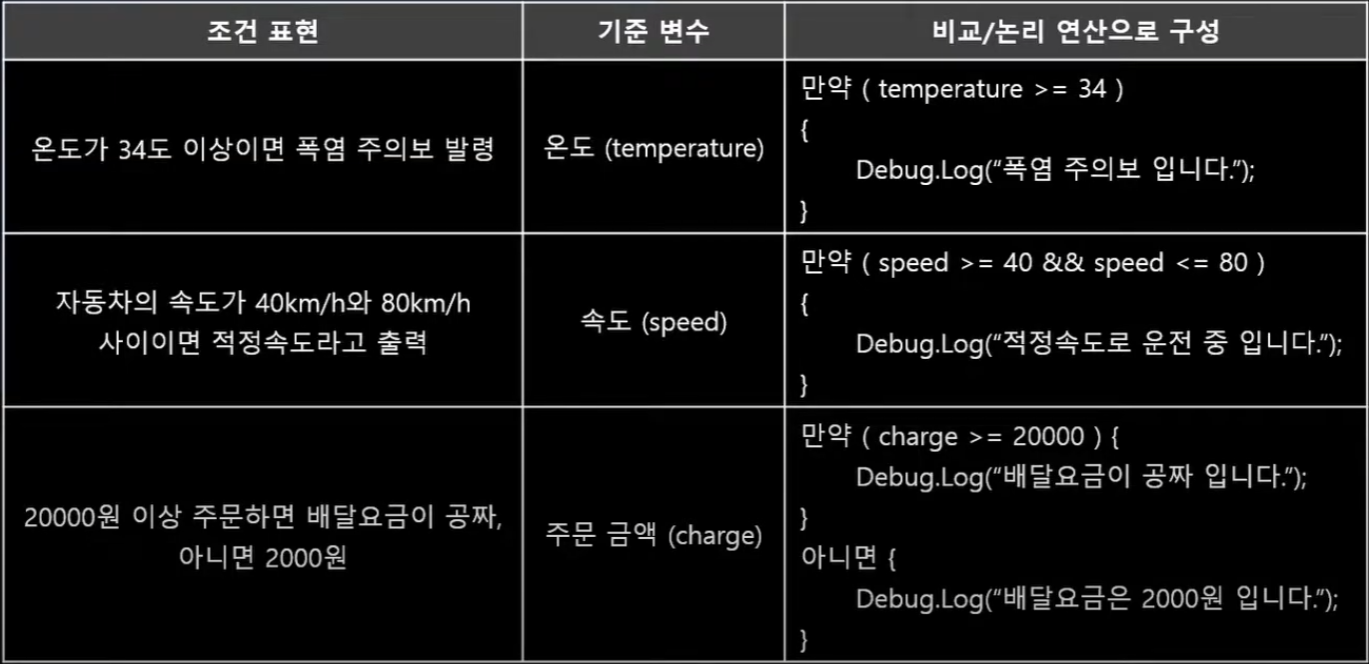
- if의 "조건"이 참(true)이면 if 조건식 뒤의 중괄호 내부를 실행하고, 거짓(false)이면 실행하지 않고 넘어간다
👇코드 예제
using System.Collections;
using System.Collections.Generic;
using UnityEngine;

public class Test : MonoBehaviour
{
    int age = 10;

    void Start()
    {
        if(age == 10)
        {
            Debug.Log("나이는 10 입니다");
        }
    }
}- 만약 중괄호를 표시하지 않았을 때는❓
👇코드 예제
using System.Collections;
using System.Collections.Generic;
using UnityEngine;

public class Test : MonoBehaviour
{
    int age = 10;

    void Start()
    {
        if(age == 20)
            Debug.Log("나이는 10 입니다");
            Debug.Log("안녕하세요");
        Debug.Log("날씨가 참 좋죠?");
    }
}
👇 실행 결과

-
if (조건) {내용...} 과 같이 실행 범위를 중괄호 "{" 로 묶지 않으면 그림과 같이 if 조건 뒤의 한문장만 if에 포함되는 것으로 간주한다
-
"안녕하세요 날씨가 참 좋죠?" 는 조건에 관계없이 실행된 모습
-
만약 조건 연산 식 뒤에 세미콜론(;) 을 붙였을 때는❓
👇코드 예제
using System.Collections;
using System.Collections.Generic;
using UnityEngine;

public class Test : MonoBehaviour
{
    int age = 10;

    void Start()
    {
        if (age == 20) ;
        {
            Debug.Log("나이는 20 입니다");
        }
    }
}
👇 실행 결과

- if (조건); 에서 문장이 끝난 것으로 간주한다
- 조건에 충족되지 않았음에도 "나이는 20입니다" 가 출력된 모습
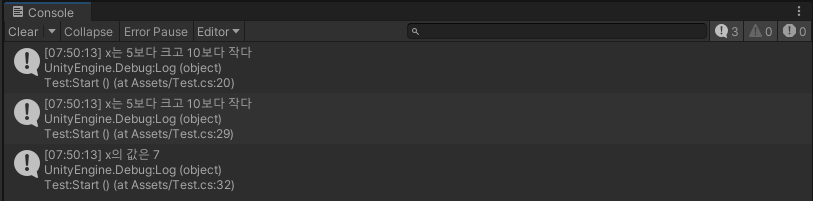
👇코드 예제
using System.Collections;
using System.Collections.Generic;
using UnityEngine;

public class Test : MonoBehaviour
{
    private int x = 7;

    void Start()
    {
        if (x % 2 == 0)
        {
            Debug.Log("x는 짝수다");
        }

        // 앞에서 배운 연산자를 이용해 조건문 내부에
        // 여러개의 조건식을 동시에 만족하도록 설정 가능
        if ( x > 5 && x < 10 )
        {
            Debug.Log("x는 5보다 크고 10보다 작다");
        }

        // 조건문 내부에 중첩해서 조건문 작성 가능
        // 위의 if 조건문과 같은 결과를 출력할 것이다
        if (x > 5)
        {
            if ( x < 10 )
            {
                Debug.Log("x는 5보다 크고 10보다 작다");
            }
        }
        Debug.Log($"x의 값은 {x}");
    }
}
👇 실행 결과
✏️ else
- if의 "조건"이 참(true)이면 if 중괄호 내부를 실행하고,
거짓(false)이면 else 중괄호 내부를 실행한다.
using System.Collections;
using System.Collections.Generic;
using UnityEngine;

public class Test : MonoBehaviour
{
    private int x = 7;

    void Start()
    {
        if (x % 2 == 0)
        {
            Debug.Log("x는 짝수다");
        }
        else
        {
            Debug.Log("x는 홀수다");
        }
    }
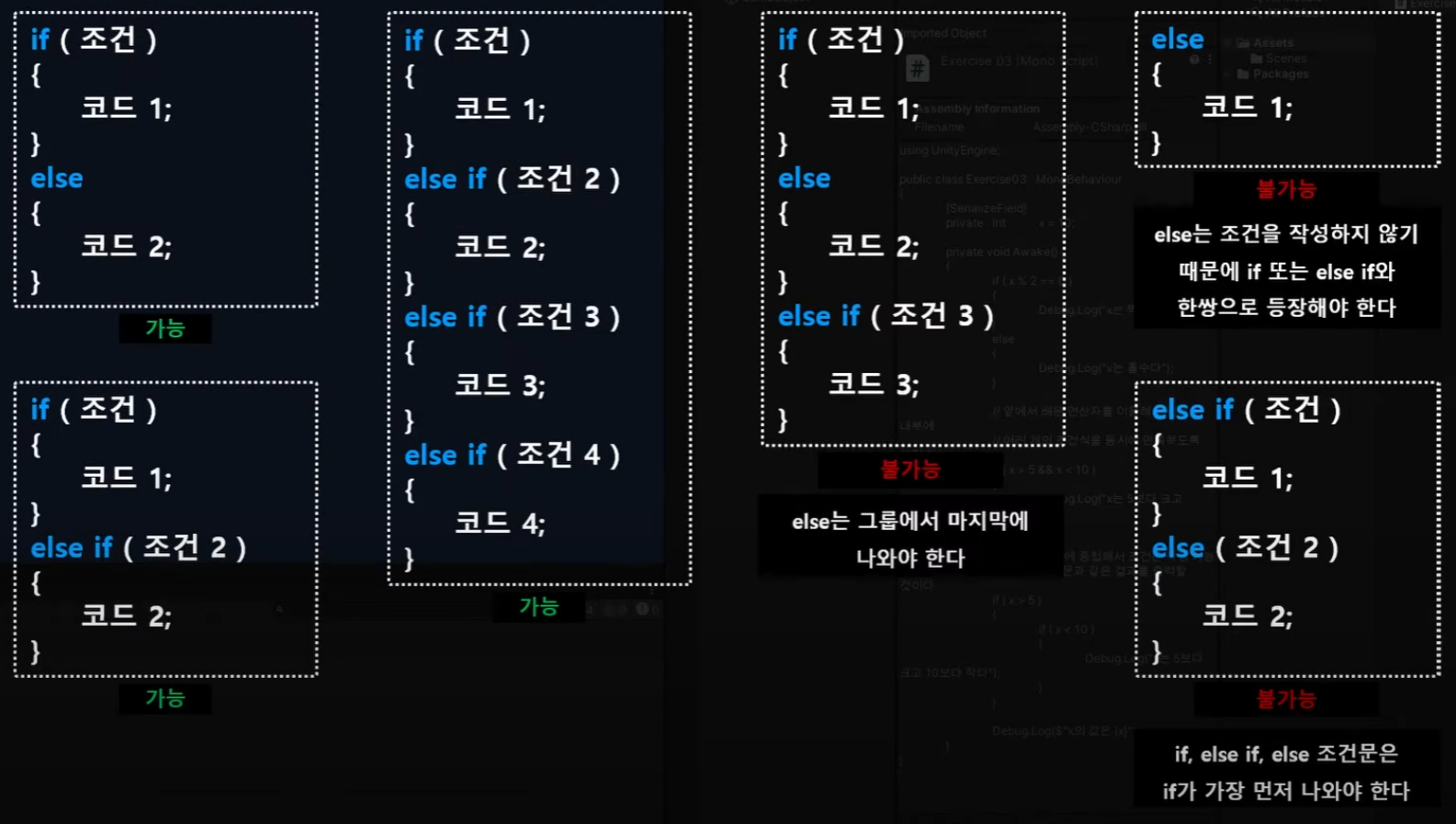
}- if - else 는 한 쌍으로 if 조건에 만족하지 않는 모든 경우가 else에 해당한다
- else는 위에 있는 조건을 만족하지 않는 모든 경우이기 때문에 반드시 마지막 조건으로 사용된다
- 한 그룹으로 묶을 수 있는 경우에는 if, if, if 이런식으로 조건을 나열하는것보다 if, else 를 사용해 가독성을 올려주는것이 더 좋다
✏️ else if
- if의 "조건"이 참(true)이면 if 내부를 실행하고, 거짓(false)이면 else if의 "조건 2"를 실행한다
- else if 의 "조건 2"가 참(true)이면 else if 내부를 실행하고, 거짓이면(false)이면 else를 실행한다
👇 조건문 문법 규칙
👇 코드 예제
using System.Collections;
using System.Collections.Generic;
using UnityEngine;

public class Test : MonoBehaviour
{
    public int x = 80;

    void Start()
    {
        if (x >= 90)
        {
            Debug.Log("학점 : A+");
        }
        else if ( x >= 80 )
        {
            Debug.Log("학점 : B+");
        }
        else if ( x >= 70 )
        {
            Debug.Log("학점 : C+");
        }
        else if ( x >= 60 )
        {
            Debug.Log("학점 : D");
        }
        else
        {
            Debug.Log("학점 : F");
        }
    }
}
👇 실행 결과

✏️ switch - case
- switch에 조건을 검사할 변수를 설정한다
- 조건에 해당하는 것이 case 뒤에 있는 값이다
- 위의 조건을 모두 만족하지 않을 때 제일 아래에 작성된 default가 실행된다 (if 조건문의 else와 같은 역할을 수행)
- switch - case에서 break는 중단의 역할을 하기 때문에 break가 없다면 다른 case의 조건도 이어서 실행하게 된다
👇 코드 예제
using System.Collections;
using System.Collections.Generic;
using UnityEngine;

public class Test : MonoBehaviour
{
    public int x = 80;

    void Start()
    {
        x /= 10;

        switch ( x )
        {
            case 10:
            case 9:
                Debug.Log("학점 : A+");
                break;
            case 8:
                Debug.Log("학점 : B+");
                break;
            case 7:
                Debug.Log("학점 : C+");
                break;
            case 6:
                Debug.Log("학점 : D");
                break;
            default:
                Debug.Log("학점 : F");
                break;
        }
    }
}
👇 실행 결과