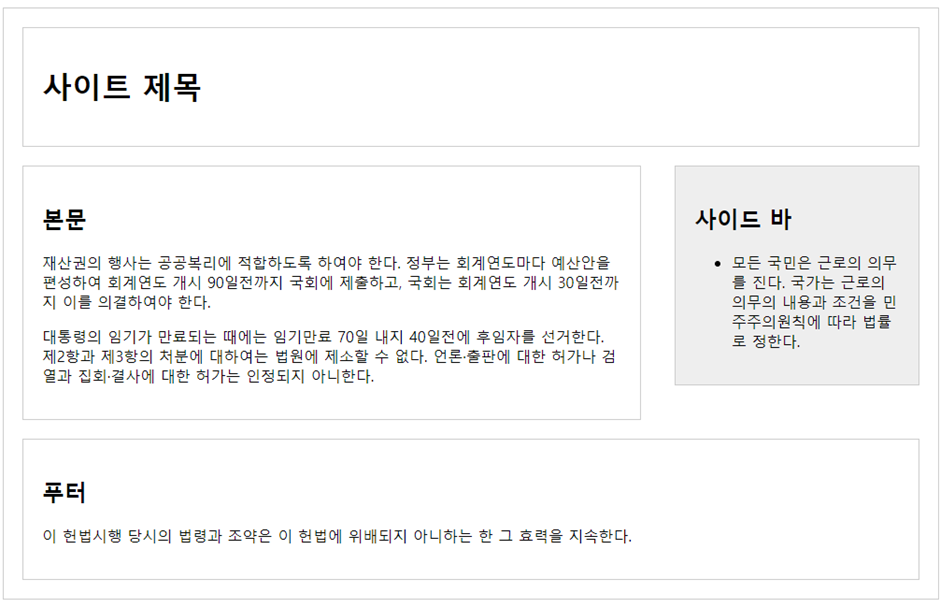
사이트 제목
본문
재산권의 행사는 공공복리에 적합하도록 하여야 한다. 정부는 회계연도마다 예산안을 편성하여 회계연도 개시 90일전까지 국회에 제출하고, 국회는 회계연도 개시 30일전까지 이를 의결하여야 한다
        대통령의 임기가 만료되는 때에는 임기만료 70일 내지 40일전에 후임자를 선거한다. 제2항과 제3항의 처분에 대하여는 법원에 제소할 수 없다. 언론·출판에 대한 허가나 검열과 집회·결사에 대한 허가는 인정되지 아니한다.
    </div>
</section>

<aside class="right-side">
     <h2>사이드바</h2>
     <ul>
         <li>모든 국민은 근로의 의무를 진다. 국가는 근로의 의무의 내용과 조건을 민주주의원칙에 따라 법률로 정한다.</li>
   </ul>
</aside>
<footer>
    <h2>푸터</h2>
    <div>이 헌법시행 당시의 법령과 조약은 이 헌법에 위배되지 아니하는 한 그 효력을 지속한다.</div>
</footer>
</div>2. display 종류와 속성에 대하여 설명하시오.
block, inline, inline-block 종류가 있습니다.
inline-block 경우에는 block속성은 아니고 width와 height속성을 가집니다.
3. 아래의 단위에 대하여 설명하시오.
- px: 픽셀이라 불리며 상대단위입니다.
- em: em은 폰트에 주로 쓰입니다.
- %:상대단위입니다.
4. inline-block 태그의 종류는?
select, button등이 있습니다.
5. opacity 속성 사용법은?
투명도를 조절합니다.
6. display:none; 과 visibility:hidden;의 차이는?
display:none 은 아예 사라지지만 visibility:hidden은 공간이 남습니다.
7. 패딩과 마진의 차이는?
패딩은 외부여백이고 마진은 내부여백입니다.
8. 아래를 구현하시오.
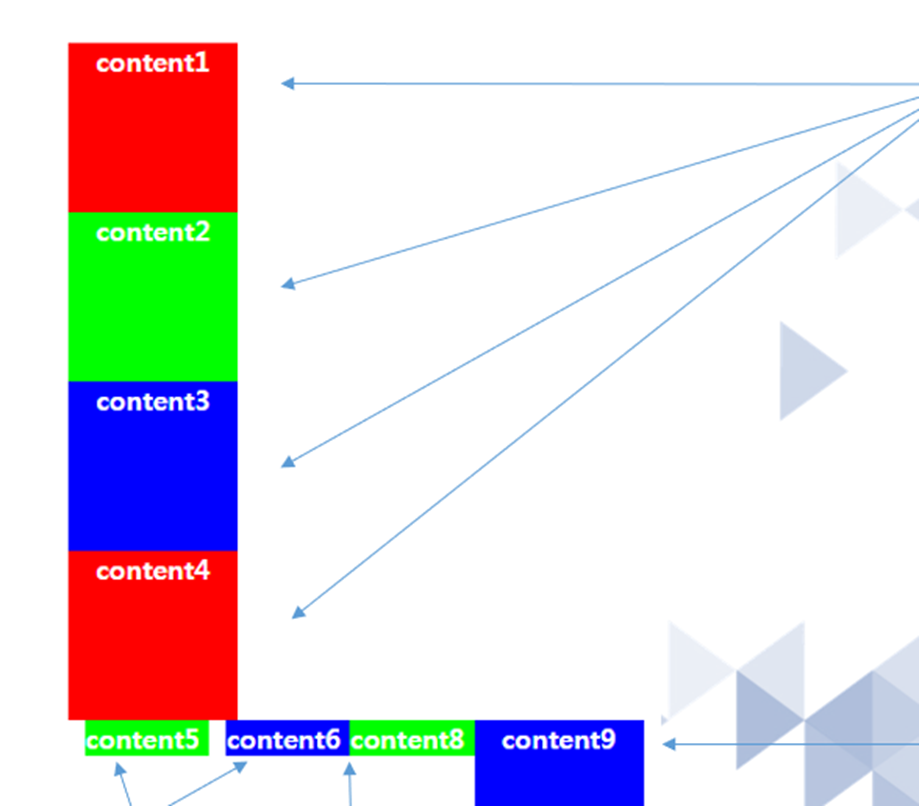
<!DOCTYPE html>
<html lang="en">
<head>
<meta charset="UTF-8">
<meta name="viewport" content="width=device-width, initial-scale=1.0">
<title>Document</title>
<style>
div:nth-child(1){
width: 100px;
height: 100px;
color: white;
background-color: red;
text-align: center;
font-weight: bold;
}
div:nth-child(2){
width: 100px;
height: 100px;
color: white;
background-color: #00ff00;
text-align: center;
font-weight: bold;
}
div:nth-child(3){
 width: 100px;
 height: 100px;
 color: white;
background-color: blue;
text-align: center;
 font-weight: bold;
}
div:nth-child(4){
width: 100px;
height: 100px;
color: white;
background-color: red;
 text-align: center;
font-weight: bold;
}
div:nth-child(5){
width: 100px;
height: 100px;
color: white;
background-color: #00ff00;
text-align: center;
font-weight: bold;
display: inline;
margin: 10px;
}
div:nth-child(6){
width: 100px;
height: 100px;
color: white;
background-color: blue;
text-align: center;
font-weight: bold;
display: inline;
}
div:nth-child(7){
 width: 100px;
 height: 100px;
 color: white;
 background-color: #00ff00;
 text-align: center;
 font-weight: bold;
display: none;
}
div:nth-child(8){
width: 100px;
height: 100px;
color: white;
background-color: #00ff00;
text-align: center;
font-weight: bold;
display: inline;
}
div:nth-child(9){
width: 100px;
height: 100px;
color: white;
background-color: blue;
text-align: center;
font-weight: bold;
display: inline-block;
}
9. 아래를 구현하시오.

<!DOCTYPE html>
  <html lang="en">
  <head>
  <meta charset="UTF-8">
  <meta name="viewport" content="width=device-width, initial-scale=1.0">
  <title>Document</title>
  <style>
  #wrap{
  width: 800px;
  height: 500px;
  margin: 0 auto;
  border: 1px solid #cccccc;
  }
  #content{ width: 80%;
  height: 100%;
  margin: 0 auto;
  color: white;
  font-weight: bold;
  background-image: url('https://search.pstatic.net/common/?src=http%3A%2F%2Fblogfiles.naver.net%2FMjAyMzAzMTNfMjQ5%2FMDAxNjc4Njg2OTA5MTE1.8bmeC_G86ELyoMjJxm4jgqum4YzsioxPCgXsSarPnFsg.QC-UzP_VXCtjuQsH_d2xhKr8BpGpQyaAAj6ep_uS_OUg.PNG.ksbc1251%2F001.png&type=sc960_832');
  font-size: 2em;
  text-align: center;
  }
  </style>
  </head>
  <body>
  <div id="wrap">
  <div id="content">해당 이미지는 저작권 보호를 받습니다.</div>
  </div>
  </body>
  </html>