
1 . 아래를 구현하시오.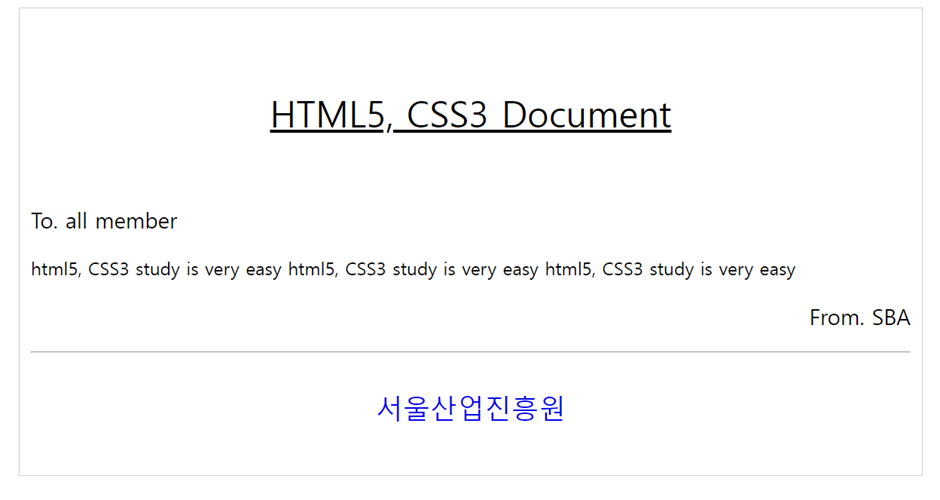
<!DOCTYPE html>
<html lang="en">
<head>
    <meta charset="UTF-8">
    <meta name="viewport" content="width=device-width, initial-scale=1.0">
    <title>Document</title>
    <style>
        #nav{
            width: 800px;
            border: 1px solid#dddddd;
            margin: 0 auto;

        }
         .text1{
            text-align: center;
            font-size: 2em;
            /* font-weight: bold; */
        }

        #footer{
            color: blue;
            text-align: center;
            height: 50px;
            line-height: 50px;
            font-size: 1.5em;
        }
         .text{
            padding: 10px 20px;

         }
          .text2{
            text-align: right;
            font-weight: bold;
            padding: 0 20px;
          }


     </style>
</head>
<body>
    <div id="nav">
        <p class="text1"><ins>HTML5</ins>,<ins> CSS3 Document</ins></p>
        <p class="text">To. all member</p>
        <p class="text">````````````</p>
        <p class="text2">From. SBA</p>
        <hr>
        <p id="footer">서울산업진흥원</p>
    </div>
</body>
</html>
2. 아래를 구현하시오.

<!DOCTYPE html>
<html lang="en">
<head>
    <meta charset="UTF-8">
    <meta name="viewport" content="width=device-width, initial-scale=1.0">
    <title>Document</title>
    <style>
        #nav{
            width: 800px;
            margin: 0 auto;
            border: 1px solid #cccccc;
            overflow: hidden;
        }
        #nav div{
            width: 150px;
            height: 100px;
            line-height: 100px;
            float: left;
            font-size: 1.5em;
            border-top: 1px solid #cccccc;
            border-bottom: 1px solid #cccccc;
            margin: 5px;
            text-align: center;
        }
        a{
            text-decoration: none;
            color: #282828;
        }
    </style>
</head>
<body>
    <div id="nav">
        <div><a href="#">menu1</a></div>
        <div><a href="#">menu2</a></div>
        <div><a href="#">menu3</a></div>
        <div><a href="#">menu4</a></div>
        <div><a href="#">menu5</a></div>
    </div>
</body>
</html>
3. box-sizing 속성들에 대하여 예를 들어 설명하시오.
border box, content box 가 있다.
- border box: 설정한 width +height 값이 곧 요소 내부의 콘텐츠 크기입니다.border 박스를 가장 먼저주고시작하면 width와 height 계산안해도 맞춰집니다.
- content box: 우리가 생각하는 디폴트값입니다.
4. margin 과 padding의 차이는?
margin은 외부여백이고 padding은 내부여백입니다.
5.폰트와 관련하여, 아래의 속성을 예를 들어 설명하시오.
- font-size: 글씨 크기를 말합니다.
- font-famaily: 글씨체를 말합니다.
- line-height: content 세로를 조절할
수 있습니다. 따라서 height 크기와 똑같이 맞추면 중앙정렬됩니다.
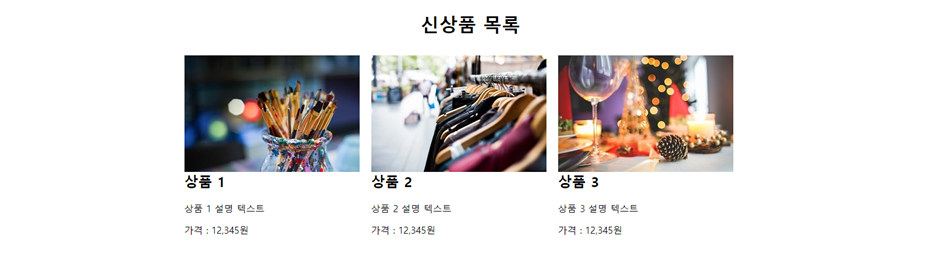
6. 아래를 구현하시오.
<!DOCTYPE html>
<html lang="en">
<head>
    <meta charset="UTF-8">
    <meta name="viewport" content="width=device-width, initial-scale=1.0">
    <title>Document</title>
    <style>
        #wrap{
            width: 1000px;
            overflow: hidden;
        }
        header{
            text-align: center;

        }
        #first{
            display: inline;
            width: 300px;
            float: left;
            border: 1px solid white;
            padding: 0 10px;
        }
        #second{
            display: inline;
            width: 300px;
            float: left;
            border: 1px solid white;
            padding: 0 10px;
        }
        #third{
            display: inline;
            width: 300px;
            float: left;
            border: 1px solid white;
            padding: 0 10px;
        }
        img{
            margin-bottom: -20px;
        }

    </style>
</head>
<body>
    <div id="wrap">
    <header><h1>신상품 목록</h1></header>
    <section>
        <div id="first"><img src="KakaoTalk_20240626_160740535_01.jpg"alt="이미지없음">
           <h1>상품 1</h1>
           <p>상품 1 설명 텍스트</p>
           <p>가격: 12,345원</p>
        </div>
        <div id="second"><img src="KakaoTalk_20240626_160740535_02.jpg" alt="이미지없음">
            <h1>상품 2</h1>
            <p>상품 2 설명 텍스트</p>
            <p>가격: 12,345원</p>
            </div>

        <div id="third"><img src="KakaoTalk_20240626_160740535.jpg" alt="이미지없음">
            <h1>상품 3</h1>
            <p>상품 3 설명 텍스트</p>
            <p>가격: 12,345원</p>
            </div>
    </section>
</div>
</body>
</html>