
1. position 4가지를 예를 들어 설명하시오.
- relative:
동위 원소일 때는 바로 전거에 영향을 받고, 부모 자식 관계에서는 부모의 영향을 받아서 상대 위치를 결정합니다.
영향을 주는 것의 bottom과 left 값을 기준으로 합니다
- fixed:
뷰포트(viewport) : 스크롤과 상관없이 항상 문서 각 끝을 기준으로 고정합니다.(어디에 고정시키는지에 따라 다름)
- absolute:
position: static속성을 가지고있지 않은 부모를 기준으로 움직입니다.
만약에 부모 중에 포지션이 relative, absolute, fixed인 태그가 없다면 가장 위의 태그인 body가 기준입니다.
- static:
static은 top, right, bottom, left 속성값에 영향을 받지 않습니다.
다른 태그와의 관계에 의해 자동으로 배치, 위치를 임의로 설정해 줄 수 없습니다. 아무 설정안했을 때 default가 static이다.
2. 아래를 구현하시오.

<!DOCTYPE html>
<html lang="en">
<head>
  <meta charset="UTF-8">
  <meta name="viewport" content="width=device-width, initial-scale=1.0">
  <title>Document</title>
</head>
<style>
  #container{

    margin-top: 5px;       width: 800px;

  }
  #main{
    background-size: 100%;
    background-image: url('images/bg.png');
    height: 200px;
    background-repeat: no-repeat;
    position: relative;
  }
  ul li{
    list-style:none;
    display: inline;

  }
  ul{
    background-color: rgb(65, 7, 7);
    height: 50px;
    line-height: 50px;
    margin: 0;

  }
  a{
    color: white;
    text-decoration: none;
    padding: 0 30px;
  }
  h1{
    color: antiquewhite;
    position: absolute;
    left: 650px;
    top: 70px;
  }
  h2{
    color: rgb(228, 192, 34);
    position: absolute;
    left: 530px;
    top: 110px;
  }
  a:hover{
  color: burlywood;
}
</style>
<body>
  <div id="container">
    <div id="main">
      <h1>Joandora</h1>
      <h2>가장 제주다운 수산리집</h2>
    </div>
    <div>
      <ul>
        <li><a href="#">이용 안내</a></li>
        <li><a href="#">제품 소개</a></li>
        <li><a href="#">예약 방법</a></li>
        <li><a href="#">예약하기</a></li>
      </ul>
    </div>
  </div>
</body>
</html>
3. 아래를 구현하시오.
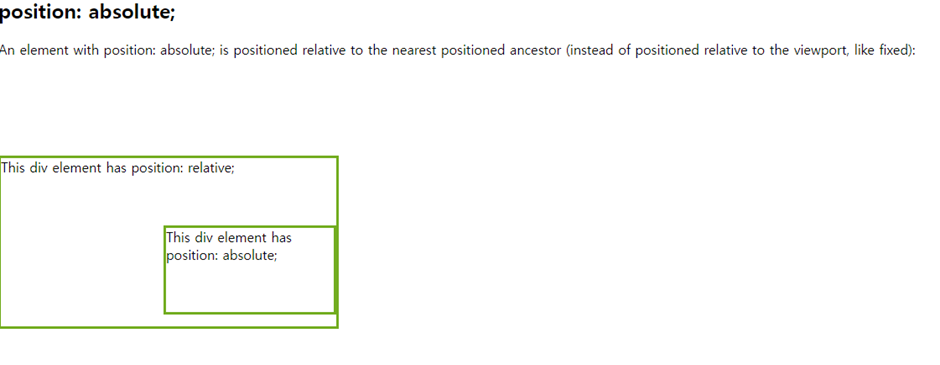
<!DOCTYPE html>
<html lang="en">
<head>
    <meta charset="UTF-8">
    <meta name="viewport" content="width=device-width, initial-scale=1.0">
    <title>Document</title>
</head>
<body>
    <!DOCTYPE html>
<html>
<head>
<style>
div.relative {
  position: relative;
  top: 100px;
  width: 400px;
  height: 200px;
  border: 3px solid #73AD21;
}

div.absolute {
  position: absolute;
  top: 80px;
  right: 0;
  width: 200px;
  height: 100px;
  border: 3px solid #73AD21;
}
</style>
</head>
<body>

<h2>position: absolute;</h2>

<p>An element with position: absolute; is positioned relative to the nearest positioned ancestor (instead of positioned relative to the viewport, like fixed):</p>

<div class="relative">This div element has position: relative;
  <div class="absolute">This div element has position: absolute;</div>
</div>

</body>
</html>
</body>
</html>