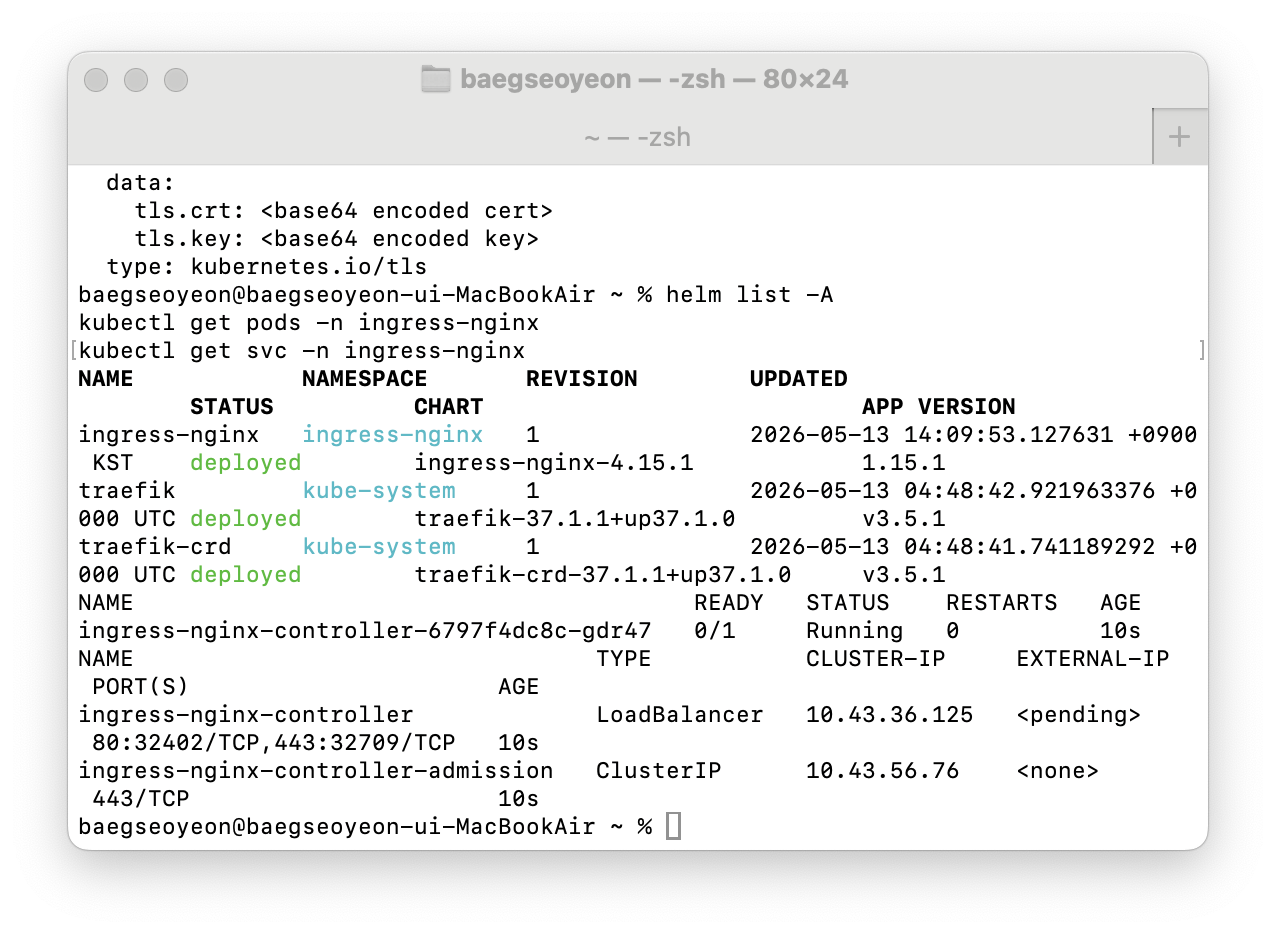
쿠버네티스에서 ingress-nginx를 설치하다 보면 이런 에러를 만날 수 있다.
helm install ingress-nginx ingress-nginx/ingress-nginx \
  --namespace ingress-nginx \
  --create-namespace
그런데 결과가 이렇게 나온다.
Error: INSTALLATION FAILED: unable to continue with install:
ClusterRole "ingress-nginx" in namespace "" exists and cannot be imported into the current release:
invalid ownership metadata;
annotation validation error:
key "meta.helm.sh/release-namespace" must equal "ingress-nginx":
current value is "default"
처음 보면 꽤 헷갈린다.
ingress-nginx 네임스페이스를 새로 만들고 설치하려는 건데, 왜 이미 존재한다고 할까?
결론부터 말하면 이 문제는 이미 default namespace에 Helm release가 설치되어 있는데, 같은 이름의 ingress-nginx를 다른 namespace에 다시 설치하려고 해서 발생한 충돌이다.
먼저 상황 정리
처음에 k3d 클러스터를 만들었다.
k3d cluster create hello-cluster클러스터는 정상적으로 만들어졌다.
Cluster 'hello-cluster' created successfully!그리고 노드도 정상적으로 Ready 상태였다.
kubectl get nodesk3d-hello-cluster-server-0 Ready control-plane,master즉, 쿠버네티스 클러스터 자체는 정상이다.
그 다음 Helm repository를 추가했다.
helm repo add ingress-nginx https://kubernetes.github.io/ingress-nginx그리고 업데이트했다.
helm repo update여기까지는 단순히 Helm이 ingress-nginx Chart를 가져올 수 있도록 저장소를 등록한 것이다. 아직 Kubernetes 클러스터에 실제 리소스를 설치한 것은 아니다.
문제의 시작은 이 명령어다.
helm install ingress-nginx ingress-nginx/ingress-nginx이 명령어를 실행했을 때 설치가 성공했다.
NAME: ingress-nginx
NAMESPACE: default
STATUS: deployed
DESCRIPTION: Install complete
The ingress-nginx controller has been installed.
여기서 가장 중요한 부분은 NAMESPACE: default다. 즉, ingress-nginx라는 Helm release가 default namespace에 설치된 상태가 된 것이다.
namespace란 무엇인가?
Kubernetes의 namespace는 클러스터 안에서 리소스를 논리적으로 나누는 공간이다.
하나의 Kubernetes 클러스터 안에 여러 개의 작업 공간을 만드는 개념이라고 보면 된다.
Kubernetes Cluster
 ├── default namespace
 ├── kube-system namespace
 ├── ingress-nginx namespace
 ├── dev namespace
 └── prod namespace
예를 들어 같은 이름의 Pod라도 namespace가 다르면 서로 다른 리소스로 관리될 수 있다.
default/my-app
dev/my-app
prod/my-app
이렇게 namespace는 리소스를 구분하는 기준이 된다.
하지만 모든 리소스가 namespace 안에 속하는 것은 아니다.
namespaced 리소스와 cluster-scoped 리소스
쿠버네티스 리소스는 크게 두 종류로 나눌 수 있다.
namespaced resource
cluster-scoped resource
먼저 namespaced resource는 특정 namespace 안에 존재하는 리소스다.
대표적으로 다음과 같다.
Pod
Deployment
Service
ConfigMap
Secret
Ingress
예를 들어 default namespace에 있는 Service와 ingress-nginx namespace에 있는 Service는 서로 다르게 관리된다.
kubectl get svc -n default
kubectl get svc -n ingress-nginx
반면 cluster-scoped resource는 namespace에 속하지 않고 클러스터 전체에 존재하는 리소스다.
대표적으로 다음과 같다.
Node
Namespace
ClusterRole
ClusterRoleBinding
PersistentVolume
여기서 이번 에러의 핵심은 ClusterRole이다.
에러 메시지에 이렇게 나왔다.
ClusterRole "ingress-nginx" in namespace "" exists여기서 namespace ""라고 나오는 이유는 ClusterRole이 namespace에 속하지 않는 리소스이기 때문이다.
즉, default namespace에 설치했든, ingress-nginx namespace에 설치하려고 하든, ClusterRole ingress-nginx는 클러스터 전체에서 이름이 하나만 존재할 수 있다.
왜 충돌이 났을까?
처음 설치했던 명령어는 이거였다.
helm install ingress-nginx ingress-nginx/ingress-nginx이 명령어에는 --namespace 옵션이 없다.
그래서 Helm은 기본 namespace인 default에 release를 만들었다.
release name: ingress-nginx
release namespace: default
그 다음 다시 이렇게 설치하려고 했다.
helm install ingress-nginx ingress-nginx/ingress-nginx \
  --namespace ingress-nginx \
  --create-namespace
이번에는 release namespace가 ingress-nginx다.
release name: ingress-nginx
release namespace: ingress-nginx
Helm 입장에서는 이전 설치와 다른 release로 본다.
그런데 이미 첫 번째 설치 과정에서 ClusterRole ingress-nginx가 만들어져 있었다.
문제는 ClusterRole은 namespace에 속하지 않는다는 것이다.
첫 번째 설치:
default namespace에 Helm release 생성
ClusterRole ingress-nginx 생성

두 번째 설치:
ingress-nginx namespace에 Helm release 생성 시도
ClusterRole ingress-nginx를 또 만들려고 함

결과:
이미 존재하는 ClusterRole이라 충돌
그래서 Helm이 설치를 막은 것이다.
Helm의 소유권 metadata
에러 메시지에 이런 부분이 있었다.
invalid ownership metadata
annotation validation error:
key "meta.helm.sh/release-namespace" must equal "ingress-nginx":
current value is "default"
이 말은 Helm이 기존 리소스를 봤더니, 그 리소스가 이미 다른 release에 의해 관리되고 있다는 뜻이다.
Helm은 자신이 설치한 Kubernetes 리소스에 annotation을 남긴다.
대략 이런 의미다.
이 리소스는 어떤 Helm release가 관리하는가?
이 리소스는 어느 namespace의 Helm release 소유인가?
기존 ClusterRole ingress-nginx에는 이런 정보가 붙어 있는 상태다.
release name: ingress-nginx
release namespace: default
그런데 지금 새로 설치하려는 Helm release는 이걸 기대한다.
release name: ingress-nginx
release namespace: ingress-nginx
즉, 같은 ClusterRole ingress-nginx를 두고 Helm 소유권 정보가 맞지 않는 것이다.
그래서 Helm은 이렇게 판단한다.
이미 존재하는 리소스인데,
내가 관리하는 release의 리소스가 아니다.
그러므로 가져와서 설치를 계속할 수 없다.
이게 바로 cannot be imported into the current release의 의미다.
kubectl get ingress가 비어 있었던 이유
설치 후에 이런 명령어를 실행했다.
kubectl get ingress결과는 다음과 같았다.
No resources found in default namespace.이걸 보고 “ingress-nginx가 안 깔렸나?”라고 생각할 수 있다.
하지만 이건 다른 의미다.
kubectl get ingress는 Ingress 리소스 목록을 보는 명령어다.
ingress-nginx controller 설치 여부를 보는 명령어가 아니다.
구조를 나누면 이렇다.
ingress-nginx controller
= Ingress 규칙을 읽고 실제 라우팅을 수행하는 컨트롤러

Ingress
= 어떤 host/path 요청을 어떤 Service로 보낼지 정의한 규칙
즉, ingress-nginx controller는 설치되었지만, 아직 사용자가 직접 만든 Ingress 리소스는 없었던 것이다.
그래서 이 결과는 정상이다.
No resources found in default namespace.뜻은 다음과 같다.
default namespace에 Ingress 규칙이 아직 없다.ingress-nginx controller가 없다는 뜻이 아니다.
지금 상태를 확인하는 명령어
이럴 때는 먼저 Helm release를 전체 namespace 기준으로 확인하는 게 좋다.
helm list -A예상 결과는 이런 형태다.
NAME            NAMESPACE   STATUS
ingress-nginx   default     deployed
이렇게 나오면 현재 ingress-nginx는 default namespace의 Helm release로 설치되어 있는 상태다.
그 다음 실제 Pod를 확인한다.
kubectl get pods -A | grep ingressService도 확인한다.
kubectl get svc -A | grep ingressIngressClass도 확인할 수 있다.
kubectl get ingressclass즉, kubectl get ingress만 보고 판단하면 안 된다.
설치된 컨트롤러를 보려면 Pod, Service, Helm release, IngressClass를 확인해야 한다.
해결 방법 1: 이미 설치된 default release 그대로 사용하기
가장 간단한 방법은 이미 설치된 것을 그대로 쓰는 것이다.
이미 설치가 성공했기 때문에 굳이 다시 설치하지 않아도 된다.
helm list -Akubectl get pods -A | grep ingresskubectl get svc -A | grep ingress실습 목적이라면 default namespace에 설치되어 있어도 동작 자체는 가능하다.
다만 리소스가 깔끔하게 분리되지는 않는다.
해결 방법 2: 기존 release 삭제 후 ingress-nginx namespace에 다시 설치하기
보통은 ingress-nginx 같은 인프라성 컴포넌트는 전용 namespace에 설치하는 것이 보기 좋다.
그러려면 기존 default namespace의 release를 먼저 삭제해야 한다.
helm uninstall ingress-nginx -n default그 다음 다시 설치한다.
helm install ingress-nginx ingress-nginx/ingress-nginx \
  --namespace ingress-nginx \
  --create-namespace
설치 후 확인한다.
helm list -Akubectl get pods -n ingress-nginxkubectl get svc -n ingress-nginx정상이라면 ingress-nginx namespace 안에 controller Pod와 Service가 보일 것이다.
해결 흐름 정리
이번 문제를 순서대로 정리하면 다음과 같다.
1. k3d 클러스터 생성
2. helm repo add로 ingress-nginx Chart 저장소 추가
3. helm install ingress-nginx ingress-nginx/ingress-nginx 실행
4. --namespace 옵션이 없었기 때문에 default namespace에 설치됨
5. 이후 --namespace ingress-nginx로 다시 설치 시도
6. 기존 ClusterRole ingress-nginx가 이미 존재함
7. 기존 ClusterRole의 Helm release namespace는 default
8. 새 release의 namespace는 ingress-nginx
9. Helm 소유권 metadata가 맞지 않아 설치 실패
한 줄로 요약하면 이렇다.
이미 default namespace에 설치된 ingress-nginx를 ingress-nginx namespace에 다시 설치하려고 해서 Helm 소유권 충돌이 발생한 것namespace 관점에서 배운 점
이번 트러블슈팅에서 중요한 포인트는 namespace를 단순히 “폴더 같은 것”으로만 이해하면 안 된다는 점이다.
namespace는 많은 Kubernetes 리소스를 분리해주지만, 모든 리소스를 분리해주지는 않는다.
특히 ClusterRole처럼 클러스터 전체에 적용되는 리소스는 namespace와 무관하게 하나의 클러스터 안에서 공유된다.
그래서 Helm Chart를 설치할 때는 다음을 확인해야 한다.
이 Chart가 어떤 namespace에 release를 만드는가?
이 Chart가 cluster-scoped resource를 만드는가?
이미 같은 이름의 release나 리소스가 존재하는가?
Ingress Controller처럼 클러스터 레벨 권한이 필요한 컴포넌트는 ClusterRole, ClusterRoleBinding 같은 리소스를 함께 만든다.
따라서 namespace만 바꿔서 다시 설치한다고 완전히 별개의 설치가 되는 것은 아니다.
정리
Helm으로 ingress-nginx를 설치할 때 --namespace 옵션 없이 먼저 설치하면 release가 default namespace에 생성된다. 이후 같은 release 이름으로 ingress-nginx namespace에 다시 설치하려고 하면, 기존에 만들어진 ClusterRole ingress-nginx와 충돌할 수 있다. ClusterRole은 namespace에 속하지 않는 cluster-scoped resource이기 때문에 클러스터 전체에서 하나만 존재한다. Helm은 리소스에 release 이름과 release namespace 정보를 annotation으로 남기는데, 기존 리소스는 default namespace의 release 소유이고 새 설치는 ingress-nginx namespace의 release가 되려고 하므로 소유권 metadata가 맞지 않아 설치가 실패한다. 이 문제는 기존 release를 그대로 사용하거나, helm uninstall ingress-nginx -n default로 삭제한 뒤 --namespace ingress-nginx --create-namespace 옵션을 붙여 다시 설치하면 해결할 수 있다.